Integrate Partition Assistant or Disk Master to Recovery Environment
Updated on Jun 15, 2024 | by Nick Jones
What is Integrate to Recovery Environment?
This function allows you to integrate Qiling Disk Master or Qiling Partition Assistant into Windows' built-in recovery environment, enabling you to partition, backup, and restore your computer within the system's RE.
How to integrate Qiling software into Recovery Environment
To integrate Qiling software into your system's recovery environment (RE), follow these steps:
What Is "Integrate to Recovery Environment"?
The "Integrate to Recovery Environment" wizard in Qiling Disk Master allows you to add Qiling software installed on your computer to the Windows recovery environment (RE). After completing the integration process, you can access the Qiling software directly from the RE, including Qiling Disk Master and other available tools.
A wizard is provided to make it more convenient to use Qiling Disk Master and/or Qiling Partition Assistant to fix computer problems and protect data under a recovery environment. This involves using partition software, which sometimes requires restarting the computer to boot into the recovery environment (e.g., PreOS Mode) to finish operations such as migrate OS to SSD or restoring the system to its original state. This process is straightforward and can be completed in a recovery environment without affecting the system, using bootable media.
Integrate Qiling Disk Master and/or Qiling Partition Assistant to Recovery Environment
Before you do, please make sure that:
- Your operating system is Windows 7 or later, Windows 8/8.1/10 or Windows Server 2008 R2/2011/2012/2012 R2/2016, as these systems have a built-in recovery environment.
- The recovery environment is fully functional, and the computer can boot into it without any issues.
- The Qiling software you want to add into the RE (Reverse Engineering) environment is not being utilized by another process, making it available for integration.
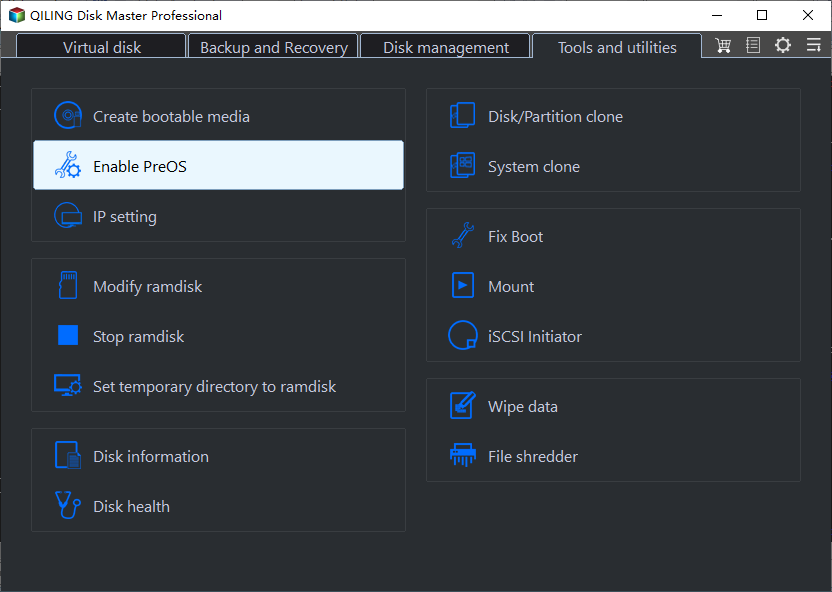
Step 1: Click Tools > Enable PreOS in the top of Qiling Disk Master main interface.
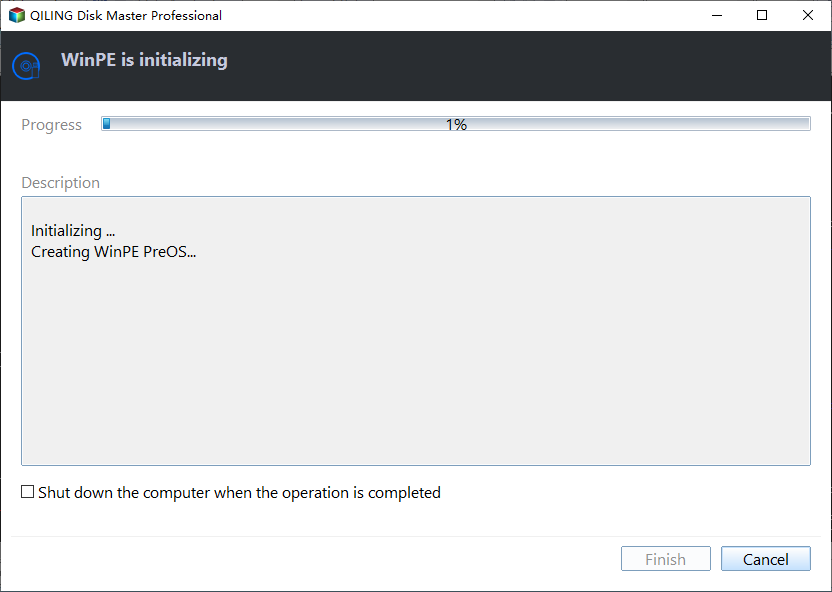
Step 2: Waiting to finish integrate to recovery environment. When it is complete, click Finish to exit.
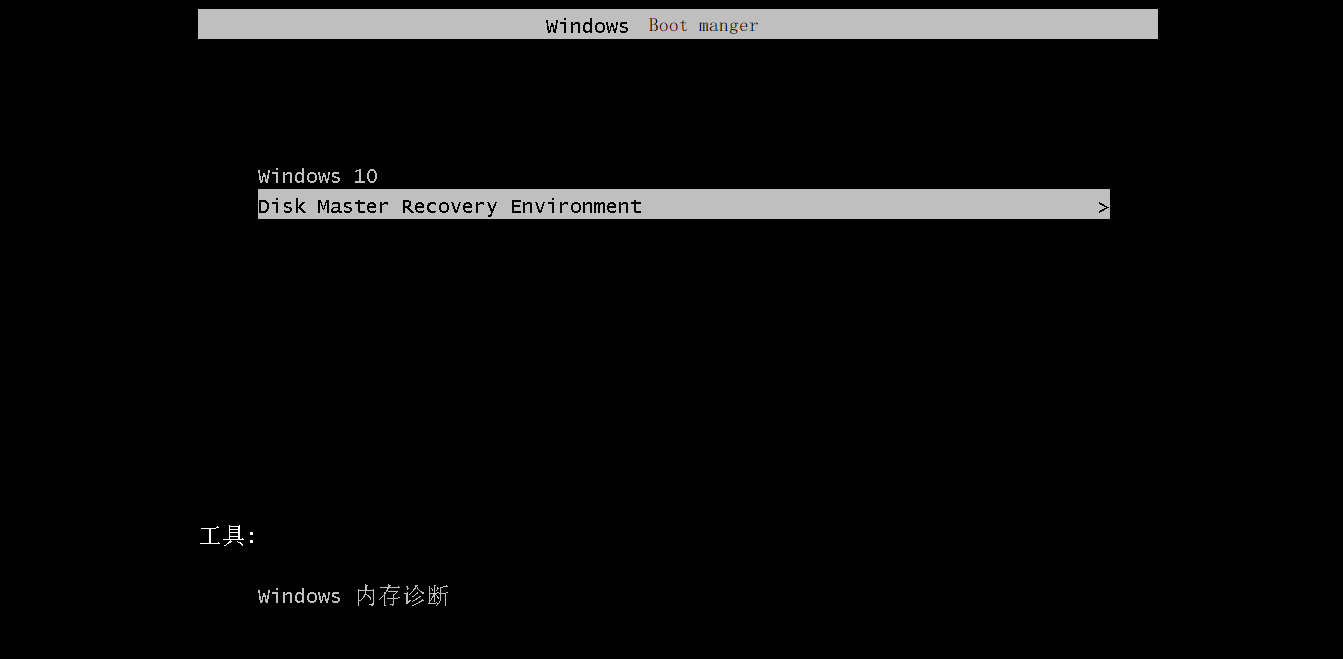
You can use Qiling Disk Master and Qiling Partition Assistant in your system recovery environment.
How to Use Qiling Software in Recovery Environment?
To get into Recovery Environment (RE), the procedures vary across different operating systems. On a Windows PC, for example, you would reboot your computer and select the "Recovery" or "Troubleshoot" option from the boot menu, often accessible by pressing a key like F2, F12, or Del during boot-up. On a Mac, you would typically hold down the Command (⌘) + R keys while booting up to access the Recovery Mode.Disk Master Environment.
How to remove Qiling Software in Recovery Environment?
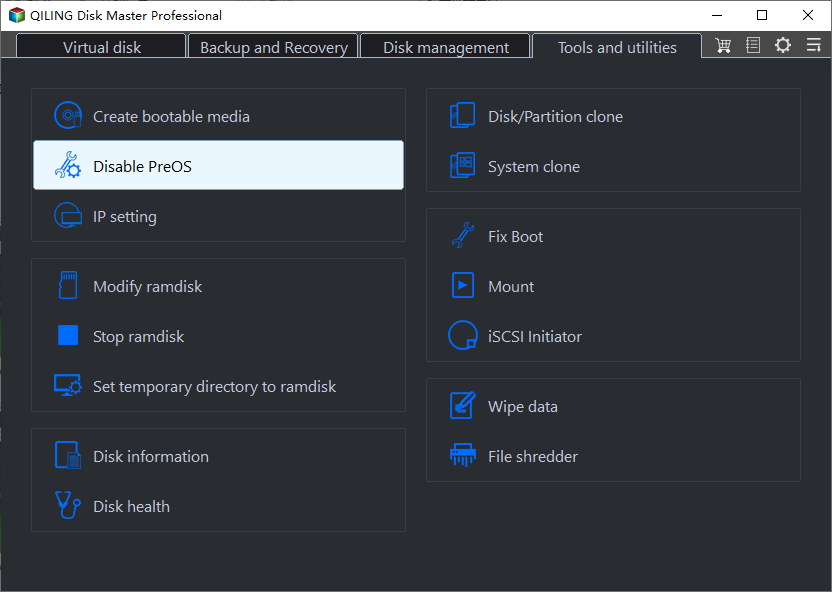
Click Tools > Disable PreOS in Qiling Disk Master main interface.
Conclusion
Integrate to Recovery Environment is a valuable feature that allows for advanced integration of Qiling Disk Master and Qiling Partition Assistant into Windows's recovery environment. This enables users to directly enter the recovery environment and perform specific procedures, such as those requiring PreOS mode, in a more efficient and streamlined manner.
Integrate to Recovery Environment is very similar to Make Bootable Media. Both tools enable you to manage your disk partition under a micro-system or when your computer cannot boot. However, they have distinct differences in their features and functionalities.
- To create bootable media, you'll need to prepare a USB drive or CD/DVD, and Qiling Disk Master can only be added to a Windows PE bootable media.
- The Integrate to Recovery Environment feature can only be used on the current computer, but a bootable USB drive or CD created with "Make Bootable Media" can be used on the current computer and other computers.
Related Articles
- How to Backup Hidden Recovery Partition in Windows 11/10/8/7
The recovery partition is useful when you want to factory reset your computer, but it is usually hidden and cannot be backed up in the usual way. - Backup Laptop to External Hard Drive in Windows 10/8/7 for Free
To protect your laptop from data loss, you can backup laptop to external hard drive with Windows Backup tool or freeware. - Disk Backup vs Clone: Which One to Choose and How to Do it
This article tells the differences between backup vs clone, help you to make the choice and offers a step-by-step guide to do disk backup or clone on Windows. - Best Way for Backing Up Windows 11 to External Hard Drive (2 Ways)
If you are still struggling to find the best way to backup Windows 11 to external hard drive, you can get the answer by reading this article. - How to Use Batch Script to Backup SQL Server Databases?
Compared to other methods, a batch script is especially useful when you want to back up batches of databases regularly. This post shares batch scripts for backing up SQL Server databases, and an alternative with equal functionality. - Solved: Boot Device Not Found HP
Sometimes, some users report that hard drive not detected or boot device not found HP laptop/desktop. This article will show you five workable ways to solve it quickly and safely.
Products
Articles & Tutorials
- Data Recovery
- Data Backup
- File Recovery
- File Backup
- File synchronize
- System Backup and Restore
- Disk and Partition Clone
- Technical articles
- Disk Master Help
- Windows Deleted File and Disk Recovery Tutorials
- Windows File and Data Recovery Tutorials
- More Windows Tutorials for Install, Security, Files, and PC Tips
- Windows Boot, Repair, and Recovery Environment Tutorials
- Windows Backup Tutorials
- Windows Restore Tutorials
- Windows Clone and Migration Tutorials
- Windows Server Backup, Recovery, and Management Tutorials
- Windows Disk, Partition, and Storage Management Tutorials