Rebuild MBR with Qiling Disk Master
Overview of Rebuild MBR
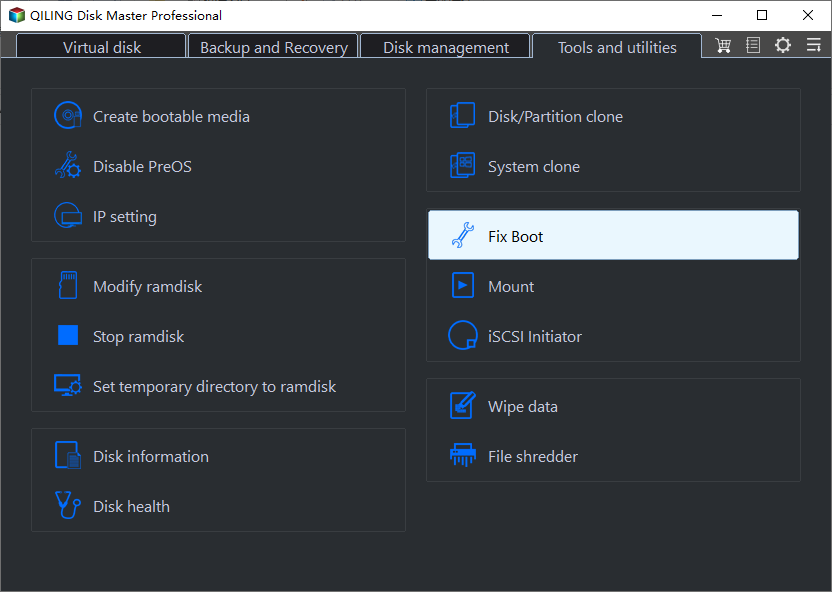
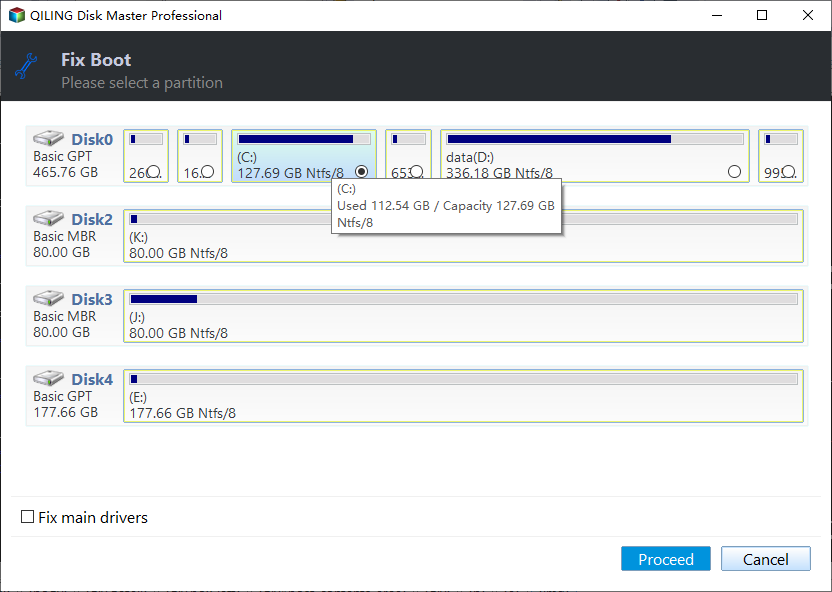
How to Rebuild MBR
Before you do
- Download and install the Qiling Disk Master first.
- If your computer won't boot, create a WinPE bootable CD on a working computer using Qiling Disk Master, then use the CD to boot into WinPE and rebuild the MBR.
- If your computer can't boot due to a corrupted MBR, you can try rebuilding it by plugging the problematic disk into another machine or a friend's computer, running Qiling Disk Master, and then using the software to Rebuild MBR on the disk.
How to Rebuild MBR with Partition Assistant
Conclusion
By following the steps above, you can easily rebuild MBR of a system drive, which may resolve boot issues caused by corrupted MBR.
This feature is primarily used to resolve system boot failure issues, such as a "system missing" or "operating system not found" error message, or a black screen with a blinking cursor. It can be particularly helpful when other types of boot failures are difficult to fix.
Notes:
- Rebuild corrupted MBR can only fix issues where the MBR code itself has been damaged. However, it is not capable of resolving problems where the operating system is unbootable due to missing bootable files or system files. In such cases, other solutions are required.
- Rebuilding the Master Boot Record (MBR) is a safe operation that won't result in data loss. However, if done incorrectly on a corrupted MBR, it might render your computer unbootable. It's recommended to learn more about the process before attempting it or backing up your data and disk first.
- Qiling Disk Master Standard version also supports "Rebuild MBR" feature.
FAQs:
Q: If it is a GPT drive, is it possible and necessary to use the feature "Rebuild MBR"?
A: The "Rebuild MBR" tool is mainly used for Master Boot Record (MBR) drives, and it is not necessary if the drive is a GPT drive.
Q: In which conditions and which boot error, can I use the "Rebuild MBR" tool?
A: This tool is primarily used to resolve system boot failures with error messages such as "system missing", "operating system not found", or a black screen with a blinking cursor. However, in some instances, it may not be effective, and alternative professional repair tools may be necessary to fix the boot issue.
Q: How can I use the feature if my PC cannot even boot without installing the program?
A: You can create a bootable media on another working PC with Partition Assistant installed and boot your PC into WinPE to use the "Rebuild MBR" tool, or unplug your system drive and connect it to another working computer to rebuild MBR.
Related Articles
- Best Free Memory Card Backup Software for Windows 7, 8,10, 11
This article will show you the best free Memory card backup software to backup memory card safely and easily. And help you to troubleshoot the memory card locked or corrupted issues. - Migrate OS to Kingston SSD without Reinstalling | 4 Easy Steps
You will find the best way to migrate OS to Kingston SSD with the Kingston SSD cloning software, only a simple clicks, and ensure it's bootable after cloning. - Best Free Mirror Backup Software for Windows 11, 10, 8, 7
This page offers you the best free mirror backup software in Windows 11, 10, 8, 7, shows mirror backup vs. mirror image backup and presents how to perform a mirror backup step by step. - Best Way to Move OS to A New Samsung SSD without Reinstalling
This tutorial explains how to move OS to a new Samsung SSD without reinstallation in simple steps with professional data migration software. - Fixed: Dell Alerts Hard Drive Not Found
Fix Dell alert hard drive not found error. Learn how to troubleshoot and resolve hard drive detection issues on Dell laptops and desktops in Windows 11/10/8/7. - How to Solve C drive full on Dell Computer Problem?
Learn how to Solve C drive full on Dell Computer Problem with clear steps, key checks, and practical tips.
Products
Articles & Tutorials
- Data Recovery
- Data Backup
- File Recovery
- File Backup
- File synchronize
- System Backup and Restore
- Disk and Partition Clone
- Technical articles
- Disk Master Help
- Windows Deleted File and Disk Recovery Tutorials
- Windows File and Data Recovery Tutorials
- More Windows Tutorials for Install, Security, Files, and PC Tips
- Windows Boot, Repair, and Recovery Environment Tutorials
- Windows Backup Tutorials
- Windows Restore Tutorials
- Windows Clone and Migration Tutorials
- Windows Server Backup, Recovery, and Management Tutorials
- Windows Disk, Partition, and Storage Management Tutorials