Solved: Apricorn EZ Gig IV Clone Failed (Alternative Inside)
The Issue: EZ Gig IV Clone Failed
You're planning to upgrade your laptop's storage to a SanDisk 500GB SSD using the EZ Gig IV cloning software, aiming to minimize the hassle of reinstalling your existing setup. Is that correct?
You've already changed the boot order and followed the EZ Gig IV manual, but the cloning process is slow after clicking Proceed. Try restarting the cloning process and ensure the boot order is correct. If you still can't boot from the cloned SSD, you may need to reseat the SSD or check for any hardware issues. Additionally, you can try using a different cloning software or seeking further assistance from the manufacturer's support team.
Upgrading to a new SSD can be frustrating when the cloning process stalls, leaving you with a paused upgrade. To resolve this issue, it's essential to identify why the cloning failed in the first place and take the necessary steps to address it. By understanding the root cause of the problem, you can take corrective action and successfully complete the cloning process, ensuring a smooth transition to your new SSD.
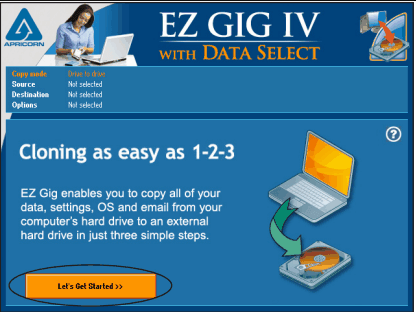
Causes and Solutions to EZ Gig IV Cloning Problems
There are many possible reasons that could lead to cloning failure with EZ Gig, including common factors such as errors in the source or destination drive, incorrect settings, or software issues. These issues can be resolved by checking the drive connections, updating the software, or recalculating the cloning settings. Additionally, hardware problems or conflicts with other software running in the background may also cause cloning failure. To troubleshoot, it's essential to identify the root cause and take corrective action accordingly.
- Using USB 3.0 host controller. To use EZ Gig, you may also need to use one of Apricorn's products, including Drive Wire, EZ Upgrade, Velocity Solo, or SATA Wire. However, the SATA Wire will only work properly if it's connected to a USB 2.0 port with USB 2.0 speeds. Try changing the port and trying again.
- EZ Gig IV not recognizing drive. Check if the SSD is detected in BIOS and Disk Management. If not, reconnect the SSD and try again. If it's a Samsung SSD 850 EVO M.2, change the SATA Mode Configuration to M.2 in BIOS.
- EZ Gig IV stuck on copying bad sectors. When EZ Gig IV copies bad sectors, it may stop the cloning progress, leading to cloning failure. This can be resolved by running CHKDSK to check the hard drive for errors. However, if the bad sectors are fixed, all data on that sector will be lost.
Using EZ Gig IV software, particularly when it's cracked, can lead to issues such as not being able to find a drive. While some problems can be resolved with fixes, others may be more persistent and difficult to resolve.
The EZ Gig IV cloning software has several drawbacks, including the inability to deselect files from folders outside of the 4 specified ones, making it difficult to clone other programs or partitions. Additionally, users have reported write errors and slow cloning speeds, leading many to seek out alternative software.
Best Alternative to EZ Gig IV Cloning Software
If a cloning tool can't resolve issues through the methods mentioned, it's time to consider using a different cloning tool.
Qiling Disk Master Professional is a reliable cloning software that ensures secure boot and offers various features for different purposes, making it an all-around cloning tool.
- Move only OS drive to SSD with System Clone feature. The cloning process will copy the system drive and all boot-related partitions, including UEFI boot cloning.
- Upgrade entire hard drive with Disk Clone feature. All partitions and drives will be copied to the target drive.
- Copy dynamic system or disk. You can clone a dynamic system volume with System Clone, a dynamic partition with Partition Clone, and the entire dynamic disk by using both features together.
This software uses the Intelligent Clone mode by default, which clones only used sectors, whether it's a system partition, data partition, or disk, making it efficient and space-saving.easier to clone large drive to smaller SSD Secure Boot is a feature that ensures the integrity of your system by only allowing trusted software to run. When enabled, Secure Boot checks the digital signature of your operating system and any other software at startup, preventing malicious code from executing. This makes it more difficult for malware to take control of your system. To enable Secure Boot, you'll need to enter your system's BIOS settings and look for the Secure Boot option.
This software has an intuitive and user-friendly interface, supporting all editions of Windows 11, 10, 8/8.1, 7, XP, and Vista. Try it out.
💬If you're using Server 2003/2008/2012/2016/2019/2022, try Qiling Disk Master Server.
Clone Windows to SSD with Step-by-Step Guide
Note: The target SSD will be overwritten during cloning, so please back up important files beforehand, if any.
1. To get started, connect your SSD to your computer and ensure it can be detected by Windows. Once the SSD is recognized, install Qiling Disk Master Professional, launch the software, and register it to begin using its features.
2. In the main console, click Clone and then System Clone.
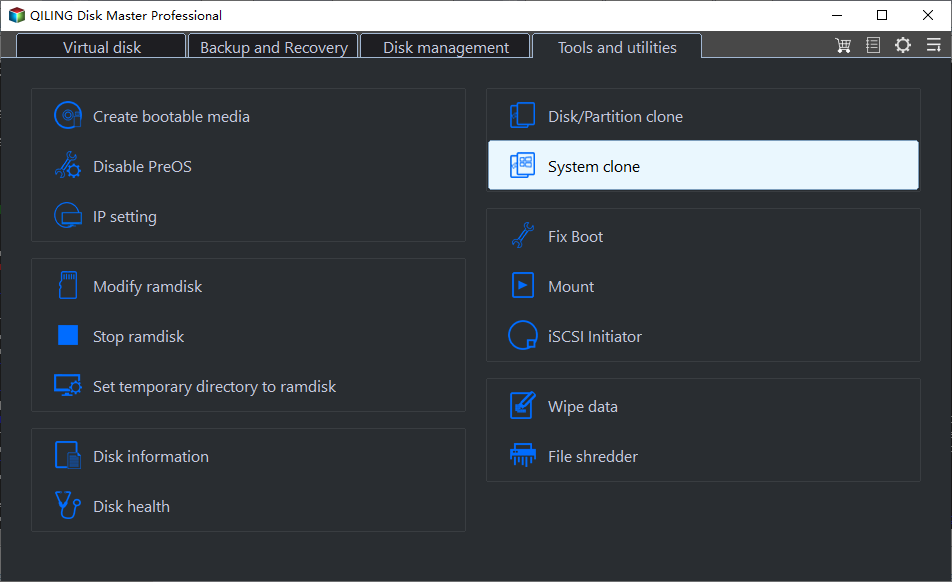
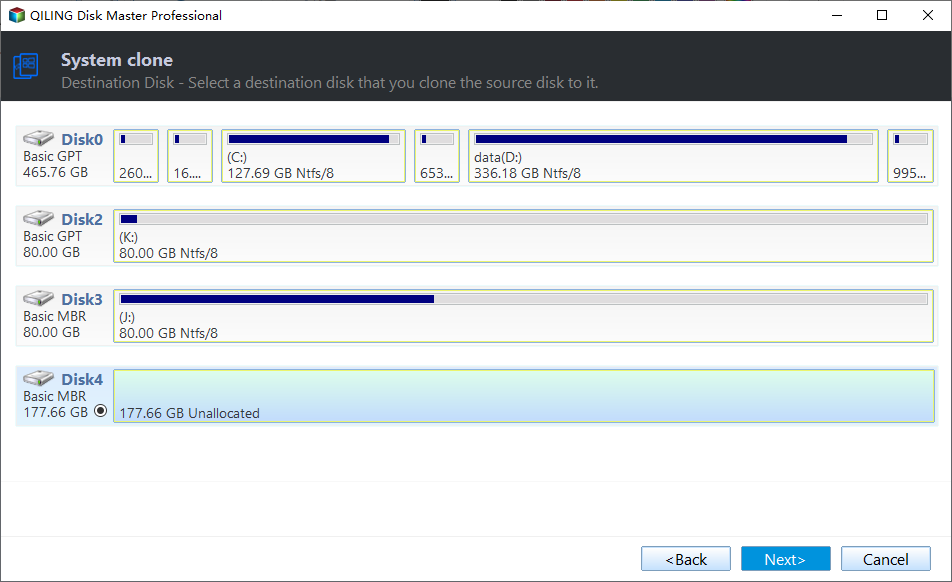
3. The system drive and boot related partitions are selected by default. Now, select the SSD or partition on it as the destination.
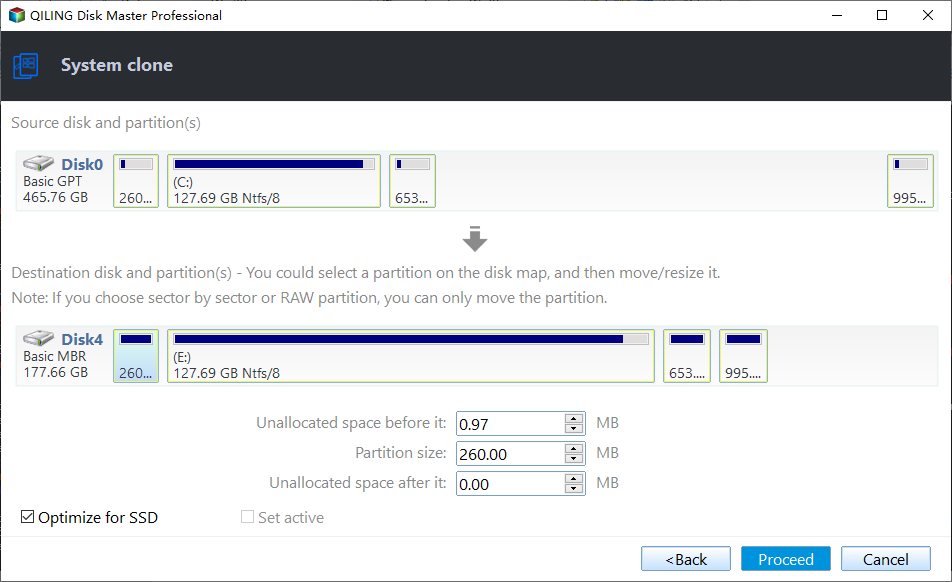
4. Check the option "SSD Alignment" to improve the reading and writing speed and prolong the SSD's lifespan. By default, "Make full use of disk space" will be checked if the SSD is larger. Click "Proceed" to execute the task.
✍Tips:
- The sector by sector clone method requires the destination to be equal or larger than the selected system drive.
- If the target disk is larger, you can use Edit Partitions to resize partitions and make the most of the disk's capacity.
After that, grab a cup of coffee and wait for it to complete. The time takes any point from minutes to several hours, depending on how large your drive is.
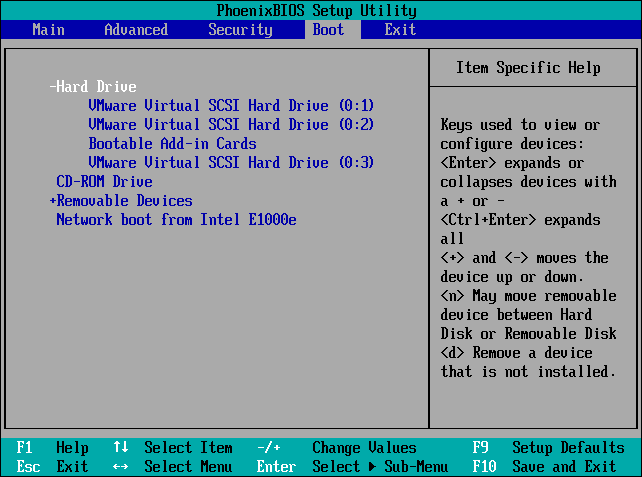
It is recommended to remove the old hard drive, install a new SSD, and then boot from the cloned SSD for the first time, or to change the boot order in the BIOS to make it boot from the cloned drive, with the first method being preferred.
If everything works out, you can reconnect the old hard drive to your computer. If you want to use it as a secondary storage, you can wipe the hard drive.
Verdict
Several solutions for the EZ Gig clone failed issue have been discussed, including checking the source and target disk, verifying the clone settings, and using alternative cloning utilities. If the problem persists, it may be worth trying a different cloning software, such as Qiling Disk Master Professional, which has a good reputation among users.
The software offers a complete backup solution for Windows computers, with features that go beyond cloning. It allows for regular system backups to external storage, protecting your Windows system continuously. Additionally, its advanced edition enables the deployment of system images to multiple computers simultaneously, making it a comprehensive tool for backup and system management.
Related Articles
- Easy Way to Clone System Disk to SSD with Secure Boot
By cloning system disk to SSD, you can avoid the reinstallation of Windows and other apps if you need to replace your current system hard drive. - How to Clone Toshiba Hard Drive to SSD with Secure Boot
To clone Toshiba hard drive to SSD, you can find a right software to easily achieve. Here, we recommend you Qiling Disk Master, which helps to clone Toshiba hard drive within four simple steps. - How to Clone Windows 10 to Smaller SSD And Boot Successfully
Learn how to Clone Windows 10 to Smaller SSD And Boot Successfully with clear steps, key checks, and practical tips. - Cloning 1TB HDD to 500GB SSD Samsung and Making It Bootable
This article illustrates one more powerful SSD cloning software and the steps of cloning 1TB HDD to 500GB SSD Samsung without boot issues. Get them now! - Best ADATA SSD Disk Migration Tool to Clone HDD to ADATA SSD
The best ADATA SSD disk migration tool - Qiling Disk Master will help you safely clone HDD to ADATA SSD without reinstalling. - Guide: Asus X505ZA SSD Upgrade-No Data Loss and Boot Issues
You can learn how to perform Asus X505ZA SSD upgrade and safely migrate your data and system with a powerful disk cloning software on this page.
Products
Articles & Tutorials
- Data Recovery
- Data Backup
- File Recovery
- File Backup
- File synchronize
- System Backup and Restore
- Disk and Partition Clone
- Technical articles
- Disk Master Help
- Windows Deleted File and Disk Recovery Tutorials
- Windows File and Data Recovery Tutorials
- More Windows Tutorials for Install, Security, Files, and PC Tips
- Windows Boot, Repair, and Recovery Environment Tutorials
- Windows Backup Tutorials
- Windows Restore Tutorials
- Windows Clone and Migration Tutorials
- Windows Server Backup, Recovery, and Management Tutorials
- Windows Disk, Partition, and Storage Management Tutorials