Fixed: Intel Data Migration Software Not Cloning Problem
- Intel Data Migration Software not cloning
- Intel Data Migration Software Errors
- How to fix Intel Data Migration Software not cloning?
- Best Intel migration software - Qiling Disk Masterer
- Steps to migrate OS to Intel SSD with Intel SSD clone tool
- The Epilogue
Intel Data Migration Software not cloning
Intel Data Migration Software helps Windows users transfer data from a hard disk drive to an Intel SSD, but it only works with Intel SSDs, not other brands.
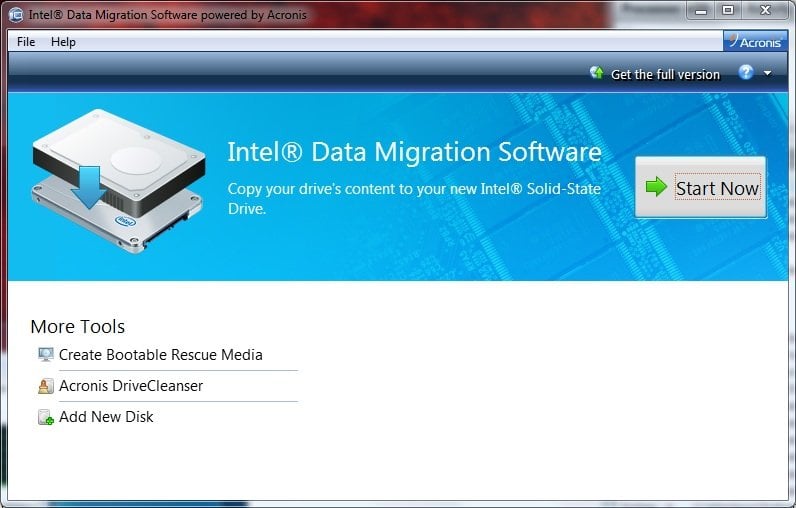
NoteIntel Data Migration Software is no longer supported and was discontinued on December 31, 2020.
Intel Data Migration Software Errors
You might encounter errors or issues while using Intel Data Migration Software, such as the software not working properly, freezing, or displaying error messages, which can hinder the cloning process.
- The operation failed. Remove all administrative profiles set up on your system.
- Intel Data Migration Software not detecting SSD drive. Check the connection between the motherboard and the Intel SSD, ensuring the SATA to USB cable is securely connected.
- Full disk encryption. Disable full disk encryption before cloning to avoid this error.
The errors may be due to the Intel SSD not being properly initialized with a GUID Partition Table (GPT) and formatted with a New Technology File System (NTFS).
How to fix Intel Data Migration Software not cloning
To fix improper file system in Windows 7/8/10, follow these steps to check errors for all partitions on the Intel SSD: Run the built-in Check Disk (chkdsk) utility to scan and fix errors on all partitions, including the system drive, by typing "chkdsk /f" in the Command Prompt, then restart your computer and let it complete the scan. Alternatively, use the built-in Check File System (fsck) utility to scan and fix errors on all partitions, including the system drive, by typing "fsck /f" in the Command Prompt.
- Right click Computer -> Properties;
- Choose Disk Management, click the Intel SSD drive letter and select Properties -> Tools, in one paragraph shortly.
- At the Error-checking option, please press Check Now button.
The Intel Data Migration Software is a tool that helps migrate data from one drive to another. If the issue persists after updating the drivers, it's recommended to try the software again to see if the problem is resolved.
If you're experiencing issues with Intel Data Migration Software, you may want to consider alternative solutions for migrating data from a hard drive to an Intel SSD or other SSD brands. Some options include Qiling Disk Master, which can help transfer data from one drive to another with minimal disruption. These alternatives may offer more flexibility and reliability than the Intel Data Migration Software.
Best Intel migration software - Qiling Disk Masterer
The Intel SSD migration tool, specifically Qiling Disk Master Professional, is a reliable and flexible software to migrate data from HDD to SSD without losing data in Windows 7/8/10. It is more effective than Intel Data Migration Software and can be used with various computer brands, including Intel, Lenovo, Samsung, Dell, Acer, and others.
The app has received high praise from millions of users, who appreciate its exceptional performance and extensive features.
The Intel SSD clone tool - Qiling Disk Master Professional benefits you from the following aspects:
- If the Intel SSD is smaller than the source HDD, you cannot simply migrate the OS to the Intel SSD as the SSD won't have enough space to hold the entire OS and data. You would need to either remove some data from the HDD or resize the partitions on the HDD to fit the data onto the Intel SSD, or use a different method such as a clone or image backup, followed by a fresh install of the OS on the Intel SSD.
- This software enables users to clone a large hard disk drive (HDD) to a smaller Intel solid-state drive (SSD) using an intelligent clone mode, which is the default setting.
- Clone entire hard drive to Intel SSD with everything transferred.
- To improve the read and write speed of an Intel SSD, it is recommended to perform SSD alignment. This process involves optimizing the physical location of data on the drive to minimize seeks and optimize performance.
You can try the Intel Data Migration Software replacement, Qiling Disk Master Professional, with a 30-day free trial by downloading it.The Clone features in the free trial can only be demonstrated, not actually used, please clarify.upgrade to unlock)
Steps to migrate OS to Intel SSD with Intel SSD clone tool
To migrate your operating system to an Intel SSD safely in Windows 10/8/7, follow these steps: First, ensure your system is compatible with the Intel SSD and that you have the necessary drivers. Next, back up your important files and data to an external drive or cloud storage. Then, download and install the Intel SSD tool, which will guide you through the cloning process.
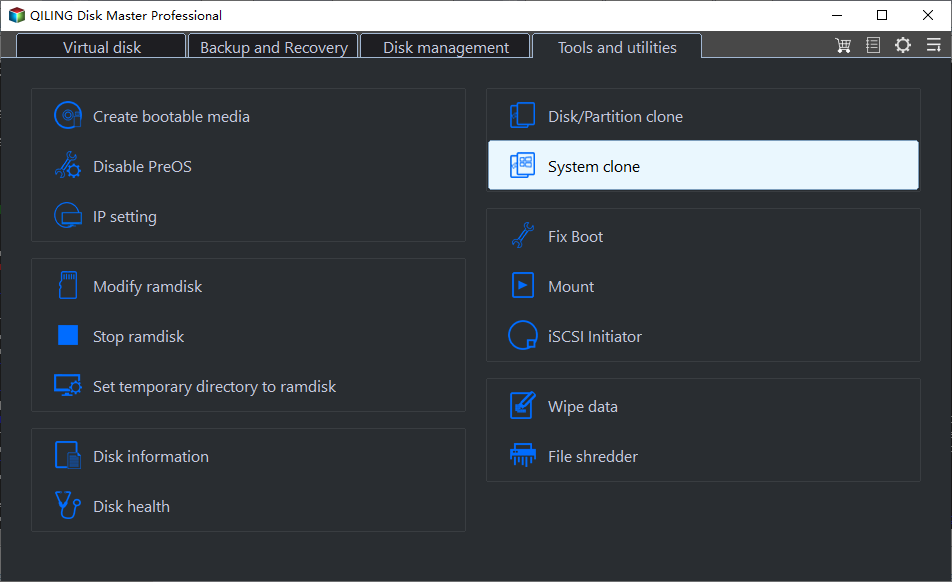
1. Connect the Intel SSD drive to your computer motherboard via a SATA to USB cable. Select "Clone" > "System Clone" in order.
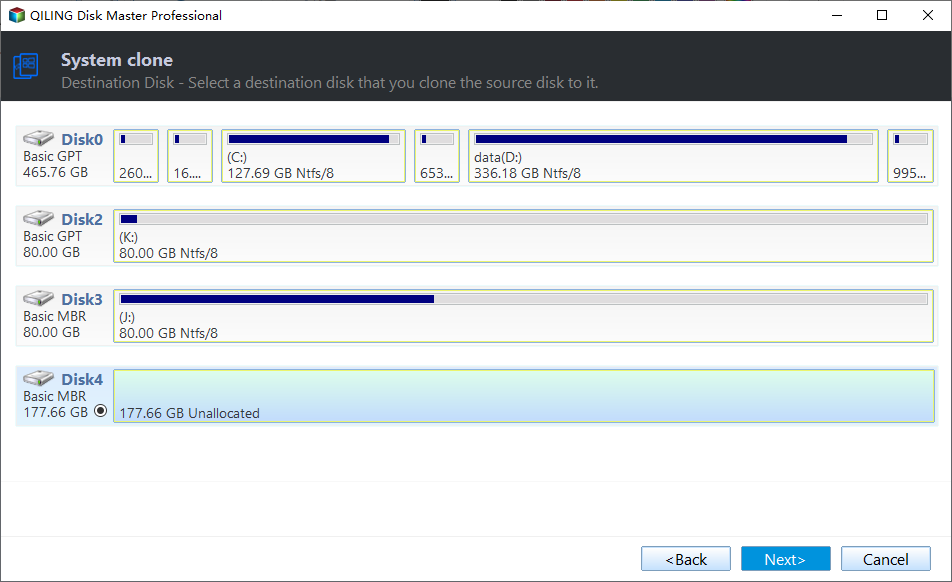
2. Select the Intel SSD as the destination disk to save the Windows system image and press "Next".
3. To clone the Intel SSD, preview the settings, tick the "SSD Alignment" option, and press "Proceed" to migrate the OS to the Intel SSD in Windows 10/8/7.
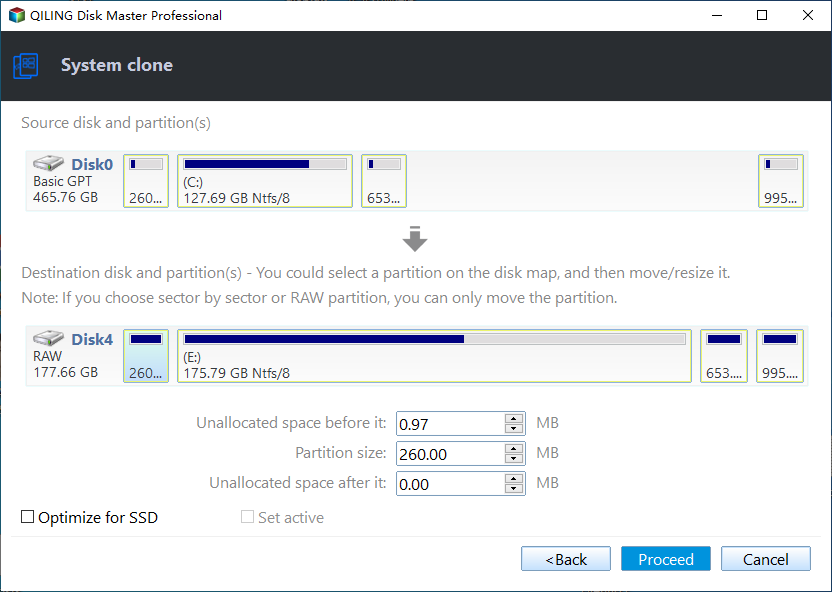
★ Tip: If your Intel SSD is larger than your original hard drive, you can choose to clone all sectors on your HDD to Intel SSD, which may take longer due to the larger size of the Intel SSD.
Wait for the cloning operation to finish, then shut down your computer, disconnect the source disk, and connect the destination disk to the source disk's socket. That's it.
If you have a laptop with only one card slot, you can back up your system to an external hard drive, create bootable media, remove your system hard drive, and install your Intel SSD drive in the card slot. Then, boot your computer with the bootable media, run Qiling Disk Master, and restore your system to the Intel SSD using the external hard drive backup.
The Epilogue
If you're experiencing issues with Intel Data Migration Software not cloning in Windows 10/8/7, try the above troubleshooting steps to resolve the problem. Alternatively, you can consider replacing Intel Data Migration Software with Qiling Disk Master Professional, which offers more reliable and powerful features to overcome the cloning issues. This alternative solution provides a perfect fix for the Intel Data Migration Software not cloning problem.
Related Articles
- Free Corsair Data Migration Software for Cloning
This guide explains Free Corsair Data Migration Software for Cloning with clear steps, key checks, and practical tips. - The Best Free Crucial SSD Data Transfer Software
The best free Crucial SSD data transfer software can transfer data to Crucial SSD and ensure the cloned disk boot securely. Please keep reading. - Step-by-Step Guide for Dell XPS 8910 SSD Upgrade
This tutorial presents how to perform Dell XPS 8910 SSD upgrade step by step and provides the best disk cloning software to help you. - How to Solve Hard Disk Error 301 Efficiently? (4+1 Fixes)
Manage solve Hard Disk Error 301 Efficiently with safer disk and partition steps to avoid data loss or boot problems. - How do you Migrate OS to SSD from HDD while Keeping Files on HDD?
Learn how to migrate your Windows OS drive from a traditional HDD to an SSD while keeping your files and software on the original HDD using the reliable Qiling Disk Master tool, following a step-by-step process. - How Do You Mirror a Hard Drive to SSD in Windows 7/8/10?
This guide explains How Do You Mirror a Hard Drive to SSD in Windows 7/8/10 with clear steps, key checks, and practical tips.
Products
Articles & Tutorials
- Data Recovery
- Data Backup
- File Recovery
- File Backup
- File synchronize
- System Backup and Restore
- Disk and Partition Clone
- Technical articles
- Disk Master Help
- Windows Deleted File and Disk Recovery Tutorials
- Windows File and Data Recovery Tutorials
- More Windows Tutorials for Install, Security, Files, and PC Tips
- Windows Boot, Repair, and Recovery Environment Tutorials
- Windows Backup Tutorials
- Windows Restore Tutorials
- Windows Clone and Migration Tutorials
- Windows Server Backup, Recovery, and Management Tutorials
- Windows Disk, Partition, and Storage Management Tutorials