Recover Data After Format: Complete in Seconds
What happens during a format?
Formatting a storage device erases the file system, making data inaccessible to the operating system. This process reinitializes the file system, effectively deleting all files and folders on the device. When a device is formatted, the operating system can no longer locate files, making them unrecoverable through normal means. This is why it is essential to back up data regularly to prevent loss in case of a format or other data loss event.
Users feel perplexed and distressed when data is lost due to formatting, especially if there are no backups, as the actual data remains on the storage medium until it is overwritten.
Formatting a drive or device does not completely erase data, and in many cases, it can be recovered. To increase the chances of successful data recovery, it is essential to act quickly and not overwrite the formatted area. This can be done by stopping any write operations to the device, disconnecting it from power, and seeking professional help from a data recovery service or a reputable software tool. Timing is crucial, as the longer you wait, the lower the chances of successful data recovery.
Immediate steps after formatting
If you have accidentally formatted your storage device, act quickly to maximize data recovery chances. Immediately stop using the device to prevent overwriting of data.
Step 1. Stop writing new data
Immediately stop writing any new information to the formatted drive to prevent overwriting the lost data.
Step 2. Disconnect the drive
If it is an external drive or a memory card, disconnect it from the computer to prevent further damage.
How to recover data after format using data recovery software?
To recover data after formatting, using a professional data recovery software tool is the best approach. There are many data recovery software available that can help retrieve lost files. These tools work by scanning the formatted drive and trying to rebuild the original file structure, giving you a chance to recover your important data.
I highly recommend Qiling FastRecovery for its user-friendly interface, robust recovery capabilities, and comprehensive disk partition management functions, making it a top choice among software on the market.
✦ Compatibility with various storage devices: This software is designed to handle the complexities of various storage devices, including HDDs, SSDs, and USB drives, and provides compatibility with a wide range of USB devices.
✦ Advanced recovery algorithms: Qiling FastRecovery uses advanced algorithms to locate and recover lost files from USB flash drives, even in difficult situations, by thoroughly scanning and reassembling data fragments.
✦ Data security: The software operates in read-only mode, ensuring the security of recovered files and minimizing the risk of further data loss or corruption, while preserving the integrity of the USB flash drive without any modifications during the recovery process.
✦ Additional features: Qiling FastRecovery provides a comprehensive set of features for disk management, including partition recovery on USB flash drives, partitioning, wiping, cloning, and creating bootable USB drives, in addition to data recovery.
Here is a step-by-step guide on how to recover data from a formatted hard disk in Windows 10 using Qiling FastRecovery:
Step 1. Install and launch Qiling FastRecovery. Choose the exact partition or disk where your data lost and click Scan.
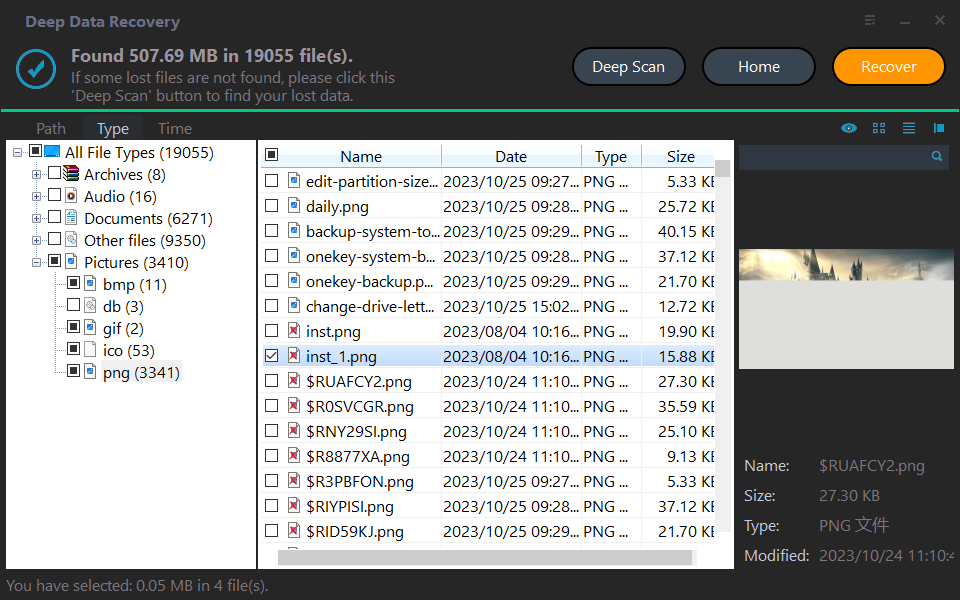
Step 2. The recovery tool begins by scanning and searching for deleted data. It first executes a "Quickly Scan" to quickly locate any recoverable files, and then proceeds with a "Deep Scan" to search for other lost data.
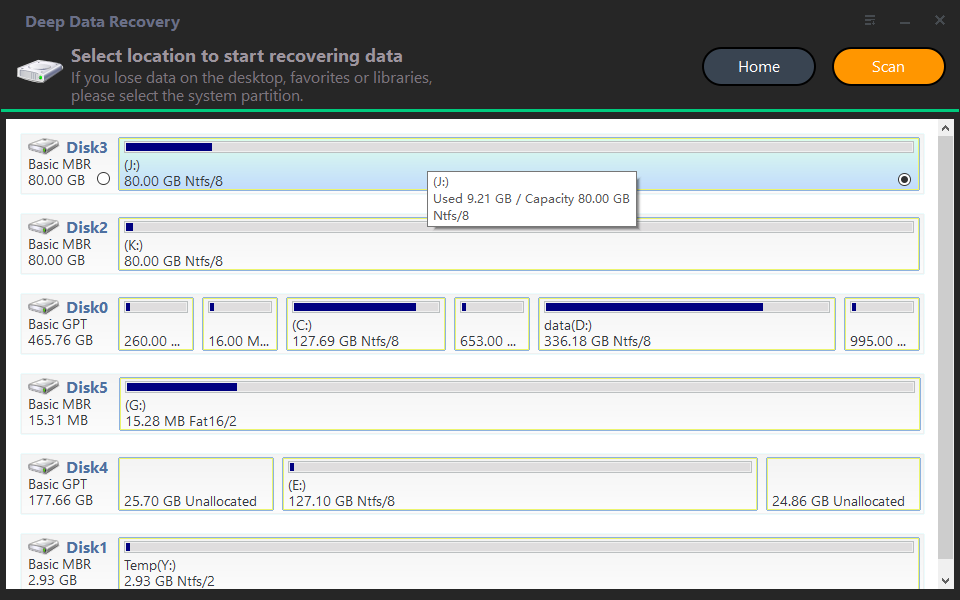
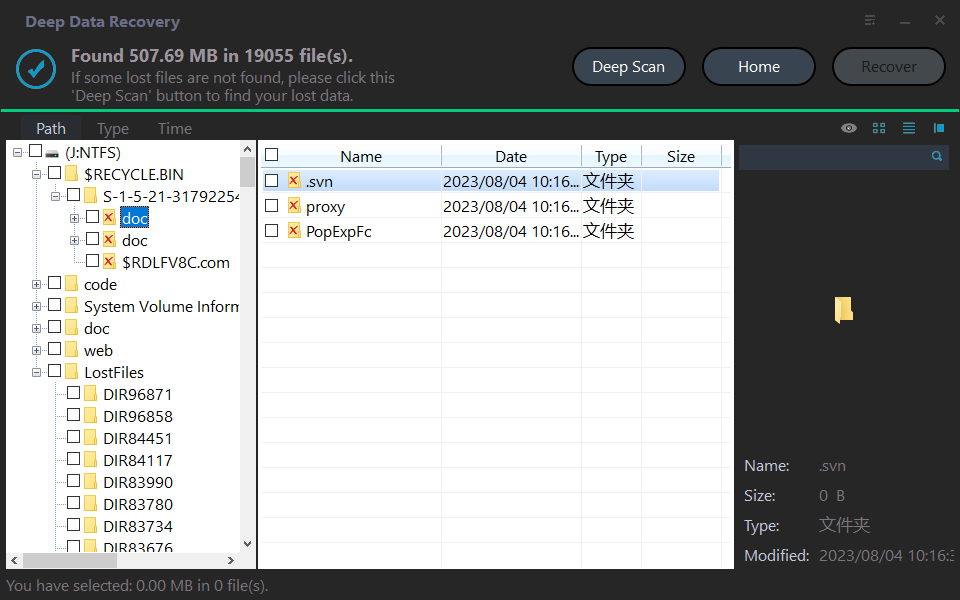
Step 3. Once the scan is completed, all deleted files, recycle bins and Raw files will be displayed. Select the desired file and click "Recover".
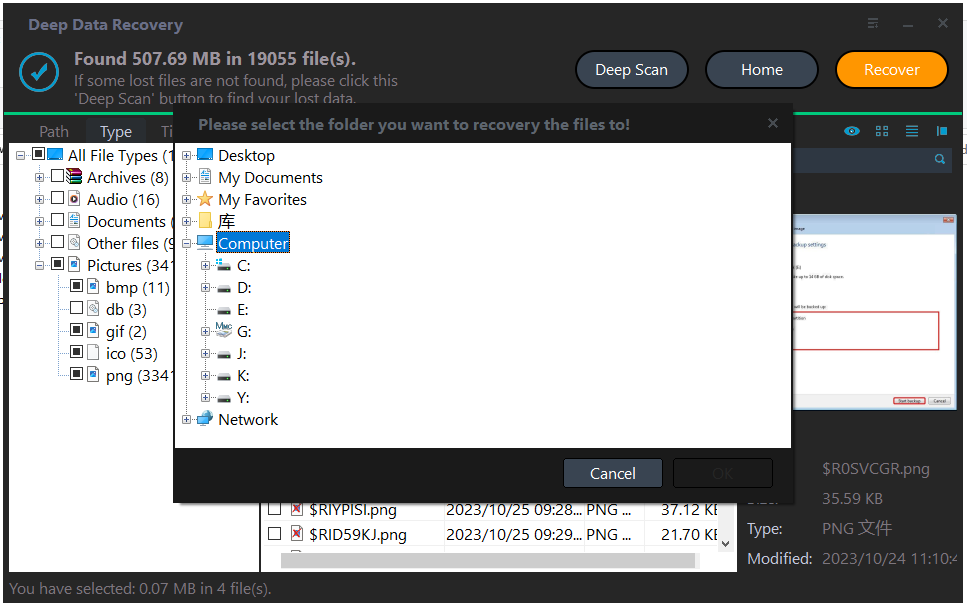
Step 4. Then, select a folder path to save your recovered files.
Step 5. Wait patiently for this process of recovering ends.
FAQs about data recovery after format
1. Is data recovery after format always successful?
Data recovery success depends on various factors, including the extent of overwriting and the condition of the storage medium, which can affect the possibility of complete recovery.
2. How can I prevent data loss after format in the future?
Regularly backing up your data on an external drive or cloud storage can help prevent data loss in case of accidental formatting.
3. Is it possible to recover data from a physically damaged drive?
Data recovery from physically damaged drives can be a complex process that may require the expertise of a professional to ensure the data is retrieved safely and effectively.
4. Will data recovery void the device's warranty?
Data recovery typically does not void the warranty of a storage device, but it is best to check the manufacturer's policies to confirm.
Conclusion
Data loss due to formatting can be a stressful experience, but it is not the end. Acting quickly is key - stop writing new data to the formatted drive and use reliable data recovery software to retrieve your files. To avoid this situation in the future, consider taking a proactive approach and cloning your hard drive as a data backup. This will safeguard your important data and prevent potential disasters.
Related Articles
- How to Recover Deleted Photos from Hide It Pro
You can recover deleted photos from Hide It Pro by following the steps outlined in this article, which provides guidance on how to retrieve images from Hide It Pro on both Android and iPhone devices. - How to Recover JPEG from SD Card
You can easily recover JPEG files from an SD card, regardless of the situation - whether they were deleted, the memory card was formatted, or it became corrupt. Follow the SD card JPEG recovery process to retrieve your lost files. - How to Recover Deleted Photos/Videos/Files from Phone Memory Card
If you've lost photos, videos, or deleted files from your phone's memory card, you can try using Deep Data Recovery software to recover them quickly. - How to Recover Shift Deleted Word Documents in Windows 11/10
You can recover Shift deleted Word files in Windows 11/10 using either Deep Data Recovery or by restoring the auto backup files, which can help you retrieve the deleted Word document. - HP External Hard Drive Data Recovery Software Free Download
HP external hard drives are popular for their high storage capacity and durability. However, like any other storage device, they can be prone to data loss due to various reasons such as physical damage, logical corruption, or accidental deletion. - Lexar Image Rescue 5 Is Not Available - Download Alternatives
Lexar Image Rescue 5 is no longer available. If you want to recover files, you need to find and download Lexar image rescue alternatives.
Products
Articles & Tutorials
- Data Recovery
- Data Backup
- File Recovery
- File Backup
- File synchronize
- System Backup and Restore
- Disk and Partition Clone
- Technical articles
- Disk Master Help
- Windows Deleted File and Disk Recovery Tutorials
- Windows File and Data Recovery Tutorials
- More Windows Tutorials for Install, Security, Files, and PC Tips
- Windows Boot, Repair, and Recovery Environment Tutorials
- Windows Backup Tutorials
- Windows Restore Tutorials
- Windows Clone and Migration Tutorials
- Windows Server Backup, Recovery, and Management Tutorials
- Windows Disk, Partition, and Storage Management Tutorials