Sony Data Recovery Software: Recover Deleted Files from Sony SD Card
About Sony SD Card
Sony SD cards are a popular choice among photographers due to their fast-writing speed and high capacity, making them ideal for storing and transferring large amounts of data, such as photos and videos. Made with flash memory, these cards retain data even if you remove photos and videos, providing a reliable storage solution.
If the same card later becomes RAW, recover data with RAW SD card recovery before formatting.
If you are a Sony SD card user, be aware that there is a risk of losing essential data. This might happen if you have encountered situations such as:
- Unintentionally delete photos from Sony SD cards.
- Viruses attack your SD card and cause SD card corruption.
- Unplug your Sony SD card without ejecting it, and then you will find that all the photos are gone.
- Accidentally formatted the Sony SD card.
- When you suddenly change the file system on an SD card, there is a risk that the data on it may become lost.
If you have lost important files, you might be frantically searching for your SD card and wanting to use memory card recovery software. To help, we recommend a reliable photo recovery tool, and if you need to recover a corrupted SD card, you can try using Command Prompt on Windows. If those methods don't work, we also provide a manual way to rescue or repair your SD card.
Recover Deleted Files with Sony SD Card Recovery Software [Photos and Videos]
If you have lost essential data from your Sony SD cards, you can still recover deleted photos with Deep Data Recovery, a risk-free data recovery program. This means you don't have to worry about how to recover deleted photos from your SD card, and you can get back to using your files immediately.
Deep Data Recovery allows for the recovery of deleted photos and videos from over 2000 storage devices, including SD cards, memory cards, cameras, USB drives, and computers, and supports over 1000 file types.
Deep Data Recovery is a software that can recover and repair photos and videos from Sony SD cards, in addition to being a data recovery tool. It can fix and restore damaged or corrupted files.
Recovering deleted files from Sony SD cards, including photos and videos, is a straightforward process with Deep Data Recovery. With this tool, you can easily retrieve lost files, even if they were deleted accidentally or due to formatting issues.
Step 1. Launch Deep Data Recovery software on your PC, select the file types you want to recover, and click "Fast Scan" to begin the recovery process.

Note: You can choose different search modes based on where and why the data was lost.
Step 2. To proceed, select the precise file location and then click the "Scan" button to continue.

Step 3. After the process, select the "Deleted Files" and "Other Lost Files" folders in the left panel. You can then apply the "Filter" feature or click the "Search files or folders" button to find the deleted files.

Step 4. Click the "Recover" button and save the restored files to a different location than the original one.
If you are dealing with corrupted photos, you can try using photo repair software like Adobe Photoshop or PhotoRec, which can help recover and repair damaged images. Additionally, you can also try using online tools or cloud storage services that offer automatic photo backup and recovery features. For corrupted videos, you can try using video repair software like Video Repair or Stellar Video Repair, which can help repair damaged video files.
How to Recover Deleted Files from Sony SD Card with CMD on Windows 11/10
If your files or SD card are corrupted, you may not know how to recover or delete them. Fortunately, you can repair a corrupted file system and recover files on Windows without needing to download any additional tools. You can use Command Prompt to recover corrupted files from Sony SD cards, providing a solution to this common problem.
Step 1. Connect your Sony SD card to your PC.
Step 2. To find the Sony SD card drive letter, press the Windows + E keys to open File Explorer and look for the drive letter associated with the Sony SD card in the left-hand panel. It will be listed under the "This PC" or "This Device" section, and will be the letter that corresponds to the SD card.
Step 3. Click "Start", and type in cmd.
Step 4. Select "Run as administrator".

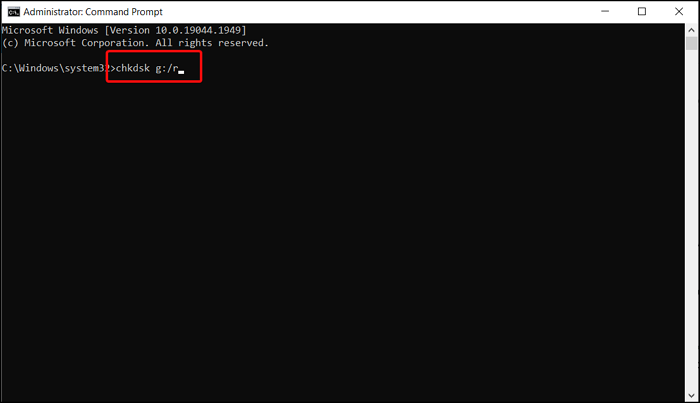
Step 5. To run a check on your Sony SD card, you can type the command `chkdsk g:/r` in the Command Prompt, replacing "g" with the actual drive letter of your SD card. This will initiate a thorough scan of the card, checking for any errors or inconsistencies in the file system.
How to Recover Deleted Photos from Sony SD Card [with Data Recovery Services]
You can recover most deleted files from Sony SD cards with Deep Data Recovery, and if that doesn't work, you can try Qiling Data Recovery Service.
We offer recovery services for various devices, including Sony SD cards, as well as RAID recovery, disk repair, and system repair. We can recover data from hard drives, SSDs, USBs, and servers.
Consult with Qiling data recovery experts for a one-on-one manual recovery service. After a free diagnosis, we could offer the following services:
- Repair corrupted RAID structure, unbootable Windows OS, and corrupted virtual disk file
- Recover/repair lost partition and re-partitioned drive
- Unformat hard drive and repair RAW drive (BitLocker encrypted drive)
- Fix disks that become GPT-protected partitions
Recover Deleted Files from Sony SD Card FAQs
If you still have some questions about recovering deleted files from Sony SD cards, read the following questions and answers.
How do I recover deleted photos from my Sony camera?
You can recover deleted photos from Sony SD cards using Qiling Data Recovery software.
- 1. Download and install Deep Data Recovery software.
- 2. Connect the Sony SD card to the computer.
- 3. Scan the Sony SD card.
- 4. You can preview the data and recover it.
What happens to deleted photos on SD cards?
Deleting images from storage devices does not permanently delete the data, but overwriting the SD card can result in permanent loss of photos and videos.
Can you bring back permanently deleted pictures?
You can recover permanently deleted pictures using data recovery software, such as Deep Data Recovery software.
- 1. Download and install Deep Data Recovery software.
- 2. Choose the destination where you lost the pictures.
- 3. Scan the target location.
- 4. You can preview the data and recover it.
Related Articles
- How to Fix The Directory Name Is Invalid in Windows 10/11
- How to Recover Shift Deleted Files in Windows 10/8/7
- Recover Deleted Files from USB Flash Drive/External Hard Drive
- Recycle Bin Recovery Software Free Download Full Version [Step-by-Step Guide]
- How to Permanently Delete Videos from Laptop/PC without Recovery
If you want to know how to permanently deleted videos from laptop, you need to check out the following ways, ensuring the deleted videos can't be recovered. - How to Permanently Remove Sensitive Files and Data from a Computer (PC & Mac)
You can use Qiling File Shredder to delete sensitive files and data from a Windows computer and Disk Utility as well as Terminal Command to remove sensitive files on Mac.
Products
Articles & Tutorials
- Data Recovery
- Data Backup
- File Recovery
- File Backup
- File synchronize
- System Backup and Restore
- Disk and Partition Clone
- Technical articles
- Disk Master Help
- Windows Deleted File and Disk Recovery Tutorials
- Windows File and Data Recovery Tutorials
- More Windows Tutorials for Install, Security, Files, and PC Tips
- Windows Boot, Repair, and Recovery Environment Tutorials
- Windows Backup Tutorials
- Windows Restore Tutorials
- Windows Clone and Migration Tutorials
- Windows Server Backup, Recovery, and Management Tutorials
- Windows Disk, Partition, and Storage Management Tutorials