Recover Files from SSD: Easy Steps to Retrieve Your Lost Data
Overview of recovering files from SSD
Solid state drives (SSDs) have become popular due to their speed and reliability, but they are not immune to data loss, which can occur due to accidental file deletions, formatting errors, system crashes, and hardware failures.
Fortunately, with the right tools and knowledge, you can effectively recover files from an SSD (solid state drive) and restore your valuable data. This article will explore the best solution for recovering files from an SSD drive, providing a comprehensive approach for your data recovery needs.

Challenges in recovering files from SSD
Recovering files from a Solid-State Drive (SSD) can be more challenging than from a Hard Disk Drive (HDD) due to its unique characteristics. Unlike HDDs, SSDs do not have physical heads that can be moved to read data, and their flash memory cells can become corrupted or wear out over time, making it harder to retrieve data.
▶ TRIM technology: TRIM, a feature in SSDs, improves performance by immediately erasing deleted files. However, this makes traditional file recovery methods less effective, as deleted files on SSDs are harder to access, making it more challenging to recover them once they are deleted.
▶ Wear leveling: SSDs use wear leveling algorithms to distribute write operations evenly, but this can scatter file fragments across different locations, making recovery more challenging and requiring a recovery process that can handle fragmented data.
▶ Encryption: Modern SSDs often have built-in encryption, making data recovery more challenging, especially without the decryption keys. This encryption adds an extra layer of security but complicates traditional recovery methods.
Despite the challenges of recovering files from an SSD, we have a reliable solution to help you recover your files effectively.
Qiling FastRecovery – Your Ultimate SSD Recovery Tool
Qiling FastRecovery is a powerful and user-friendly software that stands out in the field of SSD data recovery. With its intuitive interface and advanced features, this professional-grade tool can help you retrieve your lost files efficiently, making it a standout in the industry.
✦ Comprehensive SSD support: Qiling FastRecovery is designed to handle the complexities of SSDs, supporting various brands and models for compatibility with SATA, NVMe, and M.2 drives.
✦ Advanced recovery algorithms: Qiling FastRecovery uses advanced algorithms to recover files from SSDs, even in scenarios like TRIM-enabled drives and wear-leveling algorithms, scanning the drive thoroughly to locate and restore files.
✦ Data security: The software ensures the safety of your recovered files by operating in read-only mode, minimizing the risk of further data loss or corruption, and respecting the integrity of your SSD by preventing any modifications during the recovery process.
✦ Additional features: Qiling FastRecovery offers a range of disk management tools, including partitioning, secure erasing, cloning, and optimizing SSD performance after cloning. This comprehensive suite caters to all your SSD management needs.
Now that you understand the benefits of Qiling FastRecovery, let us explore how to recover files from SSD using this remarkable tool, which offers a quick and effective solution for retrieving lost data from solid-state drives.
Step 1. Install and launch Qiling FastRecovery. Choose the exact partition or disk where your data was lost and click Scan.
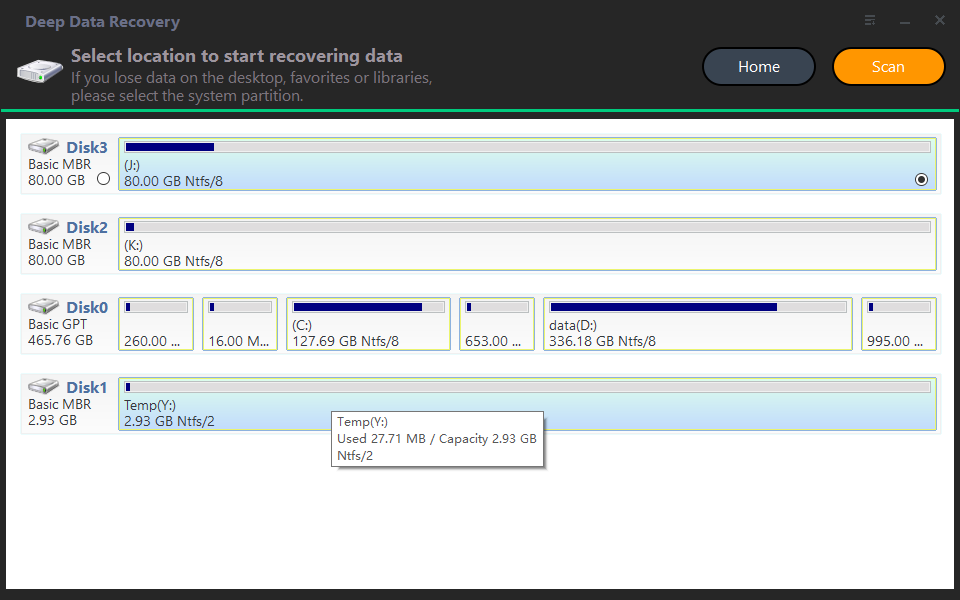
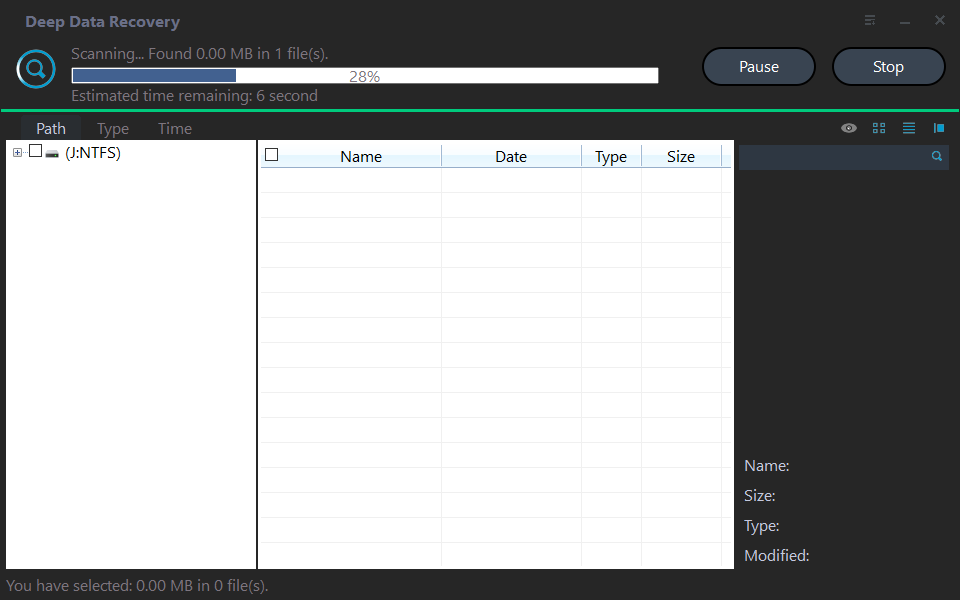
Step 2. The recovery tool starts by scanning and searching for deleted data. It first executes a "Quick Scan" to quickly find your lost data, and then proceeds to a "Deep Scan" to search for any other lost data that may be hidden.
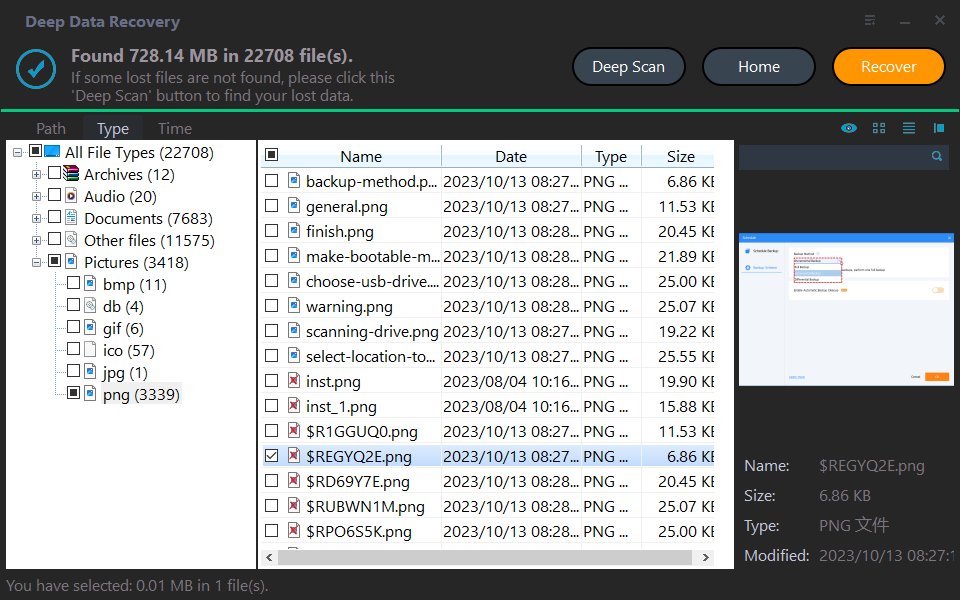
Step 3. After the scan is done, all deleted files, recycle bin contents, and raw files will be shown. Select the desired file and click "Recover" to restore it.
Step 4. Then, select a folder path to save your recovered files.
Step 5. Wait patiently for the recovery process to complete.
Conclusion
Losing important files from an SSD can be distressing, but with the right tool and method, you can recover your data effectively. Qiling FastRecovery offers a user-friendly interface, advanced recovery algorithms, and comprehensive SSD support, making it an excellent choice for SSD data recovery. By following the step-by-step guide outlined in this article, you can confidently retrieve your lost files and safeguard your valuable data, with Qiling FastRecovery being your trusted ally in restoring what is rightfully yours.
Recovering files from an SSD is a manageable task, whether you opt for Qiling FastRecovery or explore other methods. Take action now and regain control of your data today.
Related Articles
- How to Recover Temporary Word Files in Windows 11/10/7
The location of temporary files in Windows 11/10/7 can be found in the %temp% folder, which is typically located in the C:\Users\YourUsername\AppData\Local\Temp directory. - Archive File Recovery | How to Recover Deleted Zip/Rar Files in Windows 11/10
If you accidentally remove an archive, like a .rar or .zip file, and want to restore archive files, here are 7 ways to help you recover deleted Zip/Rar files in Windows 11/10 for free or using software. - 2 Ways to Complete Recycle Bin Recovery in Windows PC
Permanently deleted files from recycle bin or emptying recycle bin can be recovered using recycle bin recovery software, which can completely retrieve deleted files. - Top 5 Best Free Data Recovery Software for Windows in 2023
Here are the top 5 best free data recovery software for Windows 11/10/8/7 to download. You can use free file recovery software to recover lost or deleted files on your Windows PC. - How to Recover Deleted Audio Files from Memory Card
With the help of audio recovery software for memory card, you can solve the problem of how to recover deleted audio files from memory card on Windows or Mac easily. - How to Recover BKF Files in Windows 7/10
Losing BKF files can be frustrating, especially if they contain important data. However, with the right tools and techniques, you can recover your BKF files and get back to work.
Products
Articles & Tutorials
- Data Recovery
- Data Backup
- File Recovery
- File Backup
- File synchronize
- System Backup and Restore
- Disk and Partition Clone
- Technical articles
- Disk Master Help
- Windows Deleted File and Disk Recovery Tutorials
- Windows File and Data Recovery Tutorials
- More Windows Tutorials for Install, Security, Files, and PC Tips
- Windows Boot, Repair, and Recovery Environment Tutorials
- Windows Backup Tutorials
- Windows Restore Tutorials
- Windows Clone and Migration Tutorials
- Windows Server Backup, Recovery, and Management Tutorials
- Windows Disk, Partition, and Storage Management Tutorials