The Best Data Recovery Software to Recover Deleted File
Can deleted files ever be recovered?
When a file is deleted from a computer or storage device, it's not immediately erased. Instead, the file system marks the space occupied by the deleted file as available for reuse, allowing it to potentially be recovered if the space isn't overwritten by new data.
File recovery can be attempted through various methods, such as:
◤ Recycle Bin or Trash: Deleting a file using standard operating system commands typically moves it to a temporary holding area, such as the Recycle Bin on Windows or the Trash on Mac, where it can be restored to its original location.
◤ File Recovery Software: Specialized software applications can scan storage devices for deleted files and attempt to recover them, as long as they haven't been overwritten. This is the recommended method for recovering deleted files.
◤ Data Forensics: Forensic techniques can recover deleted files in specific cases, usually for legal or investigative purposes, requiring specialized knowledge and tools.
File recovery is possible, but its success depends on factors like time since deletion, storage device activity, and whether the deleted file's space has been overwritten, with earlier attempts increasing the chances of successful retrieval.
To increase the chances of recovering a deleted file, minimize disk activity, avoid saving new data to the affected device, and consider seeking professional help if the file is crucial.
What is the best software to recover deleted files?
When you accidentally delete files, check the Recycle Bin first. If the files are not there, stop any further actions and use reliable recovery software to try to retrieve them.
We highly recommend using Qiling FastRecovery, specifically its "Recover Data" feature, which efficiently recovers deleted files. This convenient tool is compatible with various Windows operating systems, including Windows 11, 10, 8, 8.1, 7, XP, and Vista. Its advantages make it our top recommendation.
✦ Convenience of operation is crucial: Qiling Disk Master's "Recover Data" feature offers a streamlined data recovery process with a user-friendly interface, making it easy to recover data with just a single click on the Recover button.
✦ Powerful recovery capabilities: This software supports the recovery of over 200 file formats, including Excel files, Word documents, images, videos, audio files, and emails, making it a versatile tool for restoring a wide range of data types from various storage devices and file systems.
✦ Wide device compatibility: Qiling FastRecovery is capable of recovering deleted files from a variety of storage devices, including internal hard drives (HDD and SSD), external hard drives, USB flash drives, SD cards, and others.
✦ Preserves original file names and paths: This tool utilizes advanced algorithms to analyze file system metadata and relevant information, allowing it to restore files with their original names and directory structures intact.
Qiling FastRecovery is the top data recovery software for Windows 10, ideal for retrieving deleted files in various situations. Its user-friendly interface, extensive file format support, and compatibility with different storage devices make it a great choice. Additionally, it can restore files with their original names and paths, making it an excellent solution for file recovery needs.
How to use the best software to recover deleted file?
To recover a file using the recommended software, you can follow these steps: first, download and install the software on your computer, then launch it and select the drive or location where the file was lost. Next, the software will scan the selected area and display a list of recoverable files.
Step 1. Install and launch Qiling FastRecovery. Choose the exact partition or disk where your data lost and click Scan.
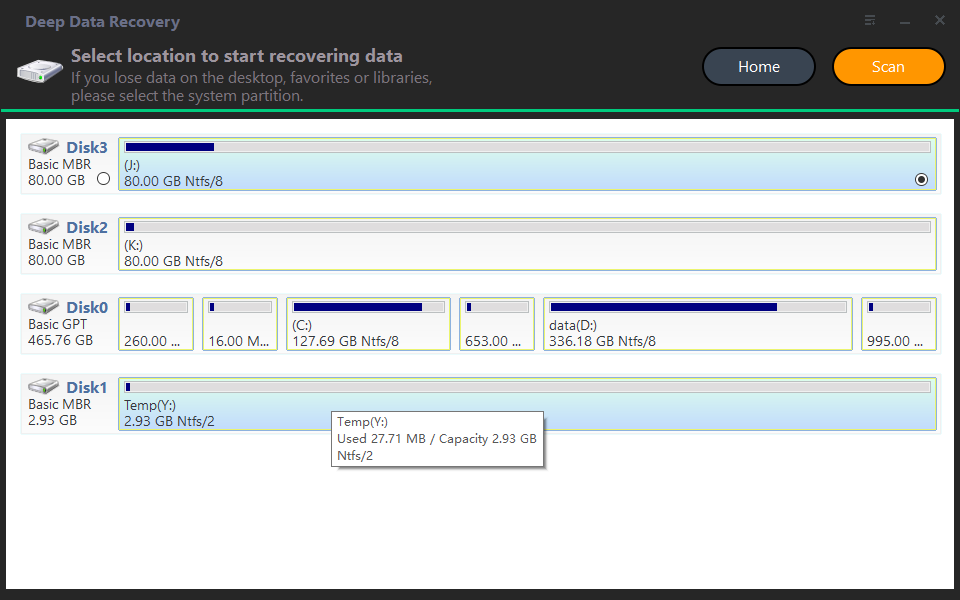
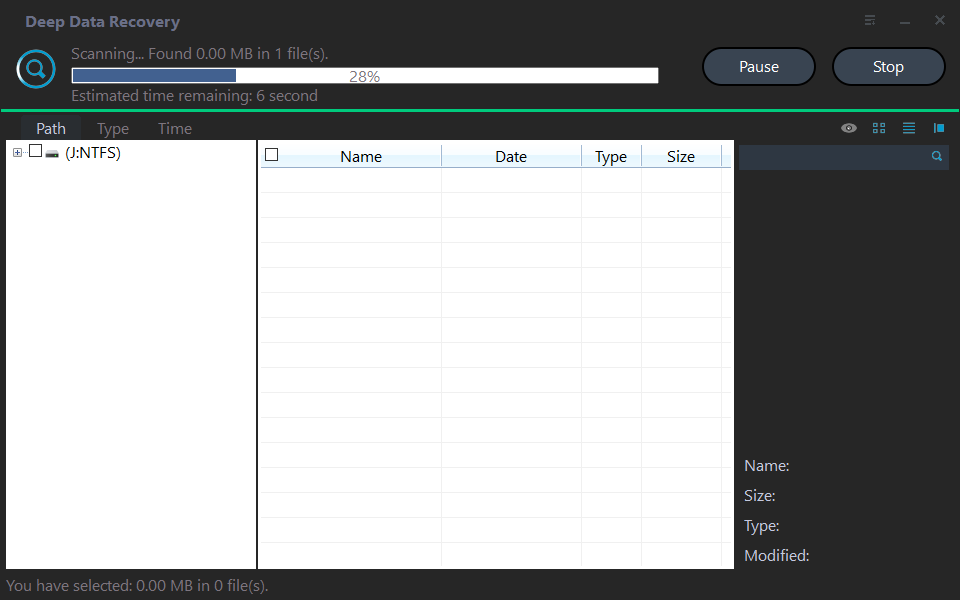
Step 2. The recovery tool begins by scanning and searching for deleted data. It first executes a "Quick Scan" to quickly find the lost data, and then proceeds with a "Deep Scan" to search for any other missing files.
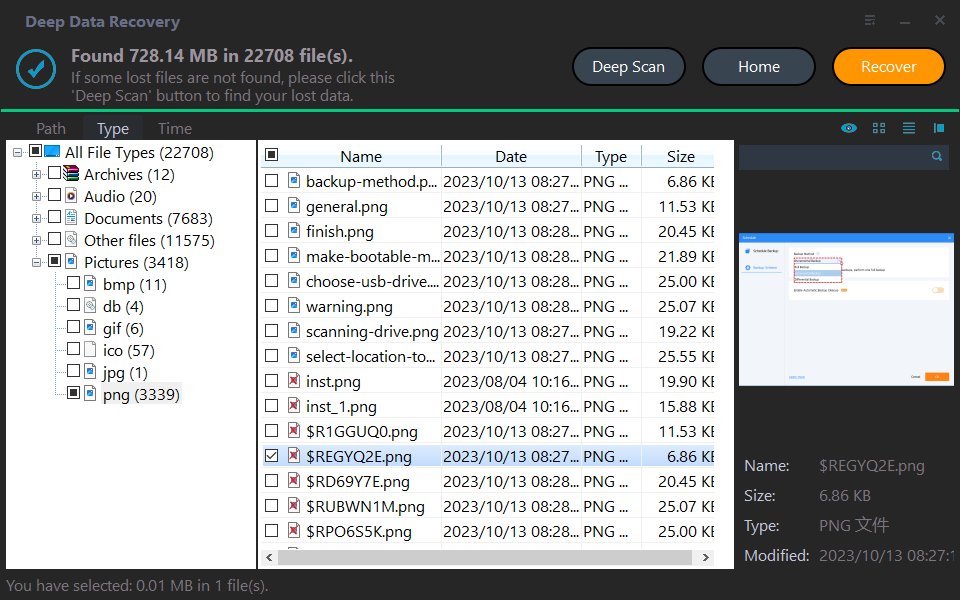
Step 3. Once the scan is completed, a list of deleted files, recycle bins, and raw files will be displayed. To recover a file, simply select it and click "Recover".
Step 4. Then, select a folder path to save your recovered files.
Step 5. Wait patiently for the recovery process to complete.
Conclusion
Employing a professional data recovery tool is often the most reliable approach when it comes to recovering deleted files. A tool like Qiling FastRecovery serves as a powerful data recovery solution, making it a versatile option for users.
Related Articles
- Where Do Photos/Pictures Go After Recently Deleted on Mac/Windows/Android Phone/iPhone
This guide explains Where Do Photos/Pictures Go After Recently Deleted on Mac/Windows/Android Phone/iPhone with clear steps, key checks, and practical tips. - Top 6 Data Recovery Services in Boston, MA
This guide explains Top 6 Data Recovery Services in Boston, MA with clear steps, key checks, and practical tips. - Genshin Impact Game Folder Empty, Get the Answers Here!
If you're experiencing an empty Genshin Impact game folder, you can find the solution here. The post provides answers on why your Genshin Impact game folder might be empty and how to fix it. - Genshin Impact Progress Lost : Restore Lost Genshin Data [Quick & Easy]
if you encounter the Genshin Impact progress lost. We will introduce two methods to recover lost Genshin Impact game progress. You can recover game data with Deep Data Recovery or recover the lost account. - How to Recover Data from Dell Laptop Hard Drive
No matter you want to learn how to recover data from a dead dell laptop hard drive or normal hard drive, check out the steps in the guide. - How to Recover Data from Digital Camera Memory Card
It's very easy to lose and deleted videos and photos from a digital camera memory card. Check out the guide for digital camera memory card recovery.
Products
Articles & Tutorials
- Data Recovery
- Data Backup
- File Recovery
- File Backup
- File synchronize
- System Backup and Restore
- Disk and Partition Clone
- Technical articles
- Disk Master Help
- Windows Deleted File and Disk Recovery Tutorials
- Windows File and Data Recovery Tutorials
- More Windows Tutorials for Install, Security, Files, and PC Tips
- Windows Boot, Repair, and Recovery Environment Tutorials
- Windows Backup Tutorials
- Windows Restore Tutorials
- Windows Clone and Migration Tutorials
- Windows Server Backup, Recovery, and Management Tutorials
- Windows Disk, Partition, and Storage Management Tutorials