How to Permanently Delete Files on SSD
Quick Navigation:
- Understanding Solid-State Drives (SSDs) and Deleting Data
- What are Solid-State Drives (SSDs)?
- Characteristics of SSDs
- Deleting Data on an SSD
- Conclusion
Understanding Solid-State Drives (SSDs) and Deleting Data
Solid-State Drives (SSDs) have become an essential component of modern computing. Replacing traditional Hard Disk Drives (HDDs), SSDs offer faster read and write speeds, lower power consumption, and increased durability. However, like any storage device, they can accumulate data that needs to be deleted. In this article, we will explore the world of SSDs, their characteristics, and how to safely delete data from them.
For complete SSD cleanup before resale, compare this with securely erasing an SSD before selling.
What are Solid-State Drives (SSDs)?
A Solid-State Drive is a type of non-volatile storage device that stores data on interconnected flash memory chips. Unlike traditional HDDs, which use spinning disks and mechanical heads to read and write data, SSDs utilize electronic signals to store and retrieve information. This design makes SSDs faster, more reliable, and more energy-efficient.
Characteristics of SSDs
- Speed: SSDs are significantly faster than HDDs, with read and write speeds that can reach up to several hundred megabytes per second.
- Durability: Due to the absence of moving parts, SSDs are more resistant to physical shock, vibration, and temperature changes.
- Power Consumption: SSDs consume less power compared to HDDs, making them ideal for mobile devices.
- Capacity: While initially smaller in capacity than HDDs, modern SSDs can range from a few hundred GB to several TB.
Deleting Data on an SSD
While SSDs are durable, they can still accumulate data that needs to be deleted. Deleting data from an SSD is similar to deleting data from any other storage device. Here's how you can do it:
Method 1: Using the Operating System
Most operating systems (Windows, macOS, and Linux) provide a built-in way to delete files and empty space on an SSD.
- On Windows, use File Explorer or Disk Cleanup.
- On macOS, utilize Finder or Disk Utility.
- On Linux, you can use Nautilus or Terminal commands like `rm` for deleting files and `wipefs` for freeing up disk space.
Method 2: Using Third-Party Software
There are several third-party tools available that specialize in wiping data securely. Some popular options include:
- DBAN (Darik's Boot and Nuke): A free, open-source tool that completely wipes an SSD.
- CCleaner: A utility for cleaning up disk space on Windows machines.
- Disk Cleanup: A built-in macOS feature for freeing up space.
Qiling Disk Master, with its multiple disk erase options, enables you to flexibly clean up an existing OS disk or data partitions with ease.
The following steps show how to clean an SSD with Reliable Disk Clean Software - Qiling Disk Master:
Step 1. Run Qiling Disk Master. Click the "Wipe Disk" tab.
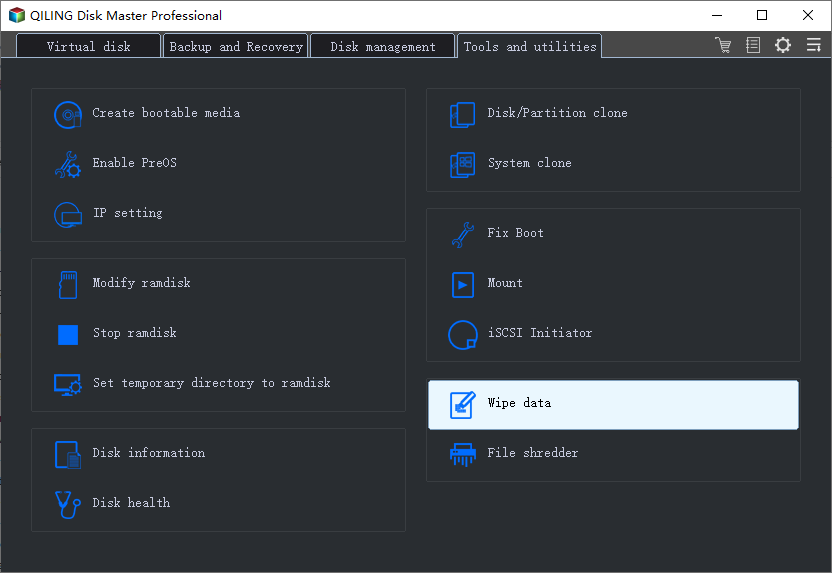
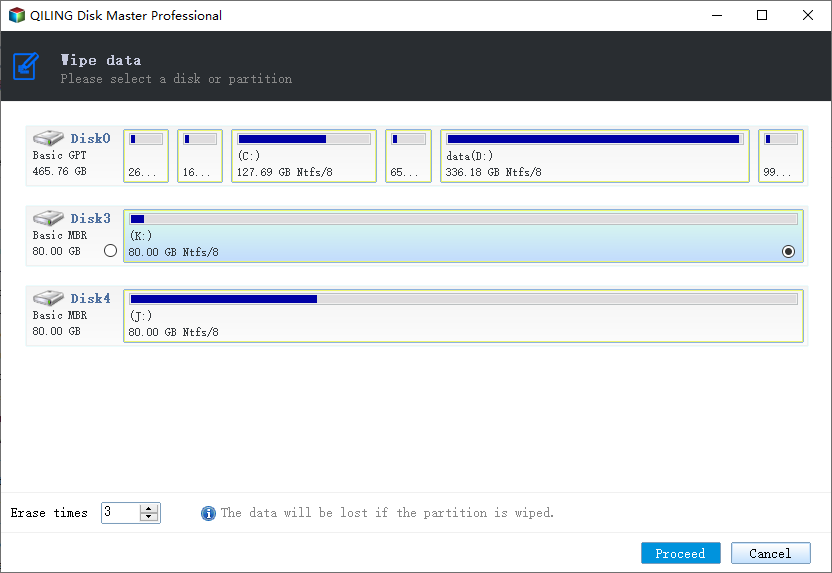
Step 2. Select the targeted HDD or SSD to wipe.
Notice: Please make sure you have chosen the correct HDD or SSD. Once the wiping starts, your data is irrecoverable.
Step 3. Choose Wiping Method.
Choose a suitable wiping method. Recommend Qiling Secure Erase!
Step 4. Check the warning message and click "Proceed" to confirm.
Step 5. Wait for wiping finish and click "Done."
Method 3: Using a Hardware Solution
If you need to securely erase data from a large number of devices, consider using hardware solutions like degaussing machines or shredders. These methods ensure that all magnetic and electronic data is completely destroyed, making it impossible to recover.
Conclusion
Solid-State Drives have revolutionized the way we store and access data. With their speed, reliability, and durability, SSDs have become an indispensable component of modern computing. When it comes to deleting data on an SSD, there are several methods available, ranging from using built-in operating system features to employing specialized third-party software or hardware solutions.
Always remember to securely erase sensitive information to protect your privacy and maintain the integrity of your device. Whether you're dealing with personal files, confidential business documents, or other types of sensitive data, it's essential to handle deletion procedures carefully.
Related Articles
- 3 Ways for How to Wipe a USB Drive Clean in Windows 10
- How to Permanently Delete Files from Thumb Drive/Pen Drive
- How to Destroy Data on a Hard Drive Permanently
Products
Articles & Tutorials
- Data Recovery
- Data Backup
- File Recovery
- File Backup
- File synchronize
- System Backup and Restore
- Disk and Partition Clone
- Technical articles
- Disk Master Help
- Windows Deleted File and Disk Recovery Tutorials
- Windows File and Data Recovery Tutorials
- More Windows Tutorials for Install, Security, Files, and PC Tips
- Windows Boot, Repair, and Recovery Environment Tutorials
- Windows Backup Tutorials
- Windows Restore Tutorials
- Windows Clone and Migration Tutorials
- Windows Server Backup, Recovery, and Management Tutorials
- Windows Disk, Partition, and Storage Management Tutorials