Solved - "Virtual Disk Service Error: The Volume Size Is Too Big"
- Scenario: “Virtual Disk Service error: The volume size is too big”
- Reason for “The volume size is too big for FAT32” error
- How to fix "Virtual Disk Service error: The volume size is too big"
- Summary
Scenario: “Virtual Disk Service error: The volume size is too big”
You're trying to format a large NTFS volume to FAT32 using Diskpart, but it's throwing an error due to the volume size being too big. To achieve this, you'll need to use a third-party tool like Qiling Disk Master, which can resize and convert the partition to FAT32. These tools are capable of handling larger volumes and can help you format the disk to FAT32 for use with your PS4 or other devices.
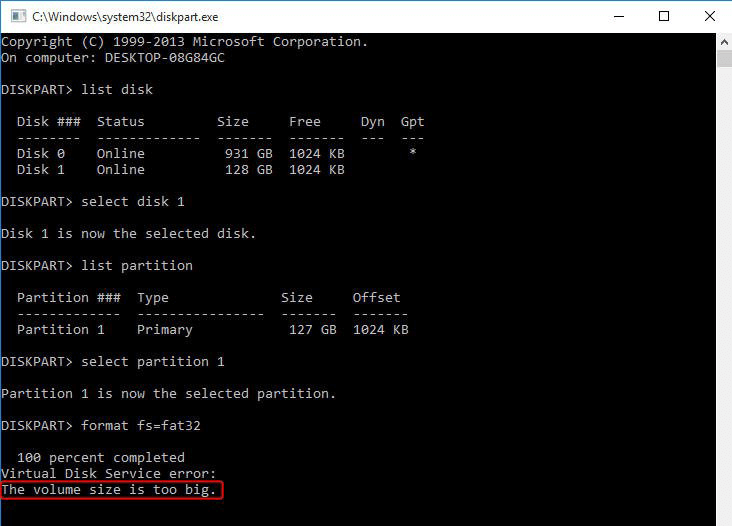
VDS is a set of APIs that provides a single interface for managing disks and volumes, including the Disk Management snap-in, DiskPart command-line tool, and DiskRAID command-line tool.
Reason for “The volume size is too big” error
The Diskpart tool, a built-in Windows utility, can help resolve disk and partition issues, but it may also cause problems. When trying to format a hard drive larger than 32 GB to the FAT32 file system, you'll encounter the error "Virtual Disk Service error: The volume size is too big".
NTFS and FAT32 are two popular file systems used by various operating systems, including Windows, Mac, Linux, and game consoles. Each has its own advantages and disadvantages, and users may switch between them depending on specific needs.
Why did you receive this error? This is because Microsoft does not allow you to format the partition larger than 32 GB to FAT32 with Diskpart.
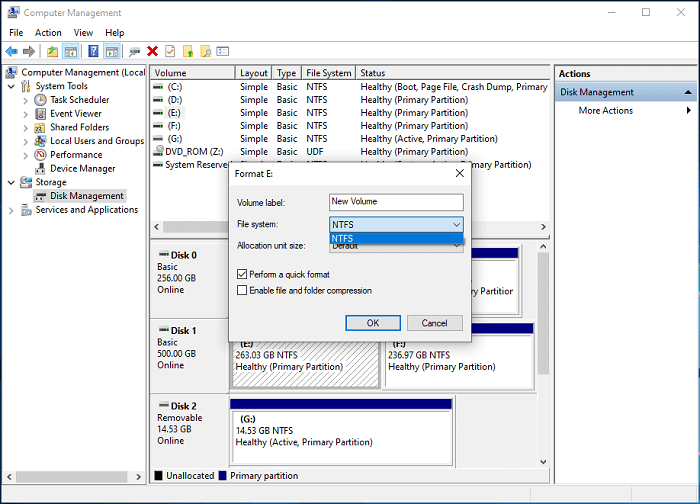
When trying to format a hard drive in DiskPart, it may fail. If you also fail to format the drive in Disk Management, you may only see NTFS as an option for formatting a hard drive larger than 32GB.
How to fix "Diskpart Virtual Disk Service error: the volume size is too big"
To resolve the "Virtual Disk Service error: The volume size is too big" issue, switch to a third-party free partition software like Qiling Disk Master Standard, which allows for formatting a large hard drive to FAT32 and supports easy formatting with a few clicks, making it simpler than using Diskpart.
The Windows built-in tool can be used to fix various problems, including extending volume, which is disabled, and creating new simple volumes or shrinking volumes, which are greyed out.
Step 1. Download Qiling Disk Master, install and launch it.
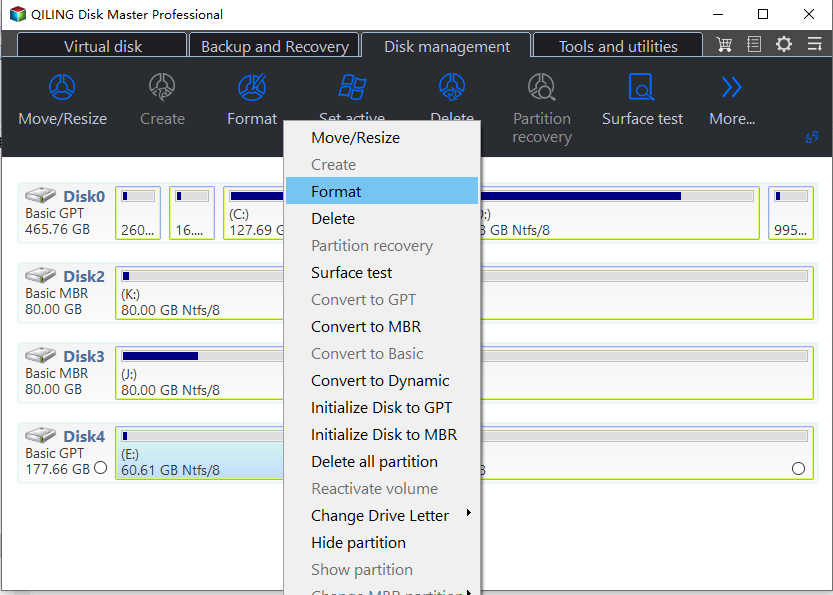
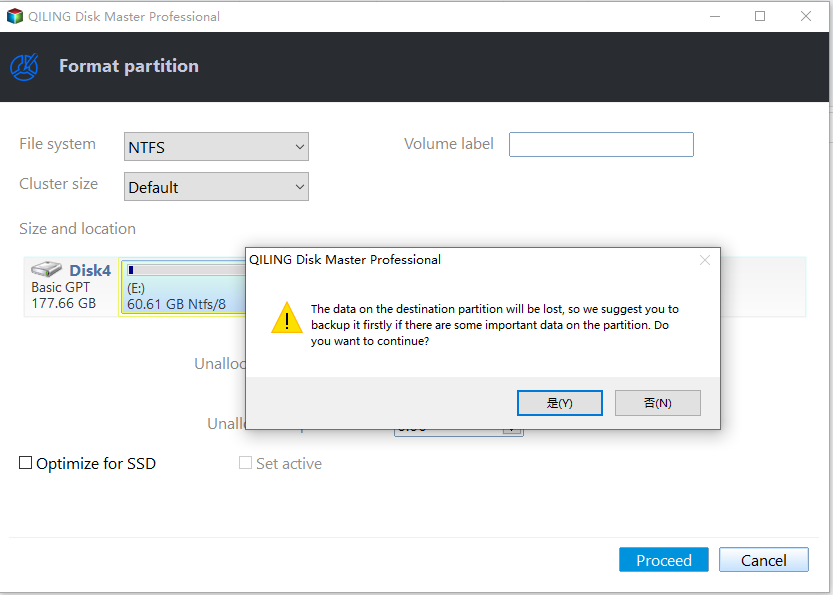
Step 2. Right-click the NTFS partition, and then select "Format Partition".
Step 3. First, input a partition label, then select "FAT32" as your file system.
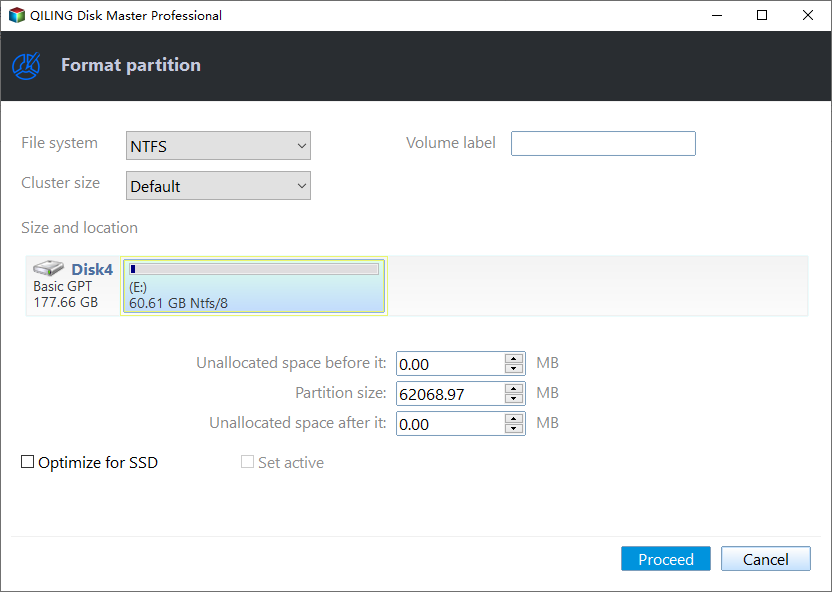
Step 4. Click the "Proceed" button to finalize the changes and format the partition with the FAT32 file system. This allows users to format large partitions to FAT32, overcoming the 32 GB limitation imposed by Windows built-in tools.
- ★Tips:
- Before running a format partition command, it's essential to back up any important files or data stored on that partition. This is because formatting the partition will erase all data, including files, folders, and system information.
- Apart from the "Format Partition" option, you can also choose to convert NTFS to FAT32 or FAT32 to NTFS using the "NTFS to FAT32 Converter" tool, which allows for data preservation.
Summary
To resolve the "Virtual Disk Service error: the volume size is too big" in Diskpart, you can use Qiling Disk Master Standard, which allows you to resize partition, move partition, shrink partition, merge partitions, create partition, and more, satisfying the basic needs of most users.
If you need to fix problems the standard edition cannot or want more advanced features, you can upgrade to Qiling Disk Master Professional.
Related Articles
- Guide to Check Disk Space Using PowerShell [2024 Tutorial]
This guide aims to introduce multiple ways to check disk space with PowerShell and an alternative tool to show disk usage. - Convert to GPT Greyed Out in Windows 10? Fix It Instantly
This article will focus on the error 'convert to GPT greyed out Windows 10', which includes why it greyed out and how to solve this problem. - Download Partition Magic Freeware for Windows 10/11 Disk Partitioning [Don't Miss It]
Though Symantec no longer supports PartitionMagic, it's still a great thing to find reliable partition magic freeware to help Windows users simply manage disk partitions on Windows computers. - How Do I Run External SSD Speed Test on My Own? Your Guide Is Here
Manage how Do I Run External SSD Speed Test on My Own with safer disk and partition steps to avoid data loss or boot problems. - Windows 11 Gets/Adds a Watermark on Unsupported Hardware, How to Remove It
If your Windows 11 computer doesn't meet the system requirements and displays a watermark with 'system requirements not met', you can remove it. - Windows 11 KB5011563 Update: Unsupported Devices Display Desktop Watermark
Windows 11 release KB update now! As the recent Windows 11 Release Preview said, Windows 11 will add a desktop watermark for unsupported hardware. Indeed the update did that on your device.
Products
Articles & Tutorials
- Data Recovery
- Data Backup
- File Recovery
- File Backup
- File synchronize
- System Backup and Restore
- Disk and Partition Clone
- Technical articles
- Disk Master Help
- Windows Deleted File and Disk Recovery Tutorials
- Windows File and Data Recovery Tutorials
- More Windows Tutorials for Install, Security, Files, and PC Tips
- Windows Boot, Repair, and Recovery Environment Tutorials
- Windows Backup Tutorials
- Windows Restore Tutorials
- Windows Clone and Migration Tutorials
- Windows Server Backup, Recovery, and Management Tutorials
- Windows Disk, Partition, and Storage Management Tutorials