Tested Ways to Repair Invalid Dynamic Disk without Data Loss Using CMD
User scenario
When a dynamic disk becomes invalid, do not format it immediately. First, check whether the issue is caused by an unsupported Windows edition, an offline disk, disk errors, or damaged dynamic disk metadata. The following methods can help repair the invalid dynamic disk while reducing the risk of data loss.
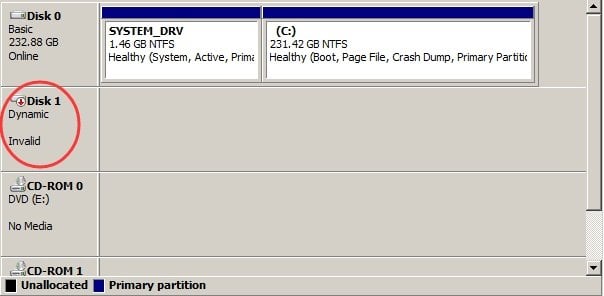
Real cause to invalid dynamic disk in Disk Management
When a Windows operating system identifies a dynamic disk as invalid, it can be a source of panic. This error can be caused by a variety of factors, including bad sectors, hard drive issues, a faulty SATA cable, a virus or malware attack, or even an incompatibility issue with the Windows operating system itself.
How to repair invalid dynamic disk without data loss?
There are several ways to repair an invalid dynamic disk, depending on its cause. The four methods below address different situations, from Windows compatibility to dynamic disk conversion.
▌ Method 1. Upgrade your Windows OS version
Dynamic disks are not supported in all Windows versions, so if you encounter an invalid dynamic disk, you may need to upgrade to a Windows OS that supports dynamic disks, which should resolve the issue.
▌Method 2. Reactivate the invalid dynamic disk with DiskPart
If the invalid dynamic disk is shown as offline, you can try to bring it online with DiskPart. This method does not convert the disk type; it only reactivates the selected disk.
To open Command Prompt as administrator, type "cmd" in the search box, select "Run as Administrator", and run the following commands.
diskpart
list disk
select disk n (replace n with the number of the invalid dynamic disk)
online disk
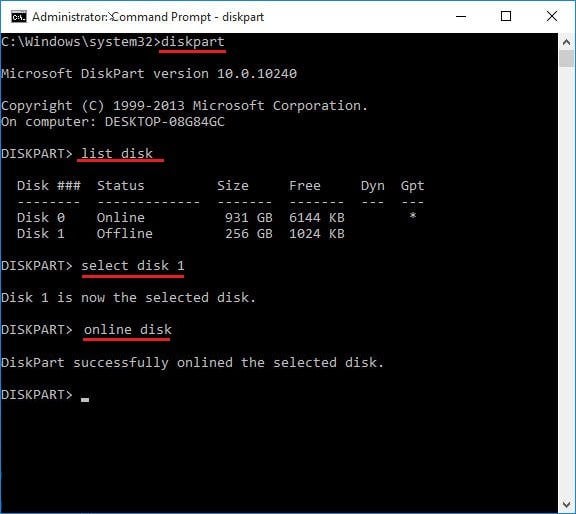
If this solution does not work, try the next method.
▌Method 3. Convert dynamic to basic disk via Disk Management
Step 1. Type diskmgmt.msc in the search box on the desktop to enter Disk Management.
Step 2. Right-click the invalid dynamic disk and choose Convert to Basic Disk.
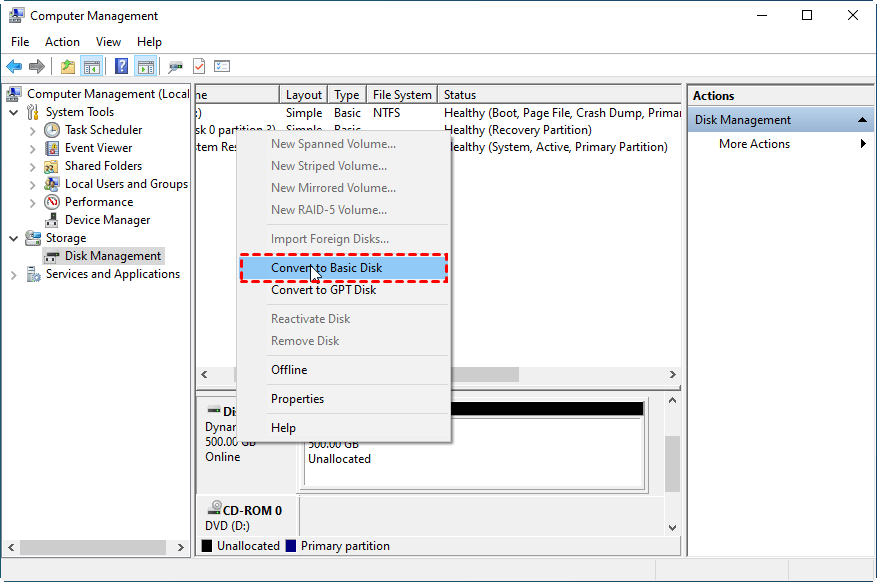
If the "Convert to Basic Disk" option is grayed out, Disk Management requires you to delete all volumes first, which will cause data loss. Back up or recover important data before using this method.
▌Method 4. Convert dynamic to basic disk without data loss
Qiling Disk Master Professional is a powerful software that manages dynamic or basic disks and volumes on Windows operating systems, including Windows 11/10/8.1/8/7/Vista/XP/2000, and also supports Windows Server 2003/2008/2011/2012/2016/2019/2022 with a Server Edition.
This tool enables you to convert a disk from basic to dynamic or vice versa without losing any data. It also allows you to manage dynamic disks and volumes, providing features such as extending, shrinking, creating, deleting, and moving dynamic volumes, as well as adding drives to RAID configurations and more.
Before converting a dynamic disk to a basic disk, back up all data on the dynamic disk in case you need to recover files later.
Here are the detailed steps to convert.
Step 1. Install and run Qiling Disk Master Professional. Right-click the target disk, and choose "Convert to Basic".
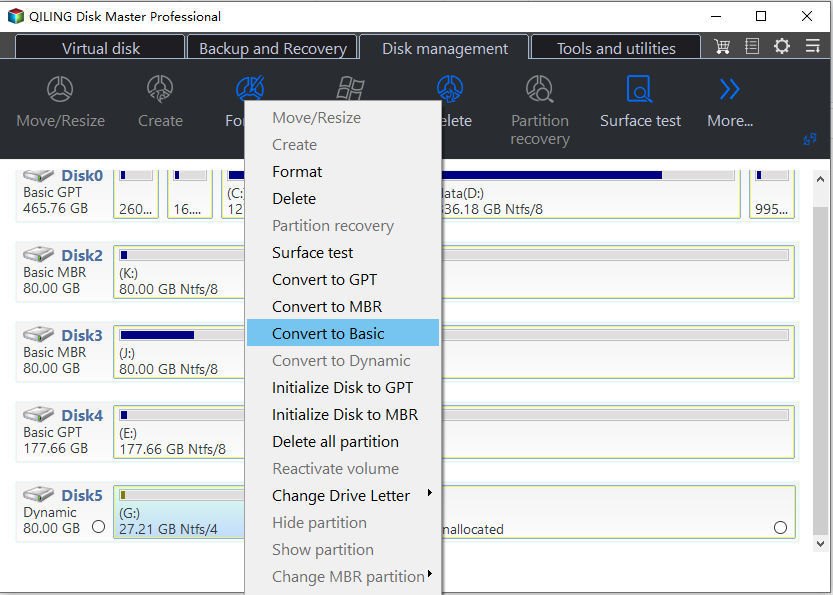
Step 2. Wait for Qiling Disk Master to complete the conversion and restart the computer if prompted.
Summary
Now you know how to repair an invalid dynamic disk without losing data. Start with non-destructive methods such as upgrading Windows or bringing the disk online, and use Qiling Disk Master when you need to convert or manage dynamic disks safely.
Related Articles
- PC Slow Down? How to Remove Bloatware on Windows 10/11
Follow practical steps to pC Slow Down How to Remove Bloatware on Windows 10/11 while keeping files, partitions, and boot settings safe. - Windows 10 Drive Converted to RAW Format, How to Fix It
This guide explains Windows 10 Drive Converted to RAW Format, How to Fix It with clear steps, key checks, and practical tips. - Your Best Guide to Clone Windows to M.2 SSD [2024 Tutorial]
This guide explains Your Best Guide to Clone Windows to M.2 SSD with clear steps, key checks, and practical tips. - How to Partition A USB Drive Windows 10 [Step-by-Step Guide]
This article teaches you how to partition a USB drive in Windows 10. You will learn three ways to partition a USB drive and choose the most suitable one. - [Solved] Preparing to Delete Takes Forever Windows 11/10, Windows 11/10/8/7 is Slow to Delete Files
If you're experiencing slow file deletion on your Windows 11/10/8/7 system, deleting a large number of files can be a frustrating and time-consuming process. However, there are some simple solutions that can help speed up the deletion process. - 8 Solutions to Fix NTLDR Is Missing in Windows 10/8/7
This guide explains 8 Solutions to Fix NTLDR Is Missing in Windows 10/8/7 with clear steps, key checks, and practical tips.
Products
Articles & Tutorials
- Data Recovery
- Data Backup
- File Recovery
- File Backup
- File synchronize
- System Backup and Restore
- Disk and Partition Clone
- Technical articles
- Disk Master Help
- Windows Deleted File and Disk Recovery Tutorials
- Windows File and Data Recovery Tutorials
- More Windows Tutorials for Install, Security, Files, and PC Tips
- Windows Boot, Repair, and Recovery Environment Tutorials
- Windows Backup Tutorials
- Windows Restore Tutorials
- Windows Clone and Migration Tutorials
- Windows Server Backup, Recovery, and Management Tutorials
- Windows Disk, Partition, and Storage Management Tutorials