Hard Disk Rescue Software - How to Rescue Files from Hard Drive
Quick Navigation:
- How to Perform Hard Drive Rescue on Windows or Mac
- Your Safe & Effective Hard Drive Rescue Software
- Guide for How to rescue files from hard drive
Unexpected hard drive faults can lead to huge data loss due to various reasons such as deleted files, formatted hard drive, disk displaying as RAW, virus threats, computer crashes, undetected hard disk, manufacturing faults, or extreme heat. To prevent complete data loss, it's essential to rescue files from the hard drive on Windows or Mac. There are reliable options available online that can help users save their files from permanent loss. This article will discuss a hard disk rescue method that is effective and trustworthy.
How to Perform Hard Drive Rescue on Windows or Mac
When users seek hard disk rescue software, they often choose the one that provides a complete solution to their problem. Deep Data Recovery is a perfect rescue hard drive solution that effectively addresses unexpected issues.
This drive rescue software can recover data from various storage devices, including hard drives, solid state drives, SD cards, USB drives, and external hard drives, on both Mac and Windows systems. It can rescue data of all types, including photos, videos, music, documents, and other files, with a high success rate and a safe and reliable process. The software supports over 100 devices and 500 file types, making it a comprehensive and effective data recovery solution.
Your Safe & Effective Hard Drive Rescue Software
- Recover Deleted Files on Mac or Windows: This tool provides a complete rescue of all deleted files, whether they were accidentally or intentionally deleted and emptied from the Trash bin, and can easily rescue data from a hard drive.
- This software will help you to recover data from external hard drive, disk, SD card, USB drive, or any other external drive.
- This software is fully compatible with various operating systems, including Windows 10/7/8/XP/Vista and Mac OS X 10.6 and later, allowing it to rescue files from a hard drive.
Guide for How to rescue files from hard drive
Using the disk rescue tool is a straightforward process that involves a three-step procedure: downloading the hard drive recovery software, selecting the file you want to rescue, and completing the rescue process. This data recovery tool for Mac or Windows is user-friendly, allowing anyone to operate it, regardless of their system knowledge. The step-by-step guide to rescuing files from a hard drive with Deep Data Recovery Software is easy to follow.
Step 1. Download the hard disk rescue software and install it, which should be a straightforward process given its virus-free and fully compatible nature with both Mac and Windows systems. Once installed, launch the software and follow the on-screen instructions from its home screen.
Step 2. Select the hard disk where you want to rescue files, click "Scan" to initiate a quick scan and find files on the drive.
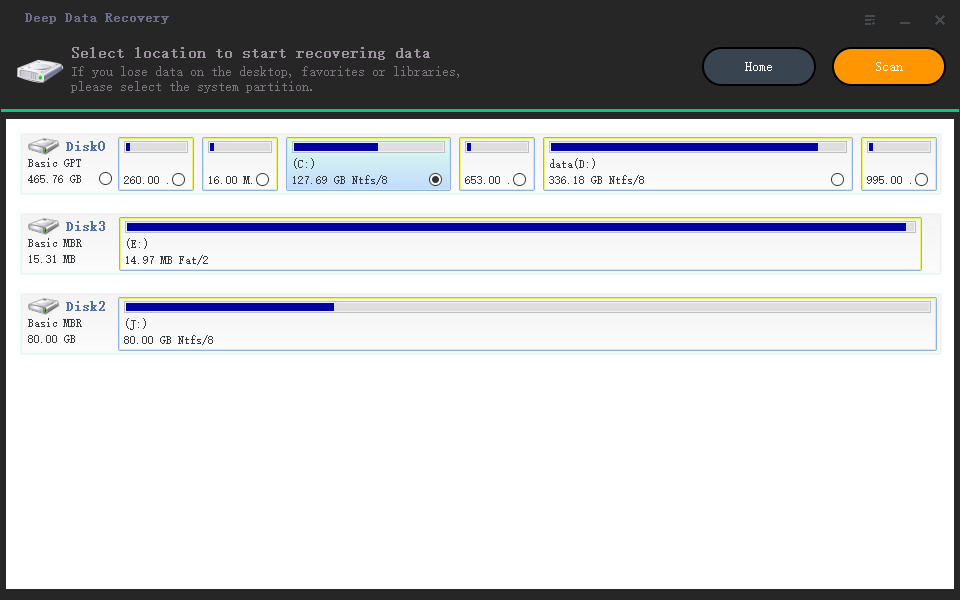
Step 3. Select the needed files, preview them to ensure they're in the right condition, and then click "Recover" to rescue your hard drive.
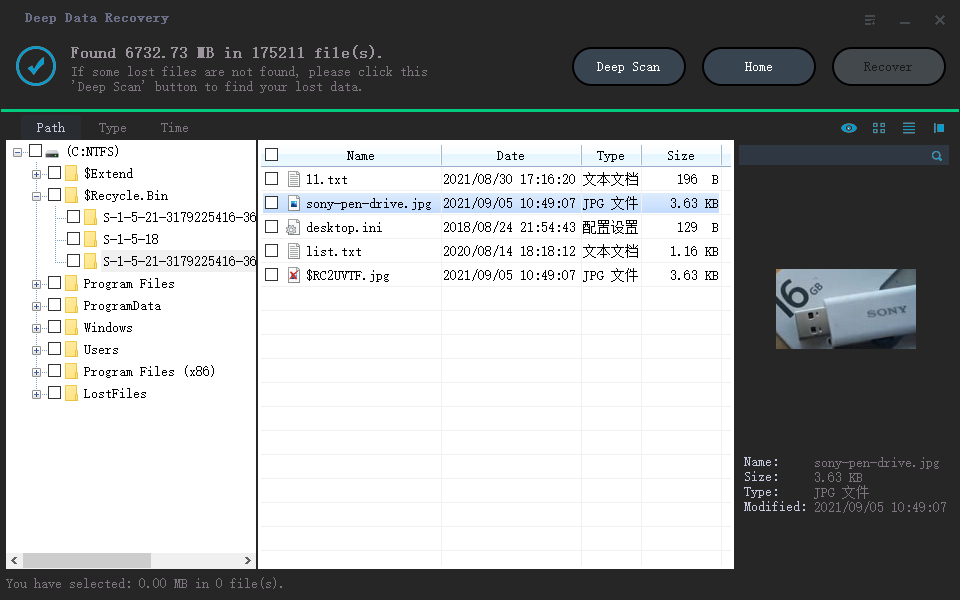
If you're recovering files from an external hard drive, save them to a different location to prevent future loss. Choosing a reliable method for hard disk data recovery is key to keeping your files safe.
Choosing the Deep Data Recovery tool as your perfect hard disk rescue software is the best solution to opt for, as it helps rescue hard drive data from unexpected errors or faults.
Related Articles
- Recover Data from BitLocker Encrypted Drive in Windows 10
- HP External Hard Drive Data Recovery Software Free Download
- Recover Data from Transcend Hard Drive
- Unformat Hard Drive in Windows 10
- Recover Data from External Hard Drive on Mac
- Recover Data from HP Simplesave External Hard Drive
- Recover Deleted Files from Dell Laptop/Desktop
- Recover Data from NTFS Hard Disk
- How to Recover Files from Formatted Disk Free in Windows 10
Products
Articles & Tutorials
- Data Recovery
- Data Backup
- File Recovery
- File Backup
- File synchronize
- System Backup and Restore
- Disk and Partition Clone
- Technical articles
- Disk Master Help
- Windows Deleted File and Disk Recovery Tutorials
- Windows File and Data Recovery Tutorials
- More Windows Tutorials for Install, Security, Files, and PC Tips
- Windows Boot, Repair, and Recovery Environment Tutorials
- Windows Backup Tutorials
- Windows Restore Tutorials
- Windows Clone and Migration Tutorials
- Windows Server Backup, Recovery, and Management Tutorials
- Windows Disk, Partition, and Storage Management Tutorials