How to Recover Deleted Files from USB Drive [Free/Paid]
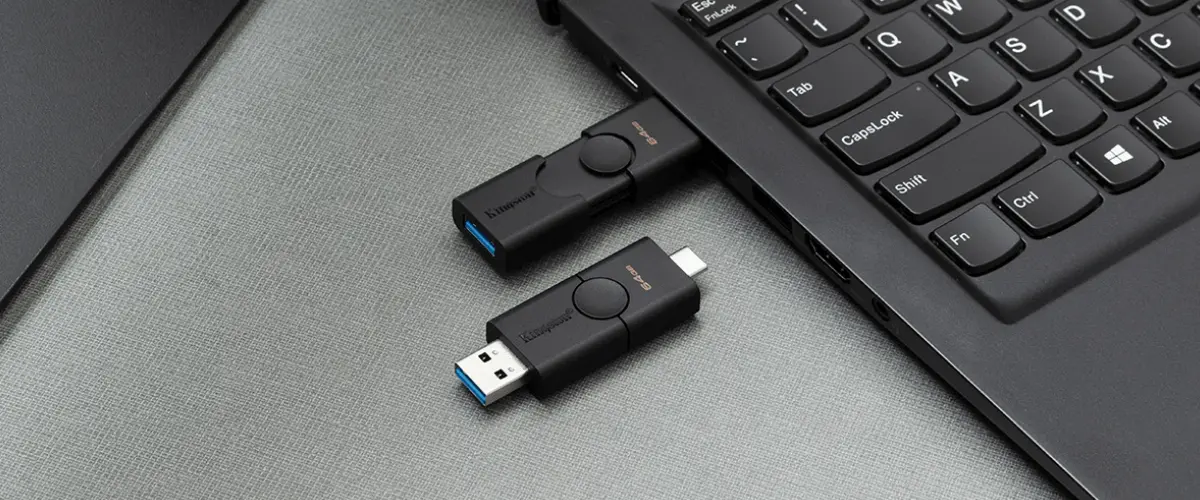
USB flash drives are a convenient way to store and transport data, but they can be unreliable due to the risk of saved files disappearing.
For deleted or hidden files on USB storage, this hidden files on flash drive guide can help before a full recovery scan.
- ❌ Losing important files or folders from a USB drive without a backup can be frustrating and stressful, often resulting from accidental formatting, virus attacks, or physical damage to the drive.
- 🗞️ To recover your lost files, you can try using a data recovery software. This type of software is designed to scan your USB drive and retrieve any files that were previously saved on it. Some popular options include Deep Data Recovery Wizard, Recuva, and Disk Drill.
- 🔼 Incorrectly unplugging it during file transfer.
- 👻 A computer virus deleted the contents of a thumb drive.
- ⛔ The system is unable to process the data due to various reasons such as access denial, formatting issues, or other factors that may lead to data loss.
Losing files from USB sticks can be frustrating, but there are ways to recover deleted files. Due to various reasons, files can get lost, but this article provides solutions, both free and using software, to help recover deleted files from USB drives.
- Quick Navigation
- Part 1. Restore Deleted Flash Drive Files with Software [High Success recovery Rate]
- Part 2. Recover Deleted Files from USB Free [Without Software and Recovery Rate Not Guaranteed]
- Part 3. Resume USB Flash Drive by Data Recovery Service [High Cost and Time Consuming]
- Part 4. How to Protect Your Files on USB Flash Drive
- Part 5. How to Repair Corrupted Flash Drive to Avoid Data Disappearance
- Part 6. Frequently Asked Questions
Recover Deleted Flash Drive Files with Software [High Success recovery Rate]
If you accidentally delete files from a USB drive, as they're not gone forever. They're just hidden and waiting to be overwritten by new data. You can use data recovery software to help you recover them, as long as you act quickly before new files are written to the drive.
Here, you can rely on Deep Data Recovery. It is a popular software used worldwide to recover deleted files from a USB drive in Windows and Mac, facilitating fast recovery of lost data by a malware attack, accidental deletion, formatting, or other reasons.
Your Safe & Effective USB Recovery Software
- Quickly recover files from damaged or corrupted storage devices such as hard disks, USB drives, memory cards, and more.
- 7-Zip is a free and open-source file archiver that can repair partially damaged files and is available for both Windows and Mac operating systems.
- The app has a user-friendly interface that makes it accessible to everyone, regardless of their technical background.
Guide To Recover Permanently Deleted Files from USB Drive:
- To recover lost data, download and run the Deep Data Recovery software, and follow the on-screen instructions to scan for lost files. If you only need to recover a specific type of file, you can skip deselecting unwanted file types and let the software focus on that type. Otherwise, select the file types you want to recover and let the software do the rest.
- To recover deleted files from a USB flash drive, select the drive from the External Devices option, click the "Scan" symbol, and initiate the file extraction process.
- After scanning, you can view the recovered files, select them, and click the "Recover" button to save them on your PC or other drives.
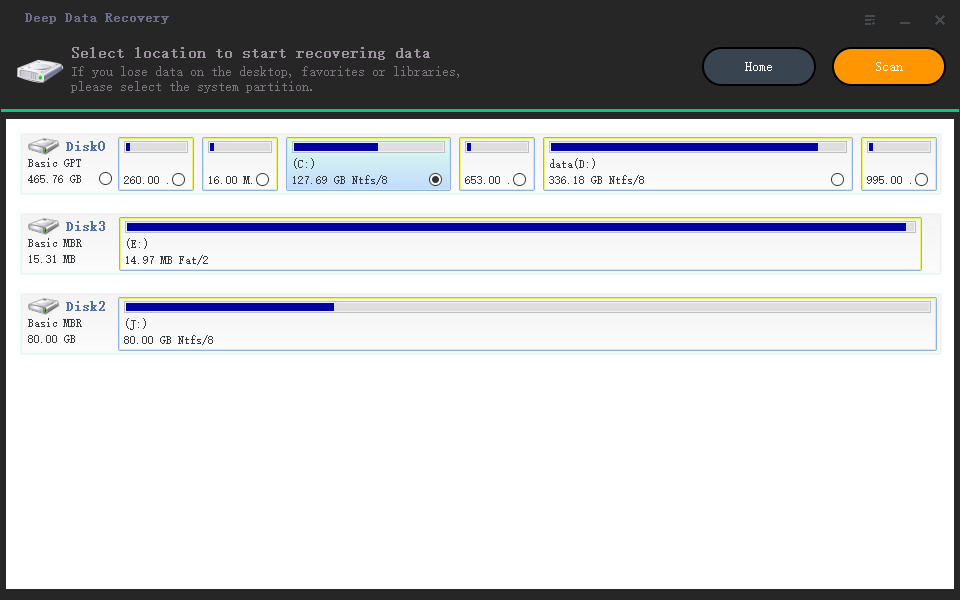
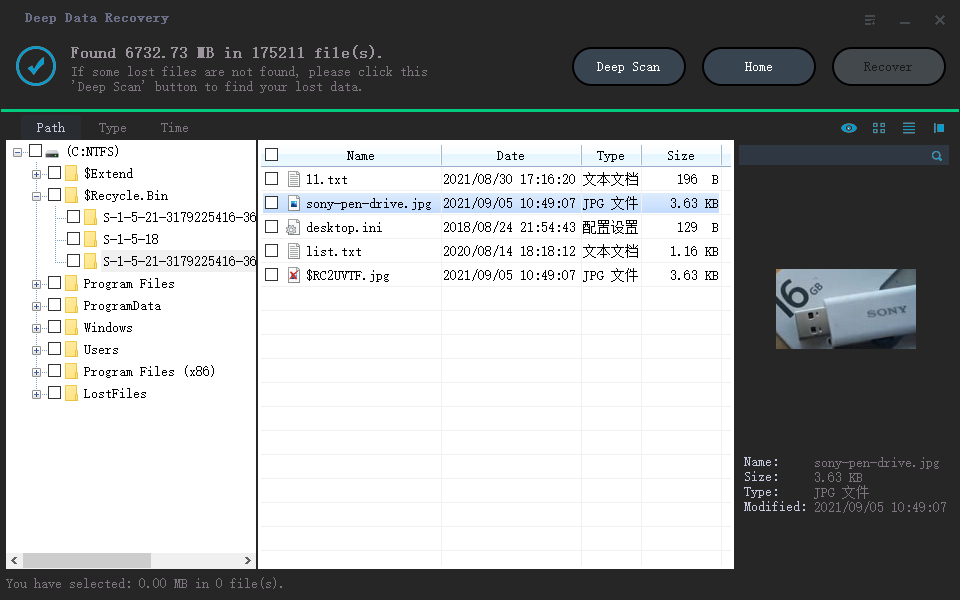
Tip: If you can't find or open lost USB files, check the "Other Lost Files" and "Tags" folder on your Mac, and consider using steps to recover deleted files from a USB drive.
Other Five Software for Data Recovery for Flash Drive
When you accidentally delete a file or format your USB drive, it can be frustrating to find the lost data. Fortunately, there are many software programs that can help you recover deleted files, with Deep Data Recovery standing out for its high recovery rate and ease of use. Other options, such as [list the other four tools], can also be considered.
- R-Studio
- Pros
- A software tool uses a unique file carving algorithm to recover deleted files from various storage devices, including USB drives, disks, and SD cards.
- It can also encrypt disk images with a password to protect your data.
- Cons
- The user interface is not friendly.
- It can be slow to run complex analyses.
- Disk Drill
- Pros
- It also has backup, wipes, and other functional options.
- The results page allows you to sort files by type, making it easy to find the specific file you're looking for.
- Cons
- The paid version is expensive.
- Unable to preview some files
- OnTrack EasyRecovery
- Pros
- The software features a built-in file viewer that allows users to preview their recovered files before deciding whether to restore them. This feature is useful for verifying the integrity and accuracy of the recovered data, ensuring that users can restore the correct files and avoid potential errors or data loss.
- Support RAID recovery
- Cons
- The trial version has only essential functions.
- You must submit personal information to access the program.
- EaseUS Data Recovery Wizard
- Pros
- It can save the scan results.
- Easy to use
- Cons
- Scanning is slow
- expensive subscription
- UnDeleteMyFiles
- Pros
- It is a free program and integrates various valuable functions.
- It has advanced filters to find files easily.
- Cons
- Poor recovery
- It cannot preview found items.
R-Studio is a professional-grade data recovery program that supports both Windows and Mac computers, making it a versatile tool for businesses and individuals. It offers a range of features for drive recovery, including support for RAID arrays and disk images, and also allows for remote recovery over the network, making it convenient for businesses with multiple computers.
Disk Drill has an advanced scanning engine that can recover deleted files from heavily damaged storage devices, and it offers previews of recovered files so you can verify the data before saving it.
OnTrack EasyRecovery is a software that can recover deleted files from USB devices in Windows 10, 11, and Mac, using an advanced algorithm to extract missing data, regardless of the storage device type, making it a reliable tool for recovering lost data.
EaseUS Data Recovery is a software that can help restore deleted files from a flash drive by recovering them with just a few clicks, making it a useful tool for recovering lost data.
This program specializes in restoring lost files by scanning drives for deleted items and undeleting them. It features a user-friendly interface that enables users to select the type of file to recover and the storage location, making it easy to recover lost files.
If you need to recover deleted files from a USB drive and another drive, it's worth trying, although there are no guarantees of success.
Recover Deleted Files from USB Free
Accidentally deleting files from a flash drive can be frustrating, but there are still some steps you can take to try and recover the deleted file. While data recovery software may not always be successful, it's worth a try to see if you can recover the lost data.
Method 1. Use Shortcut Keys to Undelete from Flash Drive
When a file is accidentally deleted from a thumb drive, pressing the Ctrl+Z keys repeatedly can undo the deletion and restore the file. This simple method can recover files that were mistakenly deleted.

- Pros:
- To recover deleted files on a USB Flash Drive, start by stopping any further use of the drive. Then, download and install a reliable file recovery software like Deep Data Recovery Wizard or Recuva.
- Cons:
- It is only suitable for immediate use; after deleting the File, there cannot be many other operations.
Method 2. Recover Deleted Files From USB Using Command Prompt
The Command Prompt, also known as CMD, is a crucial part of every Windows installation, allowing users to clear the read-only or hidden attribute of a file using the Attrib command, which can be a useful method to recover deleted files.
- Press the Windows key + R on your keyboard to open the Run dialog box.
- To open your command prompt, press the Windows key + R, type "cmd" and press Enter, or search for "Command Prompt" in the Start menu.
- To run a check on a USB drive, open the Command prompt window, enter the command "chkdsk [USB drive letter]: /f" and press Enter, replacing [USB drive letter] with the actual letter of your USB drive, for example "chkdsk D: /f".
- To make the flash drive accessible to all users, you can use the command "ATTRIB -H -R -S /S /D drive letter of the flash drive:*.*" and press Enter. This command removes the read-only attribute, allows the drive to be shared, and sets the drive to be shared on the entire network.
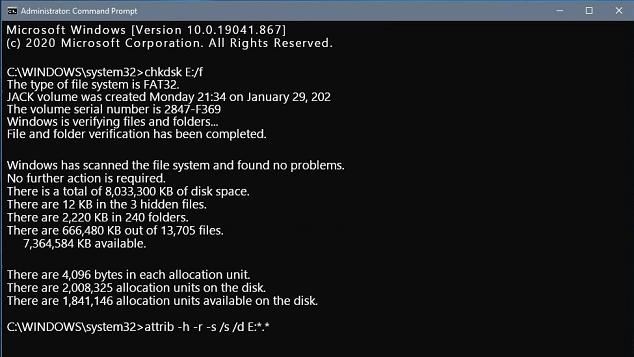
To access your files in a new folder on your USB drive, simply copy and paste the files into the new folder, then change the file extension to a format that is compatible with other applications, allowing you to utilize your files with ease.
- Pros:
- Provide great control to an operating system
- It eliminates the need for any third-party tools
- Easy command prompt interface to render quick resolution with troubleshooting
- Cons:
- You have to be very articulate and attentive while entering commands.
- The command prompt wouldn't work even with tiny errors.
Method 3. Check for Copies from Elsewhere
A USB drive's primary function is to store essential files that can be accessed anywhere, typically copied from a computer, helping prevent data loss by ensuring copies exist on other storage devices. If a file is accidentally deleted, checking if it was saved elsewhere can help recover it.
- Pros:
- A possible way to restore deleted files from USB drive
- Cons:
- It is may not be the latest version
Method 4. Recover Deleted Files from Flash Drive from a Previous Version
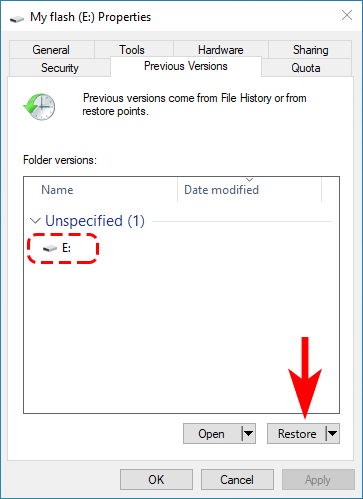
You can recover deleted files from a USB drive on Windows by using the "Restore previous versions" option, which is accessible in Windows versions 7, 8, 10, and 11, as long as you enabled it before deleting the files.
- Connect your USB flash drive to your device.
- You can access the start menu by going to 'This PC' and pressing Enter on your keyboard.
- Right-tap on the USB flash drive and choose Properties.
- To restore a previous version of your iPhone, go to the "Previous Versions" tab and select a previous version to restore, then tap on "Restore" to complete the process.
- Pros:
- Ease of management
- No need to use any professional software
- Cons:
- Lacks accuracy
- Won't work if you have deleted your File History.
Resume USB Flash Drive by Data Recovery Service
If all other methods fail, you may want to consider seeking the help of a local data recovery service provider. They specialize in data recovery and have advanced equipment such as clean rooms, magnetic head locators, and electronic magnifiers that can help retrieve files from damaged USB drives, even if they are physically damaged, through an open-disk approach.
- Pros:
- Solve almost all data loss problems
- Cons:
- Expensive and time-consuming
- This service may have the risk of privacy leakage
If you're having trouble recovering deleted files from a USB drive using the file explorer, you can try using a data recovery program to see if it can retrieve the lost files. This might just do the trick and get your deleted file back.
How to Protect Your Files on USB Flash Drive
Deleting a folder or file accidentally is a common issue for PC users, causing stress and prompting a search for ways to recover deleted files, especially when the lost data is critical, such as audio files or photos stored on a USB drive.
To minimize the risk of data loss on flash drives, regular backups to cloud storage or an external hard drive can prevent permanent loss, and using a password-protected and encrypted flash drive can prevent unauthorized access.
- 🎏 Regular backups of your data are crucial, as they protect you from losing important files in case of hardware failure, data corruption, or other unforeseen events. This ensures that your essential data remains safe and can be easily restored if needed.
- 🏷️ Flash drives are fragile and can be easily damaged, making it difficult to recover data from them, so handling them with care is necessary to prevent physical damage and protect the data stored on them.
- 🔍 To recover lost files, check if a virus or malware attack may be the cause and protect your system with anti-virus software to prevent files from being corrupted.
How to Repair Corrupted Flash Drive to Avoid Data Disappearance
If your USB flash drive is damaged and not recognized by your computer, you can try using a USB repair tool, formatting it, or using data recovery software to retrieve your files. Alternatively, you can try using a different USB port, checking for physical damage, or using a USB extension cable to troubleshoot the issue. If these methods don't work, you may need to replace the damaged drive.
- 💢 If your USB drive is not accessible or needs to be formatted, try running the Command Prompt as an administrator and enter the command "chkdsk USB drive letter: /f".
- 💤 To repair a flash drive not showing in your PC, open Disk Management, select the USB drive, right-click on it, and from the menu, select "Change Drive Letter and Paths" to assign a free drive letter to the USB drive.
- 🚫 To fix issues with copying files from a USB drive, right-click on the drive, select Properties, click on Tools, and then click on the Inspect button. This will initiate a scan and potentially resolve any problems that are preventing the files from being copied.
- 📚 To resolve the issue of being unable to store files over 4GB on a USB drive, open the Command Prompt as an administrator and enter the command "convert USB drive letter:/fs: NTFS" to convert the file system to NTFS, enabling larger file sizes to be stored.
- 🔒 To cancel password protection on a USB drive, open the Control Panel, select 'BitLocker Drive Encryption', and click 'Unlock Drive' in the Drive Encryption window, then enter the password in the pop-up window and click Unlock.
Conclusion
Losing data from a USB flash drive can be a stressful experience, but taking adequate steps to protect your data can reduce the risk of loss. While finding a 100% reliable method to safeguard your files is a challenge, being proactive can minimize the risk of data loss.
If you've experienced unexpected data loss on your flash drive, you may need to recover deleted files. Professional tools like Deep Data Recovery can help you retrieve your files. To increase the chances of a successful recovery, stop using your USB drive immediately after data loss and let Qiling assist you in getting your files back.
Frequently Asked Questions
-
When you delete files from your USB flash drive, they are usually removed permanently and not stored in the recycle bin like they would be on a computer. This means that once you delete a file, it's gone for good and can't be recovered unless you have a backup.
-
You can recover lost data from a USB drive by backing it up or using Deep Data Recovery, which can quickly and limitlessly recover deleted or formatted files.
-
You can try using CMD or from the Previous Version. If they don't work, you can rely on Deep Data Recovery to help you recover photos from USB on Mac/Windows PC.
-
Deleted or formatted data on a USB drive will be marked as deleted and hidden, but can still be recovered using data recovery software. Deep Data Recovery is a suitable option for recovering data from a formatted USB drive and repairing damaged data. It can also help retrieve data from a deleted USB drive.
-
A: Abide by the steps below:
- Connect the USB to the computer
- Download and open Qiling free data recovery software
- Select your flash drive to scanning
- Go to the "Deleted Files" folder to check found data.
- Select them to save.
-
There is no single best USB recovery software, as different tools may excel in various data loss scenarios. However, you can try the following eight famous tools to help recover data from a USB flash drive.
- Deep Data Recovery
- TestDisk
- Disk Drill
- Stellar Data Recovery
- R-Studio
- Recuva
- Wondershare Data Recovery
- EaseUS Data Recovery
Related Articles
- Recover Data from HP USB Flash Drive
- Recover Files from USB using CMD
- How to Recover Hidden Files from USB
- Recover Silicon Power USB Flash Drive
- Recover Files from SanDisk USB Flash Drive
- Show Hidden Files in USB
- Recover Data from Raw USB Flash Drive
- How to Unformat a USB Drive
- 12 Best Free USB Data Recovery Program for Mac/Windows
- How to Recover Permanently Deleted Files from SD Card
Products
Articles & Tutorials
- Data Recovery
- Data Backup
- File Recovery
- File Backup
- File synchronize
- System Backup and Restore
- Disk and Partition Clone
- Technical articles
- Disk Master Help
- Windows Deleted File and Disk Recovery Tutorials
- Windows File and Data Recovery Tutorials
- More Windows Tutorials for Install, Security, Files, and PC Tips
- Windows Boot, Repair, and Recovery Environment Tutorials
- Windows Backup Tutorials
- Windows Restore Tutorials
- Windows Clone and Migration Tutorials
- Windows Server Backup, Recovery, and Management Tutorials
- Windows Disk, Partition, and Storage Management Tutorials