WBAdmin Delete Backups for Windows Server 2016/2012/2008
Need to delete old Windows Server backups
Windows Server Backup runs an automatic disk usage management to remove previous backups, making room for the next one, so manual deletion is not necessary.
You'll still experience backup failures due to a full backup disk after running scheduled backups a couple of times. This issue arises when Windows Server Backup (WSB) can no longer track the space allocated for snapshots, leading to a problem where WSB doesn't delete old backups. To resolve this, you can use the WBAdmin command to delete old backups from the Command Prompt.
Windows Server Backup delete old backups tutorial
To delete backups created by Windows Server Backup (WSB), you can use the WBAdmin command. WSB creates two types of backups: system state and non-system state. To delete them, open an elevated Command Prompt by right-clicking on Start and selecting Command Prompt (Admin), then use different command parameters to remove the backups. This allows you to selectively delete the backups you no longer need.
Delete system state backup
The system state backup is stored in a separate directory. To delete backups, use the "wbadmin delete systemstatebackup" command with different parameters to specify which backups to remove.
- [-version]: to delete specific version(s)
- [-keepVersions]: to delete all backups but the specified versions
- [-deleteOldest]: to delete the oldest backup
To delete a system backup taken on a specific date and time, you can run a command in Command Prompt. For instance, to delete the system backup taken on May 4th at 6:25 PM, you can simply type the following command: `wbadmin delete catalog -systemState:05/04/2024 18:25` and press Enter.
wbadmin delete systemstatebackup -version:05/04/2015-18:25 -backupTarget:G:
Delete non-system state backup
If your server is running Windows Server 2012/2012 R2 or Windows Server 2016, you can delete backups using the "wbadmin delete backup" command. You can specify which backups to delete using the "-version", "-keepVersions", or "-deleteOldest" parameters.
To delete all backups except the latest three versions, run the command:
wbadmin delete backup -keepVersions:3 -backupTarget:F:machine:WIN-9814GD4FH95
✍ Tips: The "-machine" parameter is required only when multiple computers have been backed up to the same location.
To delete a non-system state backup in Windows Server 2008 R2 or previous versions, you can delete the corresponding shadow copy on the backup target location, following the steps to remove the shadow copy.
1. Type diskshadow in an elevated Command Prompt and press Enter.
2. The command to delete the oldest shadow copy on a backup drive is `delete shadows oldest G:`, where `G:` is the backup drive letter or volume GUID. This command should be typed into the command line and pressed Enter. The "G" should be replaced with the actual drive letter or volume GUID of the backup drive.
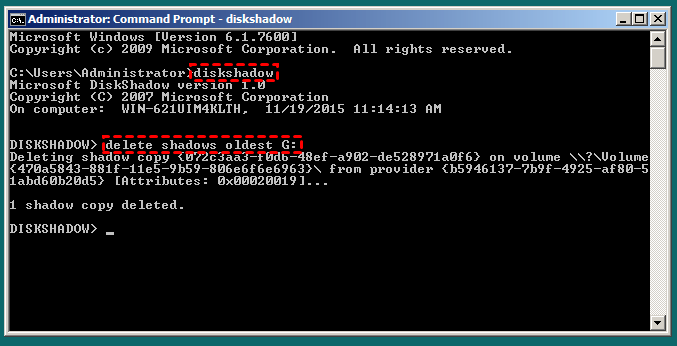
To use WBAdmin to delete full volume backups, you may need to manually assign a drive letter to the backup drive or run the command "Mountvol" to learn the volume GUID, as the backup drive usually has no drive letter. However, considering the limitations and potential issues with Windows Server Backup, it might be more reliable to switch to a dedicated backup software that can automatically remove old backups.
Effective backup software for Windows Server to auto delete backups
Qiling Disk Master Server provides 4 types of backup solutions and 5 automatic deletion methods for old backups, with email notifications for backup completion or failure. It allows multiple scheduled backup tasks with full, incremental, or differential backups, and has an intuitive interface. This makes it a suitable option for backing up Windows Server.
1. Download, install and launch this server backup program.
2. Under the Backup tab, select one of the backup types: System Backup, Disk Backup, Partition Backup, or File Backup. I chose System Backup.
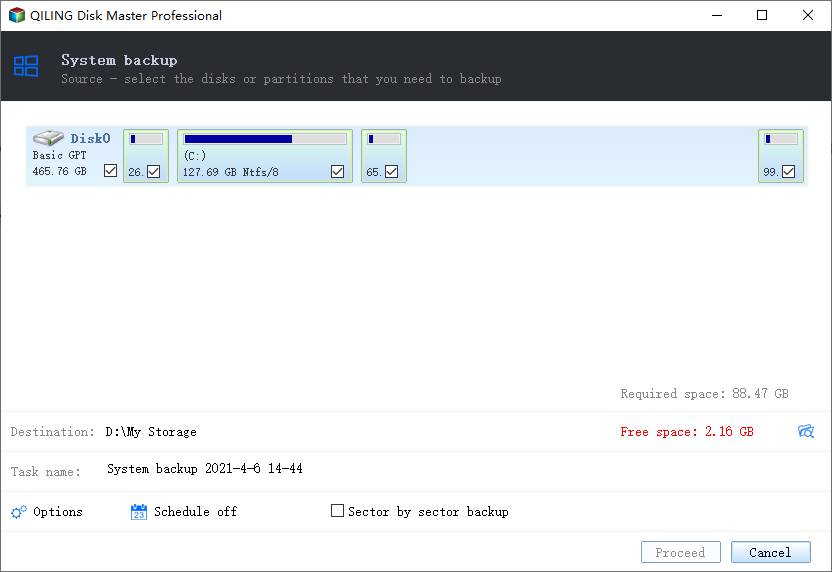
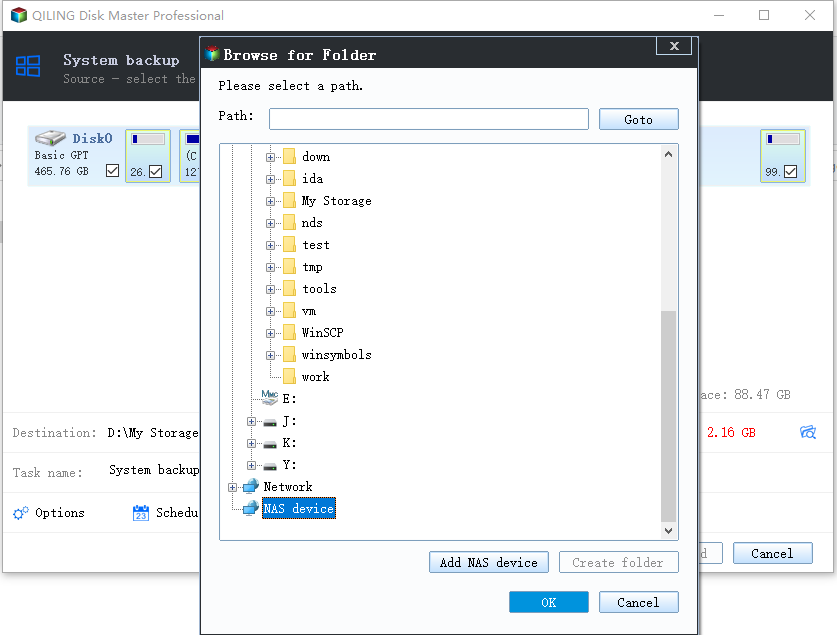
3. The program will automatically include system-related partitions in the backup. To proceed, click to select a destination path where the backup image will be saved.
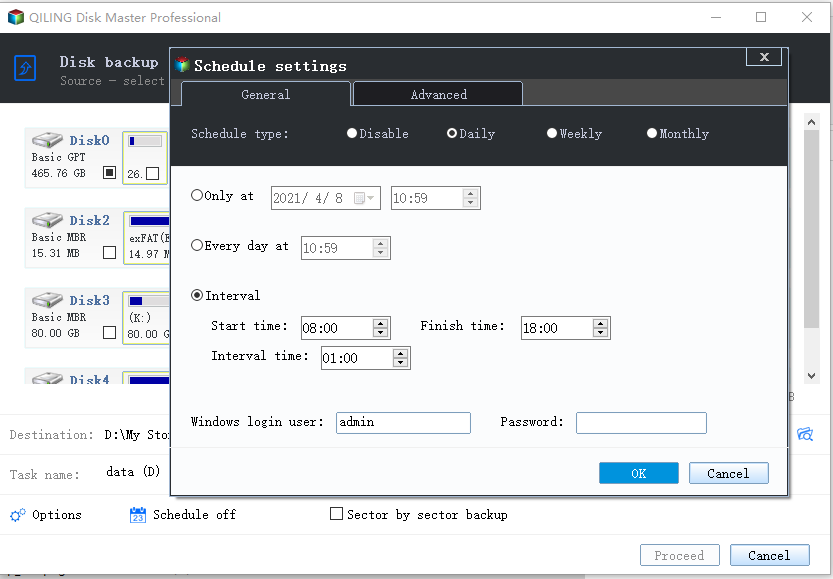
4. To schedule a backup, click on "Schedule Backup", and to configure disk space management for automatic backup deletion, click on "Backup Scheme".
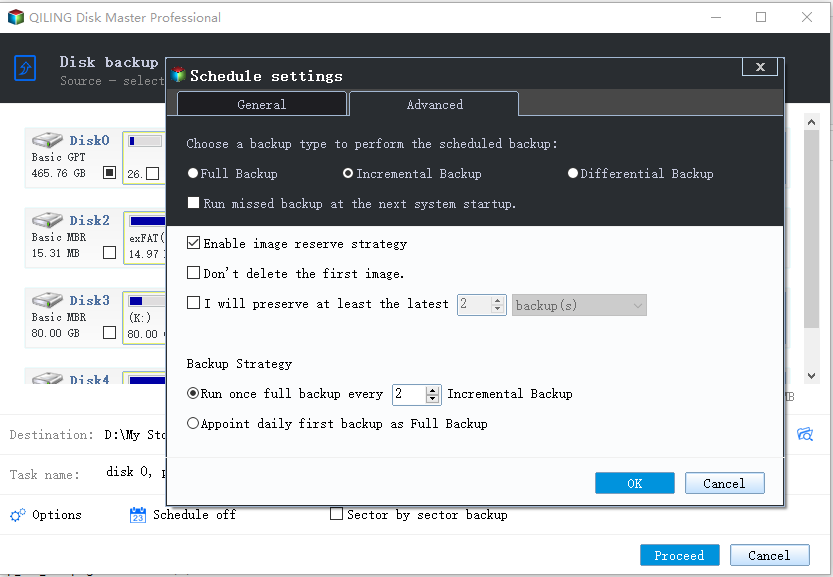
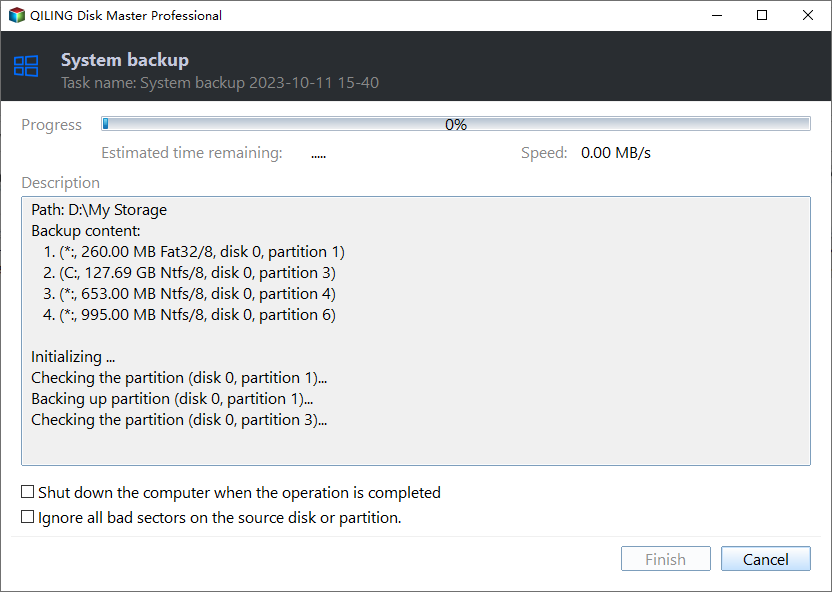
5. To proceed with the backup, click on the "Proceed" button and select either the "Add the schedule and Proceed now" or "Only add the schedule" option. This will either run the backup immediately or just add the backup schedule to the system.
Conclusion
If you want to avoid the issue of Windows Server Backup not deleting old backups, you can use Qiling Disk Master instead. With Qiling Disk Master, you don't need to use the "wbadmin delete backup" command to delete old backups, as it will automatically handle this task for you in the way you prefer.
If your server crashes, you can use the backup created by Qiling Disk Master to recover your server or restore to a server with dissimilar hardware using bootable rescue media or Qiling PXE Boot Tool.
Related Articles
- How to Let Windows Server Backup Overwrite Old Backups?
You can perform Windows Server backup overwrite old backups manually with 3 methods in simple steps, to make it flexible and automatic, try professional backup and restore software. - Let Windows Server Backup Delete Old Backups Automatically
This guide explains Let Windows Server Backup Delete Old Backups Automatically with clear steps, key checks, and practical tips. - Use Wbadmin to Perform Windows Server 2012 Backup and Recovery
This article is to illustrate how to use Windows Server 2012 Wbadmin or an easier alternative to backup, restore or delete images. Get it now! - Mount System Image Backup on Virtual Drive to Restore Single File in Windows 10/8/7
You will find the perfect solution to mount backup image to restore individual files while Windows Backup and Restore does not support to restore single file from system image file. - Fixed - Samsung Data Migration stuck at 0%, 99%, 100%
To fix Samsung Data Migration stuck at 0%, 99%, or 100%, try Qiling cloning software to clone your HDD to a new SSD or hard drive, transferring your system and data without the stuck issue. - [Unstable Wifi] How to Fix Wifi Keeps Disconnecting in Windows 11
Windows 11 users have been plagued by unstable WiFi after switching from Windows 10. This article offers 10 simple fixes and 3 advanced solutions to help you resolve the WiFi issue and enjoy a stable connection.
Products
Articles & Tutorials
- Data Recovery
- Data Backup
- File Recovery
- File Backup
- File synchronize
- System Backup and Restore
- Disk and Partition Clone
- Technical articles
- Disk Master Help
- Windows Deleted File and Disk Recovery Tutorials
- Windows File and Data Recovery Tutorials
- More Windows Tutorials for Install, Security, Files, and PC Tips
- Windows Boot, Repair, and Recovery Environment Tutorials
- Windows Backup Tutorials
- Windows Restore Tutorials
- Windows Clone and Migration Tutorials
- Windows Server Backup, Recovery, and Management Tutorials
- Windows Disk, Partition, and Storage Management Tutorials