Best Macrium Reflect Alternative for Disk Image and Clone
- Why need alternative to Macrium Reflect?
- Best free Macrium Reflect alternative in Windows 11/10/8/7
- Clone larger disk to smaller disk intelligently with Qiling Disk Master
- Backup files & folders for free with Qiling Disk Master
- Perform incremental backup manually or automatically in Qiling Disk Master
- Conclusion
Why need alternative to Macrium Reflect?
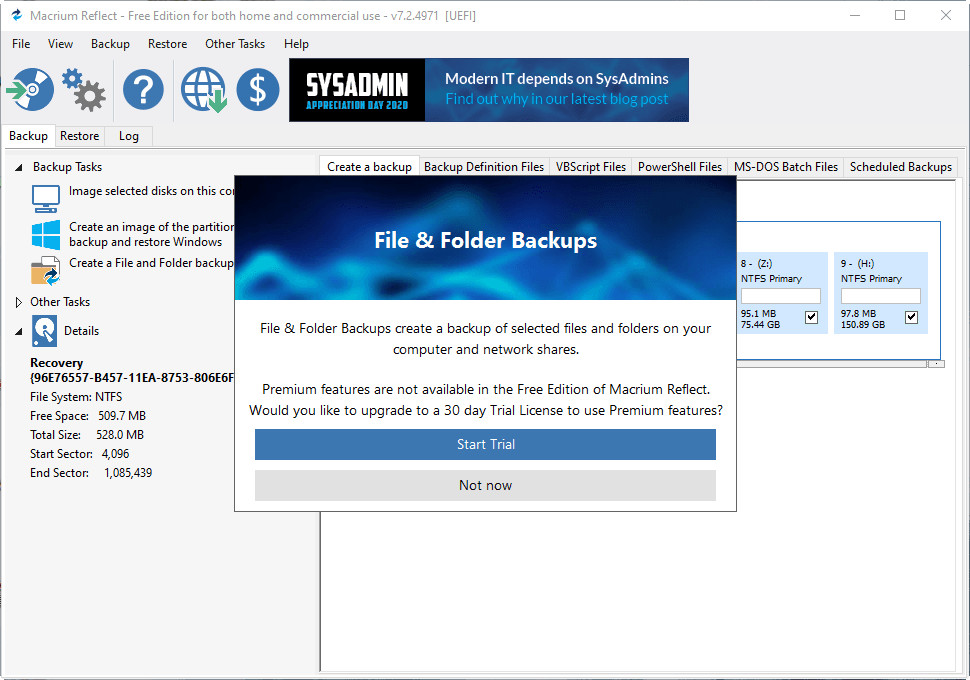
Macrium Reflect is a backup and clone software that allows users to create image-based backups of Windows, disks, and individual files/folders, which can be stored as compressed archive files for disaster recovery or used to clone disks for OS and data migration. However, in practical use, the software also has some limitations.
🌓 Most editions of Macrium Reflect are designed for business clients or enterprises, with prices that are not cheap, making them less suitable for individual users.
🌓 The free version of the software lacks certain essential features, such as incremental backup and file/folder-level backup, and also does not provide technical support, making it less useful for personal users.
🌓 It is not very intelligent in some operations, such as cloning a larger disk to a smaller disk, as it does not take into account the size difference and may lead to errors or data loss.
Macrium Reflect, a popular disk imaging software, is no longer free. For personal users who want to perform disk imaging, cloning, and recovery with ease, there may be alternative options that are more suitable.
Best free Macrium Reflect alternative in Windows 11/10/8/7
Qiling Disk Master Standard is a notable backup and clone software option, offering complete features and high compatibility. It supports Windows 11/10/8.1/8/7/XP/Vista, allowing for disk backup and cloning, similar to Macrium Reflect free edition. Additionally, it enables file/folder backup, incremental, and differential backup capabilities.
You can download it to have a try:
After a simple download and installation process, Qiling Disk Master Standard presents a full view of its interface, which is graphical and user-friendly, making it accessible even to those who are new to the program.
It contains complete features like backup, restore, clone, sync, etc. I'll show you some of them, including backup, restore, clone, and sync functionalities.
- Clone larger disk to smaller disk intelligently with Qiling Disk Master
- Backup files & folders for free with Qiling Disk Master
- Perform incremental backup manually or automatically in Qiling Disk Master
Clone larger disk to smaller disk intelligently with Qiling Disk Master
If you want to replace a hard disk or back it up, you can use the disk clone feature. This feature, offered by Qiling Disk Master, is more flexible than Macrium Reflect, allowing you to clone a larger hard disk to a smaller solid-state drive (SSD), for example, by copying only the used sectors and skipping the bad and unused ones.
The Standard edition supports cloning all data disks, but for cloning a disk with Windows installed, Qiling Disk Master Professional is recommended.
To clone a larger disk to a smaller disk, you can use the `dd` command. First, you need to identify the device name of the larger disk and the smaller disk.
🔹 Steps to use the disk clone feature:
- Connect the target disk to the computer using a cable. If there is no available drive bay, use an USB-to-SATA adapter to connect it.
- Install and launch the software, select Tools and choose Disk Clone.
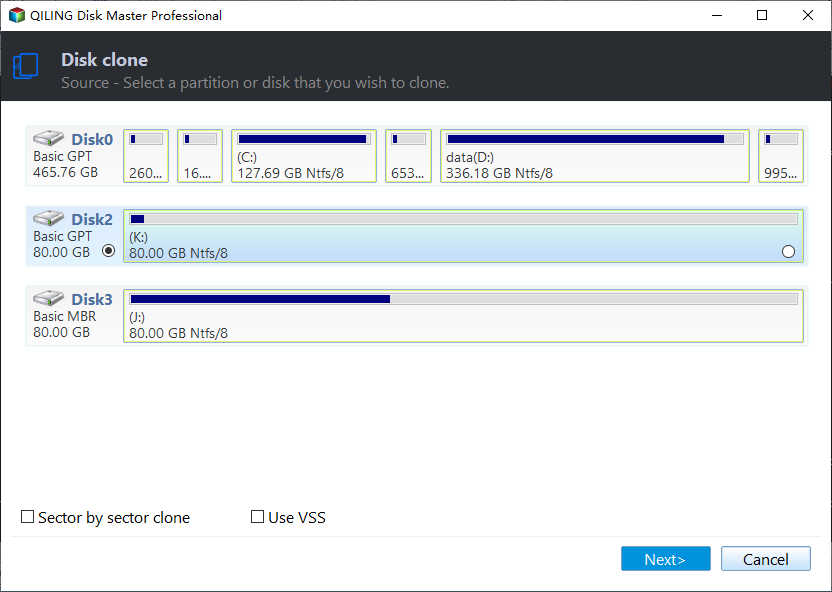
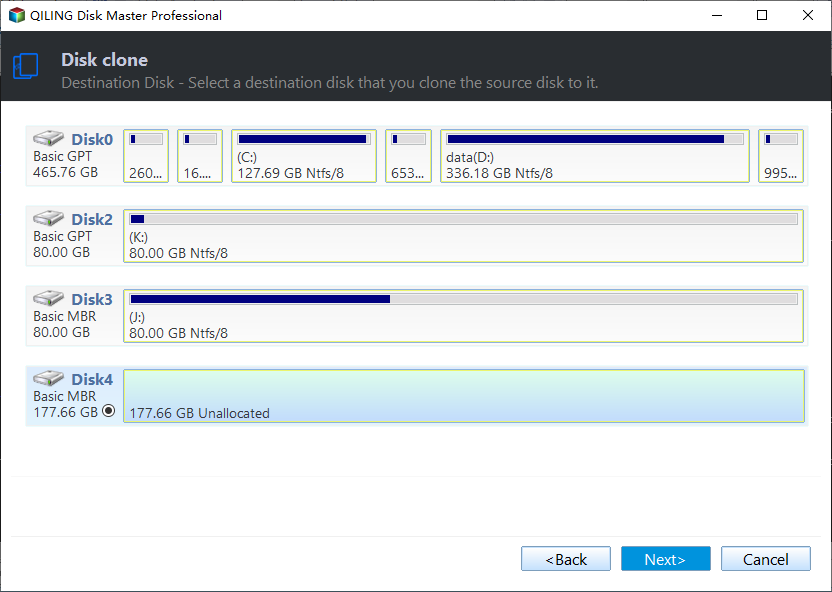
- Select the hard disk you want to clone, and then the target disk, and the cloning process will begin automatically.
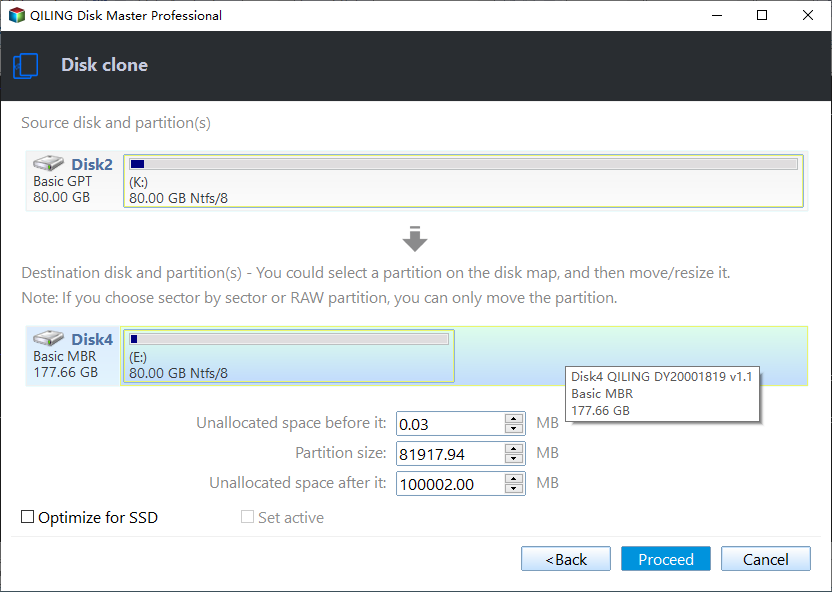
- If the destination is an SSD, tick the SSD Alignment option to accelerate its reading and writing speed, then proceed.
📢Notes:
- Sector By Sector Clone Don't tick the option to clone all sectors if you want to clone a larger disk to a smaller one.
- Edit Partitions This feature allows you to resize and reassign drive letters for partitions on the target disk, and is available in the more advanced versions.
Backup files & folders for free with Qiling Disk Master
One of the biggest limitations of Macrium Reflect is that file backup is only available in its premium editions. In contrast, Qiling Disk Master Standard offers this basic function for free, making it a suitable choice for ordinary PC users who want to back up important files just in case.
🔹 Steps to perform file-level backup:
- Install and launch Qiling Disk Master, then navigate to the Backup tab and select File Backup.
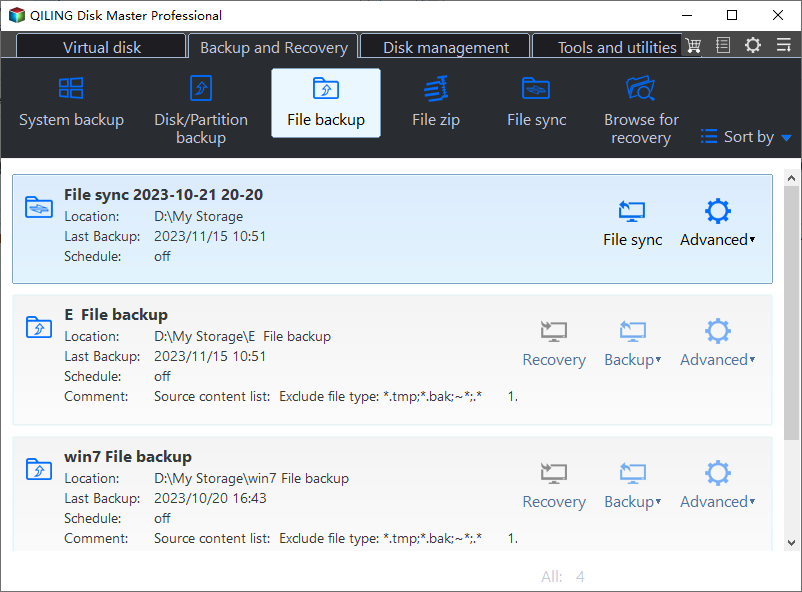
- Select source files or folders to back up, then specify a destination directory, which can be a local disk, NAS, cloud drive, or network location for added security.
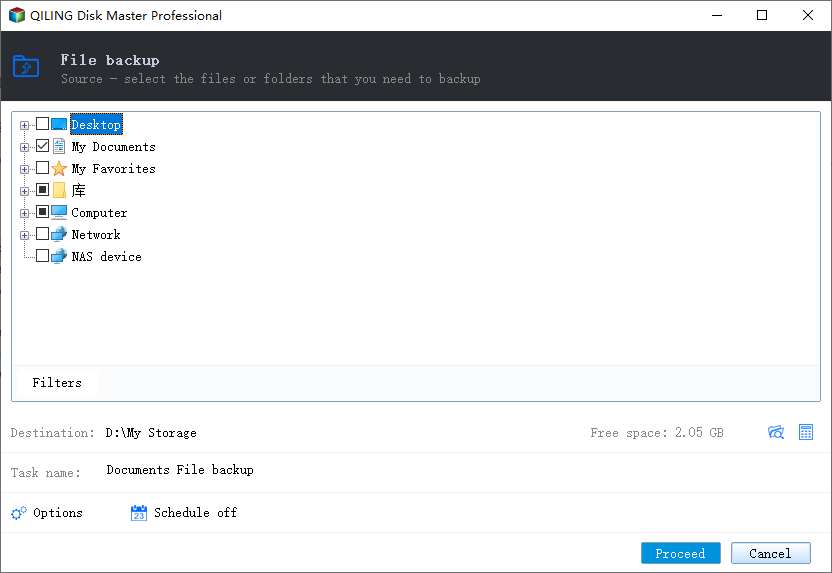
- To adjust settings for your backup task, go to Options, Schedule or Scheme if necessary. For instance, setting up a schedule allows your backup task to run automatically at regular intervals. After making any necessary adjustments, click Proceed to initiate the backup process.
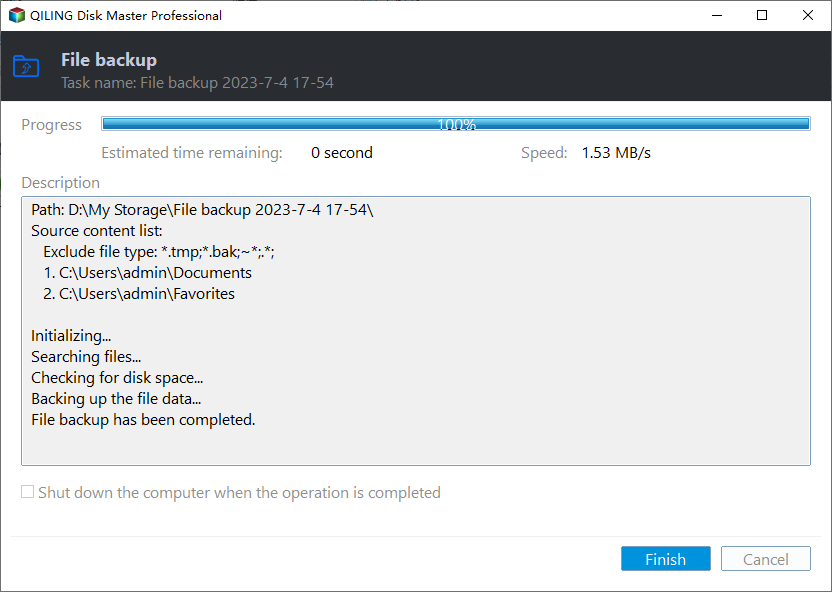
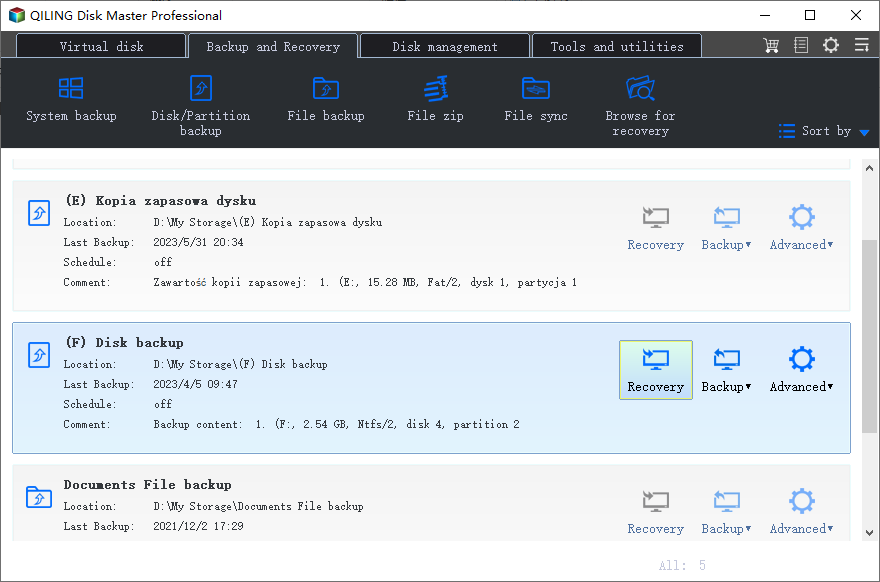
- Launch Qiling Disk Master, go to the "Home" tab, find the backup task, and select the corresponding image to restore the files. Alternatively, go to the "Restore" tab, select the image, and start the restoration process. Click "Finish" to end the wizard.
Notes:
- Qiling Disk Master offers alternative backup options, including System Backup for all system files, Partition Backup for specific partitions or volumes, and Disk Backup for the entire disk, making it a viable alternative to Macrium Reflect.
- If you're worried that your PC might not boot up properly due to system issues, you can create a bootable media for emergency rescue. This way, you can have a backup plan in case your PC fails to boot.
- Schedule This software applies to any task on a daily, weekly or monthly basis, and can be upgraded to paid editions to enjoy auto back up options with features like event triggers and USB plug-ins.
- Scheme In Professional and higher editions, you can create a backup scheme that automatically deletes older backups, thus saving disk space.
Perform incremental backup manually or automatically in Qiling Disk Master
An incremental backup saves storage space and time by only backing up changes and new files since the last backup.
Qiling Disk Master Standard allows for incremental backups, which can be done manually or automatically on a regular basis, and is a free feature.
🔹 To do incremental backup manually:
You can click the three-On the Home page, select the Stripe button of the backup task, then choose Backup > Incremental Backup from the dropdown menu.
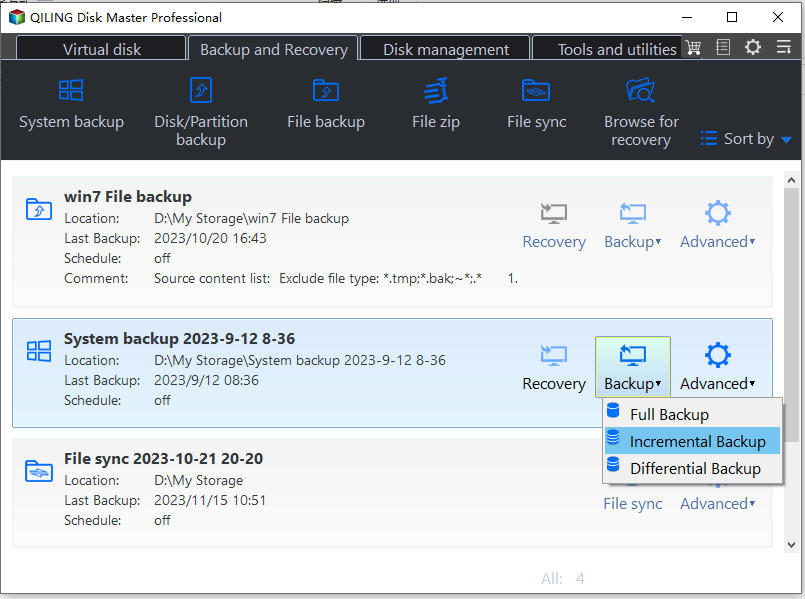
🔹 To do incremental backup automatically:
Incremental backup is the default mode of scheduled backup, which means once you set a schedule for auto back up, it will be incremental backup by default. You can find options of scheduled backup mode in Schedule > Advanced.

📢Notes:
- The image files in an incremental backup series have a sequential relationship, so if any incremental image file is damaged or missing, subsequent image files will be invalid.
- In addition to incremental backup, you can also perform differential backup manually for free, or schedule differential backup in advanced editions.
Conclusion
Qiling Disk Master Standard is a reliable alternative to Macrium, offering a better experience for managing backups and clones on your computer. Like Macrium Reflect, Qiling Disk Master comes in multiple editions to cater to different backup needs, providing a range of options to suit your requirements.
If you're not satisfied with the speed or features of the free version, Qiling Disk Master Professional may be a better choice. For small businesses, the Workstation or Server edition could be more suitable.
Related Articles
- Backup Files and Folders with Free File Backup Software [4 Steps]
Learn how to automatically back up files in Windows 11, 10, 8, 7 from this page. The best free backup software is used here. - How to Backup Files to Cloud with the Best Freeware?
Learn how to Backup Files to Cloud with the Best Freeware with clear steps, key checks, and practical tips. - Incremental VS Differential Backup: Which Is Better?
This article shows the differences between incremental and differential backup and helps users to decide which backup type should choose. More details are below. - Three Reliable Hard Disk Defragment Software for Windows
You can find three hard disk defragment software for Windows 10, 8, 7 from this article. Including built-in tools in Windows and a third-party software. - How to Low Level Format USB Flash Drive?
Learn how to Low Level Format USB Flash Drive with clear steps, key checks, and practical tips. - Quick Fixed: Mark Partition as Active Greyed out on Windows 10/8/7
This guide explains Quick Fixed: Mark Partition as Active Greyed out on Windows 10/8/7 with clear steps, key checks, and practical tips.
Products
Articles & Tutorials
- Data Recovery
- Data Backup
- File Recovery
- File Backup
- File synchronize
- System Backup and Restore
- Disk and Partition Clone
- Technical articles
- Disk Master Help
- Windows Deleted File and Disk Recovery Tutorials
- Windows File and Data Recovery Tutorials
- More Windows Tutorials for Install, Security, Files, and PC Tips
- Windows Boot, Repair, and Recovery Environment Tutorials
- Windows Backup Tutorials
- Windows Restore Tutorials
- Windows Clone and Migration Tutorials
- Windows Server Backup, Recovery, and Management Tutorials
- Windows Disk, Partition, and Storage Management Tutorials