Daily Incremental Backup vs Daily Differential Backup
Quick Navigation:
- What is an incremental backup?
- What is a differential backup?
- What are the differences between incremental backup and differential backup?
- How to backup only changes with file backup software
- Conclusion
What is an incremental backup?
Incremental backup saves backup time and disk space by creating a full backup initially and then only copying changed data since the last backup, requiring less data and time.
When creating daily incremental backups with software, the process starts with a full backup on the designated day (e.g. Sunday). Subsequent backups then compare changes to the last full or incremental backup, creating a new incremental backup each time. For instance, on Monday, the backup software compares changes to the full backup from Sunday, creating an incremental backup.
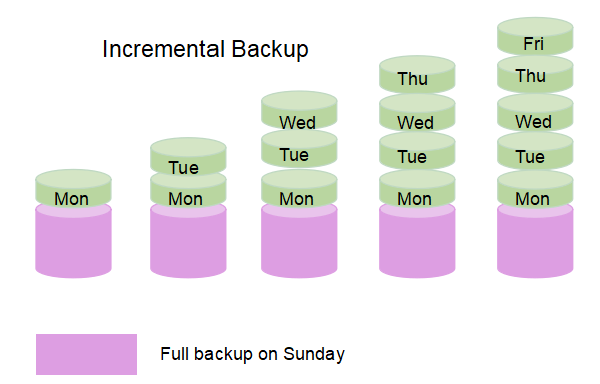
To perform a full recovery, you need the last full backup and all incremental backups up to the point of recovery. If any incremental backup is deleted, the entire recovery process becomes invalid and recovery time increases, as you'll need to restore more items.
What is a differential backup?
Similar to incremental backup, differential backup only backs up changed files, but with a different basis. It creates a full backup first and then only copies changes since the last full backup, creating a differential backup. Each differential backup accumulates more data until the next full backup, requiring more backup time and disk space, but typically less than a full backup.
For example, if you create a daily differential backup with backup software, it will create a full backup immediately, and then on subsequent days, it will backup changes based on the last full backup (created on the initial day), and create a differential backup.
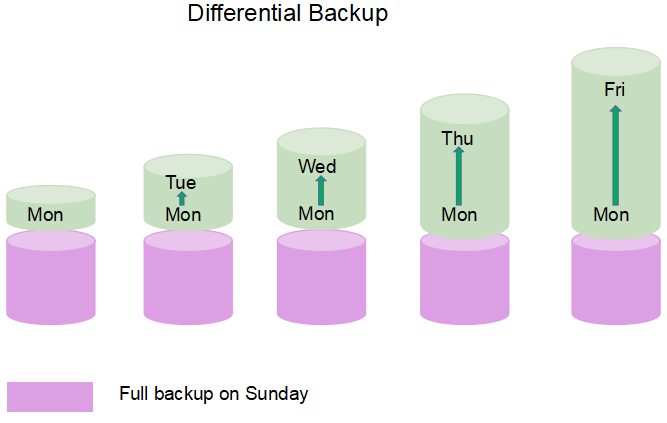
When performing a full recovery, you'll need the last full backup and any differential backups made since then, even if one is deleted in between. It's best to use the latest differential backup for a shorter recovery time, as it requires fewer items.
What are the differences between incremental backup and differential backup?
Both incremental backup and differential backup rely on daily/weekly/monthly schedule backup, and cannot exist alone. Here I will take daily incremental backup and daily differential backup as an example to show you the difference of both backup type. Here are 5 main differences between them, you can quickly browse through the table below to get incremental and differential backup advantages and disadvantages.
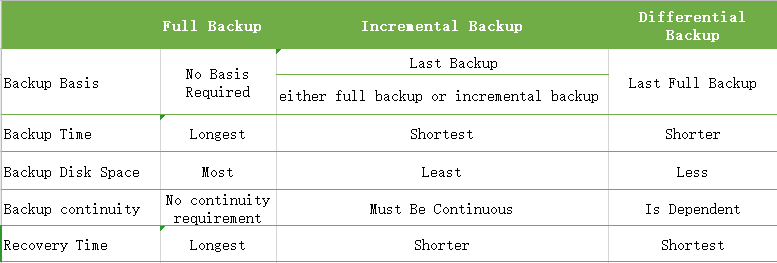
The three backup types have distinct differences in various aspects, including backup basis, time, disk space, continuity, and recovery time. However, I will focus on backup continuity, which is a crucial aspect that differs among the three types, as the other aspects have been previously discussed.
The continuity of backup is mainly for incremental backup, especially when restoring. Creating a daily incremental backup from Sunday to Friday results in one full backup and five incremental backups, requiring all six to restore. If any backup is deleted between the full and fifth incremental, restoration will fail, increasing the risk of data loss. In contrast, differential backups do not have this limitation.
Both daily incremental and differential backups can help you update files timely while saving backup time and disk space, making them suitable for users who change files frequently or collaborate with a team. However, if the target disk is limited, daily incremental backup is a better choice to save space. If data security is a priority, daily differential backup is recommended.
How to backup only changes with file backup software
To backup only changes since the first full backup, you need a professional Windows backup software, such as Qiling Disk Master Standard.
- It supports full backup solutions, including file backup, partition backup, system backup, and disk backup.
- With this feature, you can easily and quickly create daily incremental backups or daily differential backups, which are also supported by Qiling Disk Master Professional. Additionally, you can adjust the backup frequency to suit your needs, choosing between daily, weekly, or monthly backups.
- It has strong compatibility with Windows systems and storage devices, supporting Windows 11/10/8.1/8/7/XP/Vista, as well as various storage devices such as external hard disks, USB drives, network drives, and cloud drives like Qiling Cloud.
The software has a clear interface and user-friendly design, making it easy for all users, even novices, to understand and use in a short time. So, why not give it a try?
Download the software, install it, and follow the steps to create a daily incremental backup using Qiling Disk Master Standard. Upgrading to Qiling Disk Master Professional may be needed for daily differential backup.
1. Connect the storage device to store the backup files. Launch Qiling Disk Master Standard, click Backup, then File Backup.
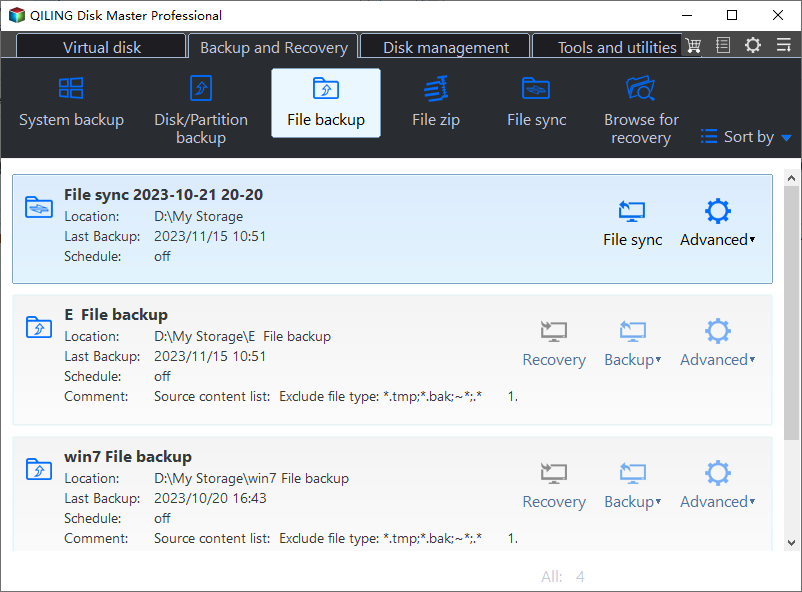
2. Click "Files" or "Folders" to choose the files or folders you want to backup.
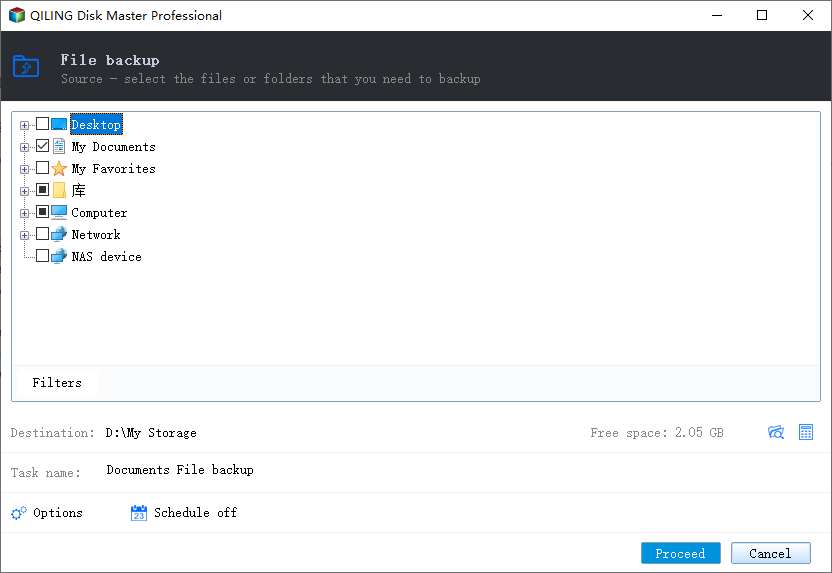
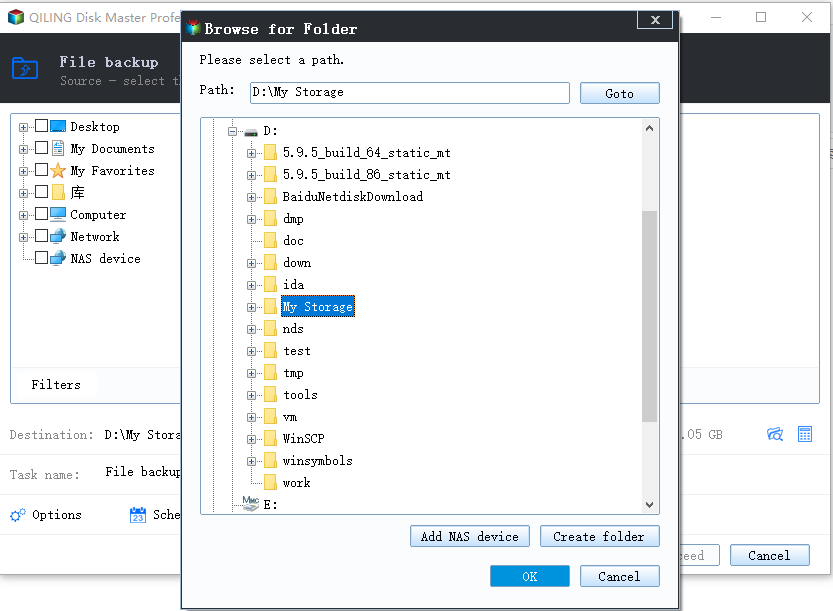
3. To save your data, click on the indicated arrow and select a path to back up your files. You can also choose to store them in the cloud, an external hard drive, or a flash drive.
4. To schedule a backup, click Schedule Backup, then Enable Schedule Backup, and choose Daily. By default, the software will use incremental backup under the Backup Scheme tab.
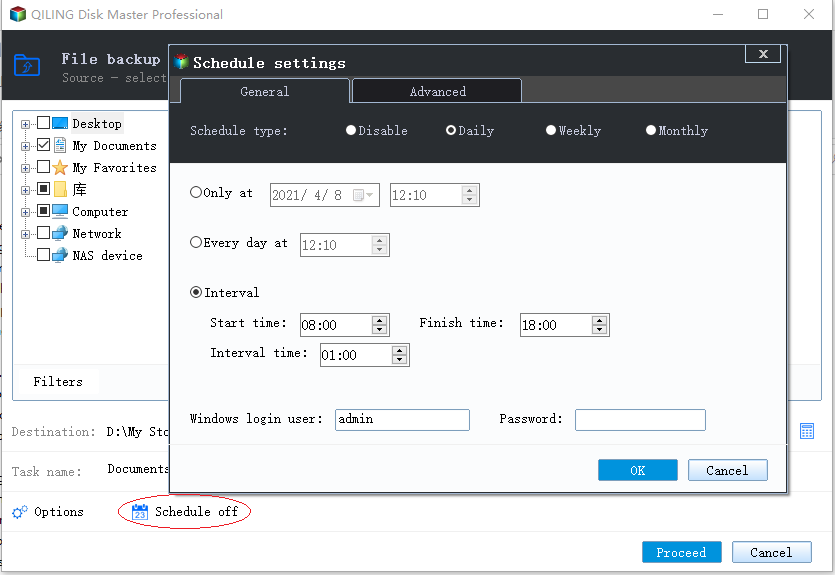
To create a daily differential backup, select "Differential Backup" under Backup Method instead. This feature is available on Qiling Disk Master Professional and advanced versions only.

5. Click the "Proceed" button to start the backup task, which will initiate a full backup first, followed by incremental or differential backups at the next scheduled backup time.
Tips:
• If your backup schedule is daily incremental, be cautious with the safety of your backup disk, as all incremental backups rely on having intact image files, whether daily, weekly, or monthly.
• In addition to daily/weekly/monthly backups, you can also use "Event triggers" and the "USB Plug in" feature in the "Schedule" of the Qiling Disk Master Professional or advanced version. These features allow for more customized backup options.
• Even with scheduled daily incremental or differential backups that only save changed files, there's still a risk of a full backup disk. To avoid this, consider using the "Backup Scheme" feature in Qiling Disk Master Professional, which allows you to automatically delete old backups and free up disk space.
Conclusion
Daily incremental and differential backups are two types of backups that can help save time and disk space. While both types of backups are useful, they have a slight difference. Before scheduling a backup, it's essential to carefully consider both options to determine which one best suits your needs.
To achieve daily incremental or differential backups, a professional backup software such as Qiling Disk Master Standard or Professional can be used, allowing for simple and easy backup of changed files.
Related Articles
- Incremental VS Differential Backup: Which Is Better?
- Free Complete Incremental and Differential Backup Software
- How to Do Incremental and Differential Backup in Windows 10
- Software for Windows Server 2008 (R2) Incremental Backup
- Windows Server 2016 Incremental & Differential Backup Guide
- How to Create Recovery Partition in Windows 10 | 2 Ways
Learn how to create a recovery partition in Windows 10 after deletion, upgrade, or reinstall, using built-in tools or Qiling software to protect system recovery.
Products
Articles & Tutorials
- Data Recovery
- Data Backup
- File Recovery
- File Backup
- File synchronize
- System Backup and Restore
- Disk and Partition Clone
- Technical articles
- Disk Master Help
- Windows Deleted File and Disk Recovery Tutorials
- Windows File and Data Recovery Tutorials
- More Windows Tutorials for Install, Security, Files, and PC Tips
- Windows Boot, Repair, and Recovery Environment Tutorials
- Windows Backup Tutorials
- Windows Restore Tutorials
- Windows Clone and Migration Tutorials
- Windows Server Backup, Recovery, and Management Tutorials
- Windows Disk, Partition, and Storage Management Tutorials