Best NTI Echo Cloning Software Alternative - Qiling Disk Master
- NTI Echo Data Migration Software
- NTI Echo Not Cloning Problems
- NTI Echo 5 vs Qiling Disk Master
- Best NTI Echo Alternative - Qiling Disk Master
- How to Clone HDD to SSD with NTI Echo Alternative
- Summary
NTI Echo Data Migration Software
Many manufacturers have released special data migration tools, such as Toshiba, Kingston, SanDisk, Samsung, and Intel, among others. NTI Echo is one of these tools, specifically designed by NTI Corporation for migrating data from a hard drive to another, such as a larger or faster solid state drive, in Windows operating systems. The latest version is NTI Echo 5.
NTI Corporation released NTI Echo 3 for Toshiba, a cloning software specifically designed for use with certain Toshiba SSD drives.
If you want to clone a Windows operating system, the NTI Echo system cloning software, provided by NTI and Silicon Power, can be a helpful tool for the task.
NTI Echo Not Cloning Problems
However, you may encounter these NTI Echo not cloning problems like the following:
- I have problems booting my laptop after installing NTI Echo 3 to migrate Windows 8 from original HDD to a new Toshiba 480GB SSD drive. The process stopped working. I had to restart my PC, but after that, I can't restart my computer, and stuck in boot loops. Hope there is some expert advice, thanks.
- NTI Echo 3 cloning software may not allow cloning to another SSD drive due to compatibility or licensing issues. You can use alternative cloning software like Qiling Disk Master, which support cloning to another SSD drive. These alternatives may have a free trial or a one-time purchase option, allowing you to clone your boot drive to another SSD drive.
NTI Echo has limitations that should be considered, including (please provide the details)
- NTI Echo does not support Microsoft Surface devices.
- Dynamic disks also not supported.
- You cannot use NTI Echo cloning software to work with RAID.
Therefore, it's time for an alternative to NTI Echo data migration software to clone hard drive to SSD in Windows 10/8/7. and you will find NTI Echo alternative - Qiling Disk Master Professional below according to the following words. Qiling Disk Master Professional is a powerful and reliable software that can clone hard drive to SSD in Windows 10/8/7, providing a seamless and efficient way to migrate data.
NTI Echo 5 vs Qiling Disk Master
To make it clear for you to know the difference between NTI Echo cloning software and Qiling Disk Master, please refer to the following chart.
| Comparison |
NTI
|
Qiling Disk Master Professional |
|
Supported OS |
Windows11, 10, 8.1, 8, 7, Vista or XP |
Windows11, 10, 8.1, 8, 7, Vista or XP |
|
Cost |
$ 29.99 |
$49.95 |
|
Features |
||
|
Disk Clone |
√ |
√ |
|
Partition Clone |
√ |
√ |
|
System Clone |
- |
√ |
|
Intelligent Clone |
√ |
√ |
|
Sector By Sector Clone |
√ |
√ |
|
Edit Partitions While Cloning |
√ |
√ |
|
Create Bootable Media |
- |
√ |
|
SSD Alignment |
- |
√ |
|
System/Partition/Disk/File Backup |
- |
√ |
|
Full/Incremental/Differential Backup |
- |
√ |
|
Schedule Backup |
- |
√ |
|
File Sync |
- |
√ |
- √ means support;
- - means not support.
The Qiling Disk Master offers more advanced features than NTI Echo 5 for data protection in Windows computers, including system cloning to SSD, intelligent cloning to clone used parts without data loss, and creating bootable media to boot unbootable computers. Additionally, it can accelerate SSD performance by aligning the disk, and clone larger disks to smaller ones without losing data.
Qiling Disk Master Professional is a suitable alternative to NTI Echo, offering a range of features and functionalities that make it a top choice for users seeking a reliable and efficient disk cloning and imaging solution.
Best NTI Echo Alternative - Qiling Disk Master
Qiling Disk Master Professional is a reliable disk cloning software that outshines NTI Echo, making it the best choice for Windows 11/10/8.1/8/7/Vista/XP. It's a highly-approved tool that allows users to replace their hard drive with an SSD without losing any data, and even makes the cloned disk bootable without any issues.
Qiling Disk Master Professional, an alternative software to NTI Echo, offers several benefits. It provides a user-friendly interface, allowing for easy navigation and management of disk images.
- Support Dynamic Disk, RAID, Virtual Machine and Microsoft Surface devices.
- Speed up the SSD and its lifespan.
- Clone used part by default Cloneit enables you to clone a hard drive to a smaller SSD/HDD, as long as the destination disk can hold all data from the source disk.
You can try the NTI Echo cloning software alternative with a 30-day free trial by downloading it.The Clone features in the free trial can only be demonstrated, please note that they may not be fully functional or available for use during the trial period. This means that while you can see how the features work, you may not be able to actually use them or access all of their capabilities.upgrade to enjoy)
How to Clone HDD to SSD with NTI Echo Alternative
To upgrade a hard disk drive (HDD) to a solid-state drive (SSD) without losing data using the NTI cloning kit, follow these steps: First, connect the SSD to the computer and ensure it's larger than the HDD. Next, boot the computer from a bootable USB drive or CD/DVD with the NTI cloning software.
1. To migrate NTI Echo data, use Qiling Disk Master Professional instead. Connect your SSD to the computer and ensure it's detected. Then, select the "Disk Clone" option from the "Clone" tab.
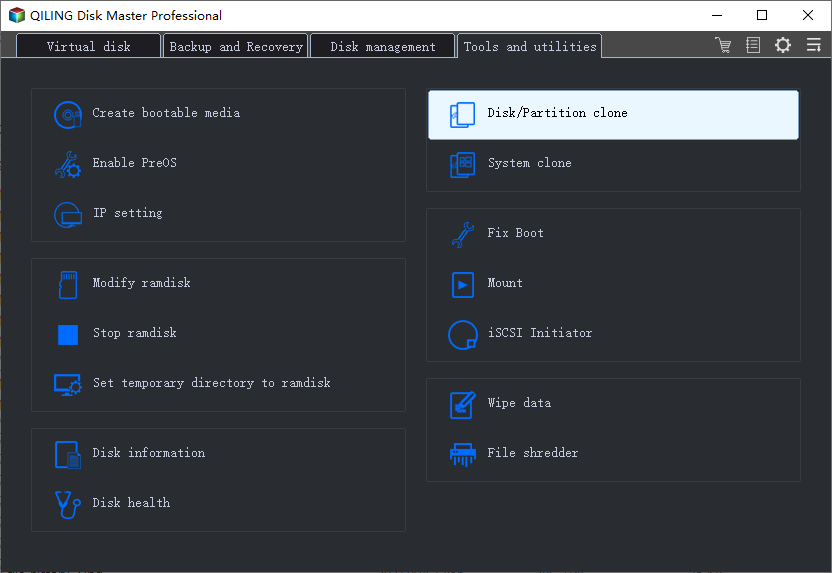
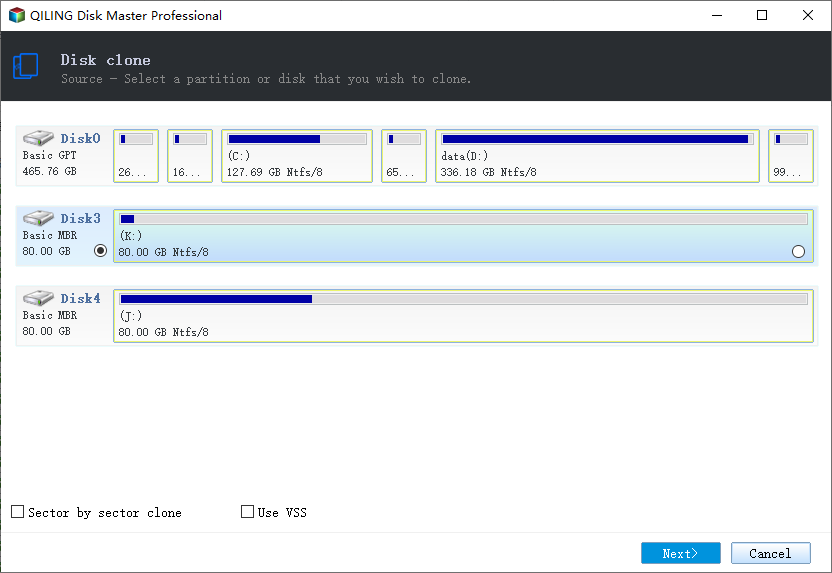
2. To clone a hard drive, you need to select the source disk which is the original hard drive that you want to clone. In this case, you should choose the hard drive (HDD) as the source disk to clone.
3. Select the larger or smaller SSD drive as destination location.
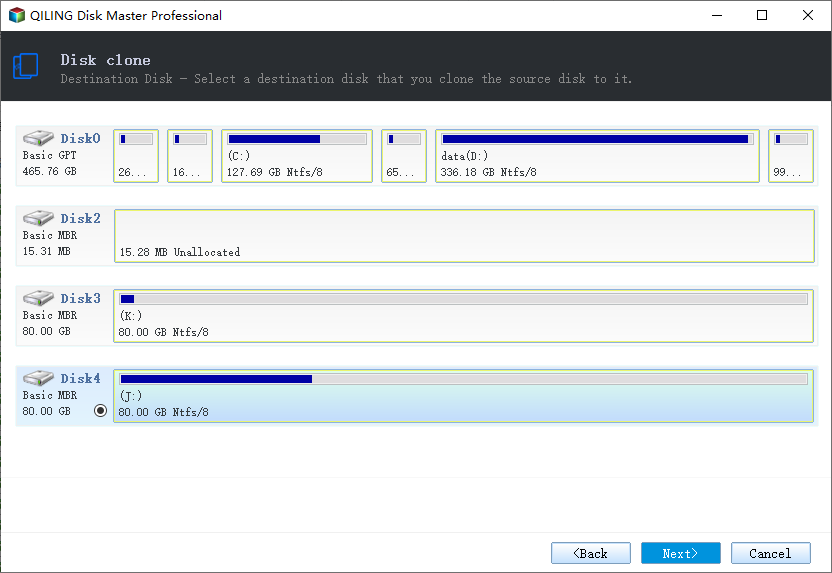
★ Tip: Please backup important files from the target disk before cloning, as it will be erased after the operation.
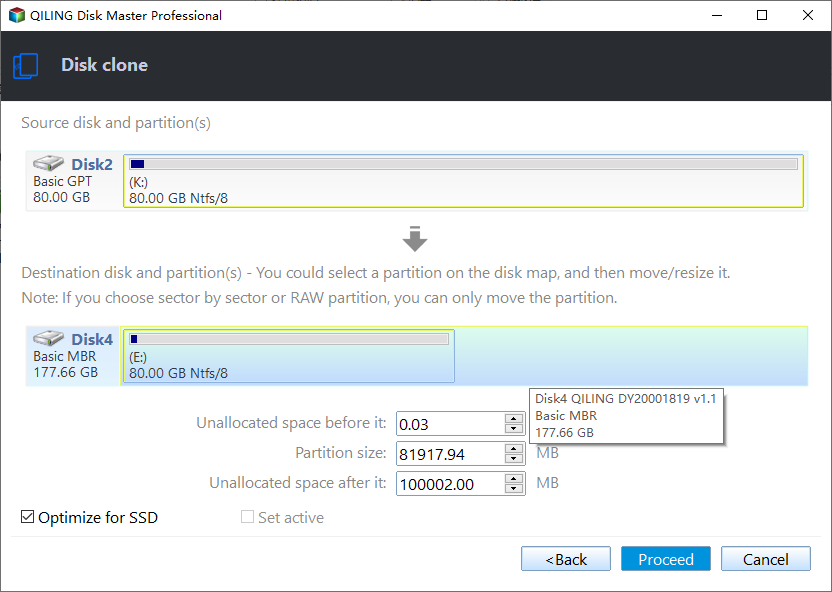
4. Check the SSD Alignment option to easily upgrade to an SSD with NTI Echo alternative.
★ Tips:
✿ You can select to clone all sectors if your SSD drive is larger than the HDD by ticking the "Sector by sector clone" option.
✿ Edit Partitions is capable of automatically adjusting partition sizes to fully utilize the storage space on the destination disk during cloning, making it a smart feature for users.
Wait for about 30 minutes, replace the hard drive with the cloned SSD, then boot from it, that's all.
Summary
With Qiling Disk Master Professional, you can transfer files between computers, sync files in real time, sync files both ways, create a system image backup, restore to a different hardware computer, and use command line for backup, restore, and cloning.
For Windows Server users, please try Qiling Disk Master Server to enjoy more.
Related Articles
- A Professional ADATA SSD Clone Software: Qiling Disk Master
- Best Free Cobian Backup Alternative
- Freeware to Clone Hard Drives with Bad Sectors (Bootable)
- Best Toshiba SSD Cloning Software in Windows 10/8/7
- Is Clonezilla Safe? | Here Is the Answer & Its Alternative
Learn the key steps, checks, and practical tips for this related guide. - How to Upgrade Lenovo IdeaPad Gaming 3 SSD (2024 Guideline)🥇
The Lenovo IdeaPad Gaming 3 is a powerful laptop, but its storage capacity may not be sufficient for some users. To address this, users may want to know if they can upgrade or add an SSD (solid-state drive) to increase storage space.
Products
Articles & Tutorials
- Data Recovery
- Data Backup
- File Recovery
- File Backup
- File synchronize
- System Backup and Restore
- Disk and Partition Clone
- Technical articles
- Disk Master Help
- Windows Deleted File and Disk Recovery Tutorials
- Windows File and Data Recovery Tutorials
- More Windows Tutorials for Install, Security, Files, and PC Tips
- Windows Boot, Repair, and Recovery Environment Tutorials
- Windows Backup Tutorials
- Windows Restore Tutorials
- Windows Clone and Migration Tutorials
- Windows Server Backup, Recovery, and Management Tutorials
- Windows Disk, Partition, and Storage Management Tutorials