Best Free PC Clone Software for Windows 11/10/8/7
Quick Navigation:
- The scenario: need to clone PC hard drive
- Best PC cloning software for Windows - Qiling Disk Master
- How to clone your PC hard drive with the PC clone software for free
- ▶ Before cloning:
- ▶ During cloning:
- ▶ After cloning:
- More advanced way to clone computer hard drive
- Verdict
The scenario: need to clone PC hard drive
You want to clone the existing hard drive from your new PC to your SSD, so you can run the OS from the SSD and avoid defragmentation, while still using TRIM to maintain performance.
Can someone suggest some decent freeware for this?
Looking for free PC cloning software to clone your original hard drive to an SSD? With such software, you can not only clone your HDD to SSD for improved performance but also clone a smaller drive to a larger one to gain more storage space.
To ensure a smooth and efficient cloning process, users can choose from a variety of free PC cloning software options, such as Qiling Disk Master, each with its own set of features and capabilities. These software tools allow users to clone their hard drive to another drive as a backup, or to create a duplicate of their original drive for use in emergency situations. By selecting the best free PC cloning software for their specific needs, users can ensure that their data is safely and securely transferred to a new drive, minimizing the risk of data loss and ensuring business continuity.
Best PC cloning software for Windows - Qiling Disk Master
Qiling Disk Master Standard, a top-rated free Windows backup software, simplifies the process of cloning your PC's hard drive.
✪ Create disk image or system image. If you create an image of the entire disk, it will include Windows OS, installed applications, user profiles, and everything else on the original disk. This will be a comprehensive copy of the entire disk.
✪ Restore image to another disk. You can restore a disk or system image to its original disk or a new one, regardless of size, as long as the new disk has enough space to hold all the data.
✪ Run smoothly on all PCs and Windows OS. This software is compatible with a wide range of PC brands, including Dell, Lenovo, HP, and Samsung, and supports almost all Windows operating systems, from Windows 11 to XP.
You can get free hard drive cloning software by downloading it, and if you're running a Windows Server operating system, you can try the Server edition.
How to clone your PC hard drive with the PC clone software for free
To transfer data from the old hard drive to the new drive after creating a disk image, follow these steps: Clone the disk image to the new drive, boot from the new drive, and verify that all data has been transferred successfully. This ensures a seamless transition and prevents data loss during the upgrade.
▶ Before cloning:
- Connect the destination disk to your PC, ensuring it's detected. If your PC has multiple drive bays, connect the disk internally for a secure boot after cloning.
- Backup files on the destination hard drive, as it will be overwritten during the cloning process.
▶ During cloning:
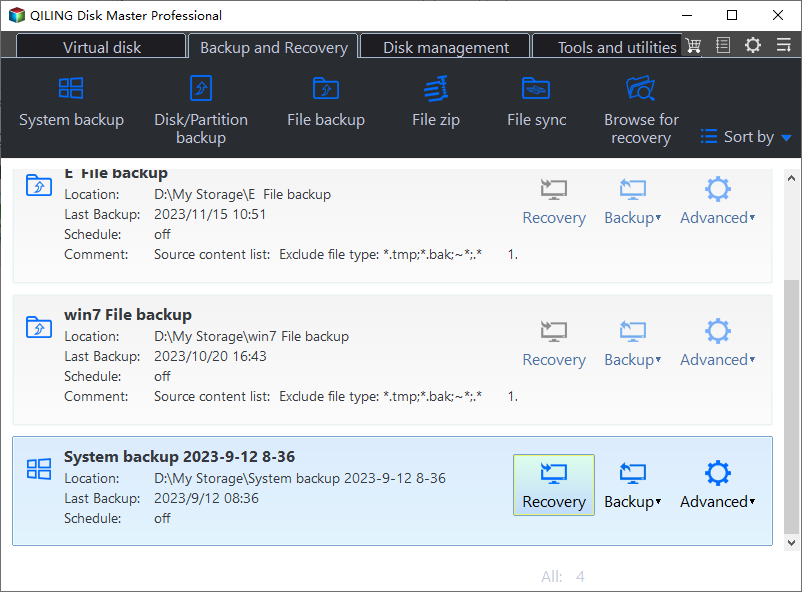
Step 1. Install and run the clone app for PC - Qiling Disk Master. Click "Home" > find the disk backup task > select "Restore" from the expanded menu.
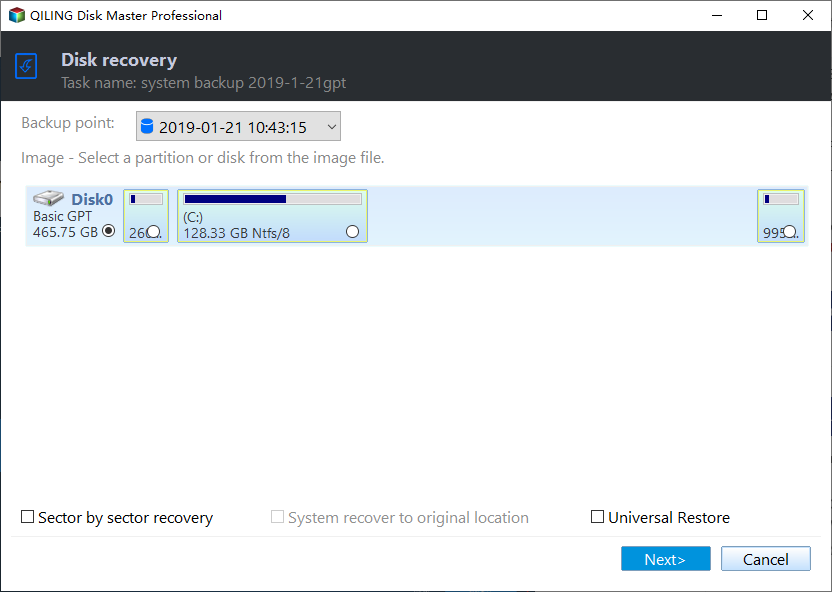
Step 2. Select "Restore the entire disk", click on the disk and click "Next".
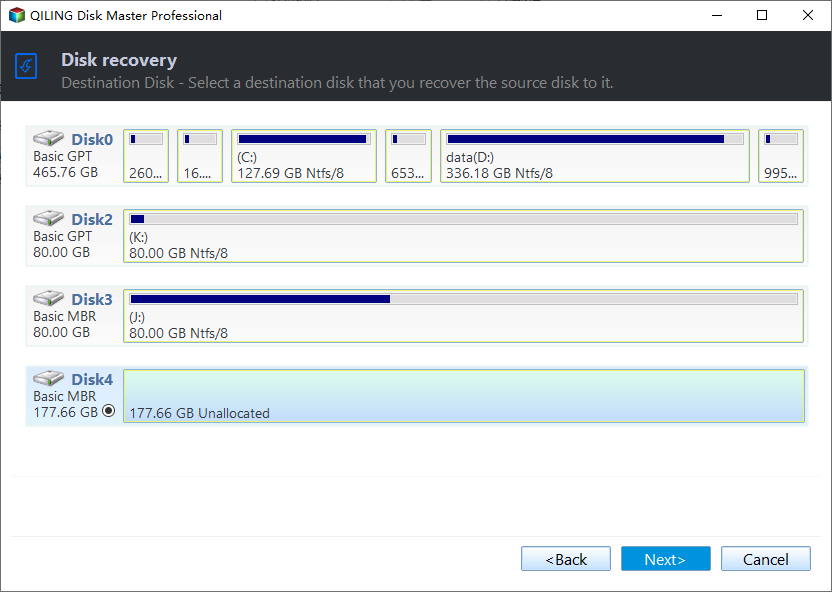
Step 3. Select the new disk as the restoration destination and click "Next".
Step 4. Confirm the operation and click "Proceed".
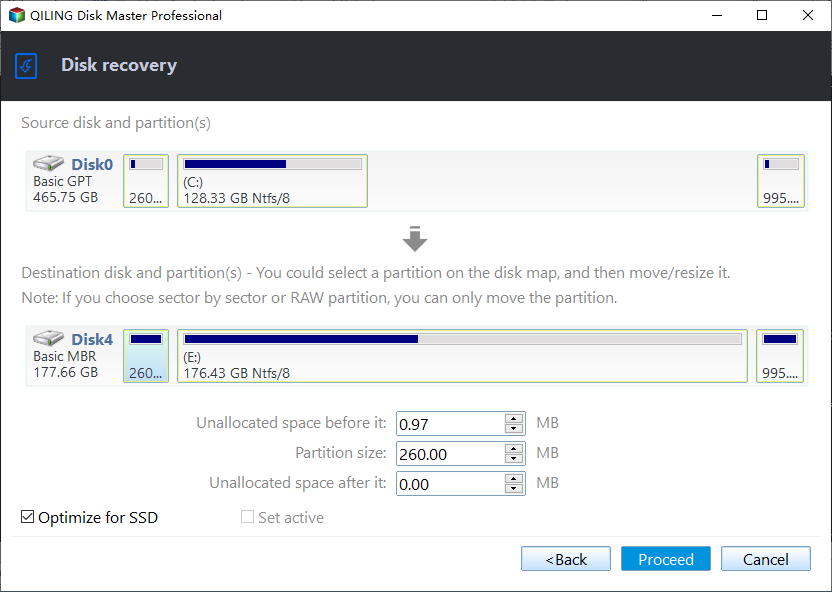
▶ After cloning:
- To replace the original hard drive with the cloned drive, simply swap them out, and if they're different types, adjust the BIOS settings to boot from the cloned drive.
- You can use both drives on your PC, with the cloned drive as the system/boot drive and the original drive as a data drive. If the cloned drive works perfectly, you can wipe the old drive to free up disk space.
- If you're unable to boot from the cloned drive, you can try various quick fixes to resolve the issue. These solutions can be found on the provided link.
More advanced way to clone computer hard drive
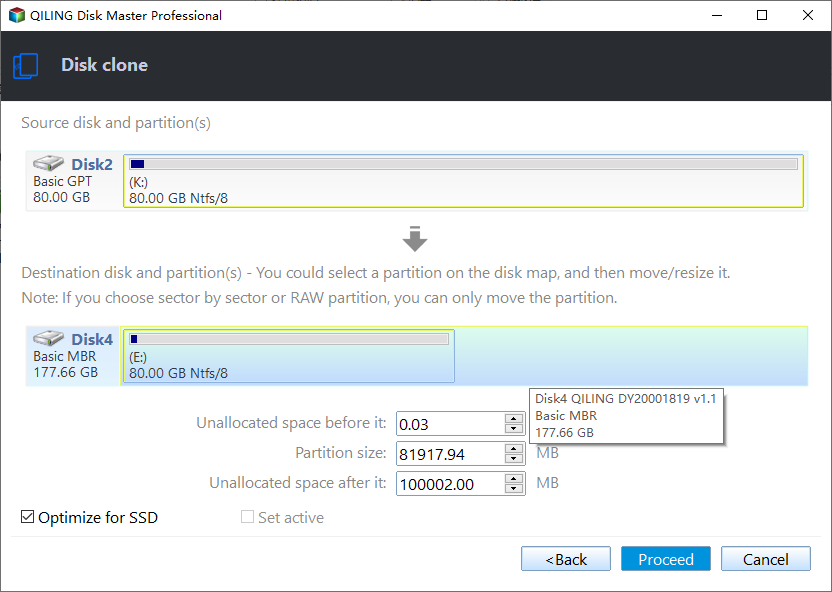
If you find the backup and restore method a bit inconvenient, you can upgrade to Qiling Disk Master Professional and use the Disk Clone feature to directly transfer data from one hard drive to another. This allows cloning of various disk types, such as IDE to SATA, SATA to NVMe, and M.2 to U.2, and more.
I'll walk you through the Disk Clone method here:
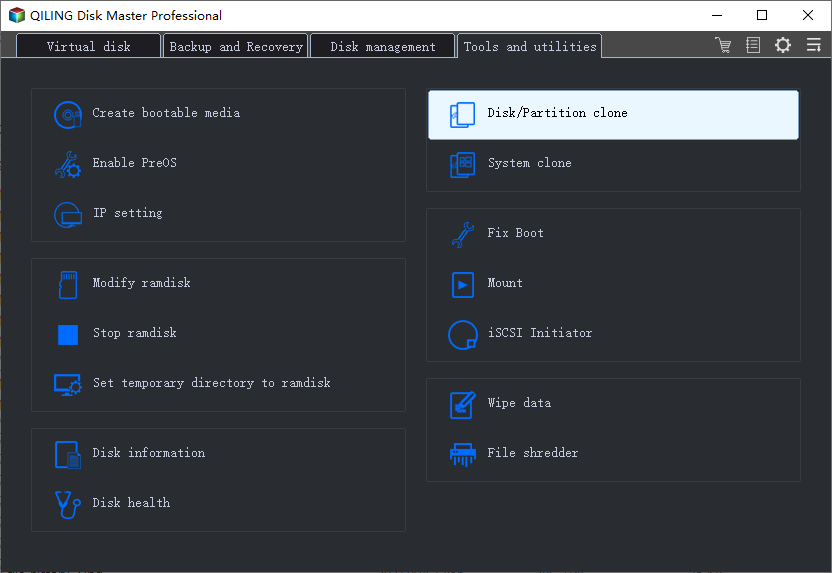
Step 1. Run Qiling Disk Master. Click "Tools and utilities" page and select "Disk Clone".
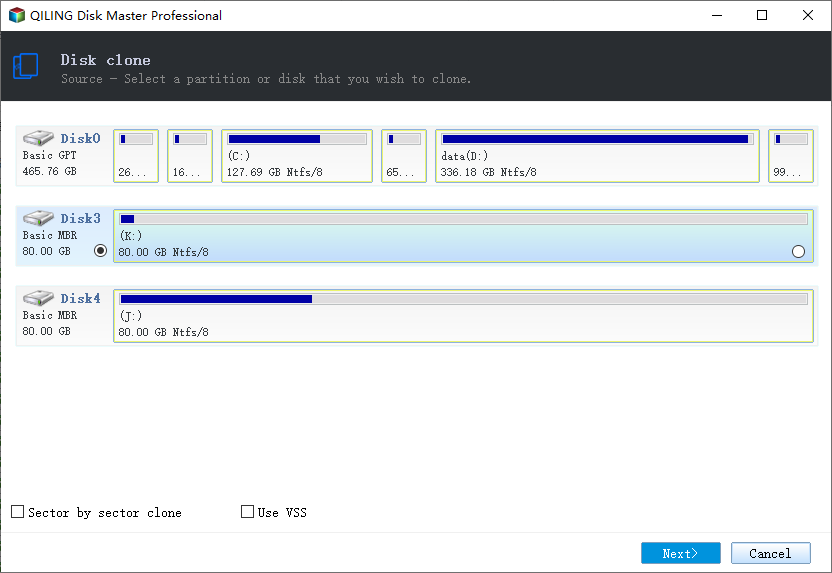
Step 2. Select the current hard drive on your PC as the source disk and click "Next".
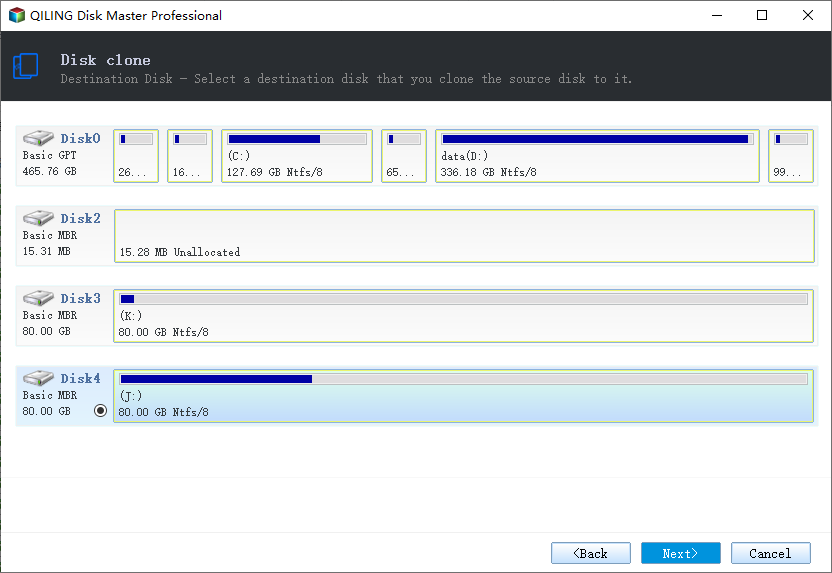
Step 3. Select the destination drive you have connected to your PC and click "Next".
Step 4. Confirm the operation and click "Proceed".
Related Tips:
💜 You can click "Edit Partitions" to resize partitions or convert the disk type of the destination disk, with four available options.
- Copy without resizing partitions: It will not resize the partition size.
- Add unused space to all partitions: The software will automatically redistribute any unallocated space on the target disk to each partition, ensuring each partition takes up the correct amount of space based on the disk size.
- Manually adjust partition size: This tool allows you to extend unallocated space to any partition on the destination disk as you want.
- Convert the destination disk from MBR (GPT) to GPT (MBR): It helps to convert the partition style of the destination disk if it is different from that of the source disk.
💜Enabling sector by sector clone clones every sector on the source disk, whether used or not, which can be time-consuming and requires the destination disk to be equal to or larger than the source disk.
💜Cloning Windows 10 to an NVMe SSD can improve your computer's speed by utilizing the fastest transfer speed available, while also checking SSD alignment to further enhance reading and writing speeds.
Verdict
Qiling Disk Master Standard is a free PC clone software for Windows that allows you to transfer a disk or system image from one hard drive to another while ensuring secure boot. It also features a Disk Clone function, available in advanced editions, which enables direct hard drive cloning.
For daily system protection, you may backup Windows 10 to a NAS or an external hard drive. Don't hesitate to give it a shot!
Related Articles
- Best Free Bootable Hard Disk Clone Software for Windows 10/8/7
- Best Hard Disk Cloning Software Free Download for Windows 7
- Best Free Clone Software for Windows 8/8.1 - Qiling Disk Master
- You May Not Install to This Volume Because It Is Currently Being Encrypted
Mac users attempt to resolve this issue 'You may not install to this volume because it is currently being encrypted.' by entering recovery mode and continuing with the installation procedure, but they fail. - [Solved] Black Screen After Cloning Disk
This article will help you solve the problem of Windows 11/10/8/7 black screen after cloning. You won't encounter boot errors if you use the best disk cloning software - Qiling Disk Master.
Products
Articles & Tutorials
- Data Recovery
- Data Backup
- File Recovery
- File Backup
- File synchronize
- System Backup and Restore
- Disk and Partition Clone
- Technical articles
- Disk Master Help
- Windows Deleted File and Disk Recovery Tutorials
- Windows File and Data Recovery Tutorials
- More Windows Tutorials for Install, Security, Files, and PC Tips
- Windows Boot, Repair, and Recovery Environment Tutorials
- Windows Backup Tutorials
- Windows Restore Tutorials
- Windows Clone and Migration Tutorials
- Windows Server Backup, Recovery, and Management Tutorials
- Windows Disk, Partition, and Storage Management Tutorials