Best Intel SSD Clone Tool to Safely Clone HDD to Intel SSD
What is Intel SSD Clone Tool?
Intel SSD clone tool is a data migration tool specifically designed for Intel SSDs, which are popular among computer users for their fast read and write speeds, convenience, and portability. As a result, many users choose to save their data or even install their operating system on Intel SSDs due to their excellent performance, making an Intel SSD cloning tool a valuable tool for data migration.
Intel provides a data migration software for its SSD drives, allowing users to migrate data to Intel SSDs in various Windows operating systems, including Windows 10, 8.1, 8, 7, Vista, and XP.
Intel Data Migration Software Has Been Discontinued
While it's technically possible to clone an Intel SSD using Intel's Data Migration Software, there are some considerations to keep in mind.
- You may encounter Intel Data Migration software not cloning problem while cloning HDD to Intel SSD, so upset and helplessness.
- Intel Data Migration Software has reached end of life, As of December 31, 2020, Intel Data Migration is no longer available, and therefore, you cannot receive technical support from them, which may not meet your data migration needs.
You're probably looking for other Intel SSD clone tools due to the current situation.
Best Intel SSD Clone Tool - Qiling Disk Master Professional
Qiling Disk Master Professional is the best Intel SSD disk clone software, allowing users to clone HDD to Intel SSD without data loss, migrate OS to Intel SSD without reinstalling OS and applications, and easily backup system, partition, or entire hard drive. It's highly recommended by millions of users due to its outstanding performance and comprehensive features.
Download the Intel Data Migration Software - Qiling Disk Master Professional 30-day free trial to try its Clone features, which can only be demonstrated in the free version, and upgrade to fully enjoy.
Steps to Clone HDD to Intel SSD in Windows 10/8/7
To demonstrate the Intel SSD clone tool's functionality, we'll show you how to safely clone a HDD to an Intel SSD drive. We'll guide you through the process step-by-step, so you can follow along and have a better understanding of how it works.
Step 1. To clone your Intel SSD, first connect the new SSD to your computer and ensure it can be detected by Windows. Then, launch the Intel SSD clone tool, Qiling Disk Master Professional, and select the "Clone" > "Disk Clone" option to proceed.
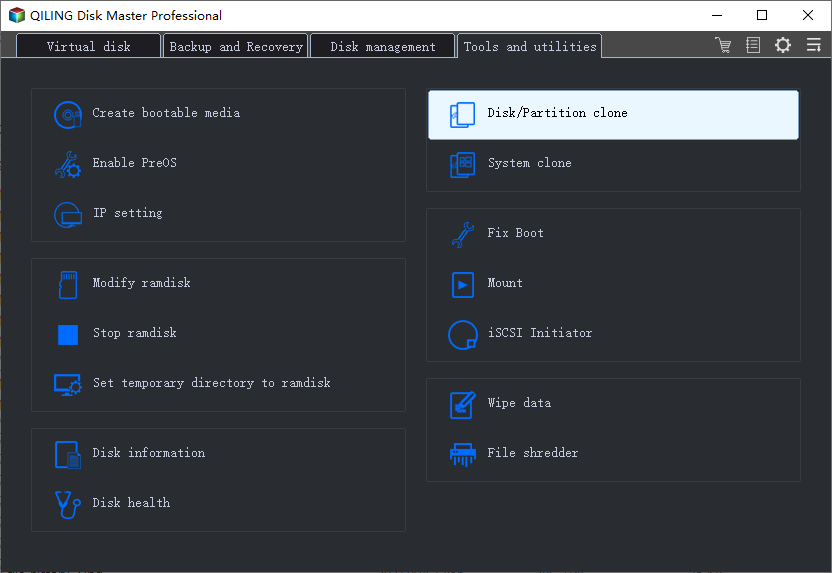
★ Tip: If you prefer to migrate your OS to an Intel SSD, you'll need to select the System Clone option at this step.
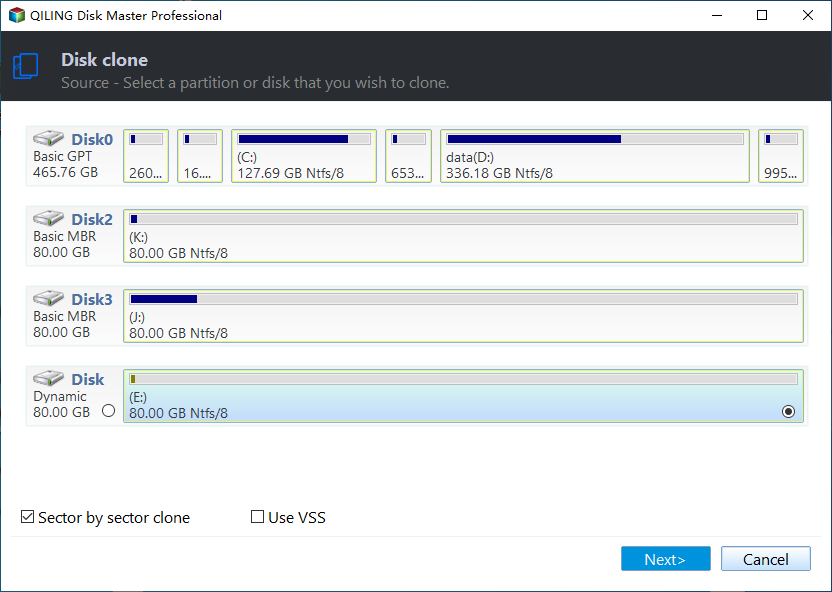
Step 2. Select the HDD as the source disk, and press "Next".
Step 3. To choose the Intel SSD as the destination disk, click "Next".
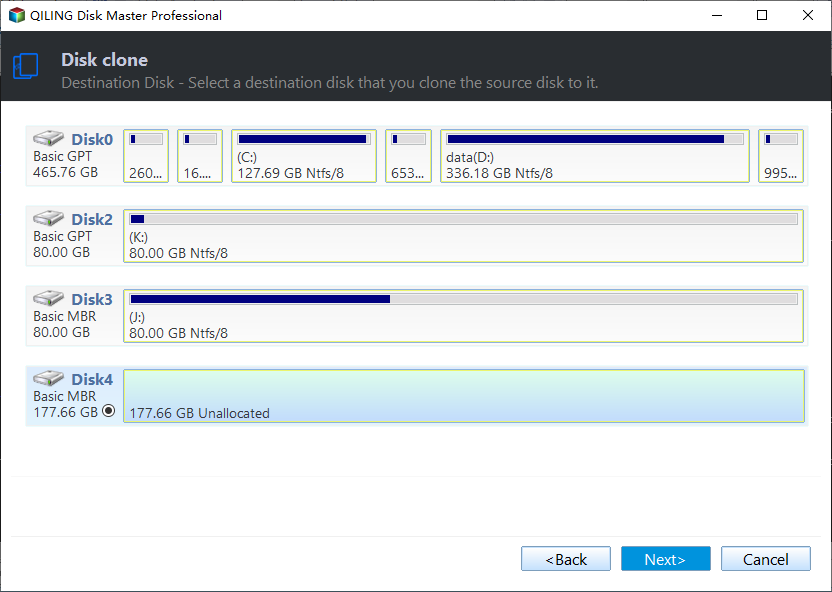
★ Tip: The Intel SSD will be completely erased after the cloning process is completed, so it's essential to back up any important documents beforehand.
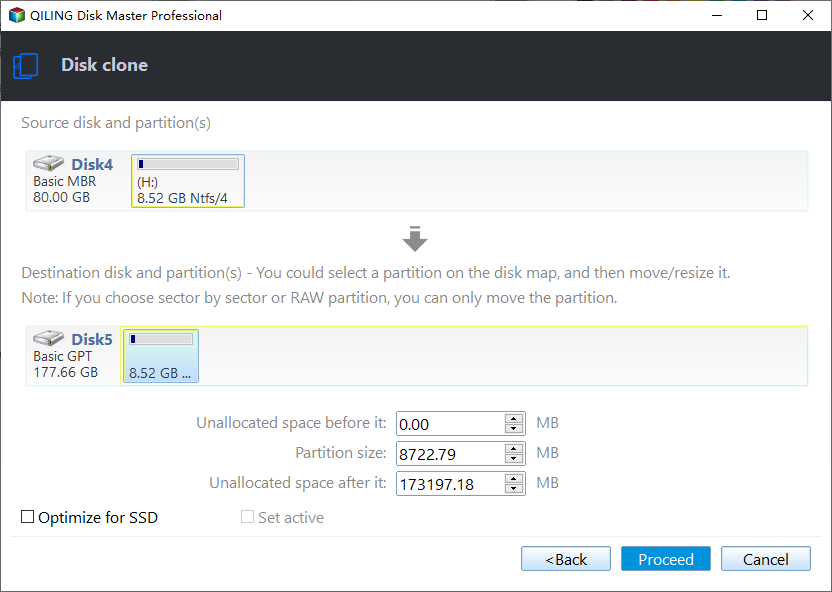
Step 4, To clone a hard drive to an Intel SSD, select the "SSD Alignment" option and click "Proceed" to ensure a smooth and safe cloning process.
★ Tips:
✿ Edit Partitions helps you resize the partition size automatically while cloning a disk to a larger disk, making full use of the space on the destination.
✿ The "Sector by sector clone" option helps clone all sectors on the source disk, which can be time-consuming, especially if cloning to a larger disk. This option is unchecked by default.
To migrate data to an Intel SSD, you can also back up your data to an external hard drive, create bootable media, and then replace your old hard drive with the Intel SSD. Booting your computer from the bootable media will automatically bring up the Qiling Disk Master Professional, allowing you to restore your data to the new SSD. This process is essentially the same as creating a recovery environment.
The Epilogue
Try the Intel SSD clone tool - If the Intel Data Migration Software is not cloning your HDD to Intel SSD, it's recommended to try Qiling Disk Master, a professional Intel SSD cloning software that can clone your HDD to Intel SSD. Since the Intel Data Migration Software has reached its end of life, Qiling Disk Master is a reliable alternative that offers long-term technical support.
For Windows Server 2003, 2008, 2012, 2016, 2019, including R2, and SBS 2003, 2008, 2011, you can try Qiling Disk Master Server or Technician Plus to access more advanced features.
Related Articles
- Freeware to Clone Intel SSD to another SSD Securely and Effectively
With the help of best free Intel data migration software, you can clone Intel SSD to another SSD easily and quickly. - Solved: Acronis True Image WD Edition Will Not Clone
If you are experiencing the "Acronis True Image WD Edition will not clone" issue, continue to read this article and learn its 3 different situations. - Clone HDD to SSD vs. Clone SSD to HDD in Windows 7
Whether you want to clone SSD to HDD in Windows 7 or clone hard drive to SSD, you could use the best free disk cloning software to make it. - How to Fix Cloned Drive Won't Boot Windows 11 Easily (5 Ways)
This article provides you with five solutions about your cloned drive won't boot windows 11, including a built-in tool as well as a reliable third-party software - Qiling Disk Master. - How to Replace Your Hard Drive Without Losing Data?
Learn how to Replace Your Hard Drive Without Losing Data with clear steps, key checks, and practical tips. - How to Switch Windows 7, 8, 10 from HDD to SSD?
Learn how to Switch Windows 7, 8, 10 from HDD to SSD with clear steps, key checks, and practical tips.
Products
Articles & Tutorials
- Data Recovery
- Data Backup
- File Recovery
- File Backup
- File synchronize
- System Backup and Restore
- Disk and Partition Clone
- Technical articles
- Disk Master Help
- Windows Deleted File and Disk Recovery Tutorials
- Windows File and Data Recovery Tutorials
- More Windows Tutorials for Install, Security, Files, and PC Tips
- Windows Boot, Repair, and Recovery Environment Tutorials
- Windows Backup Tutorials
- Windows Restore Tutorials
- Windows Clone and Migration Tutorials
- Windows Server Backup, Recovery, and Management Tutorials
- Windows Disk, Partition, and Storage Management Tutorials