2023 HGST Hard Drive Recovery: How Do I Recover Data from HGST Hard Drive
If the failed drive is an SSD rather than an HGST HDD, see SSD file recovery steps.
If your HGST hard drive has failed, you may consider contacting professional data recovery companies that specialize in recovering data from non-functional devices. Some popular options include Data Recovery Services, Drive Savers, and Ontrack. You can also search for local data recovery services in your area. Additionally, you can try contacting the manufacturer of your device for any available data recovery options. It is also a good idea to back up your data regularly to prevent such situations in the future.
Fortunately, since HGST does not offer data recovery services directly, you can try third-party software or professional assistance. This page offers a reliable data recovery tool that can help you recover data from your HGST hard drive through a step-by-step tutorial, with additional video tutorials available for those who prefer visual guidance.
About HGST Hard Drive Recovery
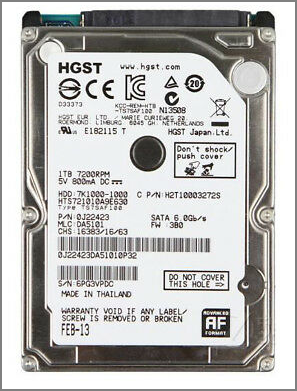
HGST, a subsidiary of WD acquired in 2012, produces hard disk drives, solid-state drives, and external hard drives. Its lifespan is reportedly 3-5 years.
Are HGST Drives Reliable?
HGST hard drives are reliable, according to Backblaze's study, and are a trustworthy option, despite not being the top performer in reliability rankings.
What's the Sign of HGST Hard Drive Corruption?
- Inaccessible or missing data
- Drive not recognized by the device
- Slow drive data read/write speed
- Repeating freezing, crashing, or errors
- Slow device performance
- Overheating device
The Culprits of HGST Hard Drive Data Loss
Hitachi hard drives, like other solid storage devices, can be prone to data loss. Let's examine the possible reasons behind files going missing on your Hitachi hard drive.
- Accidental deletion of files can be recovered from the Recycle Bin if you have only pressed the Delete key. However, if you have used the Shift + Delete combination, your files are permanently deleted and cannot be recovered through the Recycle Bin.
- Accidental or intentional formatting can occur when dealing with hard drive corruption. You may choose to format the hard disk with some advice or you might accidentally click the format option while browsing the settings menu.
- Virus attacks through unknown websites, phishing scams, and malware can potentially damage or render HGST hard drives unreadable.
- The HGST drive may experience system crashes or unexpected shutdowns due to OS crashes or power failures, leading to the accumulation of bad sectors or inaccessible errors.
If you have lost data on your HGST hard drive due to various reasons, there is hope for recovery. A user-recommended software, Deep Data Recovery, can help you retrieve deleted or lost data. For a step-by-step guide, you can follow the in-depth instructions provided, or watch a video tutorial for a visual walkthrough. This software is designed to help you recover your important files and data from your HGST hard drive.
Download the Best HGST Hard Drive Recovery Software
Many users believe that deleted data is gone forever and do not trust third-party software to help them. However, hope is not lost. Regardless of the operation performed on the hard disk, whether permanent deletion or careless formatting, the data is recoverable. Users can retrieve files using the Deep Data Recovery software.
See more highlights of Qiling Data Recovery:
- Recover data lost due to various scenarios including virus attacks, human errors, hard drive crashes, operating system upgrades, and power failures. This ensures that you can retrieve your files even in the event of unforeseen circumstances.
- The scanner has two flexible scanning modes: Quick scan and Advanced scan. It uses smart algorithms to provide fast results and a sector-by-sector scan for detailed recovery.
How Do I Recover Data from HGST Hard Drive
To recover HGST hard drive data, follow these steps: use the best hard drive recovery software to scan the drive and retrieve lost data. This software can help you recover deleted files, formatted partitions, and corrupted data from your HGST hard drive.
Step 1. Launch Deep Data Recovery on your computer, select the desired file types, and click "Fast Scan" to initiate the recovery process.

Note: You can choose different search modes based on where and why the data was lost.
Step 2. Select the drive where you lost your data and click "Scan" to start the recovery process.

Step 3. Once the scan is complete, you can use the "Filter" or "Search" feature to locate the lost files. This will help you quickly find the files you are looking for, even if they are buried deep within the scan results.

Step 4. Select all the files you want and click "Recover" to start the recovery process. Then, choose a secure location to save them. Finally, click "Save" to complete the process.
How to Repair a Corrupted HGST Hard Drive
If your HGST hard drive is corrupted or damaged, you can seek help from hard drive data repair and recovery experts who offer hard disk repair services to fix issues such as bad sectors, RAW errors, and file system errors.
Consult with Qiling data recovery experts for one-on-one manual recovery service. After a FREE diagnosis, we can offer the following services:
- Repair corrupted RAID structure, unbootable Windows OS, and corrupted virtual disk files
- Recover/repair lost partition and re-partitioned drive
- Unformat hard drive and repair RAW drive (BitLocker encrypted drive)
- Fix disks that become GPT-protected partitions
Frequently Asked Questions about HGST Hard Drive
To get additional HGST hard drive recovery help, read the questions below.
1. How long is HGST Warranty?
To learn about the warranty for a specific product, visit the website for that brand and review the warranty period, then be prepared to provide proof of purchase.
2. How to recover data from unreadable HGST/Hitachi hard drives?
To recover data from an unreadable hard disk, run Qiling data recovery software, click the "Scan" button to scan the data, select the desired file, click "Recover" and save it to a new location.
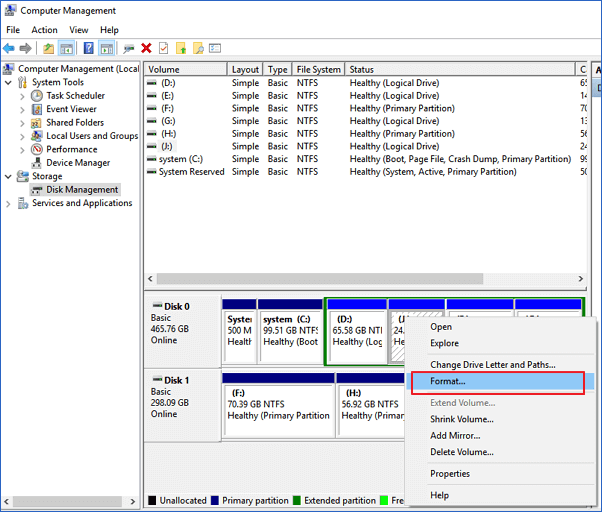
If you are also trying to repair your devices, you can format them using disk management.
- Press Windows + X and choose Disk Management.
- Right-click the Hitachi disk volume and choose the "Format" option from the context menu. If the "Format" option is grayed out, select "New Simple Volume" instead. This will allow you to initialize and format the disk volume.
- Set your volume label, file system, and allocation unit size.
Conclusion
If you ever face a data loss issue, you can try the hard drive recovery software we have introduced. For recoverable files under 2GB, you can download Qiling's free data recovery software to recover up to 2GB of data for free. Alternatively, if you need personalized data service, click on online chat to connect with our team.
Related Articles
- [2023] USB Recovery Software to Recover Files from USB Flash Drive
- Free SanDisk Recovery Software Recovers Lost Sandisk Data
- Overwritten CCTV File Recovery: How Can I Recover CCTV/DVR Files
- Seagate External Hard Drive Data Recovery (A 3-Step Guide)
- Best Partition Recovery Software to Get Back Files from NTFS Partition
The NTFS recovery software is designed for people to recover deleted or lost data from a formatted NTFS partition or disk. Free download this undelete or unformat NTFS partition tool to do partition recovery in Windows or Mac. - Shift Delete Recovery - Get Back Shift Deleted Files
Shift-deleting files may seem like a permanent solution, but it's not always the case. With the right tools and techniques, you can recover shift-deleted files.
Products
Articles & Tutorials
- Data Recovery
- Data Backup
- File Recovery
- File Backup
- File synchronize
- System Backup and Restore
- Disk and Partition Clone
- Technical articles
- Disk Master Help
- Windows Deleted File and Disk Recovery Tutorials
- Windows File and Data Recovery Tutorials
- More Windows Tutorials for Install, Security, Files, and PC Tips
- Windows Boot, Repair, and Recovery Environment Tutorials
- Windows Backup Tutorials
- Windows Restore Tutorials
- Windows Clone and Migration Tutorials
- Windows Server Backup, Recovery, and Management Tutorials
- Windows Disk, Partition, and Storage Management Tutorials