How to Recover Deleted Files After Windows 10 Updates [Fast and Safe]
Windows 10 Updates Delete My Files
If you are experiencing issues with Windows 10 updates deleting your files, this is a frustrating problem, but there are steps you can take to recover your lost files. Consider using a backup tool to regularly back up your files, which can help prevent data loss in the future. If you have already lost files, you can try using file recovery software to scan your system for deleted files. Additionally, you can try checking for corrupted system files and repairing them using the built-in System File Checker tool. It is also a good idea to check for any pending updates and install them to see if they resolve the issue. If none of these steps work, you may want to consider seeking help from a professional or contacting Microsoft support for further assistance.
For another update-loss case, see recover lost files after Windows 10 update.
If you have accidentally deleted Windows 10 update files on your PC, do not worry! We have four reliable solutions to help you recover them. In this tutorial, we will show you how to use these methods to retrieve your deleted files, so you can get back to work without any hassle.
Recover Deleted Files After Windows 10 Updates with Software
To recover Windows 10 updates deleted files, you can use a reliable file recovery software like Deep Data Recovery, which can quickly and effectively retrieve deleted files.
Deep Data Recovery can recover lost or deleted files on a PC by scanning the hard drive, memory card, or other storage devices for any remaining file fragments, and then using advanced algorithms to recreate the original files. This process can be done even if the files have been deleted, formatted, or corrupted, and can also recover files from a crashed or damaged hard drive.
- Recover deleted photos, music, documents, videos, and more from Windows 10 with this recovery tool, which can help you retrieve files that were deleted by Windows 10 updates.
- The software supports recovery of various file types, including JPG, JPEG, PNG, GIF, MP4, PST, and MOV files, making it a comprehensive tool for Windows 10 users looking to recover lost or deleted files.
- Recover deleted files from different storage media. This safe tool will help you recover data from formatted hard disk Windows 10, USB, NAS, etc.
- Deep Data Recovery allows you to create a Windows PE bootable disk, enabling data recovery even if your Windows 10 system fails to start or cannot boot.
To recover Windows 10 updates deleted files on your PC, you can use a reliable file recovery tool. This tool can help you restore deleted files, even if they were deleted during the Windows 10 update process.
Step 1. Launch Deep Data Recovery on your computer. Choose the file types you want to recover and click "Fast Sacn" to proceed with the recovery process.

Note: You can choose different search modes based on where and why the data was lost.
Step 2. To proceed, select the specific file location you want to scan and then click the "Scan" button.

Step 3. After the process, select the "Deleted Files" and "Other Lost Files" folders in the left panel, then apply the "Filter" feature or click the "Search files or folders" button to find the deleted files.

Step 4. After restoring the files, click the "Recover" button and save the files in a location that is different from the original one, ideally with a new name. This will ensure that the restored files are not overwritten by the original corrupted files.
Recover Windows 10 Updates Deleted Files Without Software
Recovering deleted files on a Windows 10 PC that were lost due to update bugs is not a complex task. The files may be deleted or hidden, but can be restored using file recovery software or by retrieving them from Windows old folders. Alternatively, users with a recent backup can easily restore files from their backups, while others may use Windows File Recovery to locate their lost files.
Method 1. Recover Windows 10 Updates Deleted Files with Backup and Restore Features
To recover deleted Windows 10 updates files, you can use Windows built-in backup and restore features, such as Backup and Restore and File History. These utilities allow you to create a backup of your files and restore them in case of data loss.
With Backup and Restore Option
To recover deleted files with Windows 10 Backup and Restore feature, you can restore files and folders from your latest Windows 10 backup, allowing you to retrieve lost data and get back to work quickly.
Step 1. Open the Windows 10 Control Panel on your computer or laptop.
Step 2. Open the System and Security menu and choose "Backup and Restore (Windows 7)".
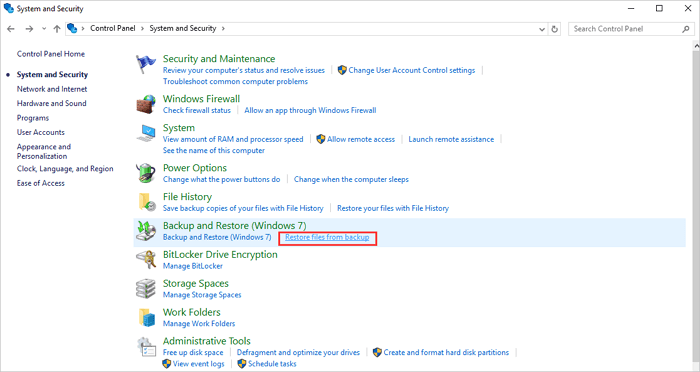
Step 3. Click the restore section and the "Restore my files" button.
Step 4. To restore files from your backup, click on "Browse for files" after selecting your backup file, and then you can browse or search the files you want to restore.
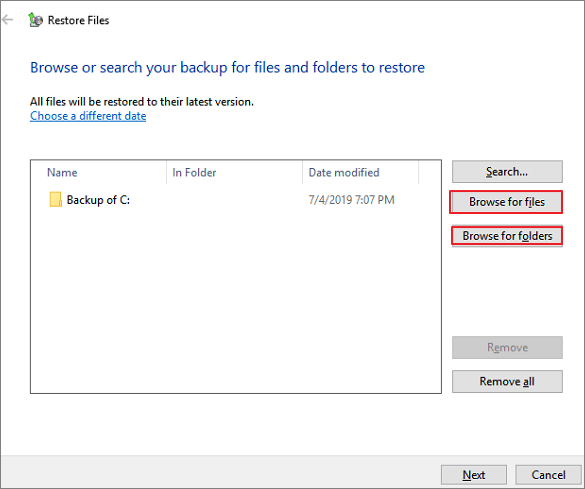
Step 5. When you locate the lost files, choose them and click "Add files".
Step 6. Click on "Restore" after deciding where you want to keep the files.
With File History Option
To recover deleted files on Windows 10, enable File History and make sure it is running before Windows updates delete your files, allowing you to easily recover them.
Step 1. Open the settings menu on Windows 10.
Step 2. Click the "Update & security" button, and choose Backup options.
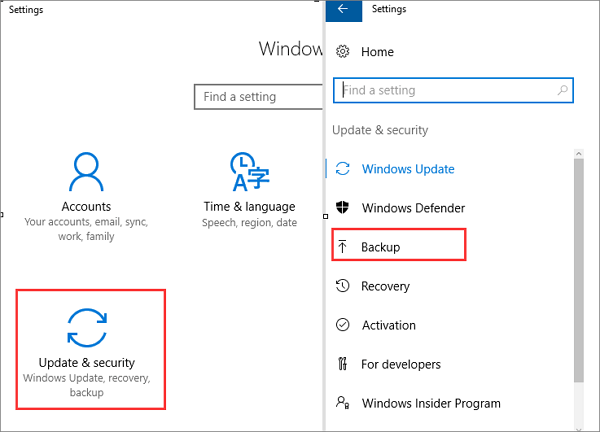
Step 3. Click "Restore files from a current backup".
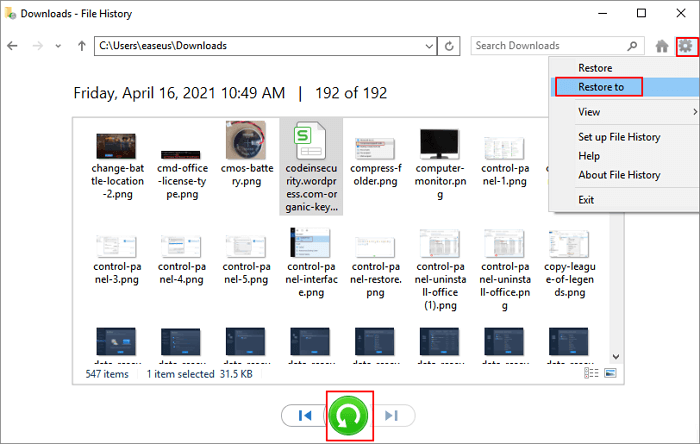
Step 4. To recover Windows 10 updates deleted files, scroll down to find the files you need and click the green button. This will initiate the recovery process.
Method 2. Recover Windows 10 Updates Deleted Files from Recycle Bin
If your files were moved to the Recycle Bin after a Windows 10 update, you can recover them by checking the Recycle Bin and restoring the files from there.
Step 1. Find the Recycle Bin from your Windows 10 desktop.
Step 2. If your Recycle Bin is full of deleted files, you can either scroll down to view them all or search for specific names to find what you are looking for.
Step 3. Find the target files and restore them.
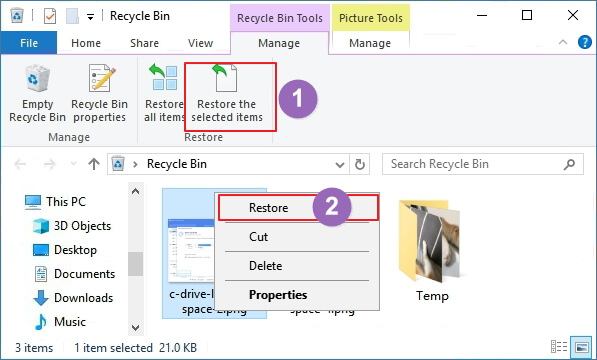
Step 4. Then you can check your files from the original place.
Method 3. Recover Windows 10 Updates Deleted Files with File Recovery
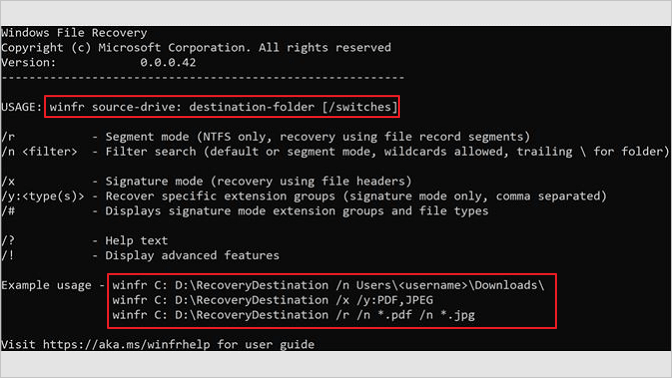
Windows File Recovery is a command-line tool that can be downloaded from the Microsoft Store, which can help recover deleted files, including Windows 10 updates. This tool is particularly useful for Windows developers who need to recover lost files.
Step 1. Search Windows File Recovery in Microsoft Store.
Step 2. After downloading this Windows command-line tool, run it.
Step 3. To copy the file "test.docx" from the source location to the destination location, you can use the command: `copy C:\Users\Documents\test.docx D:\Users\Documents\test.docx`
Conclusion
You can recover deleted Windows 10 update files using Deep Data Recovery or Windows 10's built-in backup and restore utilities. Alternatively, uninstalling updates might be a good idea, as deleted files might not be gone forever but rather hidden in folders. You can show hidden files using CMD, the control panel, or software, potentially recovering your lost files.
Deep Data Recovery is a software that can help you recover lost data, and it is available for download. It can be a useful tool to have in case you need to recover files or information that you have accidentally deleted or lost.
Windows 10 Updates Delete My Files FAQs
After some Windows 10 updates, you may lose some essential files suddenly. You can view more information about Windows 10 updates deleted files in this part.
Why are all my files gone after Windows 10 update?
Some Windows 10 updates can cause bugs and delete or hide files, but you can recover them with a backup or by uninstalling the updates if you do not have a backup.
How do I stop Windows 10 from automatically deleting files?
To prevent Windows 10 from deleting files without asking, there are three methods to consider.
- 1. Stop Windows Defender.
- 2. Turn off Storage Sense.
- 3. Uninstall Windows 10 updates.
Can I recover Windows 10 updates deleted files?
You can recover deleted Windows 10 update files using the Backup and Restore utility, File History utility, or by uninstalling updates. Alternatively, the easiest way to recover deleted files on Windows 10 is by using Deep Data Recovery.
- 1. Launch this data recovery software.
- 2. Scan the disk where you lost your files.
- 3. Preview the lost files from Windows 10.
- 4. Confirm and recover deleted files.
Will update to Windows 11 delete files?
Upgrading to Windows 11 will not delete files on your computer, but it is still a good idea to back up important files before the upgrade, just in case. You can choose to keep your files and apps during the upgrade process.
Related Articles
- How to Recover Hidden Files on SD Card Windows 11/10
- How to Fix The Directory Name Is Invalid in Windows 10/11
- How to Recover Data from 2TB External Hard Drive in Windows 11/10/8/7
- Free Download JPEG Recovery Software to Recover Your Photos
- Broken Micro SD Card Recovery - How to Recover Data from Broken SD Card
Learn the key steps, checks, and practical tips for this related guide. - SD Card Recovery Software | How to Recover Data from Corrupted SD Card
This guide explains SD Card Recovery Software | How to Recover Data from Corrupted SD Card with clear steps, key checks, and practical tips.
Products
Articles & Tutorials
- Data Recovery
- Data Backup
- File Recovery
- File Backup
- File synchronize
- System Backup and Restore
- Disk and Partition Clone
- Technical articles
- Disk Master Help
- Windows Deleted File and Disk Recovery Tutorials
- Windows File and Data Recovery Tutorials
- More Windows Tutorials for Install, Security, Files, and PC Tips
- Windows Boot, Repair, and Recovery Environment Tutorials
- Windows Backup Tutorials
- Windows Restore Tutorials
- Windows Clone and Migration Tutorials
- Windows Server Backup, Recovery, and Management Tutorials
- Windows Disk, Partition, and Storage Management Tutorials