How to Convert RAW to FAT32 Using CMD with Ease?
- Need to Convert RAW to FAT32 File System in CMD
- How to Convert RAW to FAT32 Using CMD Properly?
- Conclusion
Need to Convert RAW to FAT32 File System in CMD
Many users are searching online for the method to convert a RAW formatted drive to a FAT32 file system. Before discussing the conversion, it's essential to understand what RAW and FAT32 are. RAW is a file system format that indicates a drive is not accessible due to a disk error, while FAT32 is a file system that allows for larger storage capacity and is commonly used on older operating systems.
▌About RAW and FAT32 File System
A drive that hasn't been formatted or has an unknown file system will show up as RAW in Disk Management and won't appear properly in Windows File Explorer. If a normally formatted storage becomes RAW, it's likely due to a damaged or corrupted file system, and RAW is an unrecognized file system by Windows 11/10.
The FAT32 file system, along with NTFS and exFAT, is used by Windows to store files, and converting exFAT to NTFS is a common topic. However, FAT32 has the highest compatibility, making it recognizable by other operating systems, which is why it's often used for removable storage devices like micro SD cards, pen drives, USB flash drives, and memory cards, which are usually formatted with this file system.
▌Why Convert RAW to FAT32 Using CMD?
Windows 11/10 offers more than just the Command Prompt, but it's still a popular choice among IT experts due to its efficiency and advanced features. Unlike the graphical user interface (GUI), the Command Prompt saves time by eliminating the need for tedious clicking, making it ideal for unattended tasks. For example, converting a RAW drive to FAT32 can be done using the Command Prompt, which is a task that many professionals prefer to perform using command lines.
How to Convert RAW to FAT32 Using CMD Properly?
To convert RAW to FAT32, you can either run commands directly in the Command Prompt (CMD) or input orders one by one in Diskpart. This process can be applied to various devices such as pen drives, memory cards, SD cards, or USB flash drives. However, it's essential to be aware of the inherent limitations of CMD before proceeding.
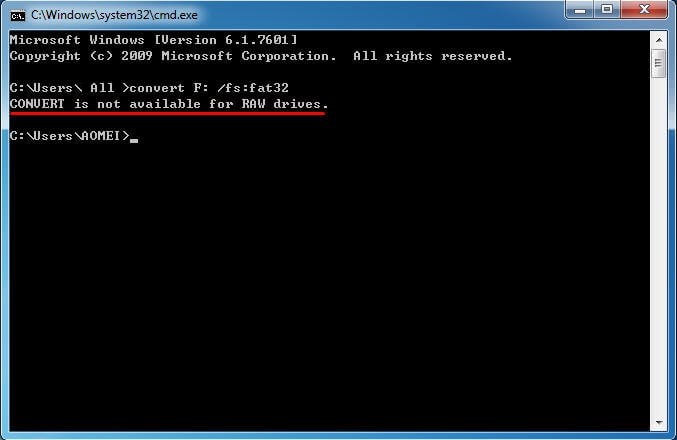
▌Convert Is Not Available for RAW Drives
To convert a drive from FAT32 to NTFS using the command prompt, you need to type "convert F: /fs:ntfs" at the prompt and press Enter. However, this will not work if the drive is RAW, as the "convert" syntax only works from FAT32 to NTFS. If you're trying to convert from RAW or NTFS to FAT32, you'll encounter errors. The command prompt needs to be run as administrator for this to work.
▌Format RAW to FAT32 in CMD
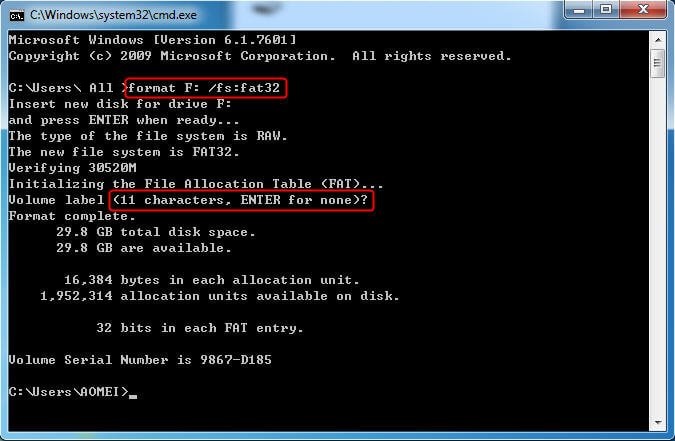
To change the file system from RAW to FAT32 using the command line, you'll need to use the 'format' command. Before doing so, it's recommended to perform a sector by sector backup of your data to prevent any loss in case something goes wrong during the formatting process. Once the backup is complete, you can proceed with the formatting.
1. Open Command Prompt as administrator.
2. To format a RAW drive, type the command "format F: /fs:fat32" (where F is the drive letter of the RAW drive), press Enter, press Enter again, and optionally specify a partition label. This process may take around twenty minutes to complete, as seen in the example of formatting a 32GB Samsung SD card.
3. Type exit to leave CMD.
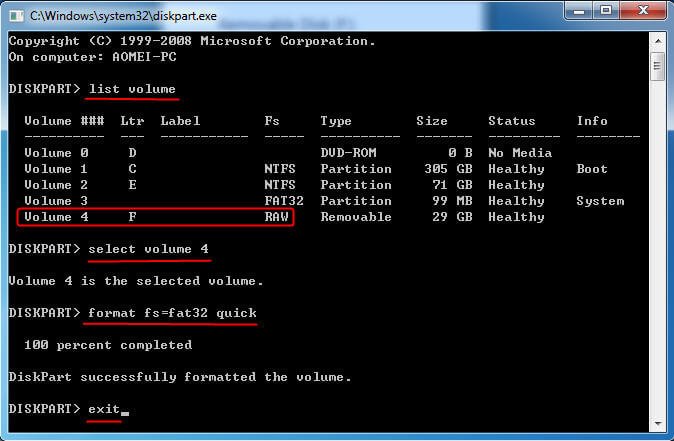
If there is no drive letter available on the RAW drive, you can format a micro SD card from RAW to FAT32 using Diskpart. To do this, open Diskpart, find the volume number of the RAW drive, and then use the "format" command with the volume number to convert it to FAT32. This process allows you to assign a drive letter and format the RAW drive to a usable file system.
1. Type diskpart in CMD prompt and hit Enter.
2. Type the following commands in sequence:
- list volume
- select volume n (where n is the volume number of the RAW drive)
- format fs=fat32 quick
- exit
Tip: You can also format a bootable USB drive to FAT32 with the help of Diskpart.
Formatting a RAW drive can sometimes be a lengthy process, especially if it's in a bad state. In most cases, the drive will be successfully formatted to FAT32, but in rare instances, the formatting may not complete or take an excessively long time to finish. If you're experiencing either of these issues, don't worry -- there are alternative solutions available to help you resolve the problem.
▌How to Format RAW Memory Card in CMD via Professional Software?
Qiling Disk Master Professional is a comprehensive partition manager that enables you to format RAW drives to FAT32, NTFS, or exFAT using the Command Prompt. The DiskMasterX.exe utility in this software supports almost all operations of its GUI utility, allowing you to download the demo version and try it out.
- ★Descriptions:
- */fmt: format; followed by partition number or drive letter.
- The file system can be followed by fat16, fat32, exfat, ntfs.
The command line operations of Qiling Disk Master Professional can be found in the "command line partition" section of the documentation.
Tips: Methods to format pen drives, memory cards, SD cards, and USB flash drives from RAW to FAT32 are available.
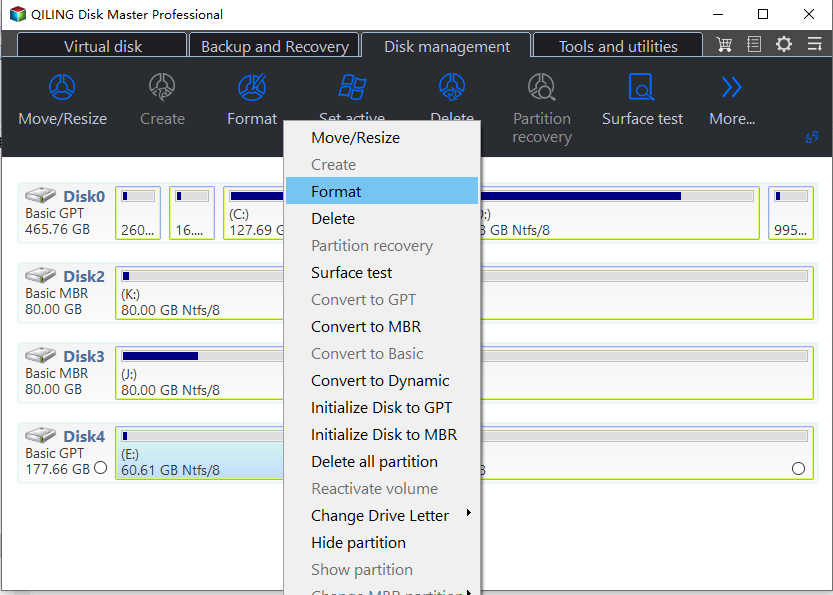
Qiling Disk Master Professional allows users to easily format a RAW drive to FAT32 using a graphical user interface. To do this, users can right-click the RAW drive, select "Format Partition", specify the partition information, and then click "Apply" and "Proceed" to complete the operation. This process is designed to be user-friendly and straightforward.
Conclusion
To convert a RAW partition to FAT32 using CMD, you can use Windows built-in utilities or third-party tools like Qiling Disk Master. This tool can help change the partition file system from RAW to FAT32, and also format a USB drive to exFAT or convert a system disk to GPT without losing data.
Related Articles
- Convert Logical Partition to Primary
Qiling Disk Master can help you to convert a logical partition to primary or set primary partition in Windows without any efforts. - Convert Basic Disk to Dynamic |When and How?
Learn how to Convert Basic Disk to Dynamic |When and How with clear steps, key checks, and practical tips. - How to Recover and Repair USB Drive/SD Card Partition in 2022
Here, you can find a simple solution to repair a damaged USB partition. Additionally, Qiling partition recovery software can help recover, undelete, or unformat lost data from USB drives. - What Is Format SD Card, Everything You Are Concerned About
This guide explains What Is Format SD Card, Everything You Are Concerned About with clear steps, key checks, and practical tips. - Solved 2022: Unable to Recover Your PC. The System is Too Small
When an error message appears saying "Unable to recover your PC. The system is too small", Fortunately, there are 4 potential solutions to this issue that can be found on this page. - Here's What to Do With Unallocated Space on SSD After Cloning
This guide explains Here's What to Do With Unallocated Space on SSD After Cloning with clear steps, key checks, and practical tips.
Products
Articles & Tutorials
- Data Recovery
- Data Backup
- File Recovery
- File Backup
- File synchronize
- System Backup and Restore
- Disk and Partition Clone
- Technical articles
- Disk Master Help
- Windows Deleted File and Disk Recovery Tutorials
- Windows File and Data Recovery Tutorials
- More Windows Tutorials for Install, Security, Files, and PC Tips
- Windows Boot, Repair, and Recovery Environment Tutorials
- Windows Backup Tutorials
- Windows Restore Tutorials
- Windows Clone and Migration Tutorials
- Windows Server Backup, Recovery, and Management Tutorials
- Windows Disk, Partition, and Storage Management Tutorials