FAT32 Partition Size Limit Explained
FAT32 is widely compatible, but its limits often cause confusion. Windows may not format a large drive as FAT32, and FAT32 cannot store a single file larger than 4GB.
Understand the problem
The best file system depends on where the drive will be used. FAT32 is useful for older devices, exFAT suits large removable storage, and NTFS is stronger for Windows-only internal or external drives.
- Confirm the target disk, partition, drive letter, file system, and capacity before changing anything.
- Back up or recover important files before formatting, deleting, resizing, converting, or reinstalling Windows.
- For boot-related repairs, check BIOS or UEFI mode, boot order, and disk style before editing system partitions.
Use Windows built-in tools
Choose the file system based on use.
- Use FAT32 for older devices that require it.
- Use exFAT for large files on USB drives or SD cards.
- Use NTFS for Windows system, backup, and permission-heavy storage.
- Back up files before formatting between file systems.
- Test the formatted drive on the target device before relying on it.
Use Qiling tools for guided steps
 Qiling Disk Master
Format a partition with the file system required by the target device.
Function. Format the target partition or removable drive with the needed file system
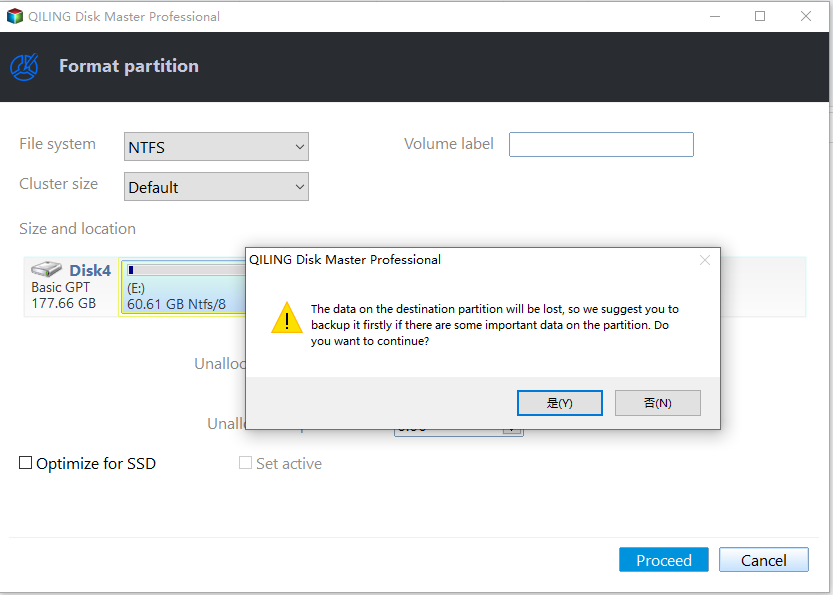
Step 1. Connect the target partition or removable drive and make sure Windows can detect it. Back up recoverable files first because formatting removes existing data.
Step 2. Open Qiling Disk Master. Right-click the partition on the target partition or removable drive and choose Format.
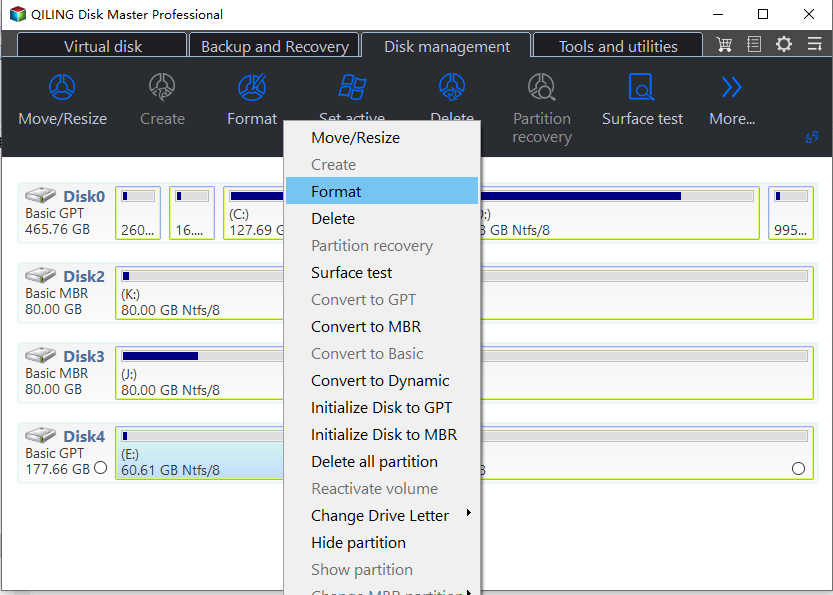
Step 3. Enter a clear partition label, choose FAT32 as the file system, and keep the default cluster size unless you have a specific requirement.
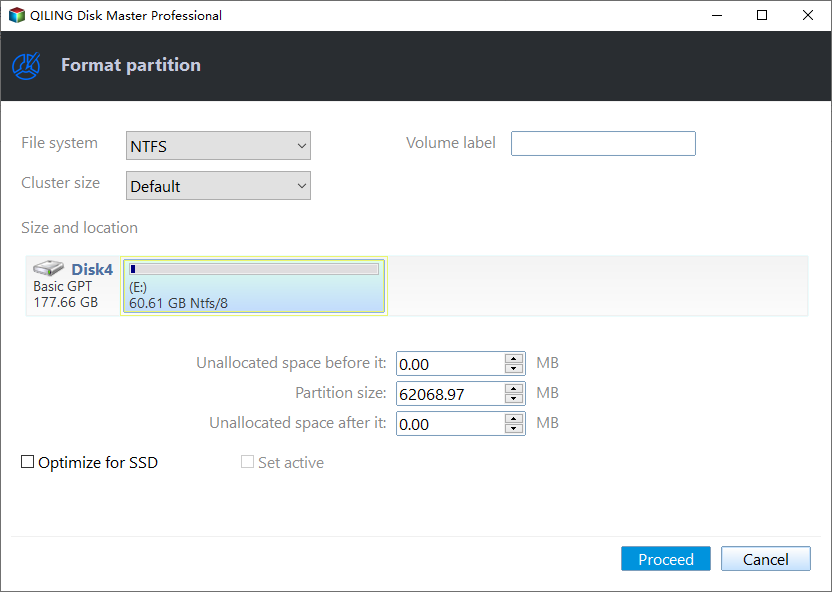
Step 4. Confirm the preview. If the correct partition is selected, click Proceed to apply the format operation.
Step 5. After formatting, reconnect the device and copy a small test file to confirm that Windows and the target device can read it.
Check the result
Check Properties to confirm the file system. Copy a representative file and test it on the device that requires FAT32.
Related Articles
- The Volume Is Too Big for FAT32
Fix FAT32 formatting limits when Windows refuses to format a large volume. - FAT32 Option Not Available
Understand why FAT32 is missing and how to choose the right format option. - SSD NTFS or exFAT: Which File System Should You Choose
Choose NTFS or exFAT for an SSD based on Windows use, portability, file size, permissions, and backup needs.
Products
Articles & Tutorials
- Data Recovery
- Data Backup
- File Recovery
- File Backup
- File synchronize
- System Backup and Restore
- Disk and Partition Clone
- Technical articles
- Disk Master Help
- Windows Deleted File and Disk Recovery Tutorials
- Windows File and Data Recovery Tutorials
- More Windows Tutorials for Install, Security, Files, and PC Tips
- Windows Boot, Repair, and Recovery Environment Tutorials
- Windows Backup Tutorials
- Windows Restore Tutorials
- Windows Clone and Migration Tutorials
- Windows Server Backup, Recovery, and Management Tutorials
- Windows Disk, Partition, and Storage Management Tutorials