2 Ways: Upgrade RAID 5 Drives to Larger Capacity without Data Loss
How do I increase RAID 5 capacity?
You can increase RAID 5 capacity by extending the RAID 5 volume with existing free space or by adding a larger hard disk to the RAID 5 array. Before making changes, back up important data and confirm that the RAID status is healthy, because RAID operations can be affected by disk errors, power failure, or an interrupted rebuild.
Before upgrading RAID 5 disks, review RAID backup and clone options to protect the array.
About RAID 5 drive
RAID 5 is a common configuration that balances usable capacity, performance, and fault tolerance. It offers more usable storage than RAID 1 and can survive one disk failure by using distributed parity. To set up RAID 5 drives, a minimum of three hard disk drives is required.
The RAID 5 drive system distributes data and parity bits across multiple disks, making it highly tolerant of single-disk failures. When data is written, the operating system calculates the parity and writes it to the drive, allowing for seamless rebuilding in case of a failure. This redundancy enables the system to continue functioning even if one disk fails.
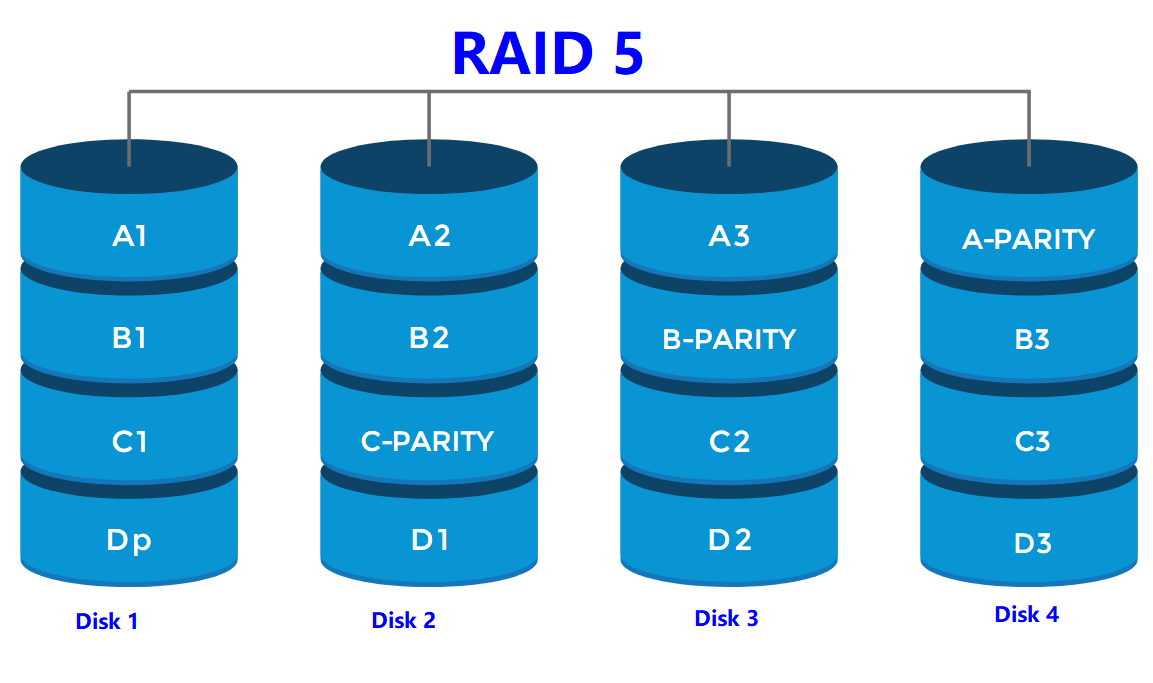
2 Ways: upgrade RAID 5 drives to larger capacity without data loss
As data grows, RAID 5 space can be gradually consumed, making it necessary to increase RAID disk space. Qiling Disk Master Server includes a professional dynamic disk manager for Windows PC and Server users, making it easier to manage and expand RAID disk space.
You can upgrade RAID 5 drives to a larger capacity by extending the RAID 5 volume with available free space or adding another hard disk. These methods are designed to keep existing data, but a backup is still recommended before resizing RAID volumes.
Way 1. Upgrade RAID drive with existing free space
If there's free space on the dynamic disk, you can use it to expand the RAID 5 volume, regardless of whether it's adjacent or not. Alternatively, you can shrink the dynamic volume to create the necessary space.
1. Run Qiling Disk Master Server, right-click the target disk, and choose "Dynamic Disk Manager" to manage dynamic disks.
2. To resize a RAID-5 volume, right-click on one of the volume slices and select the "Resize/Move Volume" option. This will allow you to adjust the size of the volume.
3. Drag the RAID 5 drive to increase its space using the unallocated space, then click "OK" in the pop-out window.
4. To expand a RAID 5 volume, click on the "Commit" button on the toolbar after previewing the changes.
Way 2. Upgrade RAID 5 with a larger hard disk
If there's no free space on other virtual drives in a RAID 5 array, you can add a larger hard drive to the array. This will show as unallocated space at the end of the array, allowing you to extend the RAID 5 with the new space. Before doing this, ensure the new disk is converted to a dynamic disk.
1. Launch Qiling dynamic disk manager. Click "Add Drive to RAID".
2. Select the RAID 5 volume you want to expand in the new window, then click "Next".
3. To add a new disk to a RAID 5 array, first tick the new disk in the list of available disks. Then, click "Finish" to complete the process.
4. Click "Commit" to execute the pending operation.
Summary
Upgrading RAID 5 drives to larger capacity without data loss is achievable in Windows PCs and Servers when the RAID status is healthy and the operation is completed correctly. The recommended dynamic disk manager also supports removing drives from RAID, extending dynamic system volumes, and extending mirrored volumes. For Enterprise users, Qiling Disk Master Unlimited Edition is recommended for unlimited usage within one company.
Related Articles
- How to Move Windows 11 to Another Drive | Ultimate Guide🔥
Learn how to Move Windows 11 to Another Drive | Ultimate Guide🔥 with clear steps, key checks, and practical tips. - 5 Methods to Fix Bootrec /Fixboot Access Is Denied Windows 11
This guide explains 5 Methods to Fix Bootrec /Fixboot Access Is Denied Windows 11 with clear steps, key checks, and practical tips. - Guide on Checking Disk Speed in Windows 10 Using CMD [2024 Tutorial]
Protecting your data requires that you keep tabs on your SSD's performance. This article explains how to check disk speed windows 10 cmd. - Forgot BitLocker Password: How to Recover?
This guide explains Forgot BitLocker Password: How to Recover with clear steps, key checks, and practical tips. - How to Wipe Hard Drive in Windows 11 (Get Your Answer)
To properly dispose of a hard drive, it's essential to wipe all data to prevent recovery. This can be achieved in Windows 11 using various methods, including built-in software or professional software, which will be guided in this post. - 3 Reliable Ways to Wipe SSD on Windows 11
We bring you a solid method to wipe SSD Windows 11 securely without any trouble. Vanish your data now by following this link.
Products
Articles & Tutorials
- Data Recovery
- Data Backup
- File Recovery
- File Backup
- File synchronize
- System Backup and Restore
- Disk and Partition Clone
- Technical articles
- Disk Master Help
- Windows Deleted File and Disk Recovery Tutorials
- Windows File and Data Recovery Tutorials
- More Windows Tutorials for Install, Security, Files, and PC Tips
- Windows Boot, Repair, and Recovery Environment Tutorials
- Windows Backup Tutorials
- Windows Restore Tutorials
- Windows Clone and Migration Tutorials
- Windows Server Backup, Recovery, and Management Tutorials
- Windows Disk, Partition, and Storage Management Tutorials