Backup GPT Disk Partition for All Windows PCs (Worry-Free)
What Is GPT Disk?
GPT, or GUID Partition Table, is a standard for the layout of the partition table on a physical hard disk, using globally unique identifiers (GUID). It offers advantages over the traditional Master Boot Record (MBR) method, including improved support for large storage devices and better data integrity.
- Arbitrary number of partitions The GPT partition table has the advantage of being able to store more partitions than the MBR, with space for defining 128 partitions by default. However, if a user needs to define more partitions, they can allocate additional space to the partition table, a feature currently only supported by the GDISK tool. This eliminates the need for extended and logical partitions, making it a more efficient and flexible option.
- Uses 64-bit Logical Block Address (LBA) - A method of addressing sectors on a disk drive using a 64-bit number, allowing for a maximum addressable disk size of 2 ZiB (Zettabytes), which is roughly 2^64 bytes.
- Stores a backup header and partition table at the end of the disk - GPT maintains a backup copy of the partition table header and partition entries at the end of the disk, which can be used to recover from corruption in case the primary header and partition table are damaged.
- CRC32 checksums To detect errors and corruption of the header and partition table, you can use a combination of checksums and validation checks. The header and partition table are critical components of a disk's file system, and corruption can render the disk unreadable or cause data loss.
GPT disk refers to a type of disk created with the GUID Partition Table (GPT) layout, which allows for larger disk space (larger than 2TB) and the creation of up to 128 primary partitions. This type of disk is often used for NVMe SSDs, which are known for their fast reading and writing speeds.
Potential backup problems you may encounter
Backing up a GPT disk is a good habit for users to protect their system and data, but some users encounter issues with doing so. We've collected some common problems users face when trying to backup a GPT disk.
★ OS disk in Backup uses GPT Disk. This may cause boot issues on BIOS Systems.
This issue may be caused by a mismatch between the disk partition style and the boot mode, with GPT disks typically using UEFI boot mode and MBR disks using Legacy BIOS boot mode.
To avoid issues when restoring a backup image from a GPT disk to an MBR disk, it's essential to ensure that the target disk has the same partition style as the backup image was created on. This consistency in partition style, either GPT or MBR, is crucial for a successful restoration and booting of the system.
★ Backup GPT corruption detected on disk GUI.
The root cause of the issue is a detection of stale data on the drive from previous use or partition located in the area where the GPT partition is located, which can occasionally be from the manufacture drive. To resolve this, you'll need to fully initialize the drive instead of using the fast initialization option.
★ HDD GPT is valid and is different than backup GPT.
Upgrading to Windows 11 on an HP computer may result in a GPT table protection issue due to enabled BIOS settings. This causes differences between the backup GPT and the HDD GPT, prompting a selection to resolve the issue. By choosing option 3 for no action and then option 1 to overwrite the backup GPT with the HDD GPT, the problem can be resolved.
To avoid issues when backing up a GPT disk, it's recommended to perform a full format before backing up. For disks with different partition styles, using a professional backup and restore software is necessary to ensure a smooth process. Such software can help mitigate potential problems and ensure a successful backup.
Best Free GPT Disk Backup Software You Need
Qiling Disk Master Standard is a software that allows you to backup and restore GPT disk partitions without boot issues, even if the target disk has a different partition style. It is a free backup software compatible with Windows 11, 10, 8.1, 8, 7, Vista, and XP. It provides a range of backup solutions.
- There are four types of backups available: System Backup, Disk Backup, Partition Backup, and File Backup. You can choose the type of backup based on your needs, such as backing up the entire disk or specific files.
- To automate the backup of changed data, utilize the schedule backup feature, which typically defaults to incremental backup, saving only modified files.
- The program uses VSS technology by default, allowing you to work on your computer while backing up data.
- Qiling Disk Master supports backing up GPT/UEFI disk and MBR/Legacy disk, as well as backing up USB flash drives, SD cards, memory cards, and other storage devices.
Download Qiling Disk Master now to have a try!
The free version of Qiling Disk Master supports Windows XP, Vista, 7, 8, 8.1, 10, and 11 operating systems, while server users may find Qiling Disk Master Server more suitable.
How to Backup a GPT Disk Partition with Qiling Disk Master
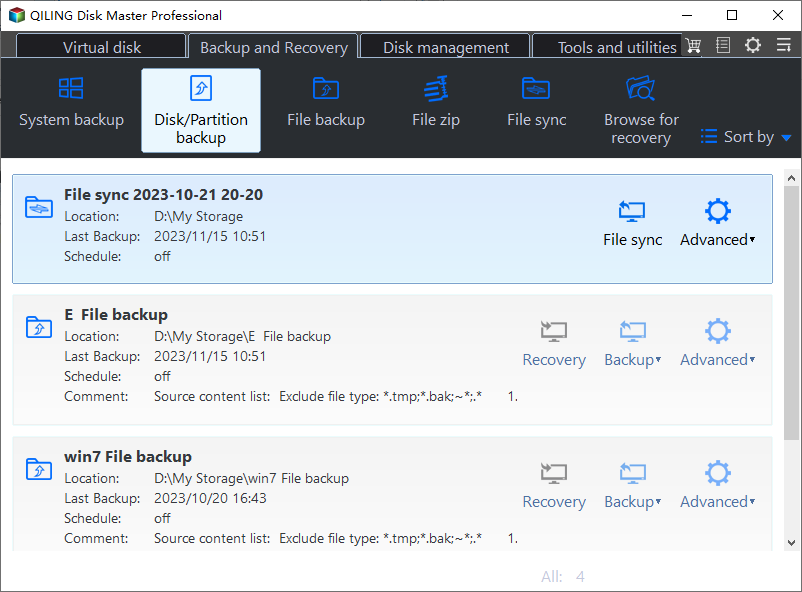
1. Launch Qiling Disk Master, click the Backup tab, then choose either Disk Backup or Partition Backup depending on your needs.
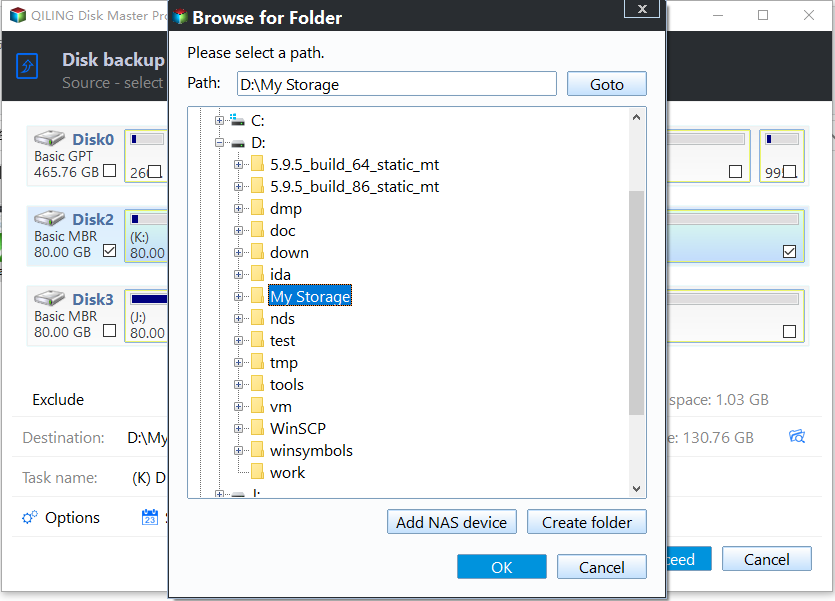
2. In the Disk Backup interface, we can enter a task name to distinguish the backup from others, then select the GPT disk and choose a destination path to store the backup image.
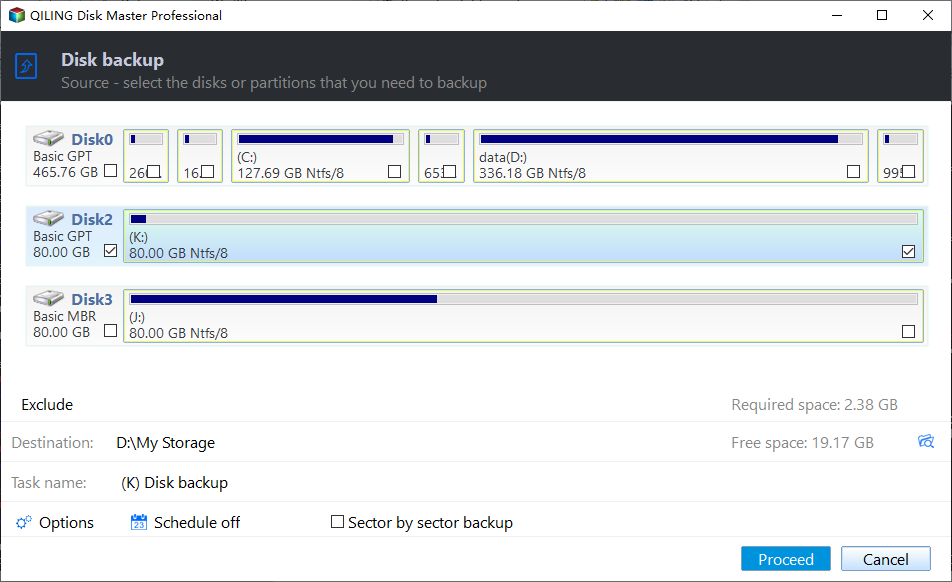
If you have both MBR and GPT disks, the disk style will be displayed at the leftmost of each disk.
Notes:
- To prevent potential boot issues, ensure the target disk for storing the backup image is also a GPT disk.
- If the target disk is an MBR disk, you need to convert it to a GPT disk to take advantage of its features.
- Besides GPT/MBR disk, this software supports backing up to a NAS device, network share and external hard drive, etc.
3. To automatically perform the settings and prevent the backup disk from becoming full, you can configure the backup settings to your liking. This can include setting a specific backup location, choosing which files to include or exclude, and setting a maximum size for the backup. Once you've made these settings, click "Proceed" to begin the backup process for your GPT disk in Windows 10.
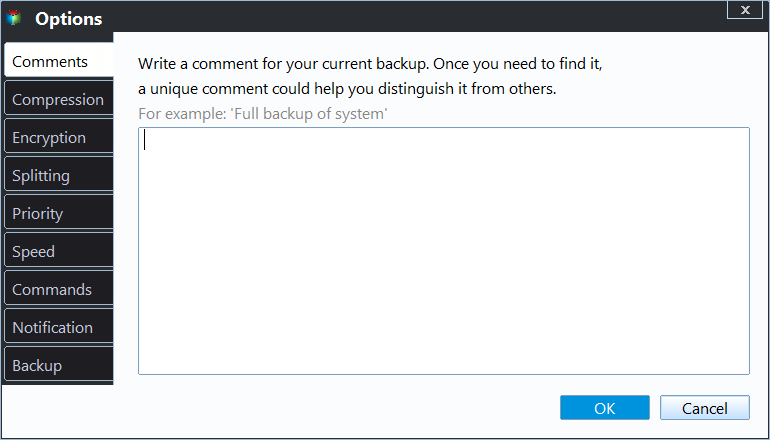
- Options: You can add a comment for the backup, enable email notification, and choose a compression level for the image file, among other settings, to customize the backup process.
- Schedule Backup: You are allowed to create a daily/weekly/monthly backup, with the last two features available on the professional version.
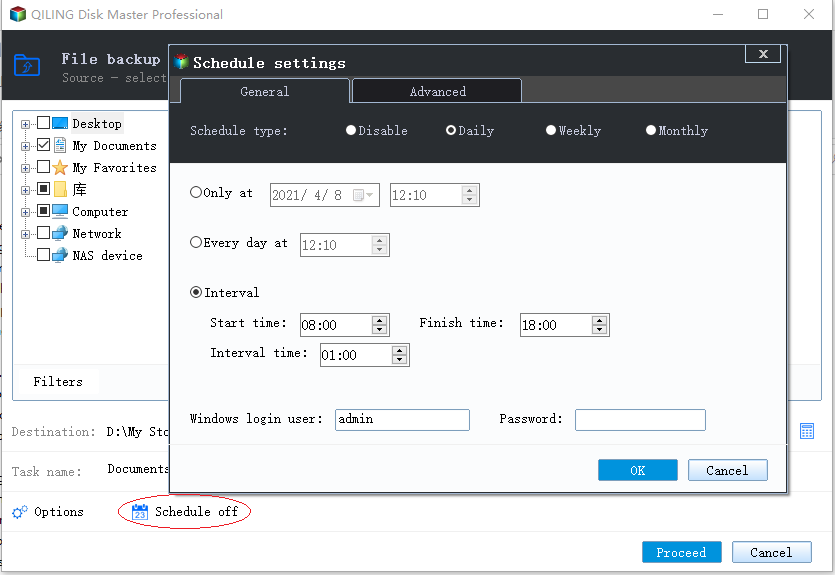
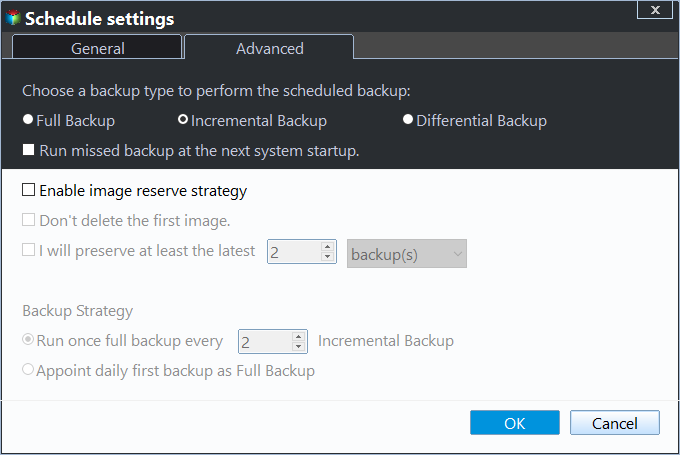
- Backup Scheme: you can choose the backup method and cleanup methods here.
The full backup option can fill up your backup disk, but incremental and differential backups can help alleviate this issue. However, incremental backups are more demanding for restoration, making differential backups a better option, especially on the professional version.
After upgrading, you can enjoy automatic backup cleanup methods to let the program delete obsolete backups for you, which is the most thorough solution for low disk space.
Summary
You can easily backup a GPT disk in Windows 10 or other systems without boot issues by using a professional backup and restore software. To avoid boot issues, the software, such as Qiling Disk Master, will keep the source disk partition style after restoring. If you want to enjoy the advantages of GPT disk, you can convert the target disk to GPT disk. For protecting unlimited PCs and servers, you can try Qiling Disk Master Techncian or TechPlus edition.
Related Articles
- Best Free Windows 10 Clone Software to Migrate OS and Data
If you are looking for the best free clone software for Windows 10 to migrate OS and data from HDD to SSD, Qiling Disk Master Standard will be an ideal choice. The easy-to-use interface is acclaimed by a lot of users. - Three Reliable Hard Disk Defragment Software for Windows
You can find three hard disk defragment software for Windows 10, 8, 7 from this article. Including built-in tools in Windows and a third-party software. - How to Create Windows 10 System Repair Disc Step-by-step?
Learn how to Create Windows 10 System Repair Disc Step-by-step with clear steps, key checks, and practical tips. - [Full Guide] How to Partition SSD for Windows 10 Install
Learn how to Partition SSD for Windows 10 Install with clear steps, key checks, and practical tips. - Best Windows Server 2012 R2 Backup Software
In this article, you will get the best 2 Windows Server 2012 R2 backup software & practices to backup Windows Server 2012 R2 to external hard drive effortlessly.
Products
Articles & Tutorials
- Data Recovery
- Data Backup
- File Recovery
- File Backup
- File synchronize
- System Backup and Restore
- Disk and Partition Clone
- Technical articles
- Disk Master Help
- Windows Deleted File and Disk Recovery Tutorials
- Windows File and Data Recovery Tutorials
- More Windows Tutorials for Install, Security, Files, and PC Tips
- Windows Boot, Repair, and Recovery Environment Tutorials
- Windows Backup Tutorials
- Windows Restore Tutorials
- Windows Clone and Migration Tutorials
- Windows Server Backup, Recovery, and Management Tutorials
- Windows Disk, Partition, and Storage Management Tutorials