Best PC Cleaner And Optimizer for Windows 10 & 11
What are PC Cleaners?
PC cleaners are tools that help Windows users improve performance by removing unnecessary files, caches, cookies, and other junk data. Some cleaners also include disk optimization or startup management features.
How to choose a reliable PC cleaner for Windows PC?
If your Windows PC is experiencing frequent system crashes, slow startup times, or other common issues, it's time to find a reliable PC cleaner and optimizer. With numerous products available, it can be challenging to choose a suitable disk cleaner or advanced system optimizer. However, with the right one, you can improve your PC's performance, stability, and overall health.
To find a PC optimizer, first clarify what you need: a free or paid tool, basic cleanup or advanced optimization, and whether you also need disk management or game performance features. This helps narrow your options and avoids installing software that does not match your needs.
Once you've decided to clean and optimize your PC, you can find the best software to do the job.
Free download: Best PC cleaner and optimizer for Windows 10 & 11
If you need a cleaning feature and other disk management functions, consider using Qiling Disk Master Standard, a free disk and partition manager for Windows 11/10/8/7/XP users, to help you optimize and organize your device.
The "PC Cleaner" feature scans your disks and system to remove all junk files, allowing users to customize which types of files to delete. It can clean all temp files, system caches, and RAM cache with just one click on the "Clean All" button.
This tool not only serves as a disk cleaner, but also offers various practical functions to optimize your Windows, including cloning disks, testing disk speeds, defragmenting HDDs, merging partitions, and converting data disks between MBR and GPT formats. With one tool, you can accomplish multiple tasks for PC maintenance.
By running the Disk Cleanup tool, your PC will automatically remove all unnecessary and redundant junk files, freeing up valuable space on your hard drive and improving its overall performance.
Further reading: Advanced system optimizer—Qiling Disk Master Professional
To maintain a computer's performance for long use, especially for heavy users who frequently test and develop new products, basic maintenance is not sufficient. For these users, we recommend the Professional Edition of Qiling Disk Master, which provides more comprehensive features to keep the PC in a stable and nice condition.
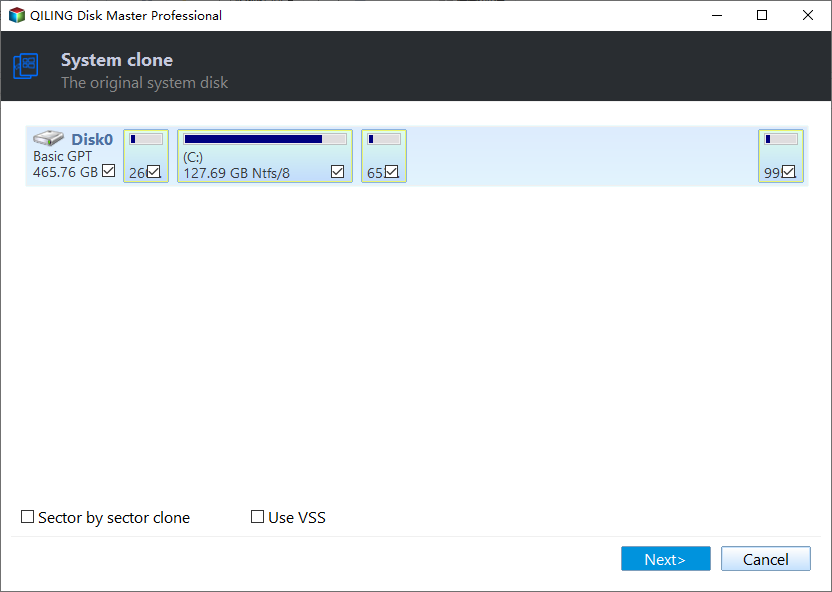
The Professional Edition allows users to perform more advanced management tasks, including cloning system disks between MBR and GPT disks or converting system disks between these two partition styles.
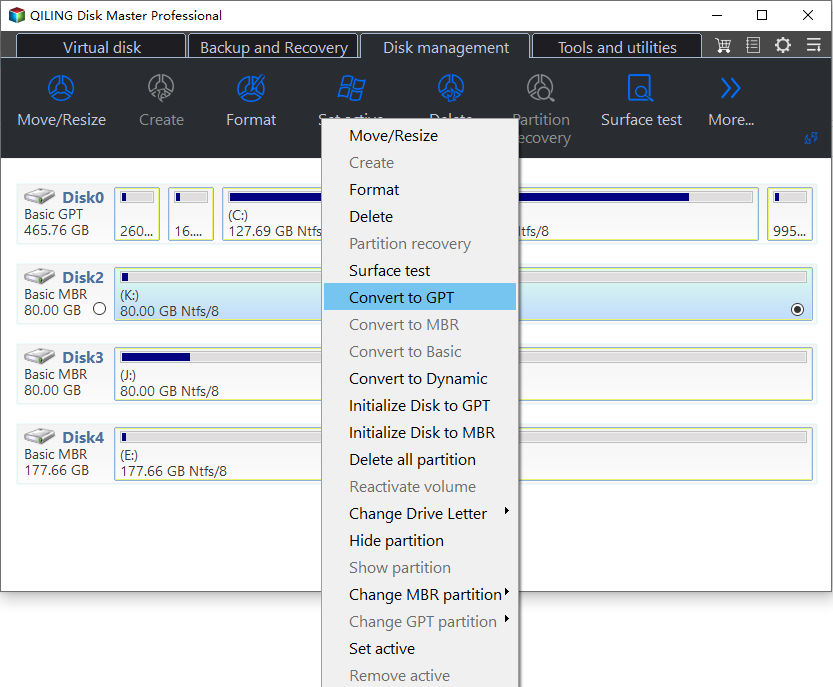
If your C drive is almost running out of space, you can use a tool to allocate free space from another drive to your C drive, or move some installed programs or games to another disk to release more space for the system.
Users who want to run Windows 11 after the 22H2 update can migrate their system to a new disk using the "Migrate OS to SSD" feature, saving time and preserving customized settings.
Final lines
Qiling Disk Master is a handy Windows optimizer with practical cleanup and disk management functions. A Server Edition is also available for Windows Server 2022/2019/2016/2012(R2)/2008(R2)/2003.
Related Articles
- How to Make a Bootable Disk Wipe Before Selling or Abandoning PC?
Learn how to Make a Bootable Disk Wipe Before Selling or Abandoning PC with clear steps, key checks, and practical tips. - How to Download Windows 11 23H2 Update from Microsoft✅
Recently, Microsoft released the Windows 11 23H2 version, and many users wonder if they can get this update. This post contains a full guide on how to download Windows 11 23H2 Update. - Solved: Ender 3 Not Reading SD Card [Quick Fixes]
If your Ender 3 cannot read an SD card, follow quick troubleshooting steps to check the card, format, files, and printer settings. - How to Format EFI Partition in Windows 11/10? [Your Guide Here 2024]
Formatting the EFI partition may cause boot problems, so only do it when necessary, such as during a Windows reinstall. Back up important data first and use a reliable tool. - Fixed: Boot Drive Not Showing Up in BIOS | 2024 Best Tips🔥
Fix a boot drive that does not appear in BIOS by checking connection, boot mode, disk status, and repair options. - How to Boot from External SSD on Windows 10/11
If you're looking for a solution to boot from an external SSD, this guide provides a complete walkthrough on how to boot Windows 10/11 from an external SSD and use it as your primary boot drive. -
Wise Disk Cleaner for Windows 10
Clean Windows 10 more safely by reviewing cleanup targets and backing up key files.
Products
Articles & Tutorials
- Data Recovery
- Data Backup
- File Recovery
- File Backup
- File synchronize
- System Backup and Restore
- Disk and Partition Clone
- Technical articles
- Disk Master Help
- Windows Deleted File and Disk Recovery Tutorials
- Windows File and Data Recovery Tutorials
- More Windows Tutorials for Install, Security, Files, and PC Tips
- Windows Boot, Repair, and Recovery Environment Tutorials
- Windows Backup Tutorials
- Windows Restore Tutorials
- Windows Clone and Migration Tutorials
- Windows Server Backup, Recovery, and Management Tutorials
- Windows Disk, Partition, and Storage Management Tutorials