General, VHD and VHDX: What's the difference?
Choose a Windows ToGo system type
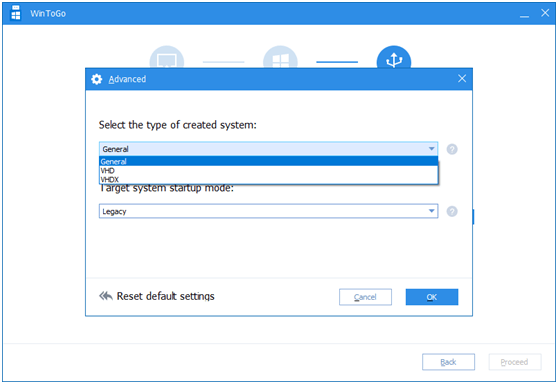
When using Windows ToGo to migrate Windows 10 to a USB device, you can choose from three system types: General, VHD, and VHDX.
Firstly, let's have a look at the directory structure comparison chart after using three different types (take Legacy boot mode as an example).
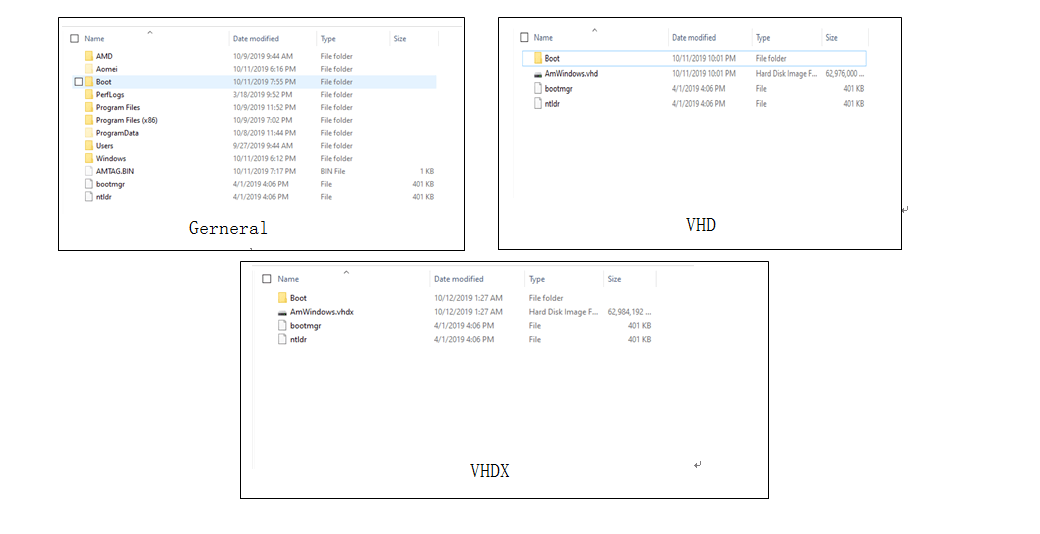
General, VHD, and VHDX differences
As can be seen from the above figure:
- General: The root directory of the C drive is presented on the partition of the USB device in a roughly similar way.
- VHD and VHDX file format: The two types of virtual hard disks (VHDs) created separately are named AmWindows.vhd and AmWindows.vhdx, each located in the root directory of the partition on the USB device.
- In Legacy mode, all types of installations will create a Boot folder, containing the bootmgr and ntdr files, in the root directory.
The three system types differ in the way they organize system files, which are stored in a way that is suitable for each type of system.
General:
The traditional method of creating a Windows installation media involves directly copying the file from the system disk (C drive) to a USB device, essentially replicating the C drive's structure on the local hard drive.
VHD type:
Microsoft's VHD (Virtual Hard Disk) is a virtual disk file format that allows users to create a virtual disk drive. To use VHD, you would create a virtual disk file, copy the necessary system files to it, and then boot the system from the virtual disk using a boot loader.
VHDX type:
Microsoft introduced VHDX, the next generation of VHD, in Windows Server 2012, which can support up to 64TB, a significant increase from VHD's 2TB limit, while maintaining the same production process.
The three types are not much different in actual experience.
The test of disk performance for these three types revealed that there is essentially no difference in speed.
You can choose one type based on your personal preferences.
Notes:
- The VHDX file format is currently only available when selecting the "Create Windows ToGo for personal computer" option.
- VHDX is only supported by Windows 8 and later, while VHD is only supported by Windows 7 and later, excluding XP.
Related Articles
- Two Ways to Make SanDisk USB Flash Drive Bootable
Learn how to make your SanDisk USB flash drive like Extreme and Cruzer bootable step by step in Windows 7/10/8.1/8 using bootable USB maker software and DiskPart. - Best Software to Create Bootable USB for Windows and Mac
The best software to create bootable USB-Qiling Disk Master enables you to create a portable system device for Windows or Mac computer. - How to Use WintoUSB Tool to create a portable Windows OS drive?
Win to USB tool allows you to run Windows 10/8/7 on any other PC using a USB flash drive. This post will tell you how to perform that. - Step-by-Step Guide: How to Run Windows 10 from USB Drive
This guide explains Step-by-Step Guide: How to Run Windows 10 from USB Drive with clear steps, key checks, and practical tips. - Create Windows 10/8/8.1/7 Bootable USB with Qiling Disk Master
Windows To Go Creator can help you make a bootabe USB from Windows 11/10/8/8.1/7 ISO/ESD file. In other words, it can install Windows 10/8/8.1/7 onto a USB flash drive. After that, you can boot Windows 10/8/8.1/7 from it anywhere and anytime. - General, VHD and VHDX: What's the difference?
This guide explains General, VHD and VHDX: What's the difference with clear steps, key checks, and practical tips.
Products
Articles & Tutorials
- Data Recovery
- Data Backup
- File Recovery
- File Backup
- File synchronize
- System Backup and Restore
- Disk and Partition Clone
- Technical articles
- Disk Master Help
- Windows Deleted File and Disk Recovery Tutorials
- Windows File and Data Recovery Tutorials
- More Windows Tutorials for Install, Security, Files, and PC Tips
- Windows Boot, Repair, and Recovery Environment Tutorials
- Windows Backup Tutorials
- Windows Restore Tutorials
- Windows Clone and Migration Tutorials
- Windows Server Backup, Recovery, and Management Tutorials
- Windows Disk, Partition, and Storage Management Tutorials