Cannot Convert Partition Between Primary and Logical
Why the conversion option is unavailable
When you try to convert a partition between primary and logical in Qiling Disk Master, the conversion option may be greyed out. This usually means the selected partition or disk layout does not meet the requirements for conversion. The restriction helps prevent unsafe changes to the partition table.
If partition layout needs broader changes, see how to repartition a hard drive without losing data.
Common cases and solutions
The following cases explain why this may occur.
A partition marked as "system" cannot be converted to a logical partition because it contains files required to start Windows.
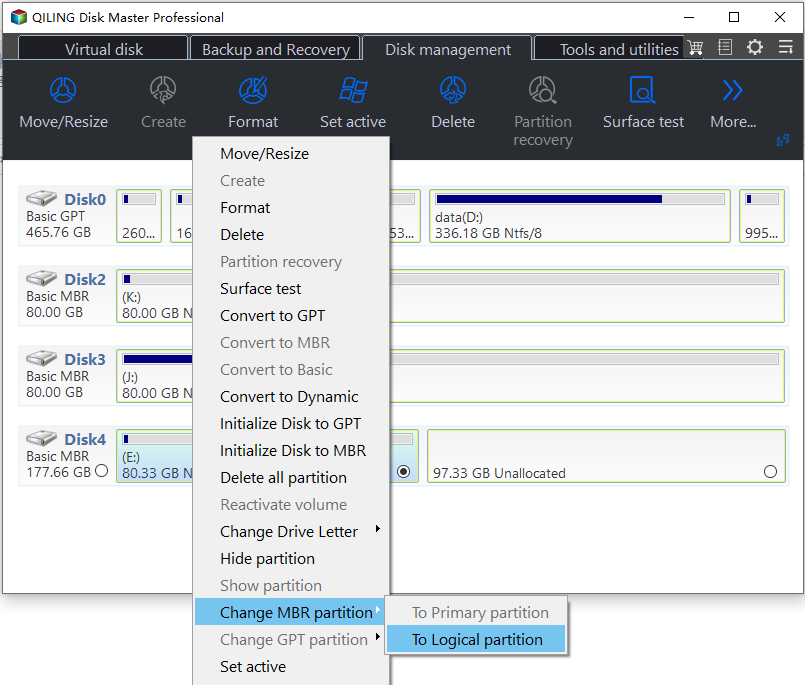
A partition on a GPT disk cannot be converted to a logical partition because GPT disks do not use logical partitions.
On an MBR disk, the number of primary partitions is limited. An MBR disk supports either 4 primary partitions or 3 primary partitions plus 1 extended partition that can contain logical partitions. If this limit would be exceeded, Qiling Disk Master will not allow the conversion.
If you still have any problem, please feel free to contact our Qiling Support Team.
Related Articles
- Qiling Partition Recovery Software Free Download Full Version Windows 10/11
This guide explains Qiling Partition Recovery Software Free Download Full Version Windows 10/11 with clear steps, key checks, and practical tips. - Is Your PC Slow to Shut Down? Try These Tips!
If your PC is slow to shut down, you're not alone. Many Windows users have reported that their computers are taking forever to shut down. Fortunately, there are a few steps that users can take to troubleshoot the problem and hopefully reduce the amount of time it takes for their PC to turn off. - How to Perform an SSD Health Check on Windows 11: Tips and Tricks for Maximizing
This article will tell you how to perform a through SSD health check in windows 11. Read this article and learn some useful tips! - Qiling Partition Master Full Version Free Download with Serial Code/Key
Qiling Partition Master offers partition management features for resizing, creating, formatting, and managing partitions more easily on Windows computers. - HP USB Disk Storage Format Tool Portable Free Download 🔎
The HP USB Format Tool Portable is a utility that allows users to format USB drives, and this article provides information on the tool, including how to download it for free. - Tutorial: Install a New Hard Drive on Windows 11 Safely
Adding a new hard drive to Windows 11/10 can expand storage capacity. Follow a safe step-by-step process to avoid data loss and keep the system stable.
Products
Articles & Tutorials
- Data Recovery
- Data Backup
- File Recovery
- File Backup
- File synchronize
- System Backup and Restore
- Disk and Partition Clone
- Technical articles
- Disk Master Help
- Windows Deleted File and Disk Recovery Tutorials
- Windows File and Data Recovery Tutorials
- More Windows Tutorials for Install, Security, Files, and PC Tips
- Windows Boot, Repair, and Recovery Environment Tutorials
- Windows Backup Tutorials
- Windows Restore Tutorials
- Windows Clone and Migration Tutorials
- Windows Server Backup, Recovery, and Management Tutorials
- Windows Disk, Partition, and Storage Management Tutorials