How to Merge C Drive with Unallocated Space When Free Space Is Less Than 2GB?
"The space of C drive is too small, and data keeps growing until it fills the drive. Less than 1GB of free space is left. When I use Qiling Disk Master to merge C drive with unallocated space, the unallocated space cannot be selected. How can I use "Merge Partition" in Qiling Disk Master to merge C drive with unallocated space when C drive has very little free space?"
If C drive remains full, see free up disk space in Windows 10.
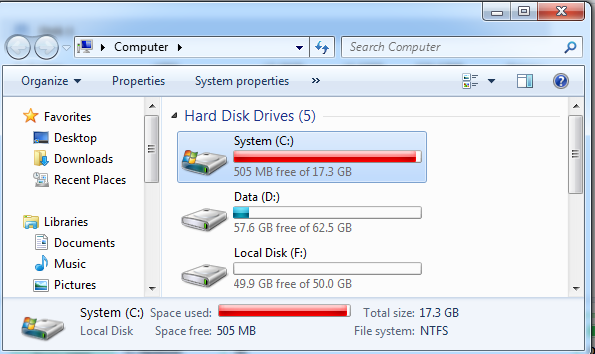
If your C drive has less than 2GB of free space, the "Merge Partitions" feature in Qiling Disk Master may not allow you to merge it with unallocated space. This restriction helps avoid file system errors and boot problems. Instead, you can use other partition resize methods to extend C drive safely.
How to merge C drive with unallocated space when free space is less than 2GB?
Because C drive has very little free space, first create enough adjacent unallocated space and then extend C drive step by step.
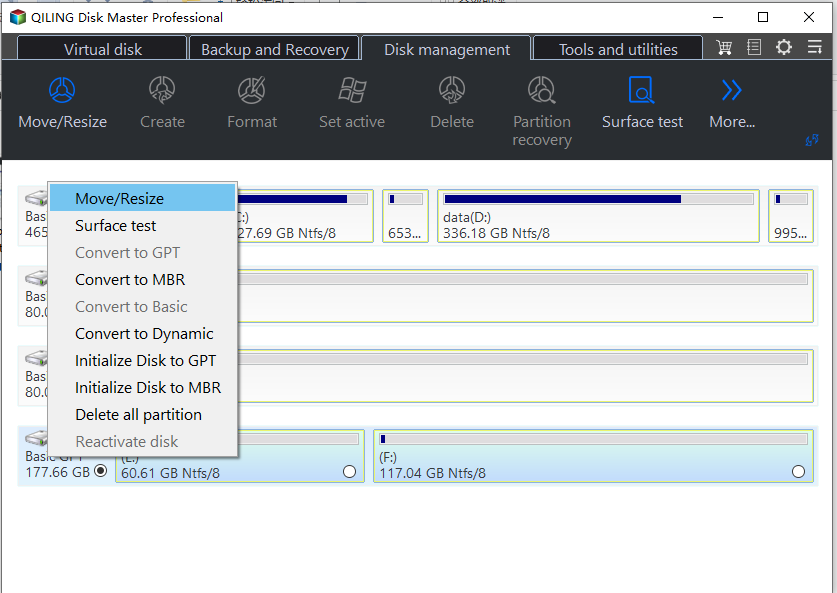
Step 1. After launching Qiling Disk Master, right-click the partition next to C drive on the main console, such as H drive, and choose "Resize/Move Partition".
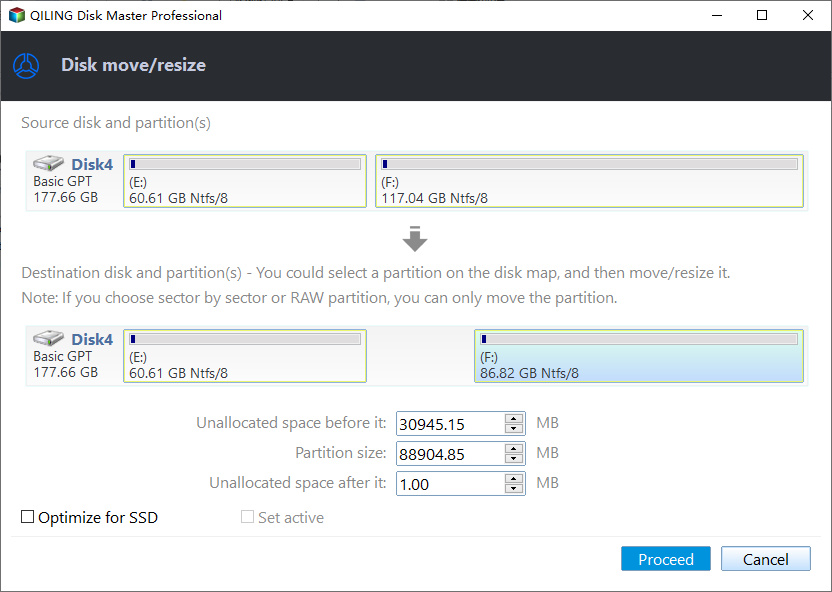
Step 2. Shrink the selected partition to create unallocated space, as shown in the picture below.
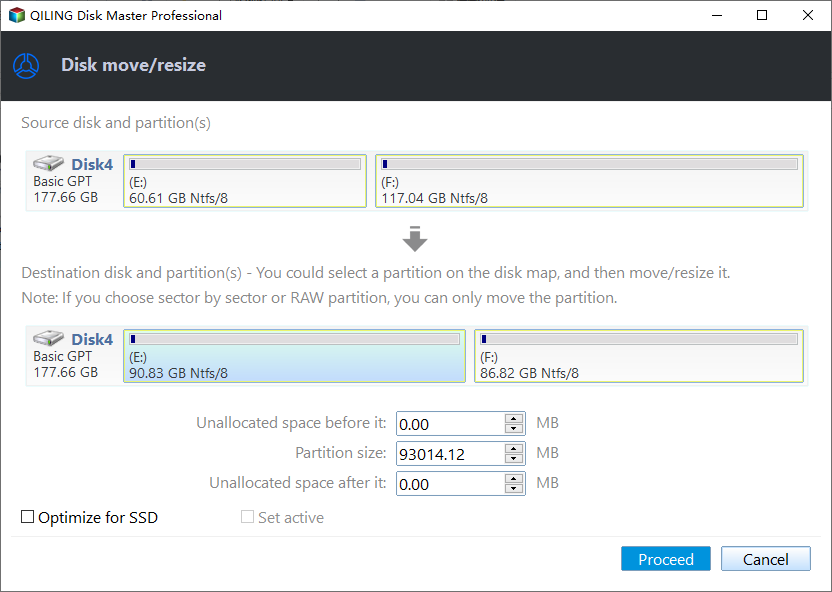
Step 3. Resize the E partition by moving its edge to the right, so the left side becomes unallocated space next to C drive.
Step 4. After the unallocated space becomes adjacent to C drive, use "Merge Partitions" or "Resize/Move Partition" to extend C drive.
Qiling Disk Master offers several functions to extend partitions. If one function is unavailable, the partition or disk may not meet that function's requirements. In this case, try another function to reach the same goal without data loss. The difference is usually the number of steps required.
Tips:
- Before resizing or merging partitions, defragment, check, and fix the partition to help ensure a smoother process.
- To process operations more quickly, click "Apply" after each step is completed instead of waiting to apply all operations at once.
- Do not cut off power, remove disks, or unplug USB devices while the software is processing operations.
Related Articles
- How to Transfer CS:GO to Another PC or Another Drive
Counter-Strike: Global Offensive transfer is not a problem anymore. Qiling Disk Master can help you transfer CS:GO or any other Steam game to another PC or drive easily. Stop making every effort to move CS:GO to another PC or drive, try Qiling game mover now. - How to Migrate Windows 7 to SSD in Two Easy Ways
Learn how to Migrate Windows 7 to SSD in Two Easy Ways with clear steps, key checks, and practical tips. - How to Undelete Windows 11 Partitions [Solved]
Learn how to Undelete Windows 11 Partitions with clear steps, key checks, and practical tips. - Fix USB Device Not Recognized in Windows 10
Learn how to Fix USB Device Not Recognized in Windows 10 with clear steps, key checks, and practical tips. - Lenovo SSD Upgrade: 2024 Step-by-Step Tutorial on How
This article introduces the process of upgrading the SSD in a Lenovo laptop. Discover step-by-step instructions and essential considerations for successfully performing a Lenovo SSD upgrade - How to Check M.2 SSD Performance [3 Efficient Ways]
This passage provides detailed information about M.2 SSD performance and offers a convenient tool to check M.2 performance, giving you a comprehensive understanding of its capabilities.
Products
Articles & Tutorials
- Data Recovery
- Data Backup
- File Recovery
- File Backup
- File synchronize
- System Backup and Restore
- Disk and Partition Clone
- Technical articles
- Disk Master Help
- Windows Deleted File and Disk Recovery Tutorials
- Windows File and Data Recovery Tutorials
- More Windows Tutorials for Install, Security, Files, and PC Tips
- Windows Boot, Repair, and Recovery Environment Tutorials
- Windows Backup Tutorials
- Windows Restore Tutorials
- Windows Clone and Migration Tutorials
- Windows Server Backup, Recovery, and Management Tutorials
- Windows Disk, Partition, and Storage Management Tutorials