Free Recover Videos from Memory Card Software Download for 2023
Quick Navigation:
- Your Effective Software for Recover Videos from Memory Card Free
- Part 1. How to Retrieve Videos from Memory Card with Free Software
- Part 2. Other Workable Ways to Recover Deleted Video from Memory Card for Free
- Method 1. Restore Deleted Videos in Memory Card from "Recently Deleted" Album
- Method 2. Retrieve Deleted Videos from Trash Bin on Mac
- Part 3. Tips to prevent photos and videos losing on memory card
To recover deleted videos from a memory card for free, try using a free data recovery software like Recuva or Deep Data Recovery Wizard, which can scan your memory card and recover deleted files. Alternatively, you can also use the built-in recovery features on your camera or phone to recover the deleted videos. If the files are not recoverable using these methods, it's possible that they may have been permanently deleted or corrupted. In that case, you may want to try contacting the manufacturer or a professional data recovery service for assistance.
If the video card was used in a camera or camcorder, this memory card video recovery guide provides a closely related workflow.
If you've accidentally deleted or lost videos from your memory card, you're not alone - many people wish to restore them for free. Fortunately, Qiling Free Data Recovery offers a solution, allowing you to recover deleted videos from your memory card at no cost. This software can be downloaded to help you find and retrieve your lost videos, making it a valuable tool for those looking to recover their memories for free.
Your Effective Software for Recover Videos from Memory Card Free
- You can use a video recovery software to recover all the videos from your memory card in different formats such as mp4, mov, wmv, etc. These software can scan your memory card and retrieve deleted, formatted or corrupted videos.
- The device supports various types of memory cards, including those used in Android phones and cameras, allowing for seamless integration and expansion of storage capacity.
- To recover video from an SD card, PC/laptop, or external drive, follow these simple steps: connect the device to your computer, download a data recovery software, select the drive to scan, choose the file type (video), and start the scan. The software will then search for and recover any recoverable video files.
- Free to restore up to 2GB videos from memory card.
Part 1. How to Retrieve Videos from Memory Card with Free Software
Using recovery software is the most efficient way to recover videos from a memory card. Since deleted files remain on the card until they're overwritten, recovery software can help retrieve lost videos without the need for manual searching. This approach is time-saving and reliable, and can be used to recover deleted videos from a memory card efficiently.
- Connect memory card with computer
- Install the Qiling Free Data Recovery
- Select videos to scan
- Select memory card to scan
- Recover memory card videos
To recover deleted videos from a memory card, connect the card to the computer you'll be using for the recovery process, which can be either a Windows PC or a Mac. Ensure the card is securely connected and remains connected throughout the recovery process. This will allow the memory card video recovery software, which has separate versions for Windows and Mac, to successfully recover the deleted videos.
To recover lost data from a memory card, download and install the free memory card recovery software on your Windows 11, 10, 7, or macOS computer. Note that the Windows version has a 2GB video recovery limit, while the Mac version only displays recoverable videos and requires an upgrade to the full version to retrieve them.
After launching the memory card video recovery software for PC, you can see a "get to setting" option, where you can deselect all file types except videos to save time while scanning.
To recover deleted videos, first, view the list of all hard drives and locate the memory card. Select it and click "Scan" to initiate the software's scan for lost or deleted videos on the memory card.
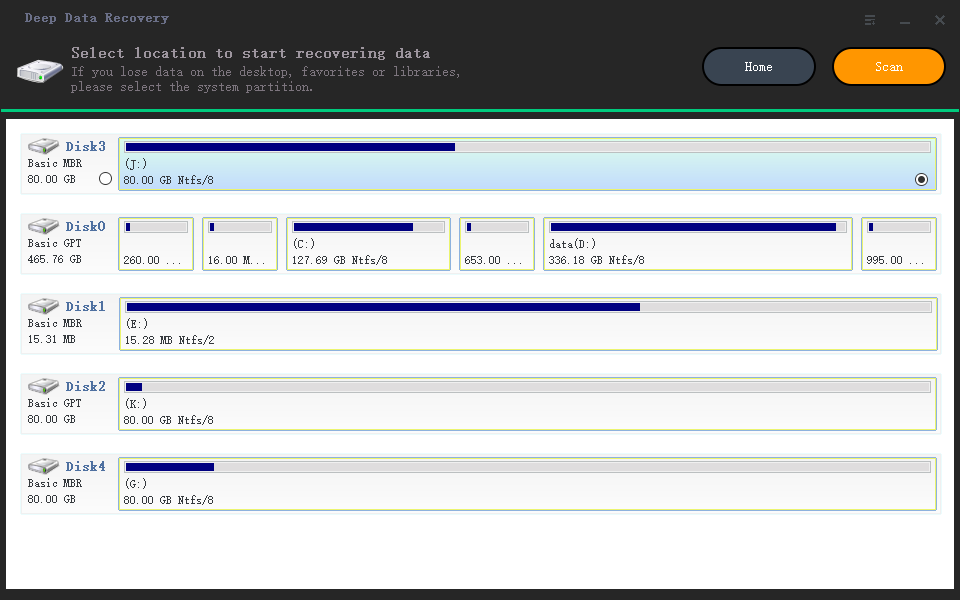
Wait for the scanning process to finish, then select and recover deleted videos from the memory card.
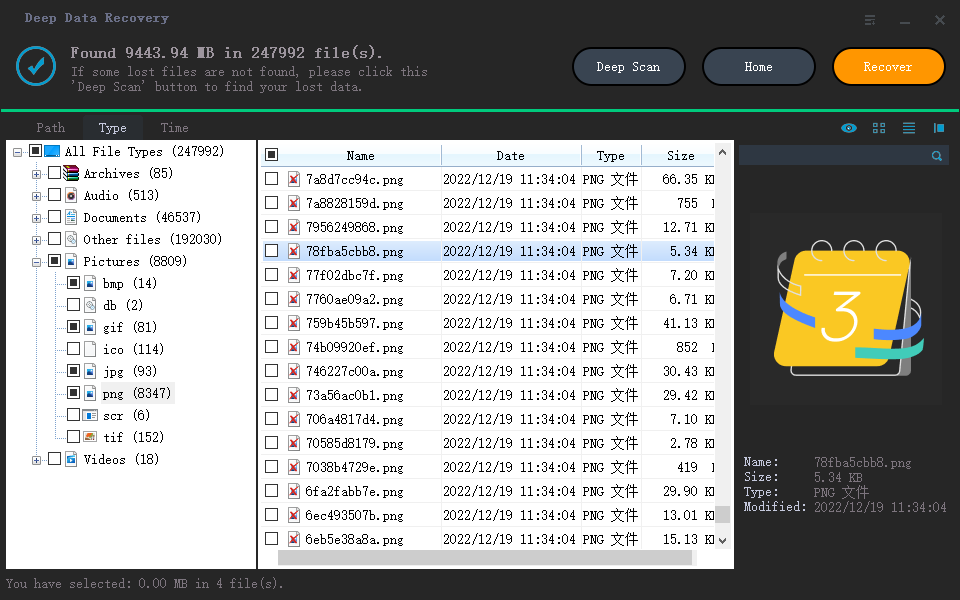
The result window also displays a "Deep Scan" feature, which is useful for recovering memory card videos that have lost file properties or had their file information partially erased after deletion. To find more videos, you can try a free video recovery software to scan the drive again.
Part 2. Other Workable Ways to Recover Deleted Video from Memory Card for Free
Some people have asked if it's possible to recover videos from a memory card without using software. While data recovery software is often the first option to consider, you can also try some alternative methods if the videos aren't crucial. You can attempt to recover them using other methods, but keep in mind that these methods may not be as effective as using software.
Method 1. Restore Deleted Videos in Memory Card from "Recently Deleted" Album
If you're trying to recover deleted video files from a memory card, the success of the method depends on where the card is - specifically, whether it's in an Android phone or tablet. If it's in an Android device, you can try looking for the deleted files in the "Recently Deleted" album, where deleted pictures and videos are temporarily stored.
To recover deleted videos on Android, open the Photos app, go to the "Recently Deleted" album, scroll down to find the deleted videos, select them, and click "Put Back".
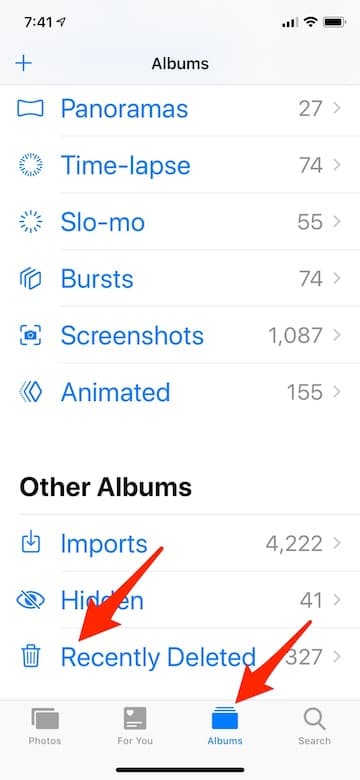
The "Recently Deleted" album only temporarily saves deleted pictures and videos, and they will be permanently removed after a short time. Go there immediately if you've lost videos from your memory card.
Some cameras have a "Recently Deleted" album where you can find deleted files. You can search for it on your camera to check the files there.
Method 2. Retrieve Deleted Videos from Trash Bin on Mac
Dealing with deleted videos on a Windows PC is different from a Mac. On a Windows PC, deleted files from a memory card don't end up in the recycle bin, making it seem like they're completely gone. In contrast, on a Mac, deleting videos from a memory card is more like moving them to the trash can, and they can often be recovered from there.
To recover deleted videos on a Mac, launch the Trash bin from the Dock, browse through the deleted files, find the desired videos, select them, and click "Put Back" to restore them.
Part 3. Tips to prevent photos and videos losing on memory card
To avoid photos and videos losing on memory card, you're supposed to regularly backup your data, use a reliable memory card and follow the manufacturer's instructions for usage and maintenance, and consider using a memory card reader or adapter to transfer data to a computer or other device for safekeeping. This can help prevent data loss due to deletion, formatting, corruption, or other issues.
- 1. To ensure your important videos and photos are safe, back them up regularly by copying them from your memory card to your computer, a cloud drive, or another storage location. This can be a time-consuming process, but using software like Qiling Disk Master can streamline the process and save time and storage space.
- 2. Don't insert memory cards into public computers as you can't be sure if they're infected with viruses, which could lead to data loss.
- 3. After using the memory card, make sure to properly eject it from your computer before unplugging it. This is an important step to prevent data corruption and ensure the memory card remains in good condition. Simply go to "Safely Remove Hardware" (Windows) or "Eject" (Mac), select the memory card, and click "Eject" to safely remove it.
- 4. Clean the memory card regularly to prevent dust from accumulating and causing problems.
Related Articles
- (Fixed)Windows Server Backup Keep Only One Copy
This guide explains (Fixed)Windows Server Backup Keep Only One Copy with clear steps, key checks, and practical tips. - 7 Easy Ways to Perform Windows Server C Drive Cleanup
The article is a full collection of how to perform Windows Server C drive cleanup in 7 ways and offers one upgrade offer of C drive for users. - How to Install Work Folders and Create Multiple Sync Shares
In this article, you are going to learn how to install work folders and create multiple sync shares in Server 2012 R2/2016/2019. The details are below. - How Much Does It Cost to Recover Data from a Hard Drive (2022)
This guide explains How Much Does It Cost to Recover Data from a Hard Drive (2022) with clear steps, key checks, and practical tips. - How to Recover Data from Dell Laptop Hard Drive
To recover data from a dead Dell laptop hard drive or a normal hard drive, follow the steps outlined in the guide. - How to Recover Deleted Files from NTFS Partition/Drive/External Hard Drive/Formatted NTFS Drive
Here are the guides for recovering deleted files from an NTFS partition, NTFS external hard drive, restoring files from a damaged, corrupted, or formatted NTFS disk or partition.
Products
Articles & Tutorials
- Data Recovery
- Data Backup
- File Recovery
- File Backup
- File synchronize
- System Backup and Restore
- Disk and Partition Clone
- Technical articles
- Disk Master Help
- Windows Deleted File and Disk Recovery Tutorials
- Windows File and Data Recovery Tutorials
- More Windows Tutorials for Install, Security, Files, and PC Tips
- Windows Boot, Repair, and Recovery Environment Tutorials
- Windows Backup Tutorials
- Windows Restore Tutorials
- Windows Clone and Migration Tutorials
- Windows Server Backup, Recovery, and Management Tutorials
- Windows Disk, Partition, and Storage Management Tutorials