How to Recover Deleted Photos from Sony Camera
Quick Navigation:
- Your Safe & Effective Sony Photo Recovery Software
- How to Recover Photos from Sony Camera on Windows or Mac?
Yesterday, my son was one year old. So we held a family party and we took a lot of photos. Later, when I was sorting through the photos, I found a lot of similar ones, so I was ready to delete them. However, due to my wrong operation, all photos were deleted. I am very worried that I will never find it again. Now I want to know if there is any way to help me recover deleted photos from Sony camera or Camera data recovery?
If the Sony camera stores photos on an SD card, this Sony SD card recovery software guide provides related recovery help.
The incorrect deletion of photos often causes them to disappear, a common issue that occurs almost daily. Before attempting Sony photo recovery, it's essential to identify the reasons behind the lost photos, which can be attributed to various factors.
- You accidentally deleted all your photos instead of just one unwanted picture.
- While transferring photos from my Sony camera to my computer, I encountered an error that resulted in the loss of the photos.
- There is an error for the camera and you have to do a formatting with the result of all photo lose.
- The Sony Cybershot Camera may have some pictures, but some of them are inaccessible, leading to a pop-up message stating that the photos do not exist.
If you've lost photos from your Sony camera, you can retrieve deleted pictures using a Sony Photo Recovery software. While there are many results for "photo recovery from camera" on Google, I recommend using Deep Data Recovery due to its effectiveness in recovering lost photos.
Your Safe & Effective Sony Photo Recovery Software
- The software supports multiple video and photo formats, eliminating compatibility concerns.
- It is easy-To recover Sony photos on Windows or Mac, you don't need to know any professional computer techniques. The process is straightforward and user-friendly, allowing anyone to easily retrieve their lost Sony photos.
- The software is standalone and works well, with the developer regularly updating it. If you encounter any issues with recovering deleted photos from a Sony camera, you can expect prompt assistance.
The best photo recovery software can solve all photo loss problems, such as deleting, formatting, or a drive displaying as RAW, as well as virus attacks. It allows you to recover up to 200MB of data from a Sony camera for free, a feature that is unique among Sony photo recovery tools, which typically require payment. You can download it to try and retrieve deleted pictures from your Sony camera.
How to Recover Photos from Sony Camera on Windows or Mac?
To use Deep Data Recovery for Sony photo recovery, you can follow these steps: First, download and install the software on your computer. Next, launch the program and select the drive or location where your Sony photos were stored.
- Download the Sony Photo Recovery Software
- Connect Sony Camera with Computer
- Select Sony Camera to Scan
- Preview and Recover Photos from Sony
To recover your lost data, click the download button to download the corresponding version of Deep Data Recovery, which is available for both Windows and Mac. Once downloaded, install it on your computer, and you'll be able to use it to recover your lost data. Both the Windows and Mac versions work equally well.
Connect the Sony camera to your computer using a digital cable, ensuring a successful connection.
To recover deleted or lost pictures from a Sony camera, select the camera in the software and click "Scan" to let the software scan the camera's memory card or stick for the deleted or lost photos.
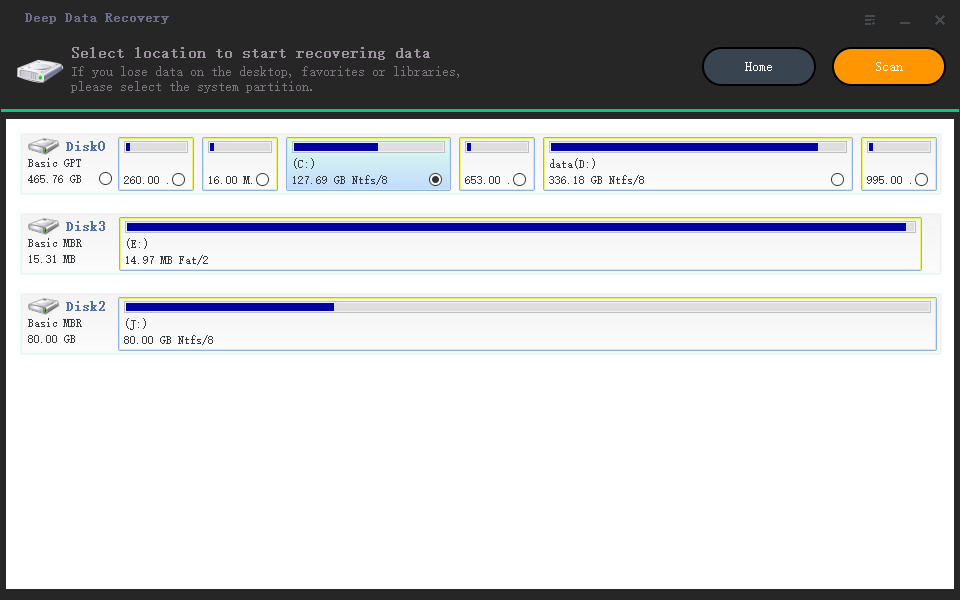
Scanning for deleted or lost photos from a Sony camera typically takes just a few minutes, depending on the number of photos. After the scan, you can filter the results by selecting the file extension on the left side and preview the photos on the right side. Once you find the desired photos, select them and click "Recover" to complete the Sony photo recovery process.
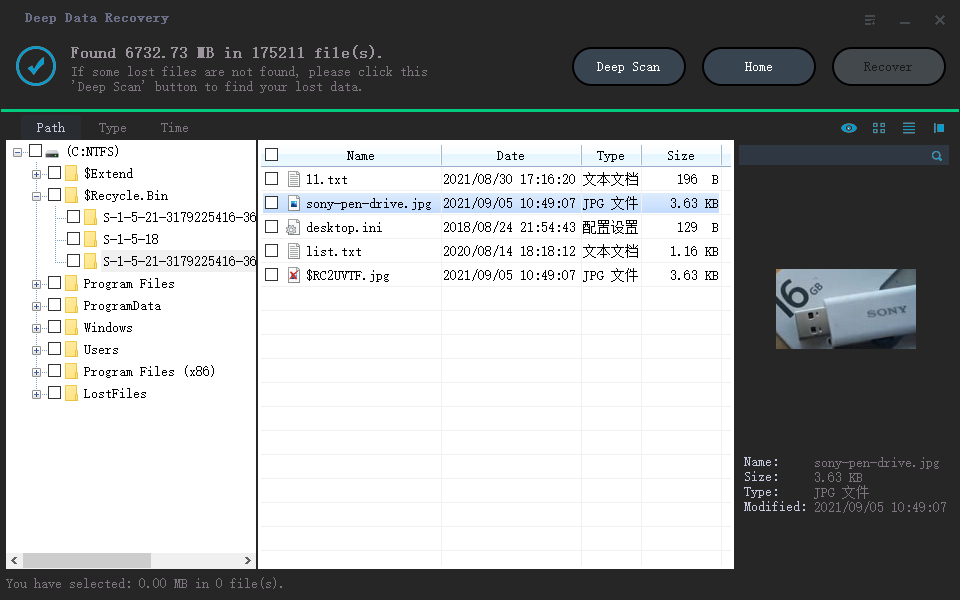
To ensure successful Sony photo recovery, save the recovered pictures to your computer, not to the memory card or stick again, as they may get erased again. This process can also be used to recover files from Sony pen drives, memory cards, and other devices.
Related Articles
- Recover Deleted Photos from Canon Camera
- Recover Deleted Photos from Sandisk
- How to Recover Deleted SQL Server Rows [2022]
when you deleted a single or several rows in SQL Server. On this page, with the provided methods by Qiling software, you'll be able to recover deleted rows and repair corrupted MS SQL Server efficiently. - How Can I Recover EXE Files Automatically Deleted? Got It!
Use this guide to how Can I Recover EXE Files Automatically Deleted Got It and improve the chance of getting important data or partitions back safely. - How to Recover Data from WD My Book Essential/Live
If you've lost or deleted files from your WD My Book, there are ways to recover them. You can use data recovery software like EaseUS, Recuva, or Disk Drill to scan your drive and retrieve your lost files. - How to Recover Data from WD My Passport
If you're struggling to recover data from your WD My Passport, you can recover deleted or lost files, simply download the WD Passport hard drive recovery software and follow the instructions. With this free tool, you can try to retrieve your data and get back on track.
Products
Articles & Tutorials
- Data Recovery
- Data Backup
- File Recovery
- File Backup
- File synchronize
- System Backup and Restore
- Disk and Partition Clone
- Technical articles
- Disk Master Help
- Windows Deleted File and Disk Recovery Tutorials
- Windows File and Data Recovery Tutorials
- More Windows Tutorials for Install, Security, Files, and PC Tips
- Windows Boot, Repair, and Recovery Environment Tutorials
- Windows Backup Tutorials
- Windows Restore Tutorials
- Windows Clone and Migration Tutorials
- Windows Server Backup, Recovery, and Management Tutorials
- Windows Disk, Partition, and Storage Management Tutorials