Video Recovery App: Recover Deleted Videos on Android
Quick Navigation:
- Reasons why there aren't many video recovery app for Android?
- What to do to recover videos on Android devices?
- Best Alternative to Video Recovery App – Deep Data Recovery
- Your Safe & Effective Video Recovery APP
- How to Use the Android video recovery app alternative to restore videos on Android device?
With the advancement of mobile phone technology, there are numerous apps available, offering a wide range of functionalities. However, unlike computer software, these apps have limitations, particularly when it comes to accessing the Android operating system. As a result, recovering deleted videos on Android devices is a challenging task, and there are few reliable video recovery apps available. Even if some apps claim to offer video recovery services, they often fail to deliver. Therefore, if you're looking for a video recovery app for Android, you may be disappointed.
If the deleted videos are stored on an Android SD card, this SD card video recovery guide gives more targeted steps.
Reasons why there aren't many video recovery app for Android?
If you want to recover deleted/lost videos on your Android phone with a video recovery app, the app needs to access the entire system, which is not allowed by the device developer.
When a video is deleted from an Android phone, it's not actually erased - it's just marked as available for overwriting by new data. This means that the video is still visible and can be recovered using a video recovery app. However, installing such an app can cause the deleted video to be permanently lost if it's overwritten by new data.
What to do to recover videos on Android devices?
Instead of searching for video restore apps on Android, you can recover deleted or lost videos on your Android phone by using a desktop Android data recovery tool on your computer. These sophisticated tools can help you recover videos, photos, and other data from your Android device.
Best Alternative to Video Recovery App – Deep Data Recovery
I recommend trying Deep Data Recovery to retrieve deleted video on Android devices. It is one of the best alternatives to video recovery apps, offering features such as a high success rate, support for various file types, and a user-friendly interface.
Your Safe & Effective Video Recovery APP
- Deep Data Recovery Wizard has both Mac and Windows versions, allowing you to download the one that matches your computer's operating system.
- This software supports all types of Android phones and tablets, allowing you to recover lost or deleted videos if you can successfully connect your device to your computer.
- The best video recovery software is fully compatible with various video formats, including .mp4, .mov, .flv, .mpeg, .3gp, and many others.
How to Use the Android video recovery app alternative to restore videos on Android device?
To recover lost or deleted videos from Android phones and tablets, you can use Deep Data Recovery. This tool allows you to scan your device and retrieve previously deleted videos, giving you a second chance to save cherished memories.
- Download and Install Video Recovery APP
- Connect Android Device with Computer
- Select Android Phone to Scan
- Select Deleted or Lost Videos to Recover
To download the correct version of Deep Data Recovery, click the download button and follow the installation wizard on your computer. This standalone software is easy to install and doesn't require any additional software, just download and run the installer.
To recover deleted videos on an Android device, connect your device to a computer using a digital cable, and it will appear as an external hard drive on your computer.
If you're unable to connect your Android device to your computer, ensure that USB debugging has been enabled on your Android device. This feature can be found in the "Settings" and then "Developer" options. Simply swipe open the settings menu and navigate to the developer options to enable USB debugging. This will allow your computer to communicate with your Android device.
In the newly opened window, select the device representing your Android phone and click the "Scan" button.
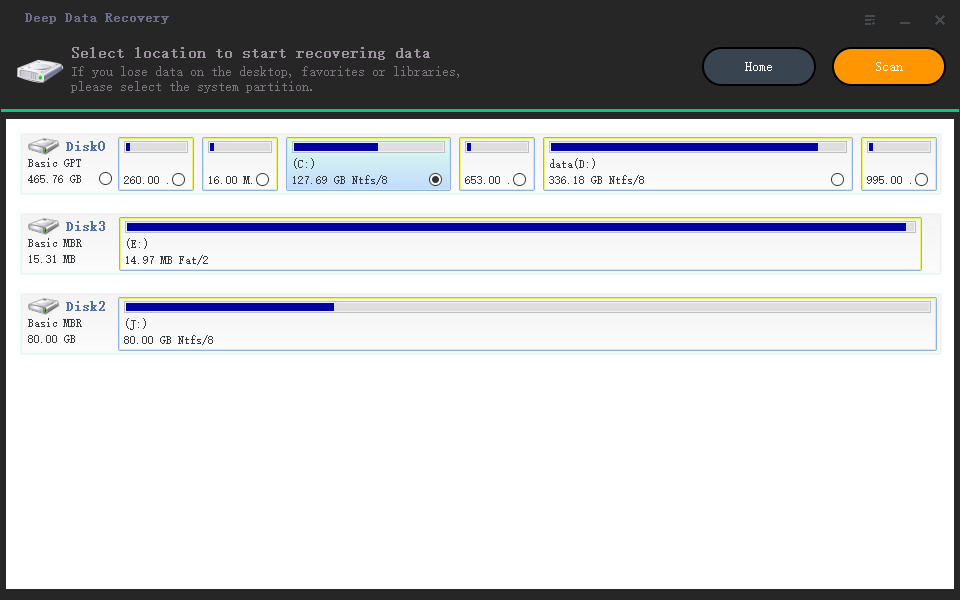
A progress bar in the main window displays the scanning process, and once finished, all found videos are listed. You can filter the videos by setting the video format type on the left and preview them on the right. Select the target videos and click "Recover" to save them to a designated location on your computer, avoiding the risk of them getting lost again by saving them back to the Android phone.
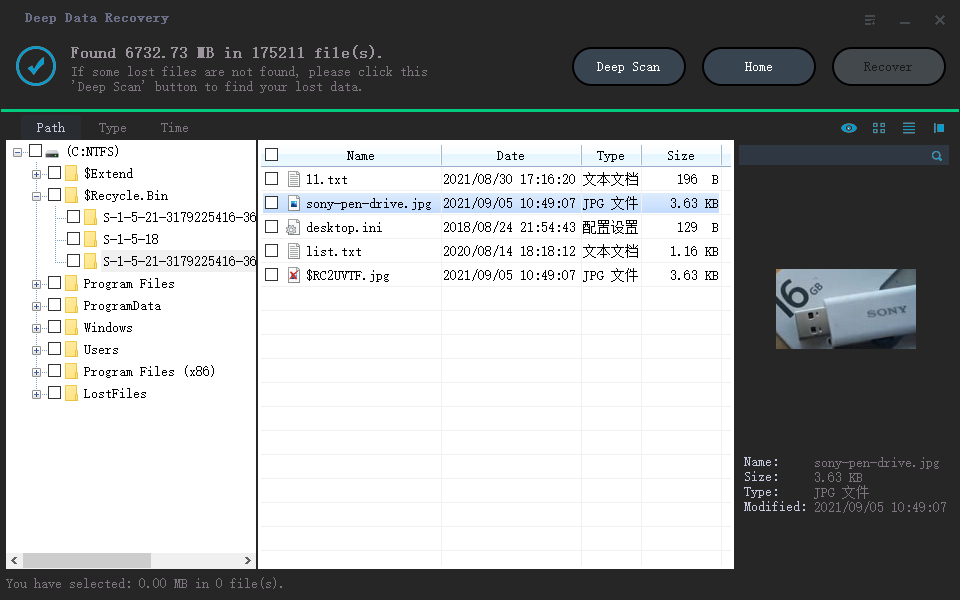
With the simple steps above, you can recover deleted videos from various types of storage devices, including SD cards, USB drives, and CF cards.
Related Articles
- How to Recover Deleted Videos from Canon Camera
- How to Recover Data from Corrupted SD Card
If you need to recover photos and videos from a corrupted SD card, follow these steps with Deep Data Recovery. - Word Recovery Online - Top 5 Repair Corrupted Word File Online | Qiling
You can restore and repair corrupted Word files online for free using top 5 text recovery converter online solutions, which provide a way to recover corrupted Word files online. - How to Fix Memory Card Error on Canon Camera
Canon camera memory card error or SD card error can occur frequently, causing the camera to lock. A Canon camera memory SD card repair tool can be used to recover photos, videos, and other files from the camera. This tool helps to fix the issue and retrieve valuable data. - 3 Steps for How to Recover Deleted Photos/Videos/Files from Acer Laptop
If you've accidentally deleted data from your Acer laptop, you can recover deleted photos, videos, and files by checking the recycle bin. Alternatively, you can use Deep Data Recovery Software to retrieve your lost data. - 2 Ways for How to Recover Files Deleted by Avast Antivirus
This guide explains 2 Ways for How to Recover Files Deleted by Avast Antivirus with clear steps, key checks, and practical tips.
Products
Articles & Tutorials
- Data Recovery
- Data Backup
- File Recovery
- File Backup
- File synchronize
- System Backup and Restore
- Disk and Partition Clone
- Technical articles
- Disk Master Help
- Windows Deleted File and Disk Recovery Tutorials
- Windows File and Data Recovery Tutorials
- More Windows Tutorials for Install, Security, Files, and PC Tips
- Windows Boot, Repair, and Recovery Environment Tutorials
- Windows Backup Tutorials
- Windows Restore Tutorials
- Windows Clone and Migration Tutorials
- Windows Server Backup, Recovery, and Management Tutorials
- Windows Disk, Partition, and Storage Management Tutorials