Canon Video Recovery Software | How to Recover Deleted Videos from Canon Camera
Quick Navigation:
- Best Canon Video Recovery Software to Get Back Your Videos
- Your Safe & Effective Canon Video Recovery Software
- Simple 3 Steps to Recover Videos from Canon Camera
"Sorry to hear that! Unfortunately, Canon cameras don't have a built-in feature to recover deleted videos. However, you can try using a third-party software like Recuva or PhotoRec to scan your camera's memory card and see if the video is still recoverable. Make sure to stop using your camera and the memory card immediately to prevent overwriting the data."
Grace was fortunate that she didn't accidentally or intentionally delete her important videos, unlike many Canon camera users who have to search for ways to recover deleted videos and photos. However, she was unfortunate to have lost the video. Fortunately, with the help of Canon video recovery software, it's possible to recover deleted videos from Canon cameras, as well as other storage devices and PCs, making it easy to get back what was lost.
Best Canon Video Recovery Software to Get Back Your Videos
The Canon video recovery software, Deep Data Recovery, is designed to help people recover a wide range of files, including videos, photos, documents, archives, and emails, from both computer and external hard drives, such as SD cards, memory sticks, and USB flash drives. I recommend trying it.
Your Safe & Effective Canon Video Recovery Software
- This software can recover deleted videos from a Canon camera, regardless of the reason for the data loss. It can retrieve files even if the SD card is corrupt due to a virus attack, was formatted by mistake, or if the files were deleted accidentally or intentionally, or if access to the files is denied.
- The video player supports a wide range of video formats, including AVI, MOV, MP4, M4V, 3GP, 3G2, WMV, MKV, ASF, FLV, SWF, MPG, and RM/RMVB.
- This software is fully compatible with all Canon cameras and offers advanced technology to easily and completely recover deleted videos from Canon cameras, a feature that sets it apart from other software available online.
Simple 3 Steps to Recover Videos from Canon Camera
To recover deleted videos from a Canon camera, you can use Canon video recovery software. The process is straightforward: first, download and install the software on your computer, then connect your Canon camera to the computer using a USB cable. Next, follow the software's instructions to scan your camera for deleted video files.
- Connect Canon camera with computer
- Install Data Recovery Software
- Select hard drive to scan
- Recover deleted videos from Canon camera
To connect your Canon camera to your computer, you can either use a USB cable to directly connect the camera to the computer or remove the memory card from the camera and connect it to the computer via an e-card reader. Once connected, the camera or memory card will be recognized as an external hard drive on your computer.
To recover deleted videos, click the download button to get the Windows or Mac video recovery software, then install it on your computer, which is fully compatible with the latest Windows 10 and macOS Mojave respectively, so choose the right separate version according to your computer's operating system.
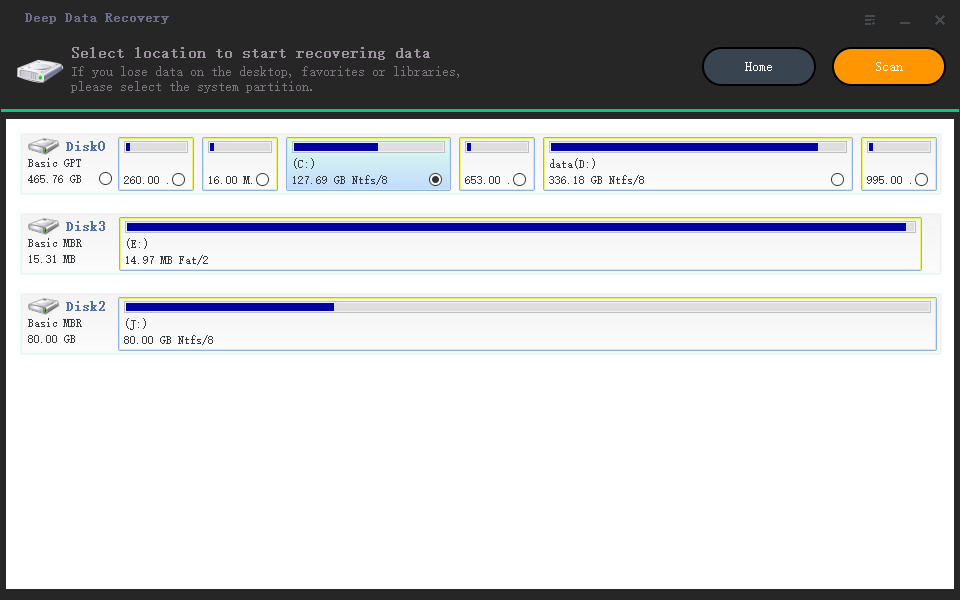
Select the external hard drive that contains the deleted Canon camera videos and click "Scan" to initiate the recovery process.
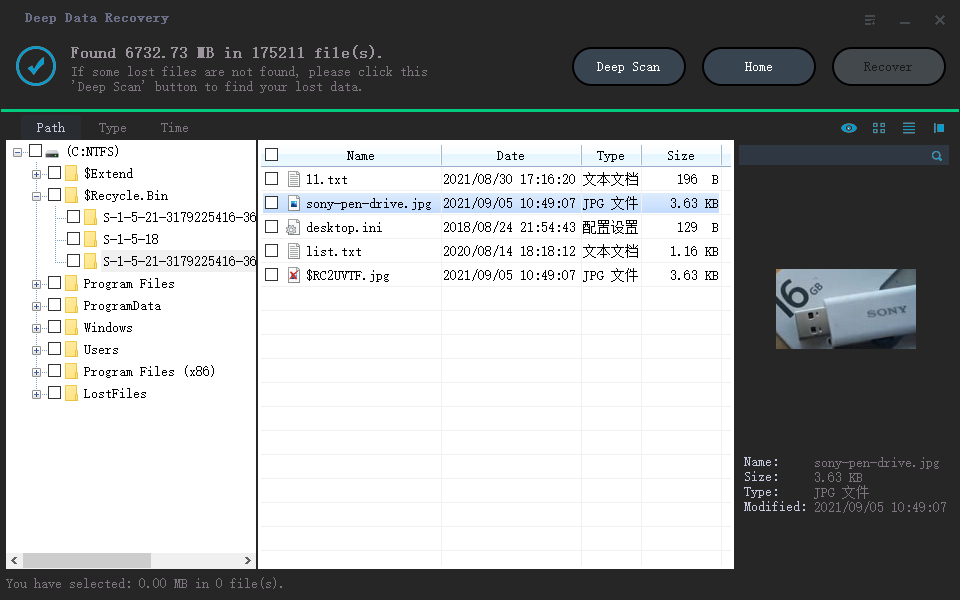
Once the software completes the scanning, it will display all the found videos in the result window, where you can preview them. Select the desired video and click "Recover" to save it on your computer. That's it.
If the videos were stored on a memory card, this memory card recovery software for Windows 11 guide may also help. For photo recovery from camera cards, see how to recover deleted photos from SD card.
Related Articles
- recover deleted videos from Sony Handycam
- Recover Deleted Videos from Memory Card
- [SOLVED] Will System Restore Recover Deleted Files in Windows 10
Learn how to recover deleted videos from Sony Handycam Recover Deleted Videos from Memory Card Will System Restore Recover Deleted Files in Windows 10 with clear steps, key checks, and practical tips. - Tech Specification of Deep Data Recovery for indows/Mac
List Deep Data Recovery for Windows/Mac supports system, file types and devices. - How to Recover ASD Files and Open It
ASD is the file extension for AutoSave Microsoft Word documents, which can be recovered to prevent document loss. You can learn how to recover ASD files. - How to Recover CDR Files on Windows PC and Mac
If you've deleted or lost CDR files, you can recover them using a data recovery software. First, stop using your device immediately to prevent overwriting of the deleted files.
Products
Articles & Tutorials
- Data Recovery
- Data Backup
- File Recovery
- File Backup
- File synchronize
- System Backup and Restore
- Disk and Partition Clone
- Technical articles
- Disk Master Help
- Windows Deleted File and Disk Recovery Tutorials
- Windows File and Data Recovery Tutorials
- More Windows Tutorials for Install, Security, Files, and PC Tips
- Windows Boot, Repair, and Recovery Environment Tutorials
- Windows Backup Tutorials
- Windows Restore Tutorials
- Windows Clone and Migration Tutorials
- Windows Server Backup, Recovery, and Management Tutorials
- Windows Disk, Partition, and Storage Management Tutorials