Best Second Copy Alternative for Easy File Backup and Sync
User case: Second Copy cannot copy my files
You're experiencing issues with Second Copy erasing the drive you want to backup and having trouble copying a folder due to a miscellaneous folder being active. The explanation from Second Copy isn't convincing you. Considering trying an alternative to Second Copy might be a good idea. Would you like some recommendations for alternatives?
– Question from Reddit
The Second Copy has several limitations, including its inability to copy files, which makes it even more limited. Fortunately, there's a backup software alternative that works well on Windows 11.
Second Copy software overview
Second Copy is an automatic backup software for Windows users, developed by Centered Systems LLP. It allows users to automatically copy files from one directory to another destination, such as local hard drives, network hard drives, floppy disks, or CDs, making it a reliable tool for data backup and storage.
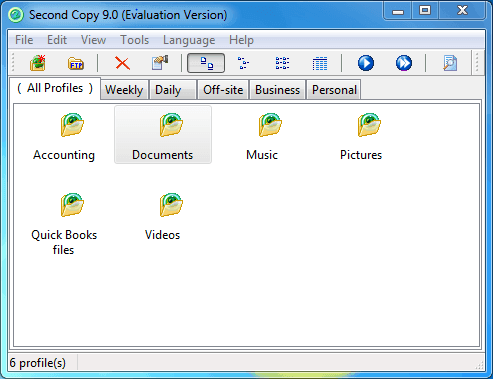
You can use Second Copy to backup, synchronize, and migrate your files and folders, making it easier to manage your data across different locations and devices.
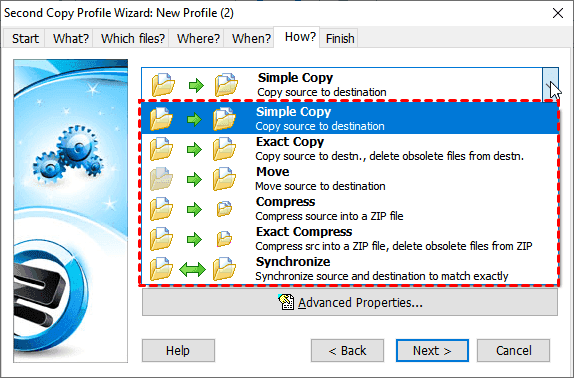
📌Simple Copy: Copy source to destination.
📌Exact Copy: Copy files from the source to the destination, and then delete any obsolete files that are present in the destination but not in the source. This ensures that the destination has the most up-to-date files and removes any unnecessary or outdated files.
📌Move: move source to destination.
📌Compress: compress the source into a ZIP file.
📌Exact Compress: compress the source into a ZIP file, and delete obsolete files from ZIP.
📌Synchronization: Syncing source and destination to match exactly, also known as File sync, is the process of synchronizing data between two locations, ensuring that they have the same content, structure, and attributes.
📌Scheduled copy: This feature allows you to automatically copy files to a destination using 6 different modes: manual, scheduled intervals (e.g.
📌Encrypt and compress the backup.
📌Email notification.
📌Command line options, and more.
Second Copy Limitations
However, it is not perfect. You may encounter issues with Second Copy, such as limited features or occasional software glitches. If you're looking for a more reliable solution, consider exploring alternatives like Qiling Disk Master, which offer more comprehensive features and robust performance.
· You may get a Second Copy out-of-memory error while copying files, showing copied files 0 error 1, you have to contact the Second Copy support team for help.
· The log file failed to update while copying files under a specific environment, resulting in an issue.
· The Second Copy run as a service did not run the scheduled profiles in Windows 7, 8, or 10, but the issue has been resolved.
· The issue with Unicode characters not displaying properly in the log file or the include/exclude specifications was resolved by rewriting the code to use the "utf-8" encoding scheme instead of the default "latin1" scheme. This change allowed for the correct display of Unicode characters.
Does Second Copy work on Windows 11/10/8/7?
Second Copy is compatible with Windows 11 and 10, and it can be used to back up and synchronize files between different locations on these operating systems. It supports the file systems used by Windows 11 and 10, and it can run as a system service, allowing it to run in the background and perform backups even when no one is logged in.
Fortunately, Second Copy 9 supports Windows 11, 10, 8.1, 8, 7, and Server 2012, making it a viable backup tool for Windows 11 users. However, it has some limitations and may fail to copy files in certain cases, and alternative backup tools may be more effective for some users.
The best free Second Copy alternative
Qiling Disk Master Standard is the best free Second Copy alternative, highly recommended by millions of users for its reliable performance and intuitive interface. It supports Windows XP, Vista, 7, 8, 8.1, 10, and 11 (all editions, 32-bit & 64-bit).
Qiling Disk Master Standard stands out as the best free alternative to Second Copy, as shown in the chart.
| Second Copy 9 | Qiling Disk Master Standard | |
| Cost | $29.95 | Free |
| Operating System | Windows 7/8/8.1/10/11/Server 2012 | Windows Vista/XP/7/8/8.1/10/11 |
| Copy/Sync File | √ | √ |
| Automatic/Full/Incremental/Schedule Backup | √ | √ |
| Differential Backup | - | √ |
| Disk/Partition Clone | - | √ |
| Restore | √ | √ |
| Command Line | √ | - |
| Email Notification | √ | √ |
| Compress/Encrypt Backup Image | √ | √ |
| Create Bootable Media | - | √ |
Tip: √: Supported; -: Unsupported.
You can identify the difference between the two backup tools:
- Qiling Disk Master Standard is a free backup tool, whereas Second Copy is a paid software for creating backup images.
- Functionally, these two backup utilities are basically the same.
Qiling Disk Master Standard is the best free alternative to Second Copy, offering a user-friendly interface and efficient backup capabilities, making it suitable for those looking for a reliable free option to back up their data.
How to use the Second Copy free alternative in Windows 11
Qiling Disk Master Standard offers a user-friendly alternative to Second Copy for automatically copying files from one location to another. With its robust backup options, you can set up effortless automatic file backups by following a few simple steps, making it an excellent choice for achieving the same effect.
To get started, please download and install the free Qiling Disk Master Standard, a Second Copy backup alternative, and run its installer.
The free version of the software supports Windows 11, 10, 8, 7, XP, and Vista, but server users should consider Qiling Disk Master Server instead.
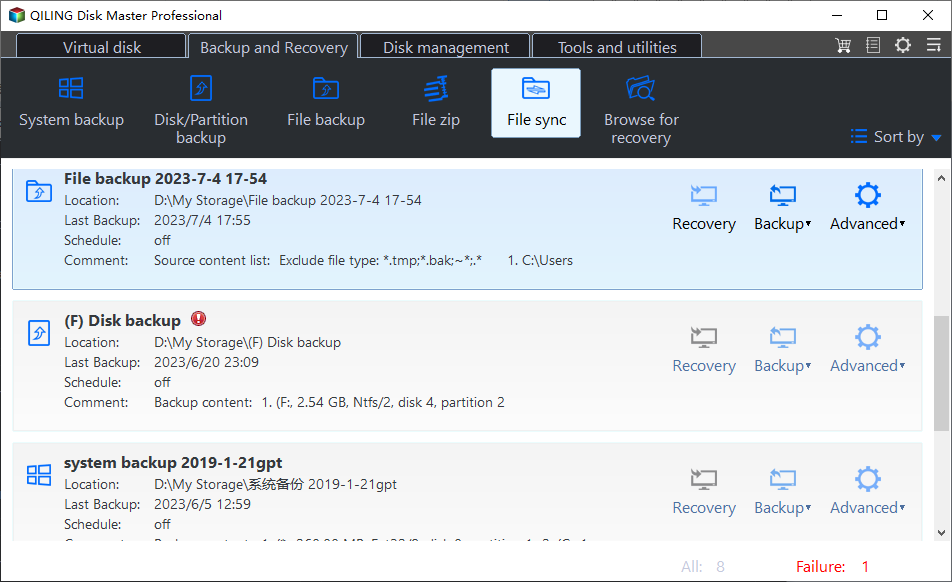
1. To copy files and folders, select Backup, and then choose File Sync.
2. Click the "Folder" button to select the files or folders you want to back up, and optionally edit the "Task Name" to give your backup task a custom name.
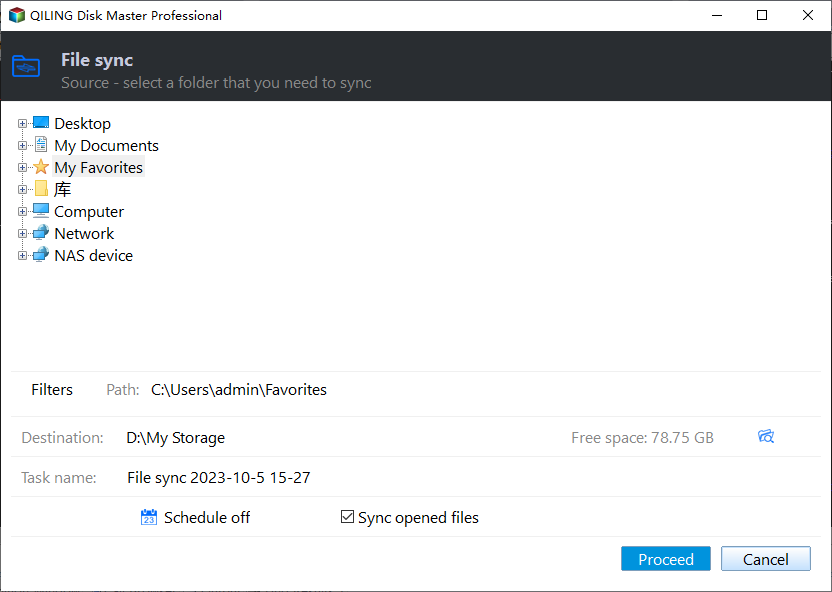
3. To save files and folders, select the destination you want to save them in. Depending on the path you choose, different save options will be available below.
- Select a local path: To access a local drive, external disk, or USB device, click on "This PC" and select the desired device from the list of available storage options. Please ensure the device is connected before attempting to access it.
- Add Share or NAS Devices: To access a shared folder on a network, you need to type the network path in the address bar and then select the shared folder from the list of available options.
- Select a cloud drive: This software enables the syncing of local folders with cloud storage services such as Google Drive, OneDrive, or Dropbox, requiring only a download and installation.
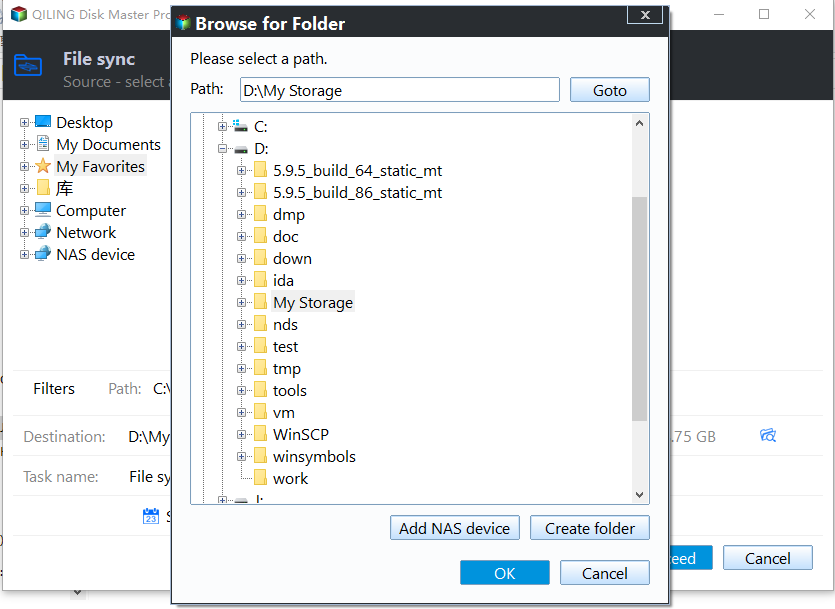
4. Click Schedule Sync and enable it, selecting Daily, Weekly, or Monthly. You can also add a comment to the sync task, enable email or SMS notifications after completion, or run a specified program or script before or after the sync task with Options. Finally, click Proceed to sync files or folders automatically with the best free second copy alternative.
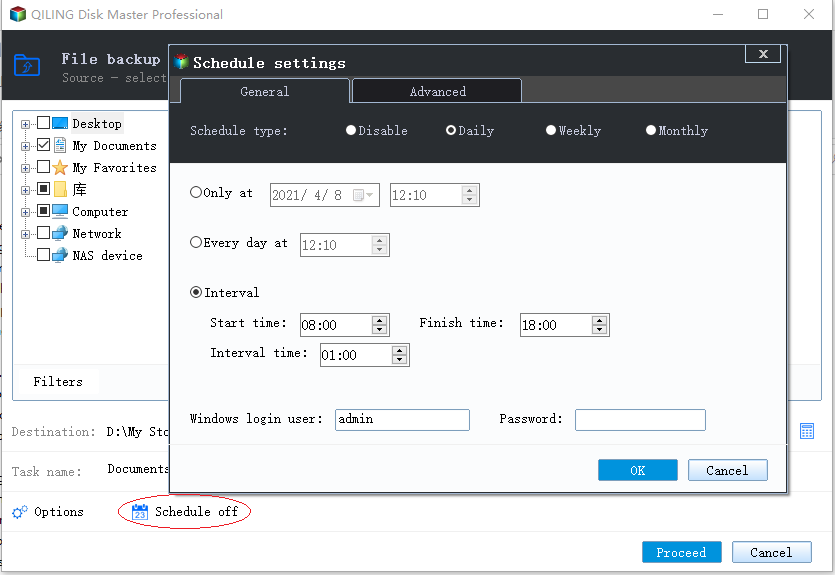
After a while, all files and folders will be synced to the destination, and then the program will automatically sync only the changed parts to the destination at the specified time.
👍 More advanced features on the professional version or higher:
✔ Event triggerIt allows you to synchronize files at specific events, such as system shutdown or startup.
✔ USB plug-in: It automatically copies files to a USB drive when connectedNo manual USB drive connection is required. The task will start automatically once the USB drive is inserted. The drive will remain connected throughout the task.
✔ Filter settingIt helps sync files with specific file extensions, saving time and space.
✔ Different sync methods: Except for File Sync, you still can use File Sync, File Sync, and File syncThe sync process can be customized based on the sync direction, frequency, or synced files in the destination, allowing for more tailored and efficient synchronization.
FAQs about Second Copy
1. What is Second Copy 9?
Second Copy 9 is a backup software that securely copies data files to a different directory, internal or external hard drive, or across a network to another computer. It continuously monitors source files and updates backups with new or modified files, operating quietly in the background without requiring manual intervention.
2. Is the Second Copy free?
You can download a free trial version of Second Copy backup software, which offers fully functional backup capabilities for 30 days to test its features and performance.
3. Can I copy a user profile in Windows 10 to another computer?
Copying a Windows 10 user profile to another computer can be achieved through manual backup and transfer or using a professional backup tool like Qiling Disk Master. The manual method involves backing up your user profile, transferring it via external storage, and then pasting it onto the new PC. This process can be simplified and streamlined by using a backup tool that enables you to back up your Windows 10 user profile and restore it onto a different computer, preserving all settings and data intact.
Summing It Up
Qiling Disk Master Standard is a free backup software that serves as a great alternative to Second Copy. It not only synchronizes files but also provides automatic backup features, allowing you to create a cloud backup. Unlike Second Copy, which focuses on USB portability, Qiling Disk Master Standard prioritizes data security and disk usage, making it a reliable choice for all Windows PCs.
This software not only automatically frees up disk space with normal compression, splitting, and incremental backup, but also offers advanced features like differential backup and automatic backup cleanup. The latter feature is particularly useful as it breaks the limitation of only increasing backup size and instead deletes old backups automatically, making it a valuable tool for protecting data.
Related Articles
- Get the Best XXCopy Alternative for Free Here!
This guide explains Get the Best XXCopy Alternative for Free Here! with clear steps, key checks, and practical tips. - The Best Free Alternative to WD SmartWare - Qiling Disk Master
You will find the best free WD SmartWare alternative in this article to backup files easily and safely, just find the step by step guide to backup. - Secure Copy and Best Alternative on Windows Server
Lear more about Secure Copy and the best Secure Copy alternative - Qiling Disk Master Server, you can then transfter files to a remote server computer with them easily. - How to Move Apps from One Drive to Another on Windows 11
Moving applications from one drive to another in Windows 11 can be easily done. This post will guide you through the simplest way to relocate applications to another drive. - Quick Fix for SyncToy Not Copying All Files in Windows 10/7
Fix SyncToy not copying all files in Windows 10 or Windows 7 with practical checks for folder pairs, permissions, sync modes, path limits, and reliable file sync alternatives. - Do You Know Any SyncToy Portable Alternative in Windows 7/8/10?
I need help to sync files or folders with the SyncToy portable alternative in Windows 7/8/10.
Products
Articles & Tutorials
- Data Recovery
- Data Backup
- File Recovery
- File Backup
- File synchronize
- System Backup and Restore
- Disk and Partition Clone
- Technical articles
- Disk Master Help
- Windows Deleted File and Disk Recovery Tutorials
- Windows File and Data Recovery Tutorials
- More Windows Tutorials for Install, Security, Files, and PC Tips
- Windows Boot, Repair, and Recovery Environment Tutorials
- Windows Backup Tutorials
- Windows Restore Tutorials
- Windows Clone and Migration Tutorials
- Windows Server Backup, Recovery, and Management Tutorials
- Windows Disk, Partition, and Storage Management Tutorials