What Is Intelligent Sector Clone? Qiling Disk Master Technology Explained
What is Intelligent Sector backup?
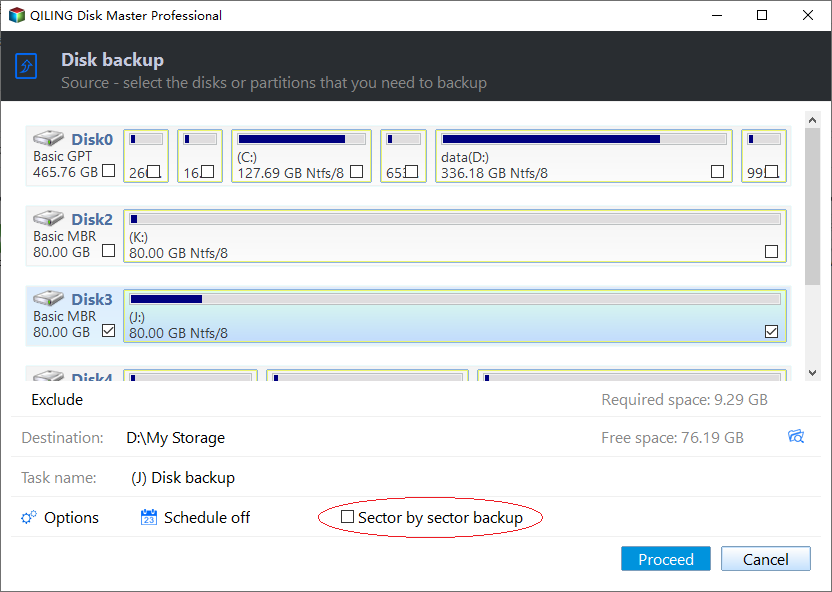
Intelligent Sector Backup: This backup method only saves the used sectors of a file system, which reduces the size of the image file and backup time, making it a more efficient option.
For situations that require copying every sector, compare this mode with sector-by-sector clone guidance.
This mode is suitable for most daily backup tasks because it skips unused disk space. For example, if a 500GB partition contains only 120GB of data, the backup image can be much smaller than a full sector-by-sector copy.
Intelligent Sector vs. exact backup
Make an Exact Backup: This method is also called Sector by Sector Mode. It backs up all sectors of the disks or partitions, regardless of whether they are in use or not, in a sector-by-sector approach.
Choose Intelligent Sector backup when you want faster backup speed and smaller image files. Choose an exact backup when you need to copy every sector, including unused sectors, hidden data, or a partition with an unsupported file system.
Related Articles
- Backup and Sync External Hard Drives with Google Drive
This page introduces you to the most efficient way to backup and sync external hard drive with Google Drive, whether from or to it. - How to Backup Computer Before Factory Reset?
Factory reset will overwrite data on the hard drive, so it is recommended to backup computer before factory reset in Windows 10/8/7. - Windows 11: Backup Files to External Hard Drive in 3 Easy Ways
It is essential to backup files for preventing data loss. This article introduces 3 methods to backup files to external hard drive in Windows 11 automatically. - Backup Hard Drive before Formatting in Windows 10/8/7
You may want to format your hard drive and reinstall Windows when it is running slow. Be sure to backup hard drive before formatting. - How to Boot Windows 7 from External Hard Drive Successfully?
There are chances that you need to boot Windows 7 from external hard drive. This article demonstrates how to create bootable media and boot Windows 7 from the drive. - Best Bootable Hard Drive Eraser for Windows 11/10/8/7
This tutorial provides the best bootable hard drive eraser freeware for Windows 11/10/8/7 and offers a step-by-step guide on how to use it to wipe your hard drive clean. The process will completely erase all data on your hard drive, leaving it completely blank.
Products
Articles & Tutorials
- Data Recovery
- Data Backup
- File Recovery
- File Backup
- File synchronize
- System Backup and Restore
- Disk and Partition Clone
- Technical articles
- Disk Master Help
- Windows Deleted File and Disk Recovery Tutorials
- Windows File and Data Recovery Tutorials
- More Windows Tutorials for Install, Security, Files, and PC Tips
- Windows Boot, Repair, and Recovery Environment Tutorials
- Windows Backup Tutorials
- Windows Restore Tutorials
- Windows Clone and Migration Tutorials
- Windows Server Backup, Recovery, and Management Tutorials
- Windows Disk, Partition, and Storage Management Tutorials