Image Splitting in Qiling Disk Master
What is image splitting?
The program allows splitting an image file into smaller parts during the backup process to fit it into various smaller storage media.
For long-term backup management, combine image splitting with a backup retention policy.
Image splitting is helpful when a backup image is too large for the destination file system or storage device. For example, FAT32 devices cannot store a single file larger than 4GB, so splitting the image keeps the backup easier to copy, store, or transfer.
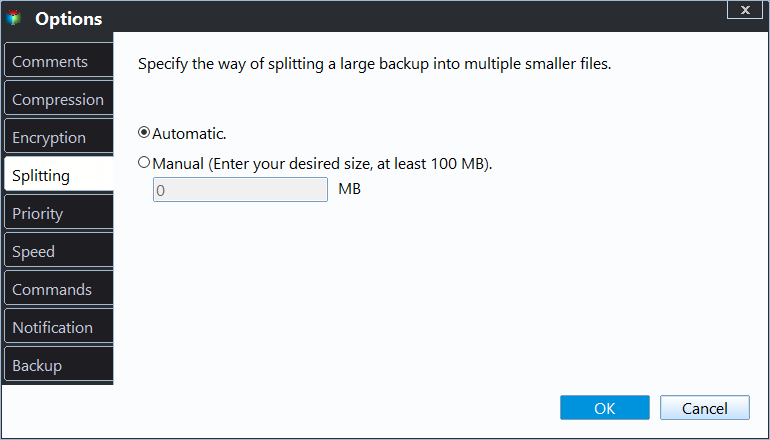
Available splitting options
- Automatic: The size of the split depends on the file system of the destination storage medium.
- Customize size: The image will be split to a size of 50MB or larger, depending on the input value.
- Choose a predetermined size: Choose the storage medium type from the drop-down menu, and the program will split the image file to suit your chosen medium.
Which option should you choose?
For most users, Automatic is the safest choice because Qiling Disk Master selects a suitable split size according to the destination. If you need to upload backup files to cloud storage, copy them to removable media, or keep each file under a specific size, use Customize size.
After splitting, keep all image parts in the same folder. When restoring the backup, Qiling Disk Master needs the complete set of split image files to read the backup correctly.
Related Articles
- How to Extend System Partition for Windows 10/8/7 and Windows Server?
Learn how to Extend System Partition for Windows 10/8/7 and Windows Server with clear steps, key checks, and practical tips. - Backup Cleanup in Qiling Backup
In this article, we will introduce a very import feature Backup Cleanup in Qiling Backup. Backup Clean helps you automatically clear history backup versions based on rule to save storage space. - How to Make Bootable CD/DVD for Windows 7 Using CMD?
Learn how to Make Bootable CD/DVD for Windows 7 Using CMD with clear steps, key checks, and practical tips. - Clone Hard Drive in Windows Server 2016 without Reinstalling Windows
Learn how to Clone Hard Drive in Windows Server 2016 without Reinstalling Windows with clear steps, key checks, and practical tips. - Best Free Software to Format SD Card to exFAT on Windows
This tutorial shows how to format SD card including micro SD card of Android phone like Galaxy S4 to exFAT file system on Windows 7/8/10 in easy and simple steps. - How to Format SD Card in Windows 10, 8, 7?
Format SD card in Windows 10, 8, 7 for your camera, phone, and other digital devices.
Products
Articles & Tutorials
- Data Recovery
- Data Backup
- File Recovery
- File Backup
- File synchronize
- System Backup and Restore
- Disk and Partition Clone
- Technical articles
- Disk Master Help
- Windows Deleted File and Disk Recovery Tutorials
- Windows File and Data Recovery Tutorials
- More Windows Tutorials for Install, Security, Files, and PC Tips
- Windows Boot, Repair, and Recovery Environment Tutorials
- Windows Backup Tutorials
- Windows Restore Tutorials
- Windows Clone and Migration Tutorials
- Windows Server Backup, Recovery, and Management Tutorials
- Windows Disk, Partition, and Storage Management Tutorials