How to Find and Change USB Serial Number in Windows 11/10?
Key Takeaways:
- To get the USB serial number using CMD, you can use the command "wmic" followed by "path" and "get" to specify the device you want to query. For example, to get the USB serial number, you can use the command "wmic path win32_pnpinstalleddevice where 'adaptertype="usb"' get deviceid". This command will display the device ID, which is the serial number of the USB device.
- The USB/PenDrive serial number is determined by the date and time on your PC when the drive was formatted, and formatting the drive again can change the serial number.
- With Qiling Disk Master Professional, you can change the USB serial number without losing data by manually doing so.
What is USB serial number
The USB serial number is a unique identifier created by the operating system when formatting a USB flash drive, used to identify and store basic information about the device, and is also found in other storage devices like hard disk drives, SSDs, and SD cards.
How to find or check USB serial number in Windows 11/10/8/7?
To get the USB or other storage device serial number, check the properties on Windows Explorer or use CMD. On Windows Explorer, right-click the USB flash drive, select "Properties", and the serial number will be under the "Details" tab.
If you can't find the number on Windows Explorer, you can get the USB serial number using CMD.
1. To open the Command Prompt, press the Windows key + R to open the Run dialog box, type "cmd" and press Enter. This will open the Command Prompt window.
2. Type the "dir [drive letter:]" command in the Prompt and press Enter.
How to change serial number in Windows 11/10/8/7? (with 2 methods)
To change or add the USB serial number in Windows 11/10/8/7, you can either use the Device Manager or the Registry Editor. The Device Manager allows you to view and modify device properties, including the serial number, while the Registry Editor provides a more advanced way to edit the system's registry, which stores device information. Both methods can be used to change or add the USB serial number for better management of USB and other disks.
Method 1. Change USB serial number without formatting
Formatting a USB drive will erase all data on it. However, it's possible to change the USB serial number without formatting by using a tool like Qiling Disk Master Professional, which can quickly and easily modify the serial number without affecting the data on the drive.
The task can be completed easily with a straightforward and simple interface. To do this, follow these specific steps.
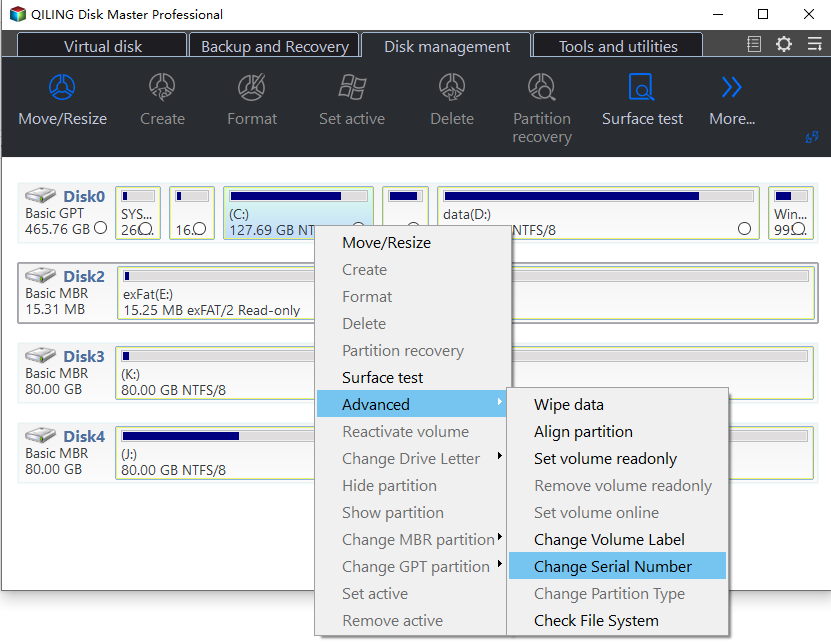
Step 1. Insert a USB into a computer and launch Qiling Disk Master Professional. Right-click the USB and select "Advanced" > "Change Serial Number".
Step 2. You can set the new USB serial number in this window like 123456.
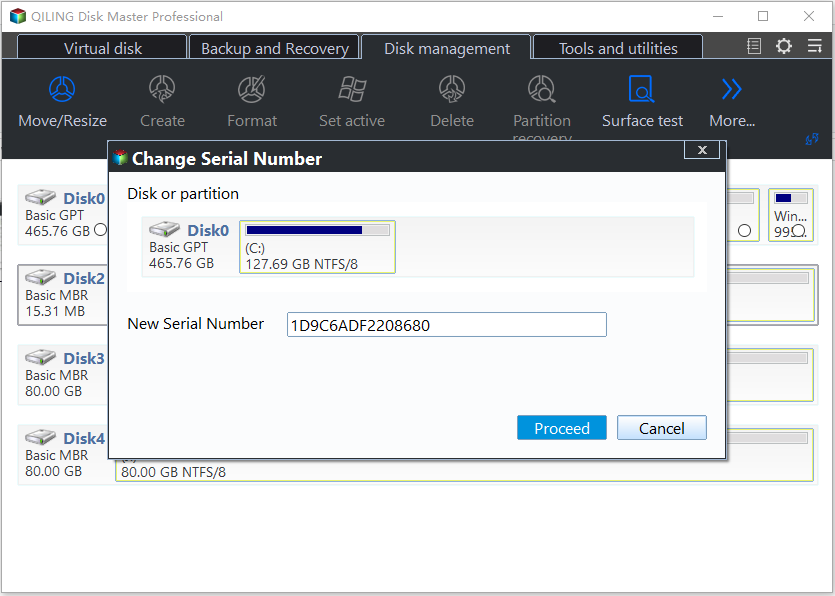
Step 3. Then click "Proceed" to execute the operation.
Qiling Disk Master Professional offers advanced features such as changing the letter of a drive, altering the partition type ID, cloning a disk, and performing disk conversions, among others.
By downloading this tool, you can significantly improve your computer and disk performance, making it run more smoothly and efficiently.
Method 2. Change USB serial number by formatting
When formatting a USB flash drive, the operating system will randomly assign a string of numbers as the serial number, effectively changing the USB serial number. This can be done by formatting the drive, which will give it a new, randomly generated serial number. This means that the original serial number will be lost, and the new one will be assigned by the OS.
✍Warning: If you have important files on your USB drive, you should back them up first before formatting it. If not, you can proceed with the formatting process.
Step 1. Double-click the PC icon, then right-click the USB flash drive and select "Format".
Step 2. The information of the USB will be showed on a pop-up window, then click "Start".
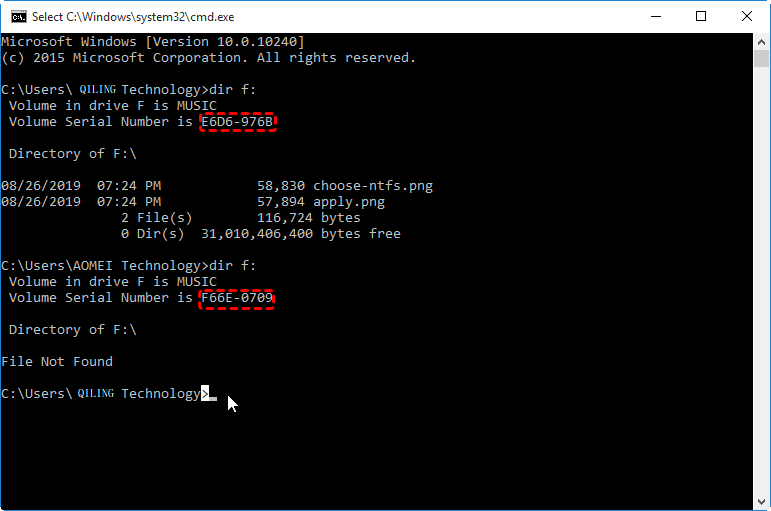
3. To verify the USB serial number, open Command Prompt and execute the command "dir [drive letter:]". Running this command again will display the USB serial number, which has changed from the previous result.
Conclusion
You can change the serial number of a USB drive via two different methods in Windows. Qiling Disk Master offers a simple 3-step process to change the USB serial number without data loss, and can also be used to change the serial number of other storage drives like SD, HDD, and SSD on your computer. This software is compatible with Windows 11/10/8/8.1/7, Windows Vista, and XP.
Qiling Disk Master is more than just a USB serial number, offering additional features to help manage disks. It can convert a boot disk from MBR to GPT, restore partitions on a USB drive, and even perform an SSD secure erase.
If your computer's system is Windows Server, you can use Qiling Disk Master Server Edition to change the USB serial number.
Related Articles
- How to Change SD Card Serial Number without Formatting Step by Step?
Here, we will tell what is SD card serial number, as well as how to change SD card serial number with formatting or without formatting the card in Windows 10, 8, 7. - Best Bootable Hard Drive Eraser for Windows 11/10/8/7
This tutorial provides the best bootable hard drive eraser freeware for Windows 11/10/8/7 and offers a step-by-step guide on how to use it to wipe your hard drive clean. The process will completely erase all data on your hard drive, leaving it completely blank. - Easily Solved: Can't Convert to Dynamic Disk (5 Methods)
To fix the issue of being unable to convert a basic disk to a dynamic disk, you can follow these steps. First, check if the disk is being used by any operating system or programs. - 2 Free Methods to Change Partition Size without Losing Data in Windows
Here, you can learn how to change partition size without losing data with Windows native tool and a free 3rd party partition manager in Windows 10/8/7. - Qiling File Shredder
Qiling File Shredder is permanently wipe the disk or shared data, irreversibly remove sensitive data easily and effectively. - QILING Disk Master Edition Comparison
QILING Disk Master offers affordable, reliable, easy and best backup and restore software and disk manager software and ramdisk software solutions for Windows.
Products
Articles & Tutorials
- Data Recovery
- Data Backup
- File Recovery
- File Backup
- File synchronize
- System Backup and Restore
- Disk and Partition Clone
- Technical articles
- Disk Master Help
- Windows Deleted File and Disk Recovery Tutorials
- Windows File and Data Recovery Tutorials
- More Windows Tutorials for Install, Security, Files, and PC Tips
- Windows Boot, Repair, and Recovery Environment Tutorials
- Windows Backup Tutorials
- Windows Restore Tutorials
- Windows Clone and Migration Tutorials
- Windows Server Backup, Recovery, and Management Tutorials
- Windows Disk, Partition, and Storage Management Tutorials