Free Acronis Clone Software Alternatives - Which is the Best?
- Need Free Alternative to Acronis Cloning Software
- Top 3 Acronis Clone Software Free Alternatives
- #1. Free Acronis Alternative for Windows 11/10 - Qiling Disk Master🏆
- #2. Acronis Free Clone Software Alternative for Mac - Disk Utility
- #3. Acronis True Image Alternative Open Source Linux - Back In Time
- How to Clone One Disk to Another with Qiling Disk Master
- Frequently asked questions: free alternatives to Acronis True Image
Need Free Alternative to Acronis Cloning Software
Acronis True Image is a feature-rich application for disk cloning, backup, and cloud management, but its support for various platforms is questionable. Despite claiming to support Windows PCs, Macs, and mobile devices, the reality is that it barely functions well on one platform.
Reports have surfaced online about Acronis' software issues, including its failure to support Intel RAID arrays and ACHI, as well as problems with its enterprise services. Additionally, users have experienced difficulties with restoring Acronis clone images to other computers, with the software refusing to function as intended.
If you're experiencing issues with the free Acronis cloning software in Windows or looking for a better free disk cloning software alternative to Acronis home free, the following options may be helpful.
Top 3 Acronis Clone Software Free Alternatives
If you're looking for alternatives to Acronis True Image for cloning a drive, there are some great options available. Three popular alternatives can help you achieve your goal.
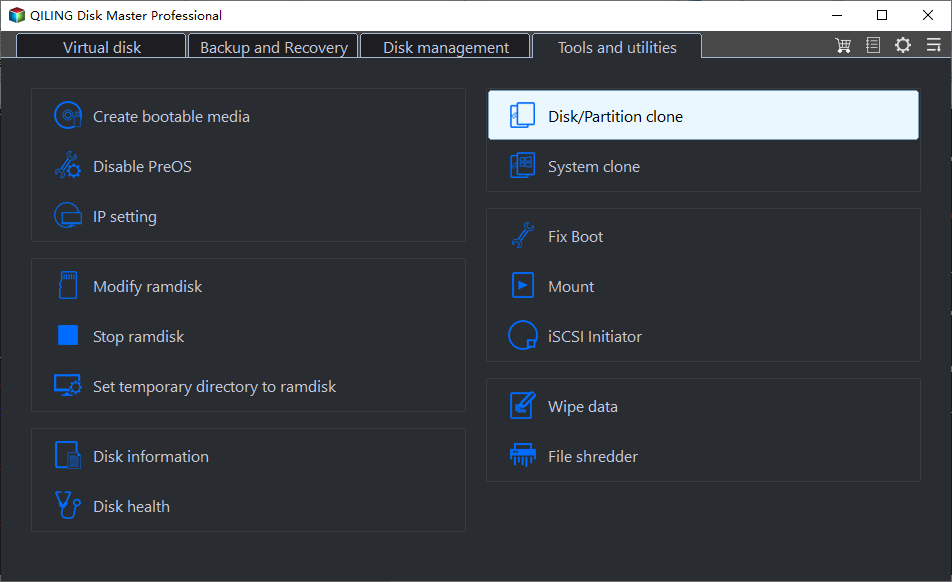
#1. Free Acronis Alternative for Windows 11/10 - Qiling Disk Master🏆
Qiling Disk Master Standard Clone OS, Clone Disk, and Clone Disk to Image. Clone OS mode allows you to clone the operating system from one disk to another, including the boot sector, partition table, and operating system files. Clone Disk mode clones an entire disk, including all data, programs, and operating system files.
- Disk Clone: To clone a disk, you need to use a software that can copy the contents of the source disk to the target disk. This process is also known as disk imaging or disk duplication. The software will read the source disk, sector by sector, and write the data to the target disk, creating an exact copy of the original disk.
- Partition Clone: You can clone a specific partition to another using software that allows you to clone NTFS, FAT16/FAT32, and other types of drives.
- System Clone: Clone system related partitions to another location. This feature is locked in the standard version but can be accessed in the Professional version or higher.
Disk Master is a more convenient option for cloning a computer compared to Acronis, thanks to its improved interface. It's also compatible with various Windows platforms, including Windows 11, Windows 10, Windows 8, and Windows 7. The software is easy to use, requiring only a simple download and setup process.
 Qiling Disk Master
Best free disk cloning software for personal use.
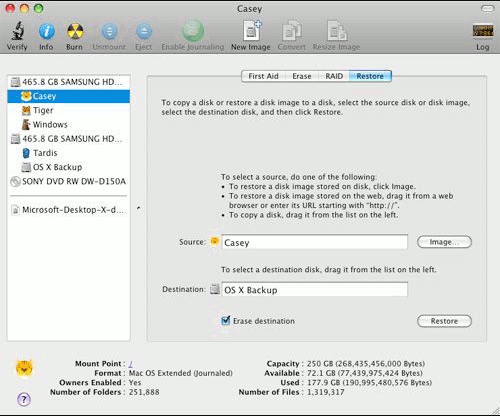
#2. Acronis Free Clone Software Alternative for Mac - Disk Utility
Disk Utility Clonezilla is a popular backup and clone software for Mac that allows you to create a clone image of your system and restore it to another Mac, making it a highly recommended utility software for Mac users.
Using Disk Utility can be helpful when creating a RAID 1 (mirror) array, and it's also advantageous for cloning a Mac's drive. Its performance in backup and restore is even more powerful than Acronis True Image, making it a suitable alternative to the paid software. Overall, it lives up to being a free Acronis cloning software alternative.
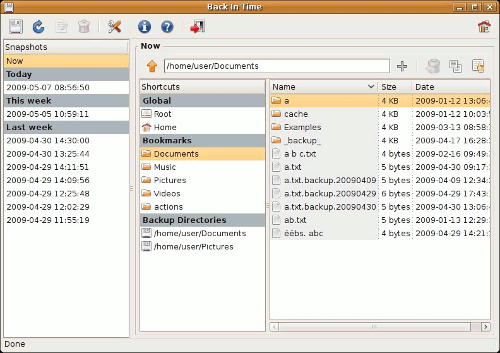
#3. Acronis True Image Alternative Open Source Linux - Back In Time
Back In Time Bacula is an open-source utility software for Linux that allows users to clone files, folders, and even entire systems. Inspired by FlyBack and TimeVault, Bacula optimizes backup and restore speed, making it a reliable and efficient tool. As a lightweight Linux utility software, it serves as a free alternative to Acronis True Image.
If you're looking for free alternatives to Acronis clone software, there are several options available that can perform a variety of cloning tasks on different platforms. These free alternatives, similar to Acronis drive clone software, can be used to take a shot and decide whether to use them.
How to Clone One Disk to Another with Qiling Disk Master
1. To start the cloning process, install and run the free disk cloning software. Once installed, click on the "Clone" tab and select "Disk Clone" from the next window.
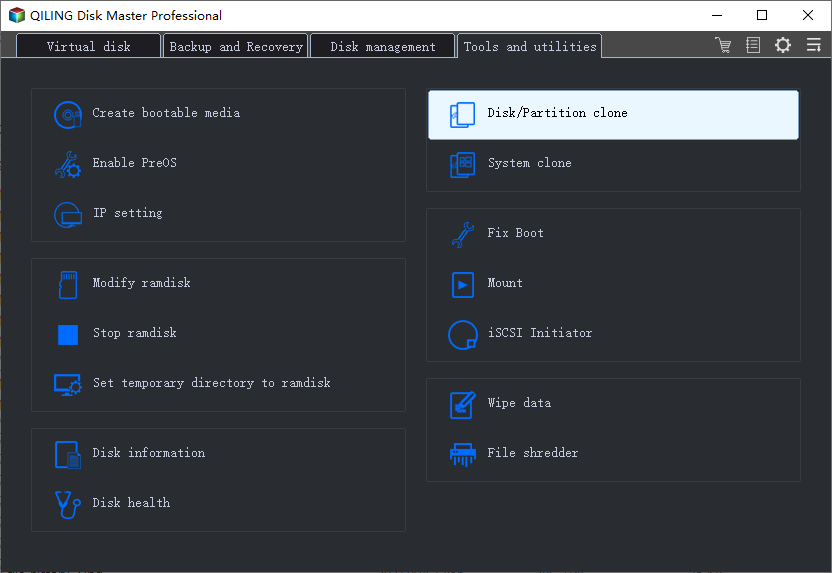
🔔 Important Note: This version only supports cloning non-system disks, meaning you can't clone a disk that contains your operating system. If you need to clone a disk with your OS, you may want to consider upgrading to a higher edition of the software.
2. Select the disk you want to clone and the disk to receive the cloned data respectively.
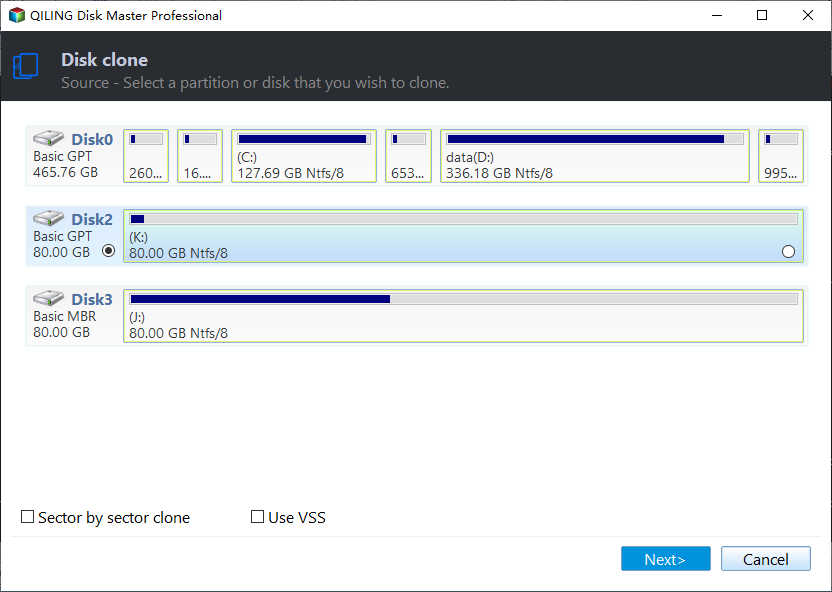
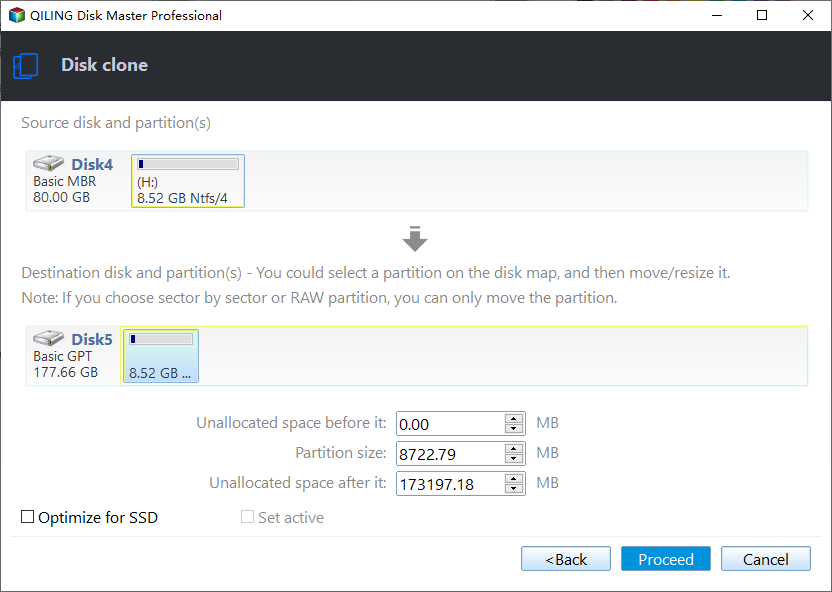
3. Confirm the operation and click on the "Proceed" button. If the destination disk is an SSD, check the "Optimize for SSD" option to optimize the SSD performance.
Frequently asked questions: free alternatives to Acronis True Image
1. Is there a free version of Acronis?
Acronis offers a 30-day free trial, allowing users to test its backup features, but the cloning feature is only accessible with an upgraded version.
2. How do I clone a disk for free?
For free yet reliable disk cloning, consider Qiling Disk Master. It allows you to clone non-system disks without any cost.
3. Which is better? Qiling or Acronis?
Both Acronis and Qiling are popular hard drive cloning software, but they have some differences. While Acronis is a powerful tool, it doesn't allow cloning a single partition and its clone feature is not available in the free trial version. In contrast, Qiling offers the ability to clone a specified partition and its clone feature is available for free, making it a good option if you want to clone a disk without paying.
Related Articles
- Best Free Acronis Snap Deploy Alternative for Windows
Get the best free Acronis Snap Deploy alternative and deploy system image to multiple computers step by step. Learn more about this now! - Acronis True Image Clone to SSD How to Guides [2020]
This guide explains Acronis True Image Clone to SSD How to Guides with clear steps, key checks, and practical tips. - Solved: Acronis True Image WD Edition Will Not Clone
If you are experiencing the "Acronis True Image WD Edition will not clone" issue, continue to read this article and learn its 3 different situations. Here are 4 common solutions and one ultimate solution. - How to Clone Dynamic Disk in Windows 7/8/10 Effortlessly?
You will learn how to easily clone dynamic disk (to HDD or SSD) in Windows 7 without losing data. And this applies to Windows 8, 10, 11.
Products
Articles & Tutorials
- Data Recovery
- Data Backup
- File Recovery
- File Backup
- File synchronize
- System Backup and Restore
- Disk and Partition Clone
- Technical articles
- Disk Master Help
- Windows Deleted File and Disk Recovery Tutorials
- Windows File and Data Recovery Tutorials
- More Windows Tutorials for Install, Security, Files, and PC Tips
- Windows Boot, Repair, and Recovery Environment Tutorials
- Windows Backup Tutorials
- Windows Restore Tutorials
- Windows Clone and Migration Tutorials
- Windows Server Backup, Recovery, and Management Tutorials
- Windows Disk, Partition, and Storage Management Tutorials