Best Way to Clone C Drive to External Hard Drive in Windows
Why do you clone C drive to external hard drive?
Cloning C drive to an external hard drive is often necessary due to various reasons. Typically, three aspects are responsible for this action: ensuring data safety and security by creating a backup, upgrading or replacing the existing hard drive, and troubleshooting or recovering the system in case of a problem. By cloning the C drive to an external hard drive, users can safeguard their important files and operating system, making it easier to recover or restore the system if needed.
- Portable Windows. When your old computer with Windows preinstalled on the C drive fails to work, you might want to clone the C drive to an SSD or HDD before buying a new computer, effectively creating a portable Windows setup.
- SSD for OS, HDD for storage. You can clone your system drive to an external hard drive, then use the cloned drive to install the OS and applications on your new SSD. This way, you can avoid reinstalling everything and still enjoy the benefits of a faster SSD.
- Speed up computer. When a computer's performance slows down over time due to accumulated caches, apps, and data, cloning the system drive to an external SSD and booting from it can improve performance. This is because SSDs have no moving parts, making them ideal for quick booting and data access.
There are tools and methods that can make cloning easier. For example, some software allows for automated cloning, reducing the manual effort required. Additionally, some tools provide features like batch cloning, which enables users to clone multiple items at once, saving time and increasing efficiency. Furthermore, some tools offer customization options, allowing users to tailor the cloning process to their specific needs. These tools can make the cloning process more efficient and less labor-intensive, making it a more viable option for users.
Best disk cloning software for Windows - Qiling Disk Master
To make this job as easy as possible, a powerful and reliable software has been developed - Qiling Disk Master Pro.
- It provides the ability to clone an entire hard drive or a specific partition, such as copying an Ext4 partition, using its Disk Clone and Partition Clone features.
- The System Clone feature allows for the cloning of the entire C drive and other system-related drives from an internal hard disk to an external hard drive, utilizing the System Clone feature.
- It supports all editions of Windows 11/10/8.1/8/7/Vista/XP.
The cloned OS can boot directly from external hard drives on any computer, allowing for a seamless and flexible experience. This capability will be explored further in the next part.
How to copy C drive to external hard drive in Windows 11/10/8/7 easily
1) Install this software by clicking the download button below and launching it. For server users, try Qiling Disk Master Server instead.
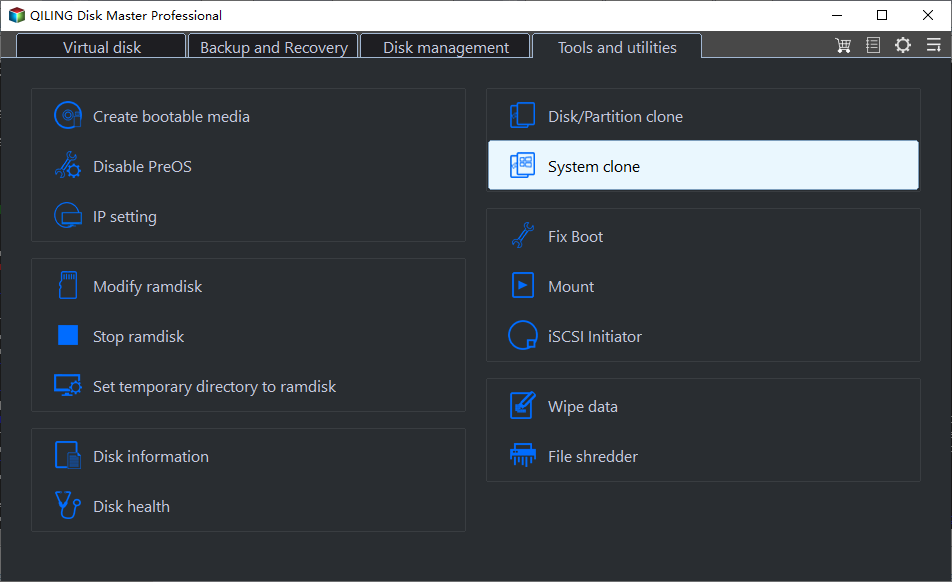
To clone the system, select "System Clone" under the "Clone" tab, and the program will automatically choose the C: drive and system-related drives to be cloned.
3) Choose a target partition to clone C: drive.
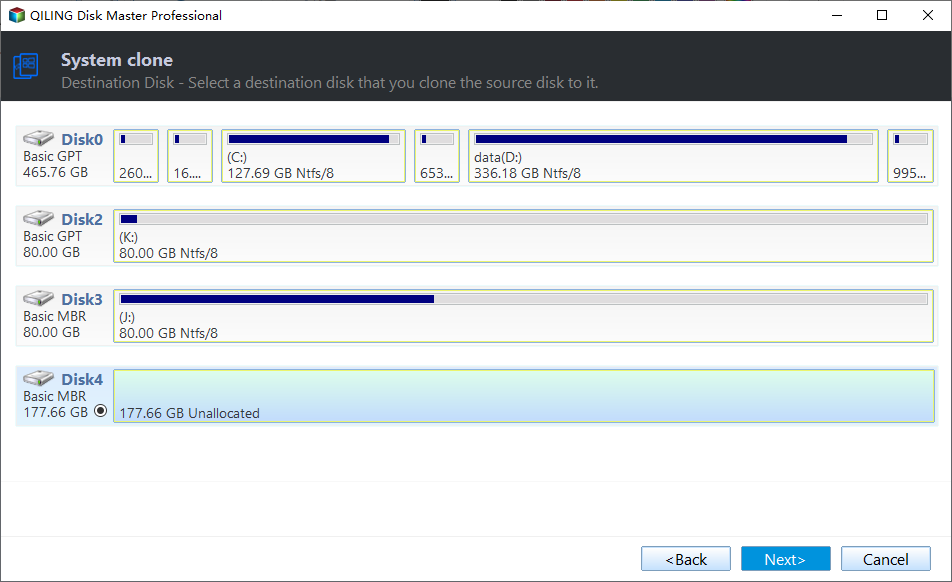
Notes:
- The destination partition should be at least as large as the C drive, and the system partition should be cloned to the first partition or first available space on the target disk to ensure the system can boot from the target disk.
- MBR disks support both 32-bit and 64-bit Windows and Server systems, while GPT disks only support 64-bit versions. GPT disks can only be used as data drives on 32-bit systems. If you plan to convert a disk from MBR to GPT, it's recommended to upgrade to 64-bit first. Additionally, if you need to clone a system drive with 32-bit versions installed from MBR to GPT, ensure your motherboard supports EFI/UEFI to ensure successful booting later.
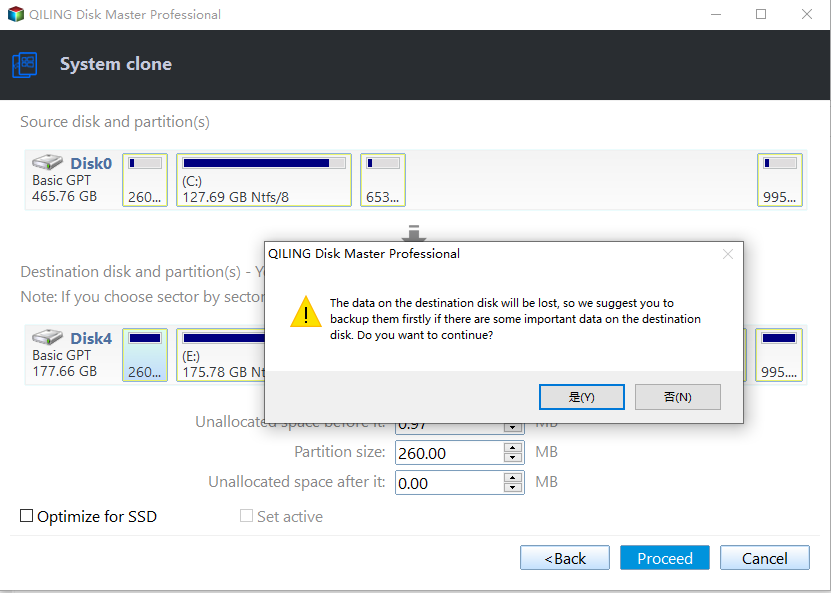
4) Click "Yes" if you have already made a backup.
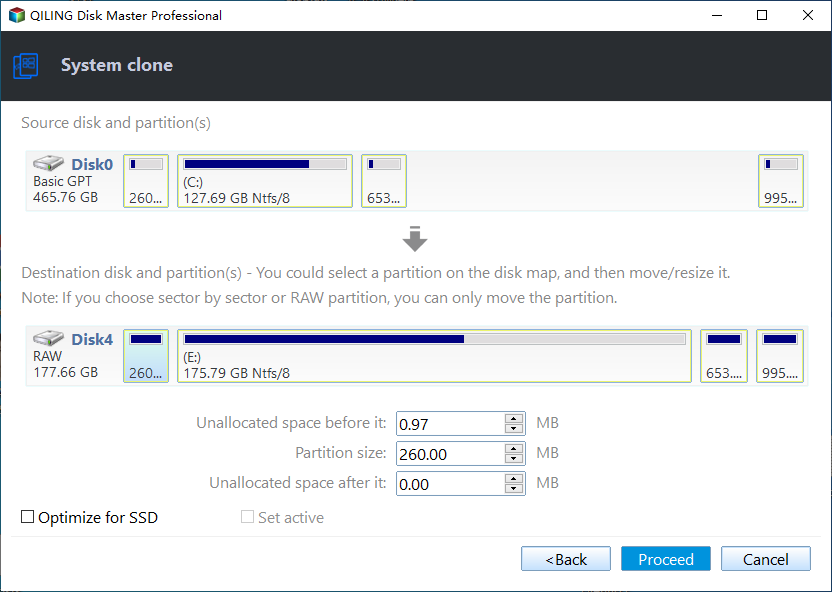
5) Click "Proceed" to finish this operation. If the external hard drive is an SSD, you can tick "SSD Alignment" to optimize its performance.
Summary
Qiling Disk Master makes it easy to clone a C drive to an external hard drive, and also works well for cloning hard drives or SSDs. It allows you to back up your system and create a system image to keep your Windows and applications safe, and can also be set up for automatic backups to prevent data loss.
If you're using Windows Server operating systems, you'll need to upgrade the Standard edition to the Server edition. However, this upgrade will give you access to many additional features that the Standard edition doesn't offer, making it a worthwhile investment.
Related Articles
- How to Clone C Drive in Server 2019 Effortlessly
- How to Clone Hard Drive via Command Prompt in Windows 10/8/7 Simply
- How to Switch Windows 7, 8, 10 from HDD to SSD?
Learn how to Clone C Drive in Server 2019 Effortlessly How to Clone Hard Drive via Command Prompt in Windows 10/8/7 Simply How to Switch Windows 7, 8, 10 from HDD to SSD with clear steps, key checks, and practical tips. - How to Transfer OS from HDD to SSD without Reinstalling
The easiest way to transfer OS from HDD to SSD is system cloning. It ensures booting from the target SSD, and eliminates the need of reinstalling Windows. - Easiest Way to Clone HDD to SSD via USB
This guide explains Easiest Way to Clone HDD to SSD via USB with clear steps, key checks, and practical tips. - Easiest Way: Clone HDD to SSD without SATA to USB Cable
You can use the easiest way to effortlessly clone HDD to SSD without SATA to USB cable or try the other two methods.
Products
Articles & Tutorials
- Data Recovery
- Data Backup
- File Recovery
- File Backup
- File synchronize
- System Backup and Restore
- Disk and Partition Clone
- Technical articles
- Disk Master Help
- Windows Deleted File and Disk Recovery Tutorials
- Windows File and Data Recovery Tutorials
- More Windows Tutorials for Install, Security, Files, and PC Tips
- Windows Boot, Repair, and Recovery Environment Tutorials
- Windows Backup Tutorials
- Windows Restore Tutorials
- Windows Clone and Migration Tutorials
- Windows Server Backup, Recovery, and Management Tutorials
- Windows Disk, Partition, and Storage Management Tutorials