How to Clone McAfee Encrypted Hard Drive with Ease
Need to clone McAfee encrypted hard drive
Many companies have experienced data breaches due to leaked or stolen information, prompting individuals to take preventive measures. To safeguard sensitive data, people often use McAfee Drive Encryption, a full disk encryption program that protects data on hard drives in case of lost or stolen equipment, thereby preventing unauthorized access.
If your computer with a McAfee encrypted hard drive is slowing down, consider replacing the drive with a faster SSD for improved performance. Alternatively, if you're running low on disk space, upgrade to a larger drive for increased capacity.
To ensure the confidentiality and integrity of your data, you need to back up your encrypted hard drive, as encryption only guarantees confidentiality, not data loss due to hardware failure or virus attacks. Cloning the McAfee encrypted drive can be a suitable solution for this.
Freeware to clone encrypted drive
Windows doesn't offer users a direct way to clone an encrypted drive, so users must turn to third-party software. However, regular cloning programs may fail due to lack of access to the data. Luckily, there is a program called Qiling Disk Master Standard that can bypass encryption and clone the drive.
This software offers two methods to clone encrypted disks secured by McAfee, allowing for cloning even when the target drive is larger than the source drive using sector by sector cloning, or decrypting the source drive when the target drive is smaller to perform an intelligent clone.
When cloning an encrypted hard drive to an SSD, this freeware can help improve the SSD's performance. It's compatible with Windows 11/10/8.1/8/7/Vista/XP and can be downloaded to explore its features.
The Standard edition supports cloning all data disks, both MBR and GPT, but for cloning a disk with a system installed, the Professional edition is required. A free trial of the Professional edition is available.
How to clone encrypted hard drive step by step?
To clone a McAfee encrypted hard drive to a same-size drive or larger drive without unlocking, follow these steps. First, ensure the destination drive is at least as large as the source drive.
Tips: After cloning, the target drive will be overwritten, so it's recommended to back up any important files to an external hard drive before proceeding.
Step 1. Install and open this freeware. Connect the target drive to your computer.
Step 2. Click Tools and Disk Clone subsequently.
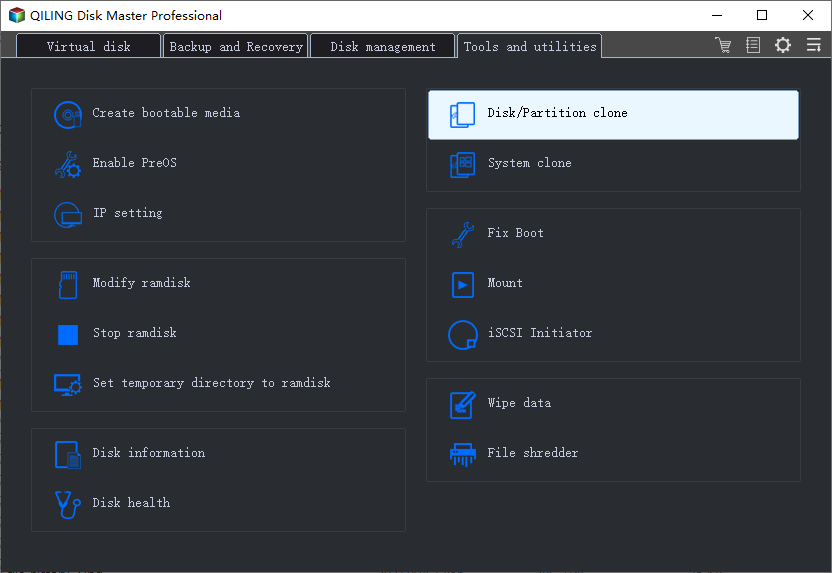
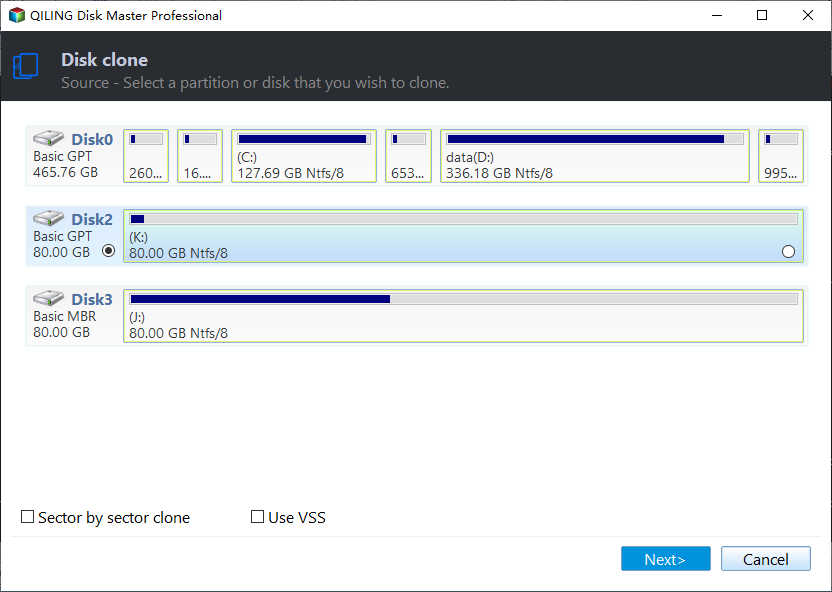
Step 3. Select the McAfee encrypted hard drive as the source drive. Then click Next.
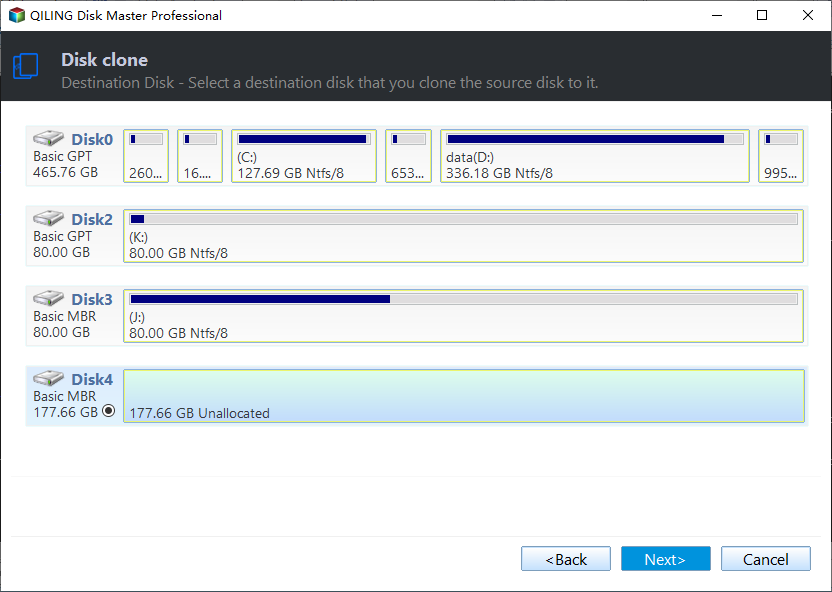
Step 4. Select the target drive to clone the encrypted drive to. Then click Next.
Step 5. Check the Sector by sector clone. Confirm your operations and then click Proceed.
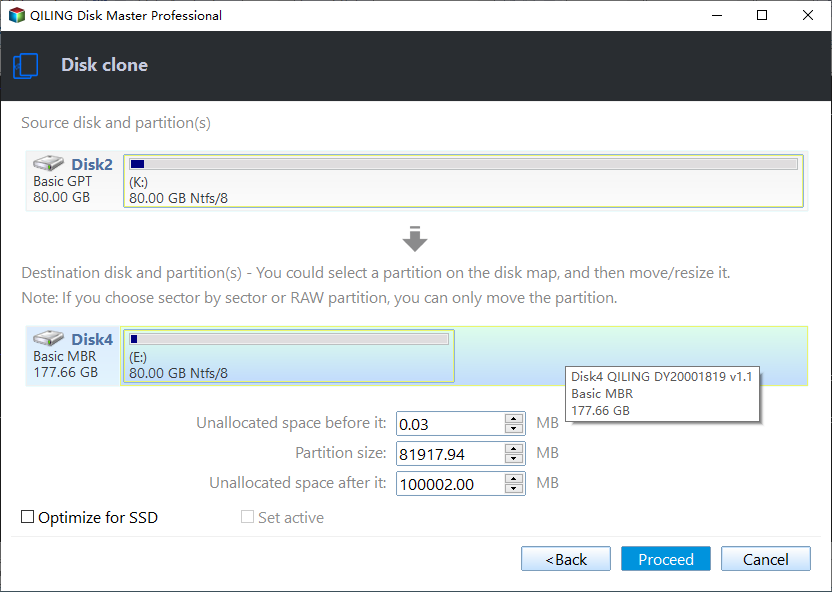
Aligning a partition to optimize for an SSD can accelerate the reading and writing speed of the drive, making it ideal for use as a target drive.
Tips:
- After cloning your hard drive, ensure you set the cloned drive as the primary boot device in your BIOS settings or replace the original drive with the cloned one to boot from it. This will allow your computer to recognize the cloned drive as the main operating system drive.
- McAfee encrypted hard drive can be kept as a backup or formatted for other purposes.
- After upgrading to the advanced version, you can clone both data disks and system disks, or use the System Clone feature to clone only the operating system.
Verdict
Qiling Disk Master Standard allows you to clone a McAfee encrypted hard drive in simple steps, and also serves you well when cloning a BitLocker encrypted disk. Additionally, it offers partition clone functionality. This freeware is also helpful for Windows Server users, and a more advanced version, Qiling Disk Master Server, is available for them.
Related Articles
- How to Make New SSD C Drive on Windows Laptop/PC🔥
When your old SSD C drive runs out of space, you can create a new SSD C drive by using a disk cloning tool like Qiling Disk Copy. This tool allows you to make a copy of your old drive, effectively creating a new SSD C drive with the same contents and settings, giving you more storage space. - How to Replace HDD with SSD on Desktop (Without Reinstalling OS)🔥
Replacing a desktop hard drive with an SSD can be done with the help of cloning software, such as Qiling Disk Copy, making the process straightforward and efficient. - Intel Data Migration Software Not Working - How to Fix?🔥
If your Intel data migration software isn't working properly, preventing you from transferring your operating system, installed applications, and personal files from an old storage device to a new Intel SSD drive, this blog can help you resolve the issue. - How to Migrate Windows 11 to Larger SSD Without Losing Anything
To migrate or clone Windows 11 to a larger new SSD, you'll need to attach the SSD to your computer, then use a cloning software to copy the entire Windows 11 OS, including all installed programs and files, to the new SSD. - How to Clone C Drive to SSD/HDD in Windows 10/8/7 Easily?
Learn how to Clone C Drive to SSD/HDD in Windows 10/8/7 Easily with clear steps, key checks, and practical tips. - How Do I Clone My Windows to External Hard Drive?
This guide explains How Do I Clone My Windows to External Hard Drive with clear steps, key checks, and practical tips.
Products
Articles & Tutorials
- Data Recovery
- Data Backup
- File Recovery
- File Backup
- File synchronize
- System Backup and Restore
- Disk and Partition Clone
- Technical articles
- Disk Master Help
- Windows Deleted File and Disk Recovery Tutorials
- Windows File and Data Recovery Tutorials
- More Windows Tutorials for Install, Security, Files, and PC Tips
- Windows Boot, Repair, and Recovery Environment Tutorials
- Windows Backup Tutorials
- Windows Restore Tutorials
- Windows Clone and Migration Tutorials
- Windows Server Backup, Recovery, and Management Tutorials
- Windows Disk, Partition, and Storage Management Tutorials