How to Duplicate Hard Drive to SSD in Windows [Bootable]
Can I Duplicate A Hard Drive?
Yes, there are several software options that allow you to clone or copy one hard drive to another, such as Qiling Disk Master. These programs can create a bit-for-bit copy of your old hard drive, including the operating system, programs, and data, which can be transferred to a new SSD. This process is often referred to as a "disk-to-disk" clone.
Cloning a hard drive means creating a complete and functional copy of the original drive, including all data and settings, allowing you to boot Windows from the duplicated drive just like the original one.
Duplicating a hard drive is often done when upgrading to a new HDD or SSD, such as copying all data and OS from an old drive to a new one (e.g. duplicating HDD to SSD, or SSD to another SSD). It's also a good idea to keep an exact copy of the hard drive as a backup in case the original fails unexpectedly.
Then, what is the best bootable hard drive duplicator for Windows?
- Duplicate Your Hard Drive with Dedicated Software
- How to Duplicate A Hard Drive to Another with Clone Software
Duplicate Your Hard Drive with Dedicated Software
No, you cannot duplicate an entire hard drive by copying & pasting or dragging & dropping, as this method is limited to copying files and folders, not the entire drive's contents, including the operating system, programs, and settings.
You can't move system files or hidden files in File Explorer, but you can move ordinary files like documents or pictures directly.
To duplicate a hard drive containing large data and a Windows installation, the most effective method is to utilize powerful disk clone software. This allows you to create an exact copy of the entire hard drive, including the operating system and all data, making the cloned drive bootable.
Whether you want to duplicate a data disk or system disk, Qiling Disk Master Professional is a good choice to help you clone HDD or SSD in Windows 11/10/8.1/8/7/Vista/XP. It offers three options: Disk Clone, System Clone, and Partition Clone, providing the best flexibility for your cloning needs.
>> The software will only copy used sectors from the original HDD to the target SSD, allowing for the cloning of a larger HDD to a smaller SSD as long as the SSD has sufficient storage capacity to hold all the data from the HDD.
>> If you want to make an exact duplicate of the hard drive, including the blank and logically bad sectors, you can choose the sector-by-sector clone option. This will ensure that even the system reserved recovery partition functions normally.
The software is also a professional external USB hard drive duplicator, allowing for effortless copying of USB sticks to another USB drive.
A software that simplifies the process of copying a hard drive can be downloaded and used to easily copy a hard drive's contents to another drive, eliminating the need for manual selection and copying of files. By following a tutorial, users can have a try and experience the convenience of this software.
Qiling Disk Master allows cloning data and system disks from any brand, regardless of partition style, but it's essential to ensure the target disk's partition style matches the boot mode (MBR for legacy BIOS and GPT for UEFI).
How to Duplicate A Hard Drive to Another with Clone Software
Preparations to Duplicate Hard Disk on Windows 10, 11:
- Clean up the source hard drive by deleting unnecessary files and apps.
- Install the target hard drive - For laptops with only one slot, connect the target disk via a SATA-to-USB adapter.
- To clone a hard drive, first install hard drive clone software - Download Qiling Disk Master and install it on your Windows computer.
Qiling Disk Master Standard includes Disk Clone feature to copy the entire hard drive, Partition Clone to duplicate individual partitions, or System Clone to move Windows to another drive. Now I will introduce its basic operation.
How to duplicate hard drive to SSD with Qiling Disk Master:
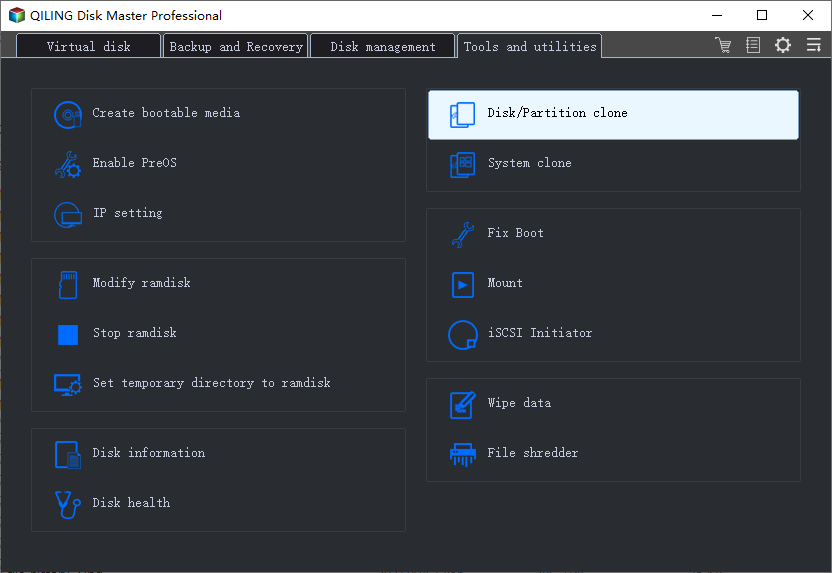
1. Open the software, navigate to the Clone tab and select Disk Clone.
If you want to transfer only the operating system, you can choose System Clone.
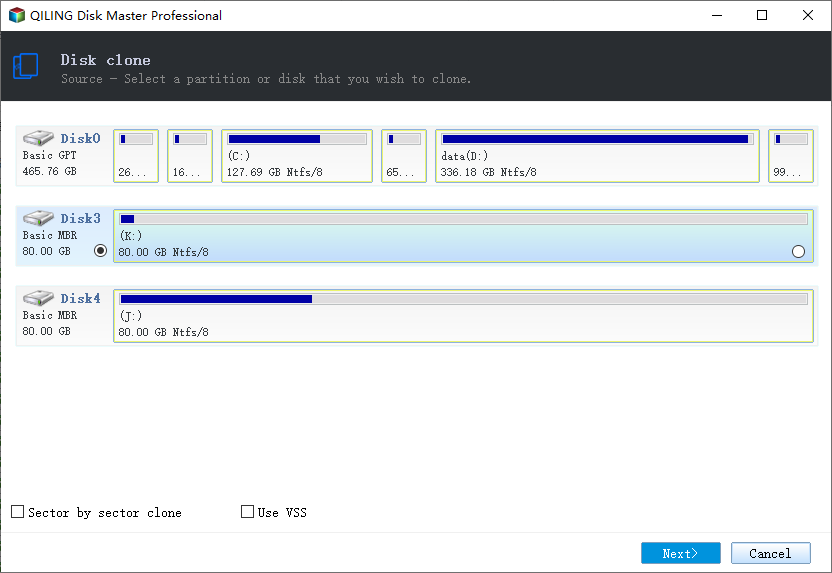
2. Select the hard drive you want to duplicate and click Next.
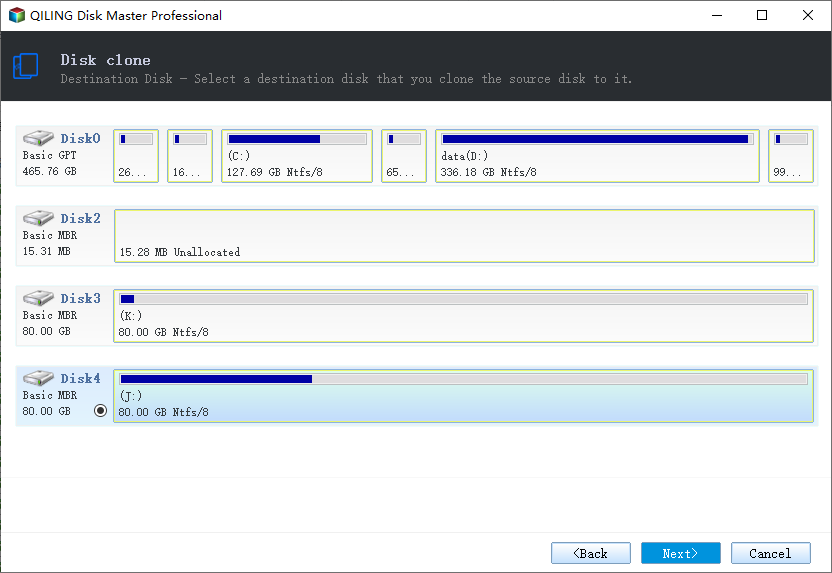
3. Then select the connected destination disk and hit Next.
4. To prepare the target SSD for cloning, select it and enable "SSD Alignment" to optimize its performance. If you want to copy all sectors from the source hard drive, choose "Sector By Sector Clone" instead. Finally, click "Proceed" to start the cloning process.
To clone a hard drive with a different size, you can click "Edit Partition" to resize and rename partitions on the target disk, avoiding unallocated space.
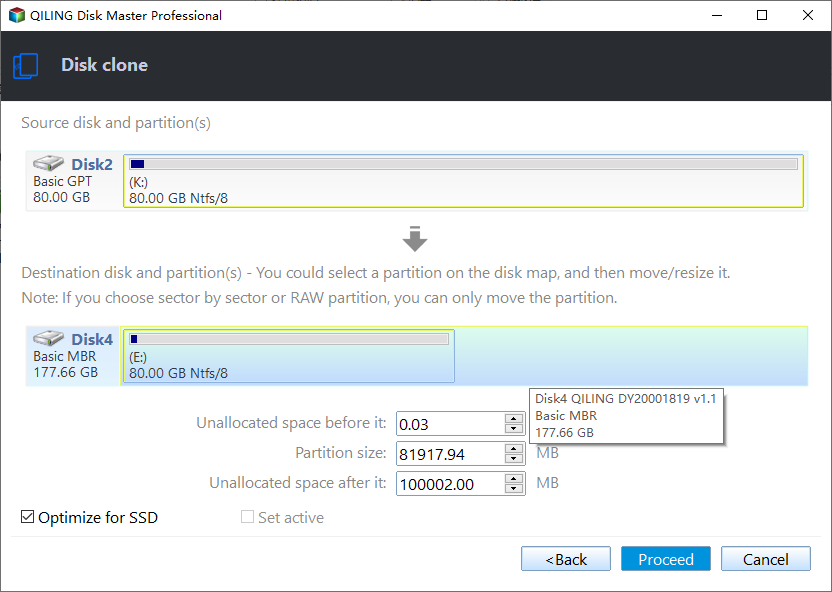
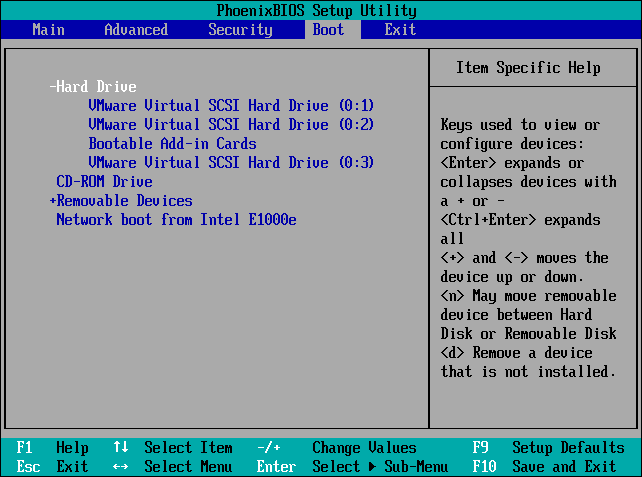
After cloning the disk, if you want to use the cloned disk as the boot drive, you can simply shut down your PC, replace the old hard drive with the new one, and turn your PC back on.
You can access BIOS/UEFI settings during startup, select the cloned hard drive as the first boot option, and save the settings to boot from it.
✍Notes:
- The target disk will be completely erased during the operation. If you have important data on it, please use Qiling Disk Master's backup feature to create a backup before proceeding.
- If the computer boots properly from the cloned drive, you can then decide whether to erase the old hard drive, which can be done using the Disk Wipe feature in Qiling Disk Master.
Summary
To duplicate a hard drive, using disk clone software such as Qiling Disk Master is the best option. This software allows you to clone a hard drive to another, including secure boot, and the operation can be completed with just a few simple clicks.
This software offers not only disk cloning but also data protection and disaster recovery features. It allows you to create system images on a regular basis and even restore them to a different computer, providing a reliable backup and recovery solution.
If you want to use these powerful features on Windows Server, you can try the specialized Server edition.
Related Articles
- Easiest Way to Clone Hard Drive to SSD without Reinstalling (Video Tutorial)
HDD to SSD cloning offers a convenient way to upgrade your Windows 11/10 PC without having to reinstall the operating system from scratch. Valuable tips & tricks included. - Make Exact Copy of Hard Drive Windows 7/8/10
You will learn how to make an exact copy of hard drive with the best disk cloning software - Qiling Disk Master Professional. No data loss and reinstallation. - Top 2 Ways to Copy/Transfer Data from One Hard Drive to Another
This guide explains Top 2 Ways to Copy/Transfer Data from One Hard Drive to Another with clear steps, key checks, and practical tips. - How to Clone HDD to External Drive in Windows 10/8/7?
You can clone hard drive or SSD to external drive easily and boot successfully with the help of the best disk cloning software - Qiling Disk Master Professional. - Easily Migrate Windows 10 to NVMe SSD without Reinstalling
You can migrate Windows 10 to NVME SSD without Windows reinstallation. Thus, you can boot OS from the NVME SSD to experience less boot time and higher read & write speed. - (2022 Tips) Replace Hard Drive with SSD without Reinstalling Windows
Learn how to replace a hard drive with an SSD without reinstalling Windows. Clone your system, files, and apps to the new SSD.
Products
Articles & Tutorials
- Data Recovery
- Data Backup
- File Recovery
- File Backup
- File synchronize
- System Backup and Restore
- Disk and Partition Clone
- Technical articles
- Disk Master Help
- Windows Deleted File and Disk Recovery Tutorials
- Windows File and Data Recovery Tutorials
- More Windows Tutorials for Install, Security, Files, and PC Tips
- Windows Boot, Repair, and Recovery Environment Tutorials
- Windows Backup Tutorials
- Windows Restore Tutorials
- Windows Clone and Migration Tutorials
- Windows Server Backup, Recovery, and Management Tutorials
- Windows Disk, Partition, and Storage Management Tutorials