Best Way to Make Exact Copy of Hard Drive
Need to make an exact copy of hard drive
Making an exact copy of a hard drive typically involves transferring data from one hard drive to another, resulting in the destination disk containing the exact same data as the source disk. This process is particularly useful in situations where data preservation and duplication are crucial, such as when backing up important files, creating a duplicate for redundancy, or transferring data to a new device.
Upgrade old hard drive: You're experiencing low disk space or want to upgrade your old hard drive to a new one, possibly to replace it with a faster SSD to improve your computer's performance.
Make an exact copy for backup: Making a full copy of your hard drive is a good idea to ensure you don't lose any important data. This process essentially serves as a backup of your critical information, allowing you to restore your computer or data in case something unexpected happens.
Deploy image to multiple computer: It's common for schools or companies to purchase many computers and then need to install Windows on each one. To avoid this tedious process, they can create an exact copy of a hard drive and use it on multiple computers, saving time and effort.
Choosing a reliable hard drive cloning software is crucial when making an exact copy of a hard drive is so important.
Best disk cloning software to make an exact copy
Qiling Disk Master Professional offers a reliable disk clone function, supporting both data and system disks, including conversions from MBR to MBR, MBR to GPT, GPT to GPT, and GPT to MBR. This process can be done without interrupting the running operating system and programs, making it a convenient and efficient solution.
Below are some useful features of this software:
- This software uses Intelligent Clone, which clones only used sectors of a hard drive to another, allowing you to easily clone a large drive to a smaller drive or SSD, and also supports cloning a disk to a larger disk.
- Clone all brands of HDDs and SSDs: It supports cloning disks from various brands, including WD, Samsung, HP, and SanDisk. Additionally, if the target disk is an SSD, it has a feature to improve its performance through SSD Alignment.
- Support all editions of Windows system: This software can be used on Windows Vista/XP/7/8/8.1/10, supporting both 32-bit and 64-bit versions.
With Qiling Disk Master, you can save time by not reinstalling your OS and apps, and avoid data loss.
How to make an exact copy of hard drive step by step
Before copying a hard drive, download and install this software on your Windows computer (11/10/8/7/XP/Vista) or use Qiling Disk Master Server for server users.
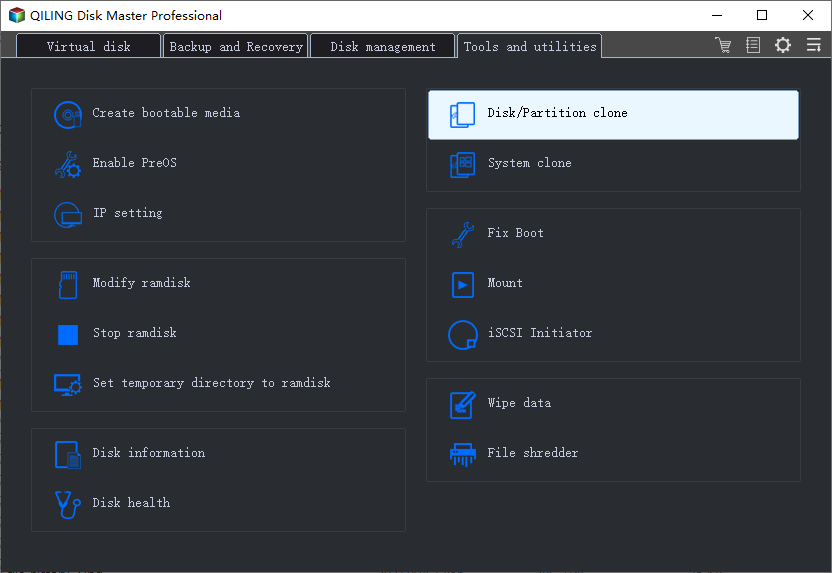
Step 1. Launch Qiling Disk Master Professional, select Disk Clone at Clone tab.
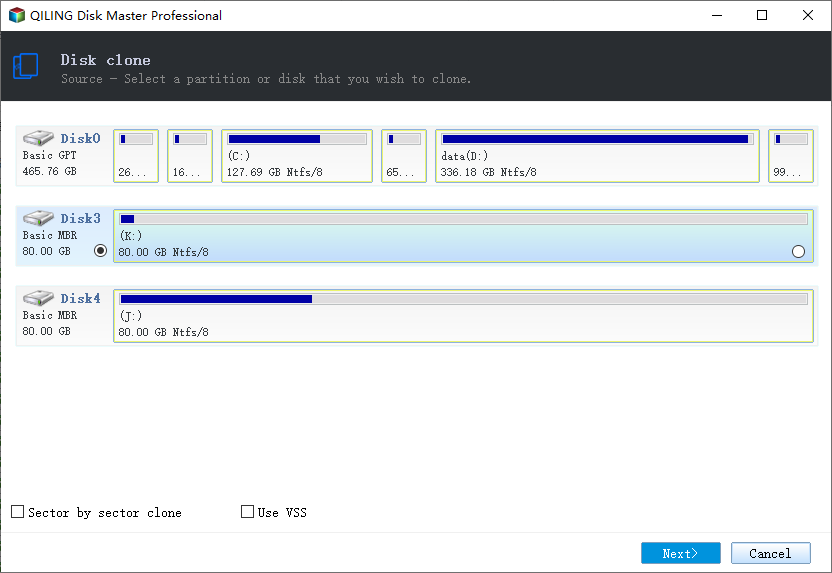
Step 2. Select the source disk that you want to clone. Then, click Next.
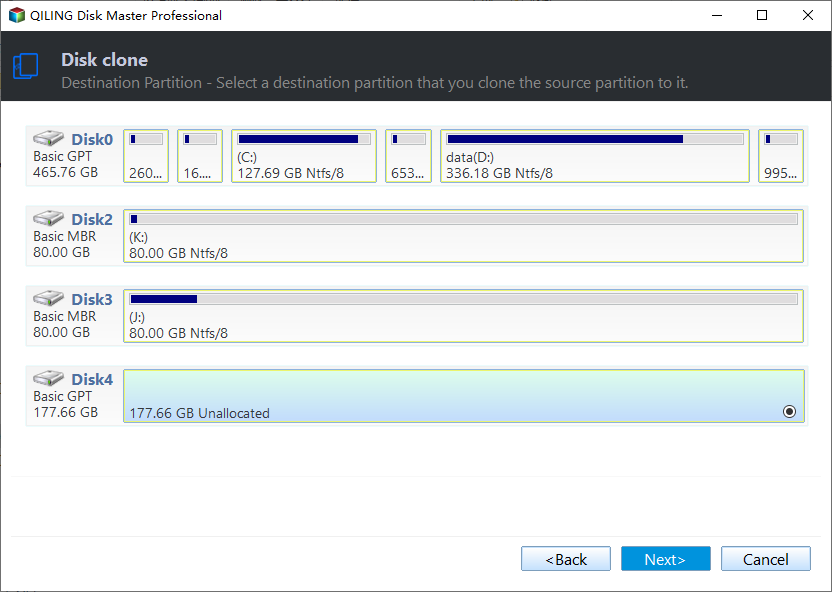
Step 3. After selecting the destination disk, click Next. Be aware that the destination disk will be completely overwritten during the cloning process, so make sure to back up any important data on it beforehand if necessary.
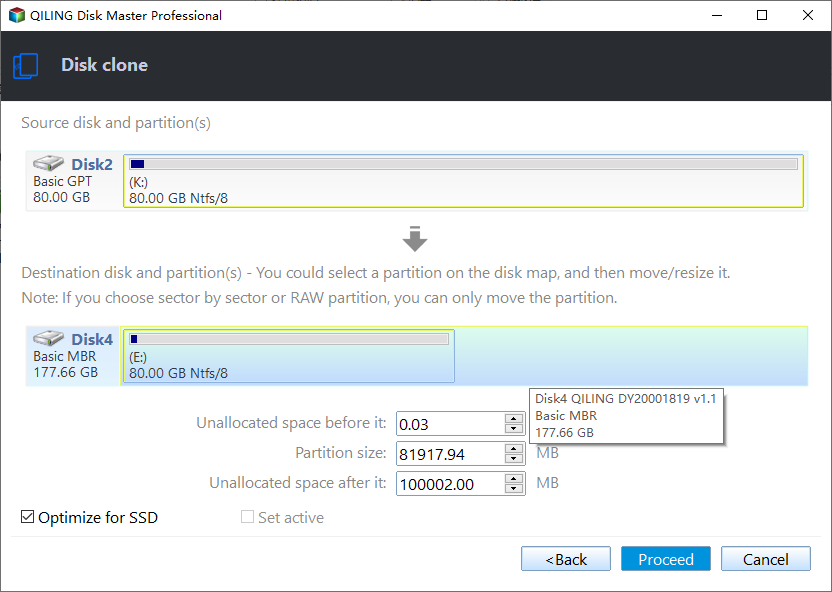
Step 4. In the Operation Summary window, check the source and destination disk and click "Proceed" to make an exact copy of the hard drive. If the destination disk is an SSD, select "SSD Alignment" to optimize its reading and writing speed.
In addition, you can enjoy the other two useful features:
- Edit Partitions: When cloning a larger disk to a smaller one, you can choose to add the unallocated space to all partitions or manually adjust the partition size, and also convert the destination disk from MBR to GPT or vice versa.
- Sector by sector clone copies all sectors of the disk to the destination disk, regardless of whether they are in use or not. This is useful for cloning a system disk where the system reserved partition is missing. The destination disk size must be equal to or larger than the source disk, and it's generally not recommended to tick this option to save destination disk space.
To check if the cloned hard drive is bootable, you'll need to connect it to your computer and boot from it. If it boots successfully, it means the cloning process was successful and the hard drive is bootable. You can then disconnect the original hard drive and use the cloned one as your main drive. If it doesn't boot, you may need to reinstall Windows or troubleshoot the cloning process.
- Restart your computer to let your computer boot from it.
- If the USB drive doesn't work, you need to change the boot order in the BIOS. To access the BIOS, press the manufacturer key (usually F2, F10, ESC, Del, etc.) while you see the Windows logo.
- Then, go to the Boot tab and move the cloned drive to the first option.
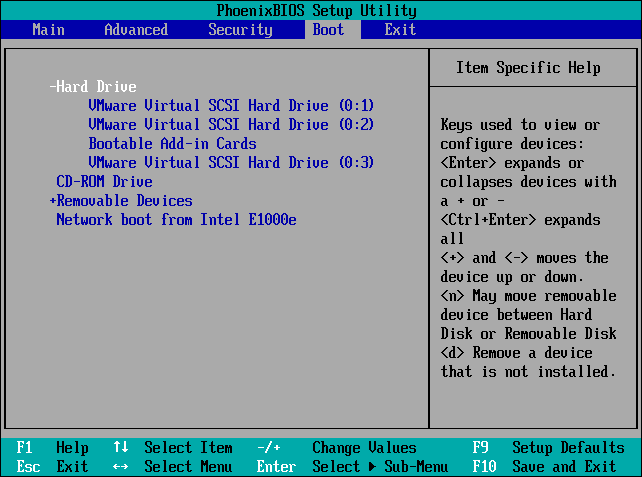
- Finally, press F10 to save changes and boot from it. If the source and target disks are of different types, you may still need to change the boot mode, with Legacy BIOS for MBR disks and UEFI for GPT disks.
Notes:
- If you're cloning a system disk from GPT to GPT or from MBR to GPT (or vice versa), you'll be prompted to upgrade to the professional version.
- If the new hard drive or SSD is smaller, you can still choose to clone the OS only with the System Clone feature, but you'll need to upgrade before using it.
Conclusion
You can easily make an exact copy of your hard drive in Windows 7/8/8.1/10/11 using the best hard drive cloning software, Qiling Disk Master Professional. This software allows you to clone your hard drive to a larger one, as well as from a larger HDD to a smaller SSD, ensuring that you can get your computer back up and running quickly without having to download everything again.
Qiling Disk Master is a fantastic software that deserves a try, offering awesome backup and restore capabilities, supporting various backup types, and providing features like schedule backup, incremental backup, and automatic cleanup to free up your hands.
Related Articles
- What is Hot Clone and How to Clone a running VMware?
- Clone Windows Server 2008 (R2) without Reinstalling Windows
- Migrate OS to SSD with Secure Boot in Windows 10/8/7 (2 Ways)
- How to Change Partition Type ID Easily? (2 Ways Included)
This tutorial demonstrates how to change partition type ID in two efficient solutions and tells basic information about partition type ID. - Backup Partition/Volume Easily in Windows 11, 10, 8, 7
This article explains how to easily backup a partition or volume using the powerful backup tool Qiling Disk Master, which helps protect your data. - 4 Steps: How to Perform Partition Restore or Volume Recovery
A powerful and excellent program - Qiling Disk Master enables you to restore partition/volume easily. It can work with all Windows OS since Windows 2000.
Products
Articles & Tutorials
- Data Recovery
- Data Backup
- File Recovery
- File Backup
- File synchronize
- System Backup and Restore
- Disk and Partition Clone
- Technical articles
- Disk Master Help
- Windows Deleted File and Disk Recovery Tutorials
- Windows File and Data Recovery Tutorials
- More Windows Tutorials for Install, Security, Files, and PC Tips
- Windows Boot, Repair, and Recovery Environment Tutorials
- Windows Backup Tutorials
- Windows Restore Tutorials
- Windows Clone and Migration Tutorials
- Windows Server Backup, Recovery, and Management Tutorials
- Windows Disk, Partition, and Storage Management Tutorials