MBR Repair for an External Hard Drive: Identify the Actual Fault
An unreadable external drive does not automatically have a damaged MBR. USB connection faults, encryption, an unsupported file system, and damaged partition information can produce similar symptoms. Repairing boot code will not solve all of these problems.
For a storage-only disk, Windows does not need its legacy boot program to open normal files. Identify the failed layer before selecting an MBR repair tool.
Separate boot code, partition information, and file-system damage
An MBR disk stores partition information and legacy startup code in its initial sector. Those two functions are related but not identical. GPT uses a different partitioning scheme, and rewriting legacy boot code is not a general GPT repair.
- The disk is missing entirely: check power, USB cable, enclosure, and hardware detection.
- The volume is healthy but has no letter: verify that it is an ordinary data volume before assigning one.
- A known data volume is RAW: protect its contents before any file-system repair or format.
- The disk suddenly appears unallocated: investigate lost partition information rather than creating a new volume.
- A bootable external disk no longer starts: inspect its intended boot configuration separately from file access.
Inspect the disk with Windows tools
- Connect the drive directly to a reliable USB port. If it uses an external power supply, check that supply. Avoid repeatedly reconnecting a mechanically failing drive.
- Open Disk Management. Cancel an unexpected Initialize Disk or Format prompt when the disk contains data you need.
- Record the disk number, capacity, partition style, and displayed status. Match these with the physical device before doing anything else.
- For a healthy ordinary data volume without a drive letter, right-click it, choose Change Drive Letter and Paths > Add, and select an unused letter. Do not expose OEM or EFI partitions this way.
- If access is restored, copy important files first and test the copies on a different drive.
Changing the command prompt from C: to E: does not make bootrec /fixmbr target E:. Do not use that command as an arbitrary USB-disk selector.
Back up readable files before a repair attempt
When the external volume is stable and readable, Qiling Disk Master can save selected files to another physical disk. This is preparation for repair, not a claim that File backup reconstructs a lost partition table.
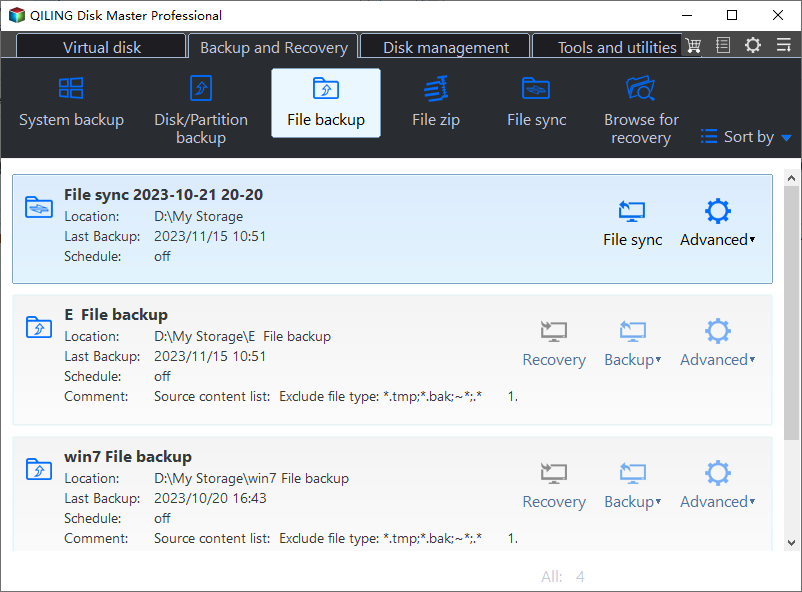
Step 1. Connect a second destination disk. Open Backup and Recovery > File backup.
Step 2. Expand the external volume in the tree control. Select the folders that need protection, starting with irreplaceable files if the available backup time is limited.
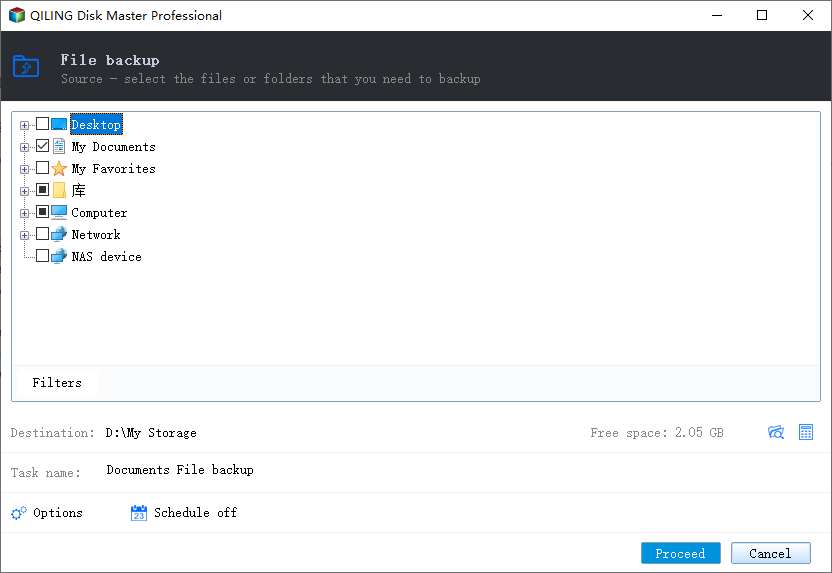
Step 3. Choose the second physical disk as the destination. Check that the path does not point back to the affected drive, then click Proceed.
Step 4. Review the result for skipped or unreadable files. Restore a sample to a test folder and open it. A successful task message is not proof that a failing source yielded every file.
Choose the next action from the evidence
If a previously populated disk is unallocated or RAW, avoid formatting, initializing, and running repeated write repairs. Work from a recoverable image where possible, or seek recovery assistance for valuable data. Save recovered files onto another disk.
If only an intentionally bootable disk has lost legacy startup code, use a repair procedure that explicitly identifies that disk and supports its operating system. A tool described as Rebuild MBR may replace code without reconstructing missing partition entries. Read that distinction before applying it.
After files are safe and hardware tests pass, a deliberately disposable data volume can be recreated and formatted. This prepares it for reuse; it does not recover its previous files. If errors return on another known-good cable or computer, replace the disk or enclosure rather than repeatedly rebuilding software structures.
Related Articles
- Recover Partition-Table Data
Investigate missing partition information before creating replacement volumes. - Recover an Unallocated Partition
Preserve data when an external disk unexpectedly becomes unallocated.
Products
Articles & Tutorials
- Data Recovery
- Data Backup
- File Recovery
- File Backup
- File synchronize
- System Backup and Restore
- Disk and Partition Clone
- Technical articles
- Disk Master Help
- Windows Deleted File and Disk Recovery Tutorials
- Windows File and Data Recovery Tutorials
- More Windows Tutorials for Install, Security, Files, and PC Tips
- Windows Boot, Repair, and Recovery Environment Tutorials
- Windows Backup Tutorials
- Windows Restore Tutorials
- Windows Clone and Migration Tutorials
- Windows Server Backup, Recovery, and Management Tutorials
- Windows Disk, Partition, and Storage Management Tutorials