Best Free Way: Check Backup Image and Ensure Data Integrity
Why Do Image File Checking before Restoration?
When restoring important data from an image file, it's crucial to get it right the first time, as any mistakes or errors could lead to data corruption, which could have severe consequences, such as financial losses or even legal repercussions.
Backing up an operating system to a CD can be problematic if the image file gets damaged by CD scratching. This can cause the recovery process to overwrite the previous data with an incorrect image file, potentially leading to system corruption and even serious system failures.
In cases of data corruption on destructible storage devices, it's crucial to validate backup images to prevent further data loss. However, verifying the accuracy of these images is often a challenge, as their integrity can't be confirmed until data recovery is attempted. To address this, using an image file checking tool can help ensure the backup image is correct before attempting recovery. This approach helps prevent potential data loss due to corrupted backup images.
Check Image File with Qiling Disk Master
Qiling Disk Master Standard is a powerful backup and restore program for all Windows PCs that provides rich functionalities, including image file checking. With it, you can examine the correctness of backups in various aspects.
- The image file is not complete if it has been split into several small files and one of them is missing, which will prevent the restoration from being completed.
- If there's partial damage, some restored files or programs may not work properly.
- Any other mistakes in the image file? To make up for it, you can perform a corresponding backup timely.
Qiling Disk Master offers a comprehensive backup solution in addition to its image file checking tool. It provides various backup modes and options to meet most data protection needs.
Another approach to check image file
To check an image file for its integrity and correctness in Qiling Disk Master, you can follow these steps. First, open Qiling Disk Master and click on "File" > "Open Image File" to select the image file you want to check.
Step 1. After completing a file backup, partition backup, system backup, or disk backup, find the backup task in the Home page.
Step 2. Hover over the task, click on the 3-line icon, and select Advanced > Check Image from the dropdown menu.
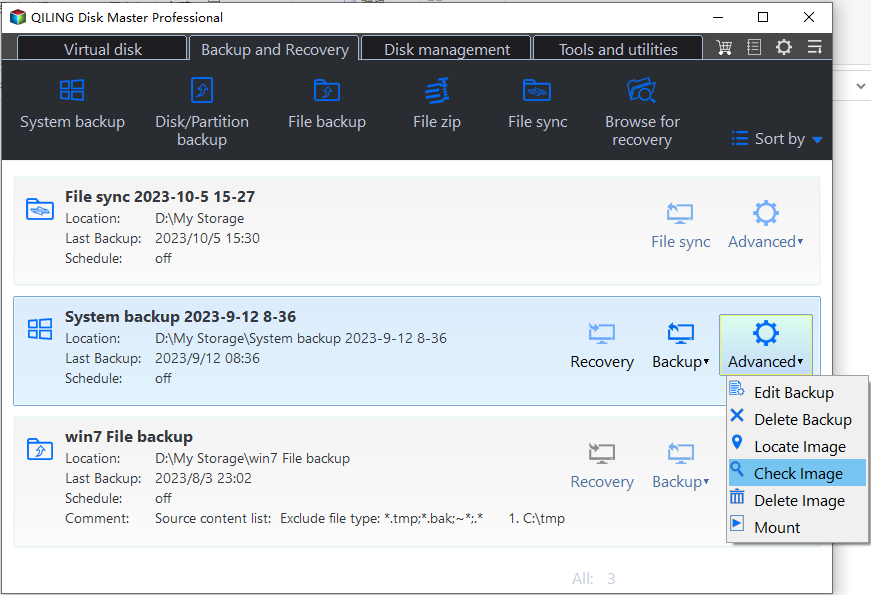
Step 3. Then, wait for the image checking process to complete.
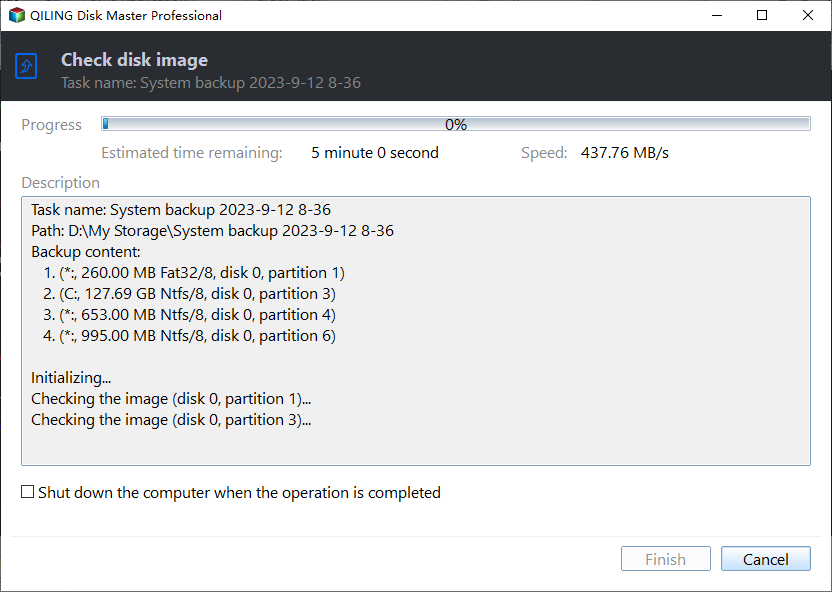
The image file checking will run automatically. If there is no problem, you just need to click Finish. When the process is complete, you can safely recover your data from the image file without any concerns.
Notes:
- We suggest checking the image file after backup or before recovery to ensure the data's safety to the fullest extent.
- If you're struggling to locate a specific image file amidst a multitude of tasks, consider creating backups with comments to make them easily identifiable and accessible.
- If you want to use only one or several files from a backup image, you can explore the image to mount it as a virtual drive, and copy the file(s) you want without restoring. Upgrading to Qiling Disk Master Professional will allow you to enjoy this feature.
Related Articles
- 3 Ways to Install Windows 7 to NVMe SSD
This guide explains 3 Ways to Install Windows 7 to NVMe SSD with clear steps, key checks, and practical tips. - How to Easily Move Boot Partition in Windows 7/8/10?
You will get the 3 ways to move boot partition in Windows 7, and the best way to avoid boot partition and system partition on different drives. - Windows 7 Starts in Safe Mode But Not Normal (Tested Fixes)
Learn how to fix the common problem that Windows 7 starts in safe mode, but not in normal mode from this page. Five solutions are mentioned. - System Restore Could Not Start in Windows 7-How to Resolve?
This guide explains System Restore Could Not Start in Windows 7-How to Resolve with clear steps, key checks, and practical tips. - How to Use Batch Script to Backup SQL Server Databases?
Compared to other methods, a batch script is especially useful when you want to back up batches of databases regularly. This post shares batch scripts for backing up SQL Server databases, and an alternative with equal functionality. - Best HDD Cloning Software for Data Migration in Windows 11/10
This article introduces one of the best free HDD cloning software for Windows PCs to download. Cloning hard drive to SSD or new drive could be a pretty easy work with it.
Products
Articles & Tutorials
- Data Recovery
- Data Backup
- File Recovery
- File Backup
- File synchronize
- System Backup and Restore
- Disk and Partition Clone
- Technical articles
- Disk Master Help
- Windows Deleted File and Disk Recovery Tutorials
- Windows File and Data Recovery Tutorials
- More Windows Tutorials for Install, Security, Files, and PC Tips
- Windows Boot, Repair, and Recovery Environment Tutorials
- Windows Backup Tutorials
- Windows Restore Tutorials
- Windows Clone and Migration Tutorials
- Windows Server Backup, Recovery, and Management Tutorials
- Windows Disk, Partition, and Storage Management Tutorials