Reliable and Powerful Data Wipe Software
About Wipe Disk or Partition
Wipe Disk is a feature that completely erases all data on a hard disk drive. Different from deleting or formatting, once data is wiped, it cannot be recovered by any data recovery software. This feature is particularly useful when you want to dispose of, donate, or sell your computer, ensuring that no one can access your personal or confidential data.
Wipe Partition is designed to erase all data on a specific partition, such as D drive, making it impossible to recover. This feature is particularly useful when you want to delete all data on a specific partition, for example, to ensure that confidential information is completely removed from the drive.
When you delete files in Windows, only the file entry in the Master File Table is marked as deleted, not the actual data. Formatting a partition only removes the file table, not the actual data. This means that data recovery software can still access the data on a formatted partition. To securely erase all data on a disk or partition, you need to use a data wipe tool such as Qiling Disk Master, which is a reliable and powerful data wipe software.
How to Wipe Disk or Partition with Qiling Disk Master
To wipe a disk or partition with Qiling Disk Master, you can follow the steps below. This software also provides other disk management features, such as partition backup, partition clone, and partition alignment.
1. Download and install Qiling Disk Master Standard. Connect the disk you want to wipe to your computer, if it is an external one.
2. Launch the software, click the Tools tab, and select Disk Wipe.
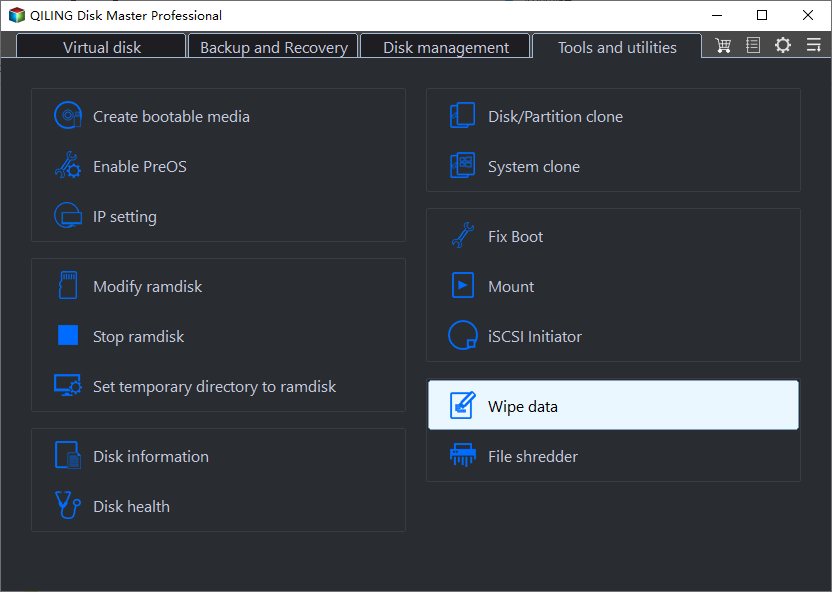
3. Select the disk or partition you want to wipe from the list. You can choose the entire disk or a specific partition.
4. Choose a wiping method. Qiling Disk Master provides several wiping methods, including zero-fill, random data, and DoD 5220.22-M. The more passes you choose, the more secure the wipe, but it will also take more time.
5. Confirm the operation and click Proceed to start the wiping process. This process will permanently erase all data on the selected disk or partition, so make sure you have backed up any important data before proceeding.
After the wiping process is complete, the disk or partition will be completely empty, and no data recovery software will be able to recover any data from it. You can now safely dispose of, donate, or sell your computer without worrying about data leakage.
Related Articles
- How to Wipe a Hard Drive on a Dead Computer?
- How to Wipe a Hard Drive Without Deleting Windows
- What Should I Do When Computer Freezes? (7 Options)
The computer freezes always to make users annoyed. Fortunately, you can find some effective solutions to fix it from here.
Products
Articles & Tutorials
- Data Recovery
- Data Backup
- File Recovery
- File Backup
- File synchronize
- System Backup and Restore
- Disk and Partition Clone
- Technical articles
- Disk Master Help
- Windows Deleted File and Disk Recovery Tutorials
- Windows File and Data Recovery Tutorials
- More Windows Tutorials for Install, Security, Files, and PC Tips
- Windows Boot, Repair, and Recovery Environment Tutorials
- Windows Backup Tutorials
- Windows Restore Tutorials
- Windows Clone and Migration Tutorials
- Windows Server Backup, Recovery, and Management Tutorials
- Windows Disk, Partition, and Storage Management Tutorials