How to Choose One Key Recovery Software
With the increasing intensity of computer production, manufacturers have improved their techniques, leading to the development of one-key recovery software that replaces the traditional system repair disc for Windows 7, 8, and 10.
Within Lenovo's Onekey Recovery software, you can directly factory reset your Lenovo desktop or laptop without a CD/DVD, even if you never created a system image, as it contains an initial backup from when you first got your computer.
What is one key recovery software?
One key Recovery software is a preinstalled backup and restore program in specific operating systems, offering a bootable solution that allows users to restore their computer without needing an installation disc or recovery drive, similar to Lenovo OneKey Recovery, Dell Backup and Recovery Manager, and HP Recovery Manager.
Recovery software for branded computers has a limitation that it can only be used on the specific computer it was originally installed on, and it may not work if the system is reinstalled or the partition size is changed.
The branded recovery software is not a viable option, instead, a third-party software that can be used on various brand computers is preferred. One such software is Qiling Disk Master Professional, which is bootable.
Best one key recovery software: Qiling Disk Master
Due to its limited functionality and potential stability issues, many users find Lenovo Onekey Recovery software to be a hassle to learn and use, with common errors including driver initialization failure, recovery partition damage, insufficient space, and service partition destruction.
Qiling Disk Master is a software designed to operate and maintain stability, addressing issues commonly faced by other backup and recovery software. Its stable performance allows it to be used with confidence, making it a reliable option. Additionally, it supports unlimited users worldwide, further enhancing its usability and appeal.
Qiling offers different versions for various users, including Qiling Disk Master Professional for common server and PC users, Qiling Disk Master Technician for technicians, and a customization option for UI customization.
How to use Qiling Disk Master Professional
Qiling Disk Master breaks the brand product limitation and becomes one of the best One Key Recovery software.
Qiling Disk Master provides a backup and recovery solution that supports various laptops and computers, similar to Lenovo's One Key Recovery, but with broader compatibility. It allows users to restore their system to its factory settings or a previously saved state by pressing specific keys, such as "A" or "F11".
In the OneKey System Backup feature, you have two options: backing up your system to the Qiling Disk Master partition, which is the recommended choice, or backing up to another location. This recommended option is secure because the recovery partition is hidden by default, protecting the image files from damage. Additionally, you can use this feature to create a Lenovo OneKey Recovery to a new hard drive.
To create a bootable system backup with Qiling Disk Master software, follow these steps: Download and install Qiling Disk Master on your computer. Launch the software and select the drive you want to backup, which should be the drive where your operating system is installed.
Step 1. Download onekey recovery software, install and launch it
Step 2. Click System Backup in the main interface.
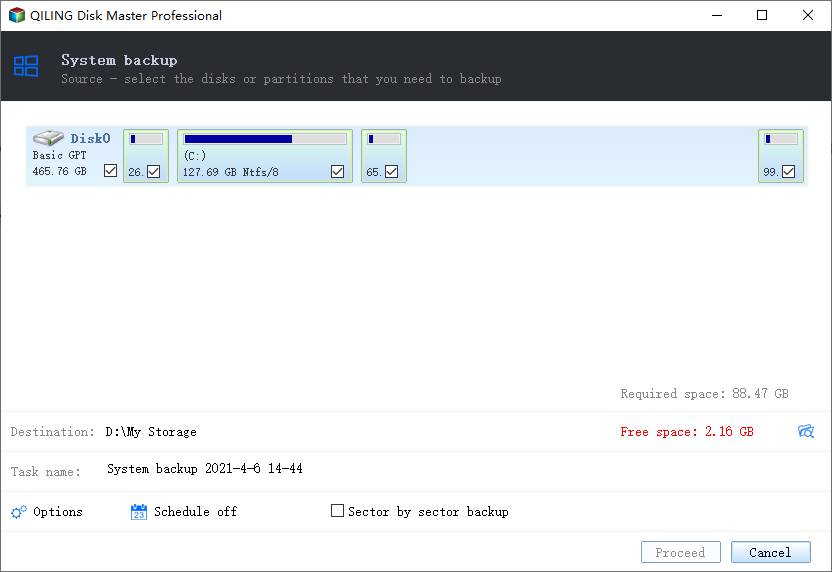
Step 3. Tick "Backup system to Qiling Disk Master partition" or, "Backup system to other location".
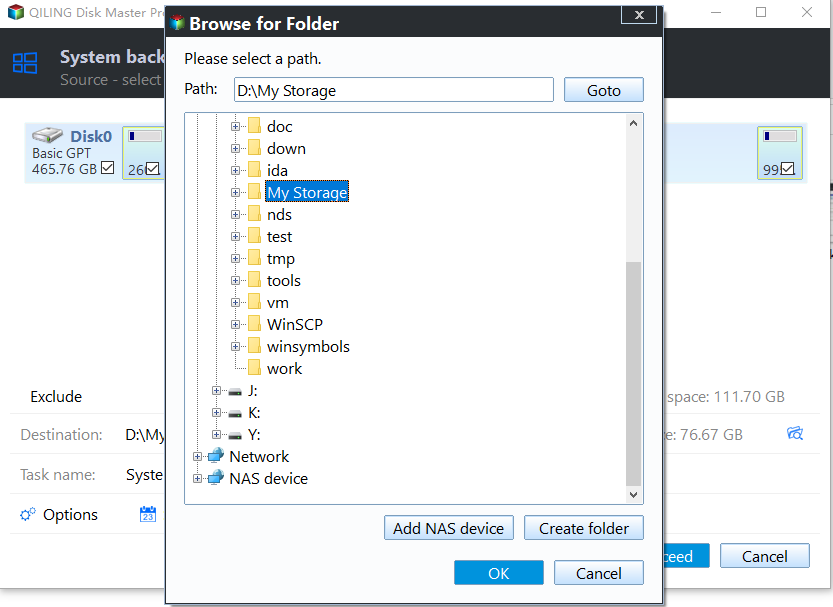
- ★Tips:
- You can enable the feature to compress backup images with a normal or high compression level, or add a password to prevent unauthorized access. This can help protect the image from being accessed or modified without authorization.
- You can make it possible to keep all items on your computer up to date instead of a factory image. There are 3 options: Daily, Weekly, Monthly.
Step 4. After selecting a partition, click "Proceed" to initiate the process. Qiling Disk Master will add a new boot option to the current operating system, allowing you to choose between booting your computer or the bootable system backup.
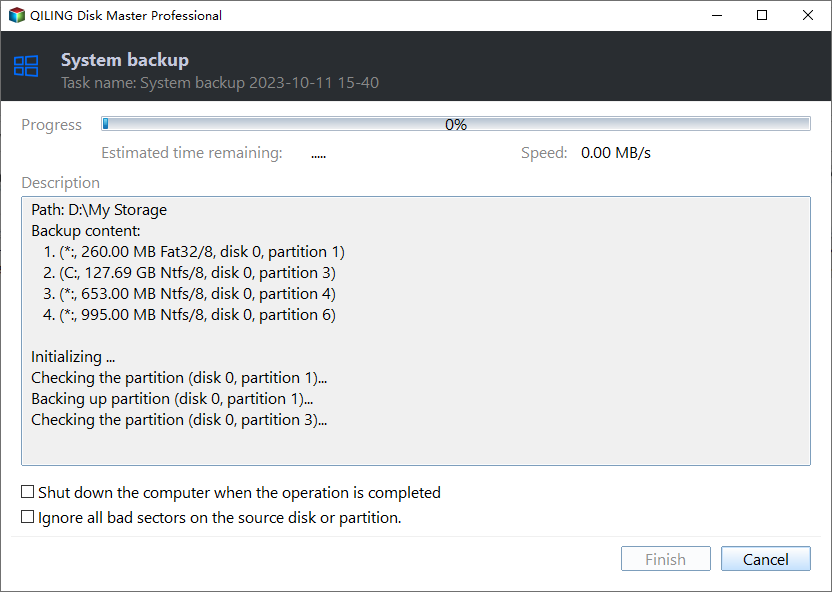
If you've recently purchased a new computer or need to reinstall your system, you can download Qiling Disk Master from the official website. First, create an initial backup, following the same steps as before. In the event of future system failures, simply restore your OS to factory settings from this initial backup.
Wrapping things up
Lenovo's OneKey Recovery software is not the only option available, as other brands offer similar backup and recovery tools. However, these pre-installed software may have limitations, prompting the need for alternative solutions like Qiling Disk Master Professional, which offers more comprehensive functionality.
You can download OneKey Recovery from your branded computer or Qiling, and then try it yourself.
Related Articles
- One-Key Recovery Software Lenovo OneKey Recovery in Windows 10
Lenovo OneKey Recovery is a backup and restore tool preloaded on Lenovo computers. Learn how to use Lenovo OneKey Recovery in Windows 10 and get the best alternative from this page. - One Click Recovery System with Qiling Disk Master
You will learn 2 useful one click recovery system methods whether you want to factory reset a computer or restore to previous status. - Asus One Key System Recovery Reset to Factory Default Settings
You will factory Asus to default settings with Asus One Key System Recovery in 2 steps. And one data lossless method. - How to Restore Onekey Recovery Function After Changing Partition Size
Many people have asked online that can't restore one key recovery function after changing partition size. Here are the solutions to cope with it. - Create Portable Windows 10 Creators To Go USB Drive
Learn how to back up Create Portable Windows 10 Creators To Go USB Drive with practical steps, storage tips, and safer recovery planning. - Can You Create Windows 10 Recovery/Repair Disk from Another Computer
This page guides you on how to create a Windows 10 recovery disk for another computer. You can use this method to create a repair disk from another computer to fix errors or corruptions in the Windows system and get it working normally again.
Products
Articles & Tutorials
- Data Recovery
- Data Backup
- File Recovery
- File Backup
- File synchronize
- System Backup and Restore
- Disk and Partition Clone
- Technical articles
- Disk Master Help
- Windows Deleted File and Disk Recovery Tutorials
- Windows File and Data Recovery Tutorials
- More Windows Tutorials for Install, Security, Files, and PC Tips
- Windows Boot, Repair, and Recovery Environment Tutorials
- Windows Backup Tutorials
- Windows Restore Tutorials
- Windows Clone and Migration Tutorials
- Windows Server Backup, Recovery, and Management Tutorials
- Windows Disk, Partition, and Storage Management Tutorials