Best Prosoft Data Rescue Alternative Free Download
Quick Navigation:
- Main Features of Prosoft Data Rescue
- Best Alternative to the Prosoft Data Rescue – Deep Data Recovery
- Below is the comparison between Prosoft Data Rescue and Deep Data Recovery software:
- How to use Deep Data Recovery to recover deleted or lost files
Prosoft Data Rescue is a fast data recovery tool for Windows and Mac, offering hard drive and RAID recovery, with a powerful version that recovers files quickly. It has a free version with a Deleted File Finder that can recover deleted or lost files, making it a top RAW drive recovery software, although it can be complex to use.
If you are comparing Mac recovery choices, also review online Mac data recovery.
Main Features of Prosoft Data Rescue
- Duplicate Recognition can easily recognize and remove duplicate data, helping to save storage space on your computer by eliminating duplicate files.
- The search engine for finding lost files is highly effective and quick, thanks to the use of cutting-edge technology in its development.
- The software sends email notifications to you in case of any update or your current scan.
- The program supports a wide variety of file types, including images, videos, audio files, emails, and many others.
- Scanning provides quick and deep scan options to recover deleted or lost files, allowing for efficient retrieval of important data.
- The software can also recover deleted files from a Time Machine backup.
The software has some drawbacks, including not allowing users to select specific file types to scan, which can prolong the recovery process. Additionally, it is incompatible with the latest APFS system.
Best Alternative to the Prosoft Data Rescue – Deep Data Recovery
Looking for a reliable alternative to Prosoft Data Rescue? Deep Data Recovery software is a top-notch option that can recover lost files in various data loss situations, including accidental deletion, system failure, and virus attacks. This Windows and Mac data recovery tool can also recover data from iOS, Windows, and Mac operating systems, and is 100% safe and secure to download on your computer.
The Prosoft Data Rescue 4 for Mac is more complex to use compared to Qiling, while Deep Data Recovery is easier to use, providing a detailed guide on its website for recovering lost or deleted files in various operating systems and devices.
Below is the comparison between Prosoft Data Rescue and Deep Data Recovery software:
- Features
- Prosoft Data Rescue
- Deep Data Recovery
- Interface
- The interface of the data recovery system lacks sufficient information, making it difficult for users to effectively recover their data.
- Its interface is informative and user-friendly.
- Supported File Types
- It supports a wide range of files.
- Like Prosoft, it also supports more than 1000 file types.
- Supported Operating Systems
- It supports Windows and Mac OS X 10.6 - 10.12.
- It supports Windows, Mac OS X 10.6 and 10.13, and iOS.
- Mode
- It provides quick and deep Mode.
- It also offers quick and deep scan mode.
- Supported Devices
- It is RAID and Hard drive data recovery software.
- This device can recover data from various storage devices, including RAID and hard drives, as well as from portable media players like mp3/4 players, SD cards, USB drives, and even iPhones.
- Locate deleted files
- After scanning, it's often challenging to pinpoint deleted files that are recovered, making it difficult to locate them.
- Locating the lost files is easier with the Deep Data Recovery software.
- Saving Recovered File
- Saving a recover file through this software is easy, select the file and press "Recover".
- Licensed
- It can recover data from five drives only.
- It can recover data from unlimited drives.
- Customer Support
- It offers the US-based customer support to the users.
- It provides the 24X7 customer support to the users.
- Policy
- If there is no recovery, then the individuals responsible for the incident will not face any consequences or charges.
- No recovery means you don't need to pay any amount for the service.
How to use Deep Data Recovery to recover deleted or lost files
The Qiling is easy to operate for recovering deleted or lost files, offering a quick scan for basic recovery needs and a deep scan for more complex situations, making it a powerful tool for every type of data loss.
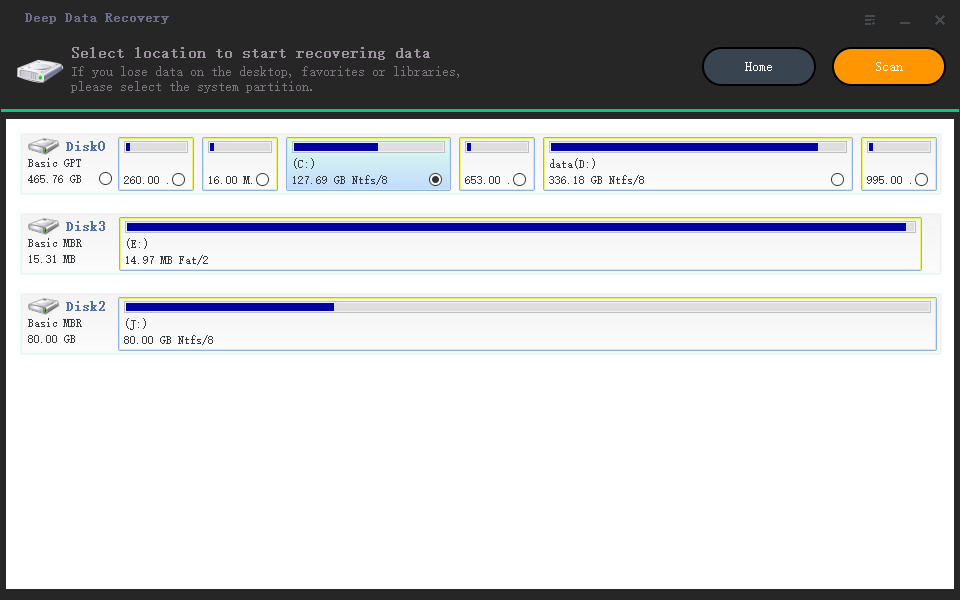
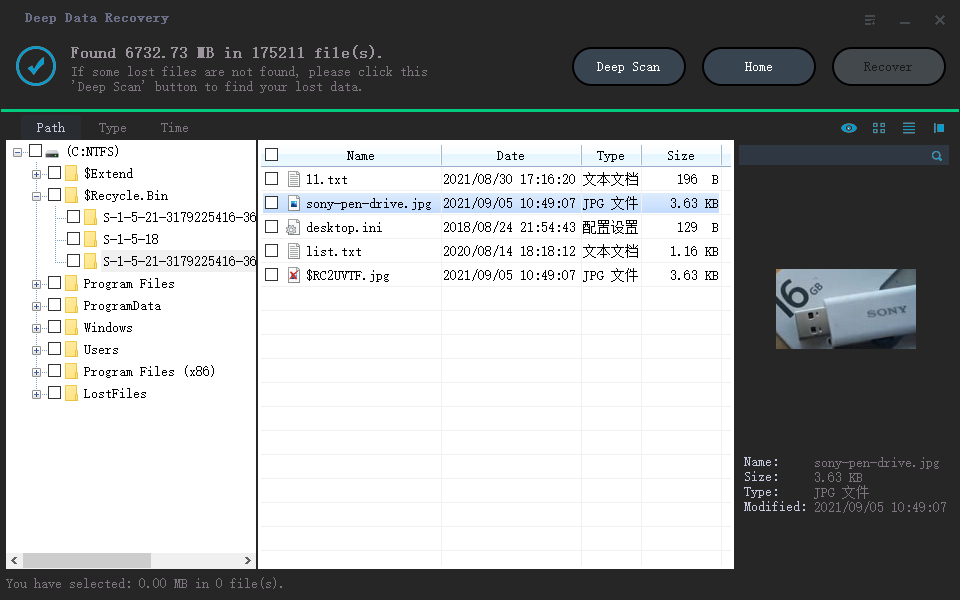
To recover deleted files, follow these steps using Deep Data Recovery software: First, download and install the software, then select the drive or location where the deleted files were stored. Next, choose the file types you want to recover and select the scan mode, either quick or deep.
- Download the Deep Data Recovery software from its official website.
- After downloading the software, launch it on your computer.
- Select the location where you want to find deleted files, then tap on the "Scan" button to start the scanning process.
- After scanning, the tool will display all the files on the tool interface. Select the desired deleted files and click the "Recover" button to retrieve them.
The Qiling is a reliable alternative to the Prosoft Data Rescue Mac, offering robust and professional data recovery features, making it a go-to tool for many multinational companies to recover data from corrupted hard drives, storage media, and more.
Related Articles
- Top 4 Alternatives to SanDisk RescuePro Recovery Software
- DiskDigger Video Recovery from Windows PC/Android/Mac
- Top 10 R-Studio Data Recovery Alternatives
- MiniTool Power Data Recovery Review
- How to Recover Files from WD External Hard Drive
- Convert RAW to NTFS without Losing Data
- How to Recover Unsaved/Deleted WPS Document File
If you need to recover an unsaved WPS document or retrieve corrupted, lost, or deleted WPS files, there are currently three ways to recover your WPS office files.
Products
Articles & Tutorials
- Data Recovery
- Data Backup
- File Recovery
- File Backup
- File synchronize
- System Backup and Restore
- Disk and Partition Clone
- Technical articles
- Disk Master Help
- Windows Deleted File and Disk Recovery Tutorials
- Windows File and Data Recovery Tutorials
- More Windows Tutorials for Install, Security, Files, and PC Tips
- Windows Boot, Repair, and Recovery Environment Tutorials
- Windows Backup Tutorials
- Windows Restore Tutorials
- Windows Clone and Migration Tutorials
- Windows Server Backup, Recovery, and Management Tutorials
- Windows Disk, Partition, and Storage Management Tutorials