DiskDigger Video Recovery – Undelete Videos from Windows PC/Android/Mac
Quick Navigation:
- Your Safe & Effective DiskDigger Video Recovery Tool
- Step 1. Download and install the DiskDigger video recovery tool on your Windows PC or Mac
DiskDigger is a powerful tool that can undelete and recover a wide range of files, including photos, documents, music, and videos. It supports recovery of various file types, including photos in formats like TIFF, ANI, CR2, SR2, NEF, DCR, PEF, RAF, and videos in 21 different formats. This makes it a great tool for recovering lost files.
If the missing files are large camera or phone videos, this HD video recovery software guide offers a related comparison.
The DiskDigger video recovery tool is now available in separate versions for Windows PC and Android devices, allowing users to download the right version for their specific needs. This makes it easy to recover lost videos using the tool, which is designed to be user-friendly. By downloading the correct version, whether for a Windows PC or an Android device, users can access the tool and begin the video recovery process.
Unfortunately, DiskDigger doesn't have a version for Mac, but you can try Deep Data Recovery, a great alternative that can recover deleted or lost videos from devices, offering features such as.
Your Safe & Effective DiskDigger Video Recovery Tool
- The software supports a wide range of video formats, including AVI, WMV, ASF, MP4, MOV, M4V, 3GP, MXF, MKV, MTS, DIVX, OGM, MOI, VOB, MPEG, MPG, AVS, DVM, QT, ANM, SMJPEG, SCR, FLC, CLK, ANI, FLA, SWF, FLV, and M4P.
- This tool enables users to recover videos from various storage devices, including SD cards, Android phones, flash drives, cameras, and hard drives.
- The video file recovery software has separate versions for Windows PC and Mac, and has a simple interface that makes it easy to use, requiring no computer technology.
Here are the simple steps for how to use DiskDigger alternative to recover videos from the computer and digital devices. To recover videos using DiskDigger alternative, first, download and install the software on your computer.
Step 1. Download and install the DiskDigger video recovery tool on your Windows PC or Mac
This software is compatible with both Windows PC and macOS, and is virus-free, making it safe to use on your computer.
Step 2(optional). Connect computer with digital device
To undelete and recover videos from digital devices such as Android phones and tablets, cameras, flash drives, and hard drives, you'll need to connect the device to your computer using either a card reader or a USB digital cable. This will ensure that the device is recognized by the software, allowing you to recover your lost videos.
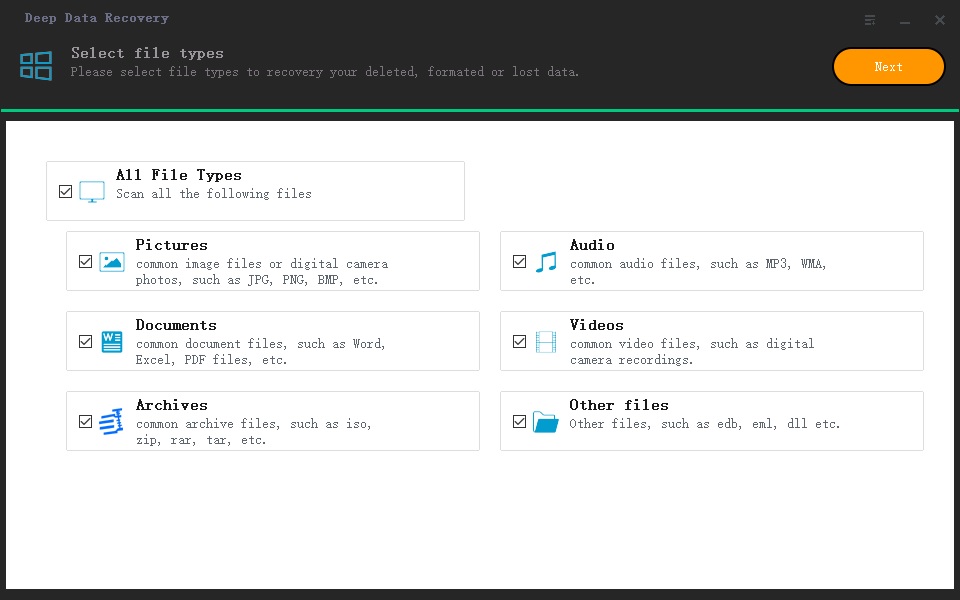
Step 3. Select file types to scan
Launch Deep Data Recovery, untick all file types except Videos, and click Next.
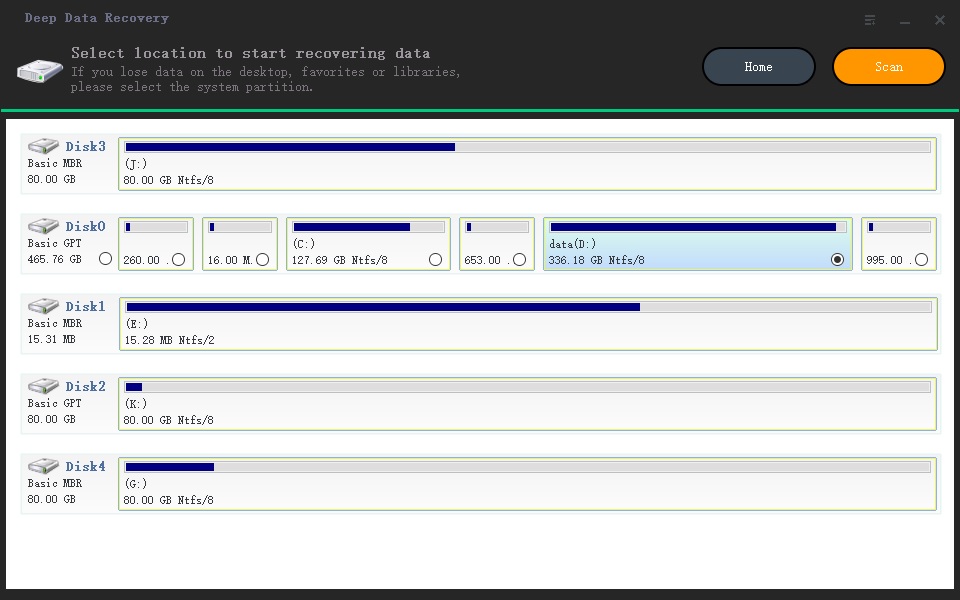
Step 4. Select drive to scan
The next step is to select the target hard drive, digital device or memory stick to scan, then click "Scan" to let the software scan for the target video files.
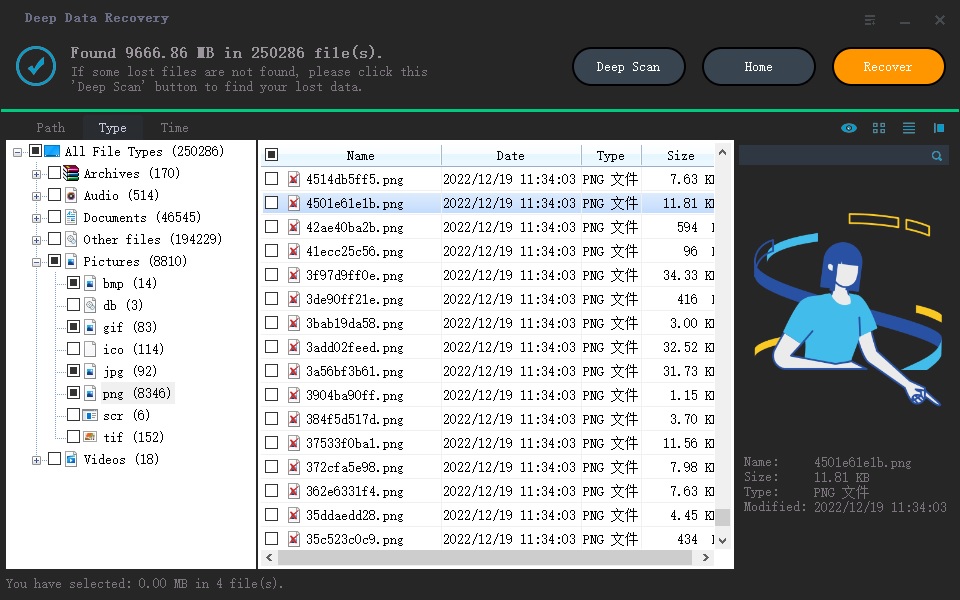
Step 5. Preview and Perform DiskDigger Video Recovery
After scanning, the software lists all found videos under the Video category, allowing you to filter and select the target video(s) by file format. You can then preview the selected video, and if it's the one you need, simply select it and click "Recover" to recover it on your computer.
Related Articles
- How to recover deleted videos from Sony Handycam
- How to Recover Deleted Videos from Canon Camera
- 5 Ways to Recover Lost Files After Windows 10 Update in 2023
Learn how to recover deleted videos from Sony Handycam How to Recover Deleted Videos from Canon Camera 5 Ways to Recover Lost Files After Windows 10 Update in 2023 with clear steps, key checks, and practical tips. - How to Recover Lost Files After Windows 11 Update (5 Best Ways)
If you lost files after a Windows 11 update, you can find or recover them with practical methods. Among them, Qiling data recovery software is the best recommendation. It recovers data from Windows 11/10/8/7 with simple clicks. Read on to recover lost files from Windows 11. - Sony Data Recovery Software: Recover Deleted Files from Sony SD Card
This guide explains Sony Data Recovery Software: Recover Deleted Files from Sony SD Card with clear steps, key checks, and practical tips. - Recover Files from SSD: Easy Steps to Retrieve Your Lost Data
In this post, we will explore a powerful Windows data recovery tool to recover files from SSD on Windows 11, 10, 8, and 7, ensuring you have the best chance of retrieving your valuable data.
Products
Articles & Tutorials
- Data Recovery
- Data Backup
- File Recovery
- File Backup
- File synchronize
- System Backup and Restore
- Disk and Partition Clone
- Technical articles
- Disk Master Help
- Windows Deleted File and Disk Recovery Tutorials
- Windows File and Data Recovery Tutorials
- More Windows Tutorials for Install, Security, Files, and PC Tips
- Windows Boot, Repair, and Recovery Environment Tutorials
- Windows Backup Tutorials
- Windows Restore Tutorials
- Windows Clone and Migration Tutorials
- Windows Server Backup, Recovery, and Management Tutorials
- Windows Disk, Partition, and Storage Management Tutorials