2 Ways for How to Recover Uninstalled Programs on Windows 10
if you've accidentally uninstalled programs in Windows 10 - this article shows you two ways to retrieve them. You can use Deep Data Recovery to recover the installed data, or restore Windows 10 from a backup file. To get started, simply download the software and you'll be ready to recover your lost data.
If uninstalling a program also removed personal files, this overwritten or replaced file recovery guide may help with related data loss.
If you've ever accidentally uninstalled a program on your Windows 10 PC and later realized you need it, you're not alone. When you uninstall a program, both the program data and .exe file are removed, making it seem like the program is gone for good. However, there are ways to recover your installed programs in Windows 10, and in this post, we'll share two methods to help you retrieve the programs you thought were lost.
- Quick Navigation
- Method #1: How to Recover Deleted Programs on Windows 10 with Software
- Method #2: How to Retrieve Uninstalled Apps in Windows 10 with System Restore
Method #1: How to Recover Deleted Programs on Windows 10 with Software
Deep Data Recovery is a professional tool that uses advanced technology to make data recovery easy and seamless. It helps users find uninstalled programs on Windows 10 and recover deleted or lost folders and files, making it perfect for reinstalling apps that have been uninstalled.
Thanks to its unique features, the Deep Data Recovery tool allows users to recover different types of files from PCs and external drives. This software is particularly useful in avoiding data loss situations, such as accidentally deleting files or uninstalling programs, by having it installed on your system. Its main features include.
Your Safe & Effective Windows 10 Uninstalled Program Recovery Tool
- This software is designed to help users recover lost files and uninstalled programs using advanced technology, offering two scanning modes: Quick Scan for a faster recovery and Deep Scan for a more thorough search.
- The software recovers the uninstalled program's .exe installation file and program data in just three easy steps.
- It supports all major and common file types, including documents, photos, videos, audios, and other programs on a computer.
Step-by-step Guide on how to recover uninstalled programs on Windows 10 with Deep Data Recovery
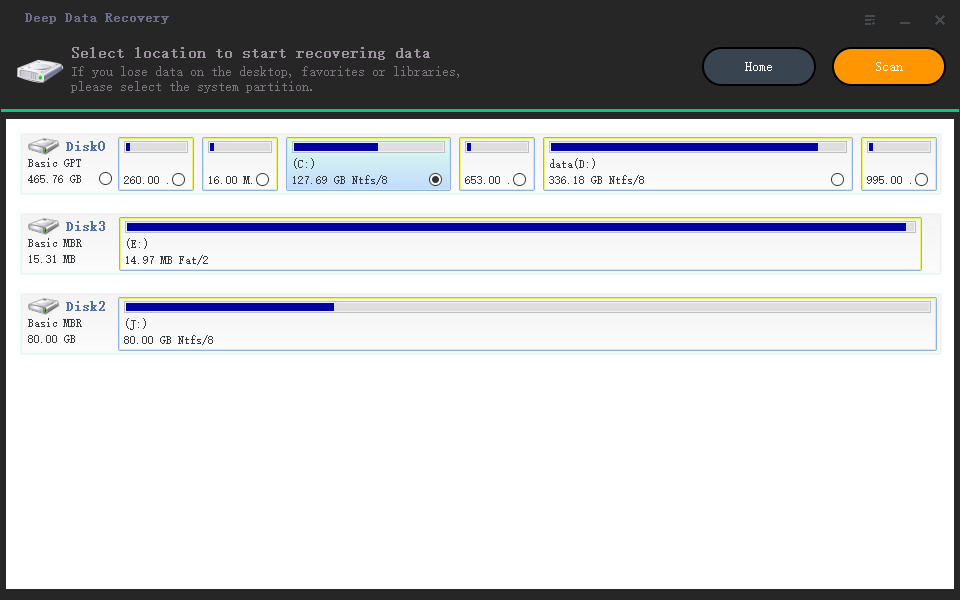
To find uninstalled programs in Windows 10 using this program, download the tool, then follow these four simple steps: download, scan, recover, and restart. It's essential to complete the recovery process before using your PC again, as any new data may overwrite the recovered files.
- To avoid data loss, install the Windows 10 data recovery software on a different hard drive than the one where the program you want to recover is installed. For example, install it on hard drive D instead of hard drive C. This will prevent the software from overwriting the program's data.
- The software will scan the hard drive and locate uninstalled programs and their associated data, which may take a few minutes to complete.
- After scanning, you'll see a list of uninstalled programs in Windows 10. Select the file types on the left to view details on the right. Choose the uninstalled program and its .exe file, then click "Recover" to save it on your PC.
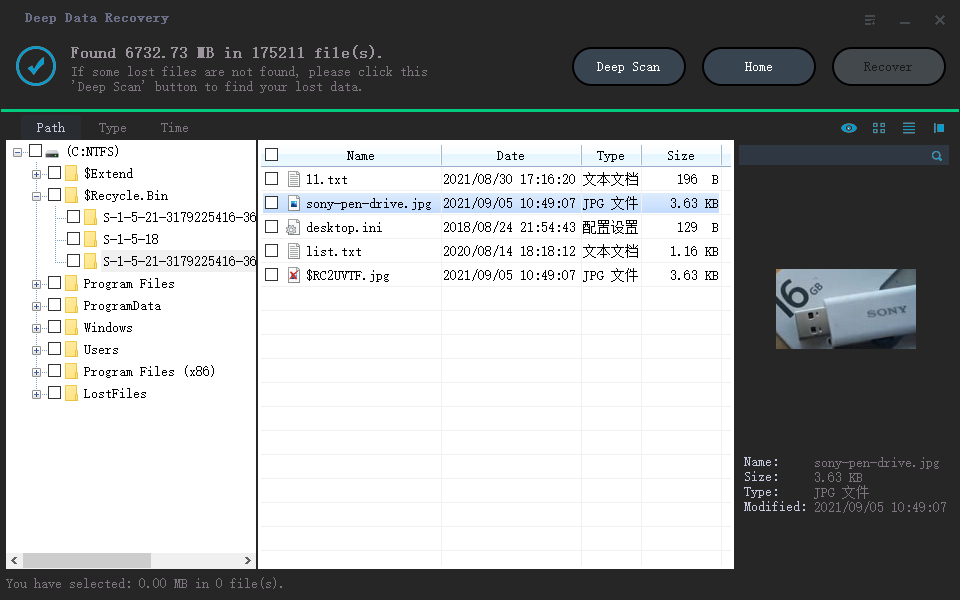
You can preview and retrieve files created by an uninstalled program on your Windows 10 using Deep Data Recovery. Simply navigate to the program's files and data types, and when you find important ones, click to save them on your Windows 10. This process allows you to recover files that were previously inaccessible due to the program's uninstallation.
Method #2: How to Retrieve Uninstalled Apps in Windows 10 with System Restore
Windows 10, like other Windows OS, comes with the System Restore feature, which allows users to recover deleted files and data, as well as uninstalled programs, by restoring their system to an earlier state. When using System Restore, the uninstalled program will be reinstated, and any current data will be removed, effectively restoring the PC to its previous working state.
Step-by-Step Guide to restore uninstalled apps in Windows 10 with System Restore
To use System Restore to find an uninstalled program on your Windows 10, follow these easy steps. First, open System Restore by typing 'restore' in the Windows search bar and selecting the 'System Restore' option.
- To access the recovery settings on your PC, click the "Start" button at the bottom left and select "Settings". In the search box, type in "Recovery" and click to search. This will open the Recovery settings page.
- Select 'Recovery' from the list, then click "Open System Restore" and click "Next".
- To restore your system to a previous state, select a restore point that was created before you uninstalled the program. After selecting the desired restore point, click "Next" to proceed with the restoration process.

If you don't see any restore points, check if system protection is turned on. Go to the Control Panel, search for "Recovery", select it, then "Configure System Restore", and click "Configure". Ensure the system protection icon is turned on. This should allow you to restore the deleted program.
To retrieve uninstalled programs in Windows 10, you can use the System Restore method, which can help recover deleted programs, but may not retain all data saved after the chosen restore point, resulting in potential data loss. Alternatively, you can use Qiling data recovery software to retrieve uninstalled programs without risking further data loss.
Related Articles
- Recover Deleted Restore Points in Windows 10
- Recover Deleted Files after Reinstalling Windows
- Recover Unsaved/Deleted Notepad Files in Windows 10/11
- Recover Shift Deleted Files in Windows 10
- Recover Deleted Files from SD Card in Windows 10
- How to Recover Files Lost During Cut and Paste in Windows 11/10
- How to Recover Deleted Archive Files in Windows 11/10
Products
Articles & Tutorials
- Data Recovery
- Data Backup
- File Recovery
- File Backup
- File synchronize
- System Backup and Restore
- Disk and Partition Clone
- Technical articles
- Disk Master Help
- Windows Deleted File and Disk Recovery Tutorials
- Windows File and Data Recovery Tutorials
- More Windows Tutorials for Install, Security, Files, and PC Tips
- Windows Boot, Repair, and Recovery Environment Tutorials
- Windows Backup Tutorials
- Windows Restore Tutorials
- Windows Clone and Migration Tutorials
- Windows Server Backup, Recovery, and Management Tutorials
- Windows Disk, Partition, and Storage Management Tutorials