SanDisk Extreme PRO Recovery | Recover Lost/Deleted Files
Quick Navigation:
- How to SanDisk Extreme PRO Recovery in Windows/Mac
- Your Reliable Sandisk File Recovery Software
- Easy Steps to Recover Files from SanDisk Extreme PRO
SanDisk Extreme PRO is a popular memory card among professionals, but some users may experience data loss due to issues, making SanDisk Extreme PRO recovery necessary.
If the problem affects another SanDisk card model, this SanDisk SD card recovery guide gives a broader recovery process.
- You deleted some files accidentally or intentionally, but now you need them back.
- If you switched from a Mac to a Windows PC and are having trouble opening your external drive, you may need to format it first. This is because Windows and Mac have different file systems, which can cause compatibility issues. By formatting the drive, you'll be able to use it on your Windows PC.
- You connected your SanDisk Extreme PRO to your computer, but instead of recognizing it, a pop-up window appeared, prompting you to format the device. This was because the device had been infected with a virus, which was causing the issue.
- You need to erase all data on the SanDisk Extreme PRO, including some important files, to fix the issue.
To recover SanDisk Extreme PRO data, you'll need to know the right steps and tools to take. Whether it's due to accidental deletion, formatting, or physical damage, having the right information and tools at your disposal can make the process much easier and more efficient. By understanding what you need to do and which tools to use, you can successfully recover your data and get back to what's important.
How to SanDisk Extreme PRO Recovery in Windows/Mac
Please stop using the SanDisk Extreme Pro memory card immediately to prevent permanent data deletion. All lost or deleted files, including photos, videos, documents, and others, are still on the card and marked as deleted, waiting to be overwritten. If you transfer or delete any files on the card after the data loss, the original files will be permanently lost. To recover your data, keep the card untouched until you're ready for the recovery process with the SanDisk PRO recovery.
To recover data from a SanDisk Extreme PRO, you can find and download a professional recovery software, such as Deep Data Recovery, which has separate Windows and Mac versions available. This tool can help you recover your data efficiently, and it's available for download over the internet.
Your Reliable Sandisk File Recovery Software
- The best SanDisk recovery software supports recovery of various file types, including images, videos, audio files, documents, Excel worksheets, and more.
- The software supports all types of SanDisk SD/CF/TF cards and other drives, making it a unique feature of the SanDisk Extreme PRO recovery software.
- Standalone and easy-To recover data from a Sandisk drive on Windows or Mac, you can use the built-in Disk Utility or Disk Management tool. For Windows, you can use the built-in Check Disk utility to scan and fix errors on the drive. For Mac, you can use the Disk Utility to repair the drive and recover your data.
Easy Steps to Recover Files from SanDisk Extreme PRO
- Install Sandisk Extreme Pro Recovery Software
- Connect SanDisk Extreme PRO with Computer
- Select the SanDisk Extreme PRO to Scanning
- SanDisk Extreme PRO Recovery
To recover SanDisk Extreme PRO data, you need to download and install the correct version of Deep Data Recovery for either Mac or Windows PC, depending on the device you're using.
Use a card-To connect the SanDisk Extreme Pro to your computer, firmly attach it to your computer using the provided USB-C cable, ensuring a secure connection. If successful, the device will be recognized as an additional hard drive on your computer, allowing you to access and utilize its storage capacity.
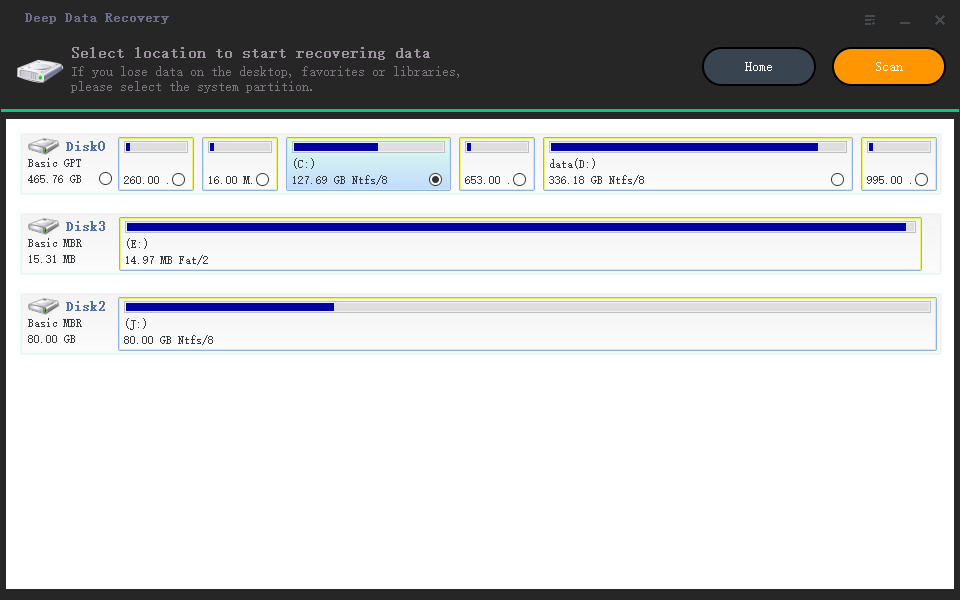
The software will then allow you to select the SanDisk Extreme PRO and click "Scan" to search for deleted or lost data. If it's successfully connected to your computer, it will detect and display it in the window.
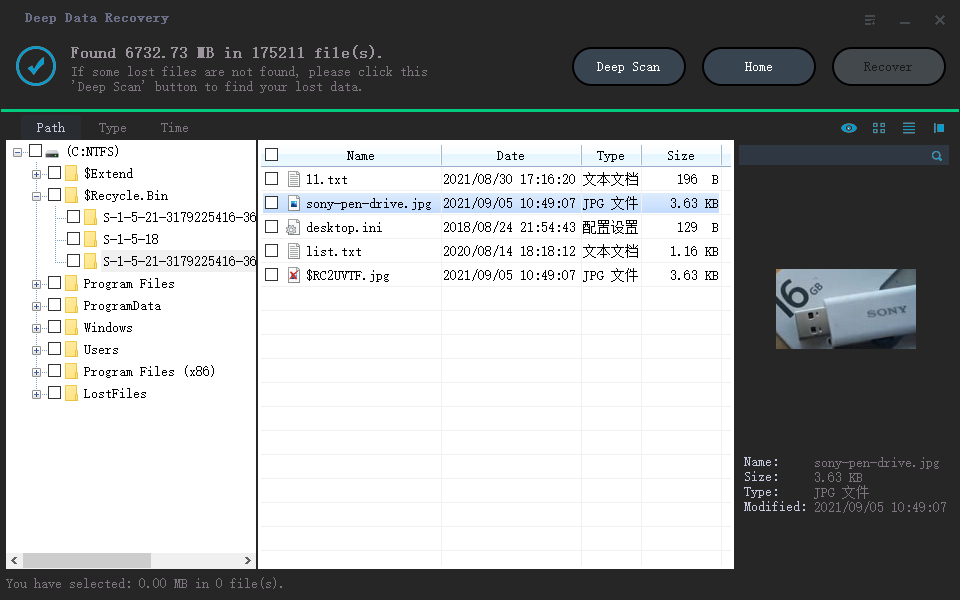
Select the files you want to recover from the SanDisk Extreme Pro, and click "Recover" to save them to your computer.
Related Articles
- How to Do Sandisk Corrupted SD Card Recovery & Fix It
- SanDisk Repair Tool to Repair SanDisk SD Card/USB/HDD/SSD
- SanDisk Cruzer Flash Drive Data Recovery Solution
- Recover Deleted Photos from Sandisk
- Top 4 Alternatives to SanDisk RescuePro Recovery Software
- How to Recover Data after Diskpart Clean
Misusing Diskpart can lead to data loss on your computer. If you accidentally clean or delete important data using Diskpart, you can try to recover it by learning how to recover data after Diskpart clean.
Products
Articles & Tutorials
- Data Recovery
- Data Backup
- File Recovery
- File Backup
- File synchronize
- System Backup and Restore
- Disk and Partition Clone
- Technical articles
- Disk Master Help
- Windows Deleted File and Disk Recovery Tutorials
- Windows File and Data Recovery Tutorials
- More Windows Tutorials for Install, Security, Files, and PC Tips
- Windows Boot, Repair, and Recovery Environment Tutorials
- Windows Backup Tutorials
- Windows Restore Tutorials
- Windows Clone and Migration Tutorials
- Windows Server Backup, Recovery, and Management Tutorials
- Windows Disk, Partition, and Storage Management Tutorials